What Is a Certificate Chain of Trust and How Does It Work? (Explained Simply)
Every secure HTTPS connection depends on one core concept: the certificate chain of trust.
It’s the mechanism that proves a website, API, or server is legitimate — and not an attacker.
Whether you’re browsing a site, using a VPN, accessing internal tools, or connecting IoT devices, this trust model ensures your browser knows:
- Who issued the certificate
- Who signed it
- Whether the signer is trusted
- And if the identity is valid
This guide breaks the concept down in a simple, modern, deeply technical way.
What This Guide Covers
- Root, Intermediate, and Server certificates
- How trust flows from a Root CA
- Why browsers rely on chain validation
- Visual certificate hierarchy
- Real enterprise use cases
- Validation, revocation, OCSP, CRL
- Best practices for PKI and chains
1. What Is a Certificate Chain of Trust? (Simple Definition)
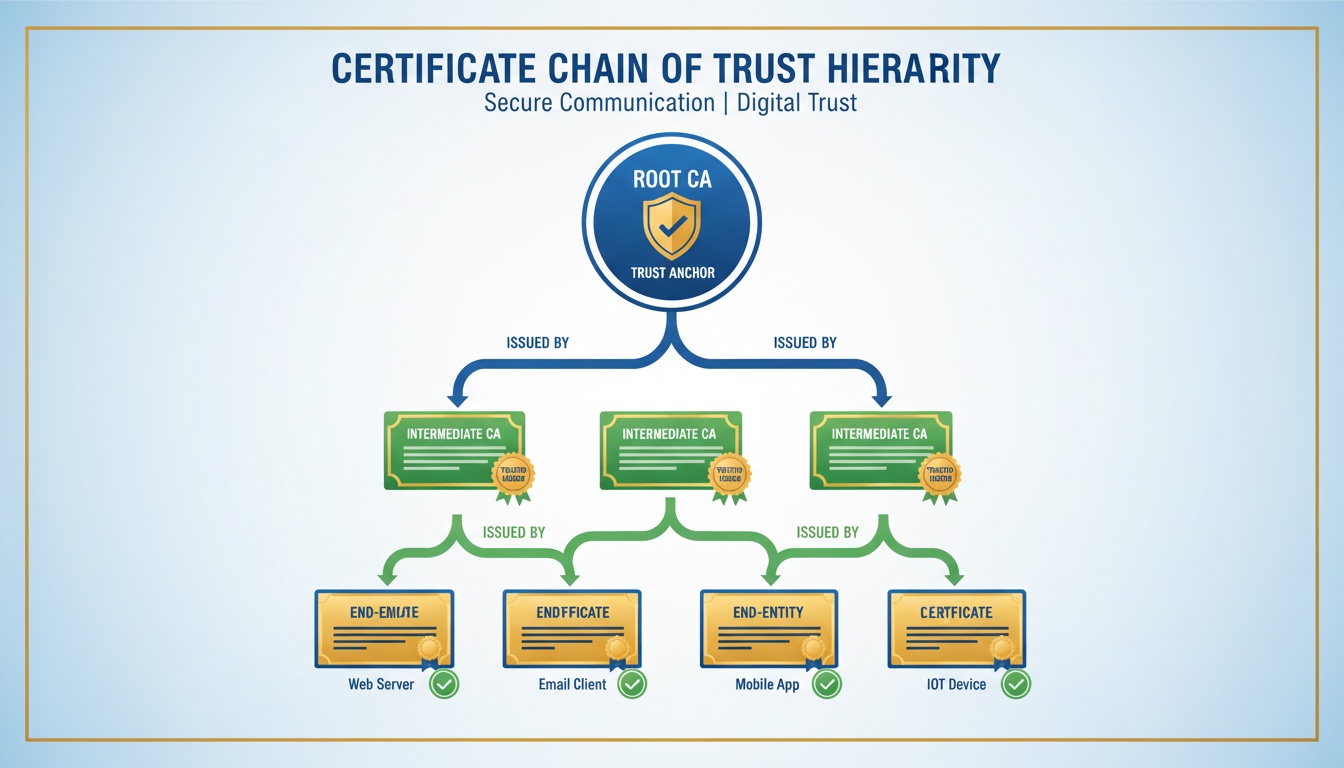
A certificate chain of trust is a sequence of linked certificates that connects your server certificate back to a trusted Root Certificate Authority (Root CA) built into browsers and operating systems.
This ensures:
- The identity behind the certificate is authenticated
- The certificate was issued by a legitimate authority
- The connection can be encrypted securely
2. The 3 Layers of the Certificate Trust Structure
A complete trust chain contains these certificate types:
Root Certificate (Trust Anchor)
- Stored in OS/browsers
- Self-signed
- Highly protected and rarely used directly
- Basis of global internet trust
Intermediate Certificate
- Issued by the Root CA
- Signs end-entity certificates
- Reduces risk by keeping the Root offline
Server / End-Entity Certificate
- Installed on your domain or application
- Contains the public key and identity details
- Short-lived for security
- What browsers validate during HTTPS
3. Visual Diagram: How Certificate Trust Flows
       Root CA (Trusted in Browsers)
                   ↓
          Intermediate CA
                   ↓
        Server Certificate
       (example.com / api.company.com)
This hierarchy ensures trust moves from the top → down.
4. Why Certificate Trust Chains Exist
Chaining provides:
- Security isolation (Root CA stays offline)
- Scalable issuance
- Controlled trust delegation
- Strong identity verification
- Protection against unauthorized certificates
Without chaining, a single compromised certificate could undermine the entire global PKI ecosystem.
5. How Browsers Validate the Chain
When you connect to a website, the browser checks:
- Server certificate validity
- Whether it was issued by a trusted Intermediate
- Whether the Intermediate leads to a known Root CA
- Expiration dates
- Revocation status (OCSP/CRL)
- Hostname match
- Full trust-path consistency
If any step fails, the connection is blocked.
6. Example Validation Flow
- Client requests an HTTPS page
- Server sends:
- Its own certificate
- One or more intermediate certificates
- Browser builds the trust path
- Browser finds a matching Root CA in its trust store
- All signatures are verified
- If the chain is complete → secure HTTPS padlock
7. What Happens When the Chain Is Incomplete?
Common errors include:
- NET::ERR_CERT_AUTHORITY_INVALID
- CERT_CHAIN_INCOMPLETE
- SELF_SIGNED_CERT_IN_CHAIN
- UNABLE_TO_GET_ISSUER_CERT_LOCALLY
Typical causes:
- Missing intermediate
- Wrong chain order
- Expired certificate
- Untrusted CA
- Mismatched domain
- Revoked certificate
8. What Certificate Authorities Actually Do
Certificate Authorities (CAs):
- Validate domain ownership and identity
- Issue server certificates
- Sign intermediates
- Manage revocation
- Maintain compliance rules
- Anchor the internet trust ecosystem
9. Chain of Trust in Enterprise Environments
Enterprises use trust chains for:
Internal PKI
- AD CS
- Device identity
- Internal services
Zero Trust & NAC
- Certificate-based authentication
- Passwordless access
SSO & IAM
- Mutual TLS
- Secure identity flows
IoT Security
- Device onboarding
- Mutual authentication
- Firmware validation
10. Best Practices for Trust-Chain Deployment
- Always include intermediate certificates on servers
- Never expose the Root CA
- Use short-lived certificates
- Automate renewals
- Monitor certificate expiration
- Follow CA/Browser Forum guidelines
- Enable OCSP stapling
- Use 2048-bit RSA or ECDSA P-256
11. Keyword Integration Zone
certificate chain of trust • certificate hierarchy • trust certificate • ssl certificate chain • chain certificate • certificate trust list • https certificate chain
(Each appears once only.)
12. External References
- https://www.rfc-editor.org/rfc/rfc5280
- https://www.cabforum.org/
- https://www.cloudflare.com/learning/ssl/
****
Need help managing certificate chains, internal PKI, automation, Zero Trust identity, or enterprise TLS workflows?
Qcecuring delivers secure, automated PKI and certificate lifecycle platforms.
Final Summary (5 Key Points)
- The chain of trust links your certificate to a Root CA.
- All chains contain Root → Intermediate → Server certificates.
- Browsers validate every link before allowing HTTPS.
- Missing or misordered intermediates cause trust failures.
- Proper certificate chain management is essential for PKI, IoT, and Zero Trust.