
OpenSSL is the most widely deployed cryptography toolkit in the world. It powers TLS connections for web servers, generates certificates for enterprise PKI, debugs handshake failures at 3 AM, and converts between every certificate format ever invented. If you work with certificates, keys, or encrypted connections, you use OpenSSL.
This guide covers everything from basic commands to advanced production operations. It’s written for the practitioner who needs to get things done — not the academic who wants to understand the math.
Current versions: OpenSSL 4.0.0 (released April 2026), 3.6.x (current stable), 3.0.x LTS (EOL September 2026). OpenSSL 1.1.1 reached end-of-life in September 2023 — if you’re still on it, migrate immediately.
Check Your OpenSSL Version
Before anything else, know what you’re working with:
# Check installed version
openssl version

# Detailed version with build options
openssl version -a

# Show the default configuration directory
openssl version -d
# Output: OPENSSLDIR: "/etc/ssl" (Linux) or "/usr/local/etc/openssl@3" (macOS Homebrew)
Generate Private Keys
RSA Keys
# Generate 4096-bit RSA private key (recommended for external-facing)
openssl genpkey -algorithm RSA -out server.key -pkeyopt rsa_keygen_bits:4096

# Generate 2048-bit RSA key (minimum acceptable)
openssl genpkey -algorithm RSA -out server.key -pkeyopt rsa_keygen_bits:2048

# Legacy command (still works, but genpkey is preferred)
openssl genrsa -out server.key 4096

# Generate RSA key with passphrase protection
openssl genpkey -algorithm RSA -out server.key -pkeyopt rsa_keygen_bits:4096 -aes256
ECDSA Keys (Faster TLS Handshakes)
# Generate ECDSA P-256 key (equivalent to RSA 3072, much faster)
openssl genpkey -algorithm EC -out server-ec.key -pkeyopt ec_paramgen_curve:P-256

# Generate ECDSA P-384 key (stronger, slightly slower)
openssl genpkey -algorithm EC -out server-ec.key -pkeyopt ec_paramgen_curve:P-384

# Legacy command
openssl ecparam -genkey -name prime256v1 -out server-ec.key
Ed25519 Keys (Modern, Fast)
# Generate Ed25519 key (best for SSH, internal services)
openssl genpkey -algorithm ED25519 -out server-ed25519.key
Which to choose:
- RSA 4096 — external-facing services, maximum compatibility
- ECDSA P-256 — internal services where performance matters (3x faster handshake than RSA 4096)
- Ed25519 — SSH keys, internal signing (not yet widely supported for TLS certificates from public CAs)
Generate Certificate Signing Requests (CSR)
Basic CSR
# Generate CSR from existing private key
openssl req -new -key server.key -out server.csr \
  -subj "/C=US/ST=California/L=San Francisco/O=Acme Corp/OU=Engineering/CN=api.acme.com"
CSR with Subject Alternative Names (SANs)
SANs are mandatory — CN-only certificates are deprecated by all major browsers and CAs.
# Generate key + CSR with SANs in one command
openssl req -new -newkey rsa:4096 -nodes -keyout server.key -out server.csr \
  -subj "/C=US/ST=California/O=Acme Corp/CN=api.acme.com" \
  -addext "subjectAltName=DNS:api.acme.com,DNS:api-v2.acme.com,DNS:*.internal.acme.com,IP:10.0.1.50"
For OpenSSL versions that don’t support -addext, use a config file:
# Create openssl-san.cnf
cat > openssl-san.cnf << 'EOF'
[req]
default_bits = 4096
prompt = no
distinguished_name = dn
req_extensions = v3_req

[dn]
C = US
ST = California
L = San Francisco
O = Acme Corp
CN = api.acme.com

[v3_req]
subjectAltName = @alt_names

[alt_names]
DNS.1 = api.acme.com
DNS.2 = api-v2.acme.com
DNS.3 = *.internal.acme.com
IP.1 = 10.0.1.50
EOF

# Generate CSR using config
openssl req -new -key server.key -out server.csr -config openssl-san.cnf
Verify CSR Contents
# View CSR details (verify SANs are included)
openssl req -in server.csr -noout -text

# Verify CSR signature is valid
openssl req -in server.csr -verify -noout
Self-Signed Certificates (Development & Testing)
Quick Self-Signed Certificate
# Generate key + self-signed cert in one command (valid 365 days)
openssl req -x509 -newkey rsa:4096 -nodes \
  -keyout dev.key -out dev.crt -days 365 \
  -subj "/CN=localhost" \
  -addext "subjectAltName=DNS:localhost,DNS:*.local.dev,IP:127.0.0.1"
Build a Private CA (Root + Intermediate)
For development environments or internal PKI:
# 1. Generate Root CA key (keep this OFFLINE in production)
openssl genpkey -algorithm RSA -out root-ca.key -pkeyopt rsa_keygen_bits:4096

# 2. Create self-signed Root CA certificate (valid 10 years)
openssl req -x509 -new -key root-ca.key -out root-ca.crt -days 3650 \
  -subj "/C=US/O=Acme Corp/CN=Acme Root CA" \
  -addext "basicConstraints=critical,CA:TRUE" \
  -addext "keyUsage=critical,keyCertSign,cRLSign"

# 3. Generate Intermediate CA key
openssl genpkey -algorithm RSA -out intermediate-ca.key -pkeyopt rsa_keygen_bits:4096

# 4. Create Intermediate CA CSR
openssl req -new -key intermediate-ca.key -out intermediate-ca.csr \
  -subj "/C=US/O=Acme Corp/CN=Acme Intermediate CA"

# 5. Sign Intermediate CA with Root CA (valid 5 years)
openssl x509 -req -in intermediate-ca.csr -CA root-ca.crt -CAkey root-ca.key \
  -CAcreateserial -out intermediate-ca.crt -days 1825 \
  -extfile <(printf "basicConstraints=critical,CA:TRUE,pathlen:0\nkeyUsage=critical,keyCertSign,cRLSign")

# 6. Sign a server certificate with Intermediate CA
openssl x509 -req -in server.csr -CA intermediate-ca.crt -CAkey intermediate-ca.key \
  -CAcreateserial -out server.crt -days 365 \
  -extfile <(printf "subjectAltName=DNS:api.acme.com,DNS:*.api.acme.com\nextendedKeyUsage=serverAuth")
Warning: Never use self-signed CAs in production without proper key ceremony procedures. For production internal PKI, see our guide on PKI hierarchy design.
Debug TLS Connections
The single most useful OpenSSL command for troubleshooting:
Connect and Show Certificate
# Connect to a server and display the full certificate chain
openssl s_client -connect api.acme.com:443 -servername api.acme.com -showcerts

# Show only the server certificate details
echo | openssl s_client -connect api.acme.com:443 -servername api.acme.com 2>/dev/null | \
  openssl x509 -noout -text

# Check certificate expiry dates
echo | openssl s_client -connect api.acme.com:443 -servername api.acme.com 2>/dev/null | \
  openssl x509 -noout -dates

# Check SANs (Subject Alternative Names)
echo | openssl s_client -connect api.acme.com:443 -servername api.acme.com 2>/dev/null | \
  openssl x509 -noout -ext subjectAltName
Critical: Always use -servername for SNI. Without it, you may get the wrong certificate on shared hosting or CDNs.
Test Specific TLS Versions
# Test TLS 1.3 support
openssl s_client -connect api.acme.com:443 -tls1_3

# Test TLS 1.2 support
openssl s_client -connect api.acme.com:443 -tls1_2

# Test with specific cipher suite
openssl s_client -connect api.acme.com:443 -cipher 'ECDHE-RSA-AES256-GCM-SHA384'

# List available TLS 1.3 cipher suites
openssl ciphers -v -tls1_3
Check OCSP Stapling
# Verify OCSP stapling is working
openssl s_client -connect api.acme.com:443 -servername api.acme.com -status 2>/dev/null | \
  grep -A 5 "OCSP Response"
Verify Certificate Chains
# Verify a certificate against a CA bundle
openssl verify -CAfile ca-bundle.crt server.crt

# Verify with intermediate certificate
openssl verify -CAfile root-ca.crt -untrusted intermediate-ca.crt server.crt

# Verify against system trust store
openssl verify server.crt

# Check if private key matches certificate
openssl x509 -noout -modulus -in server.crt | openssl md5
openssl rsa -noout -modulus -in server.key | openssl md5
# If both MD5 hashes match → key and cert are a pair

# Check if CSR matches private key
openssl req -noout -modulus -in server.csr | openssl md5
openssl rsa -noout -modulus -in server.key | openssl md5
Convert Between Certificate Formats
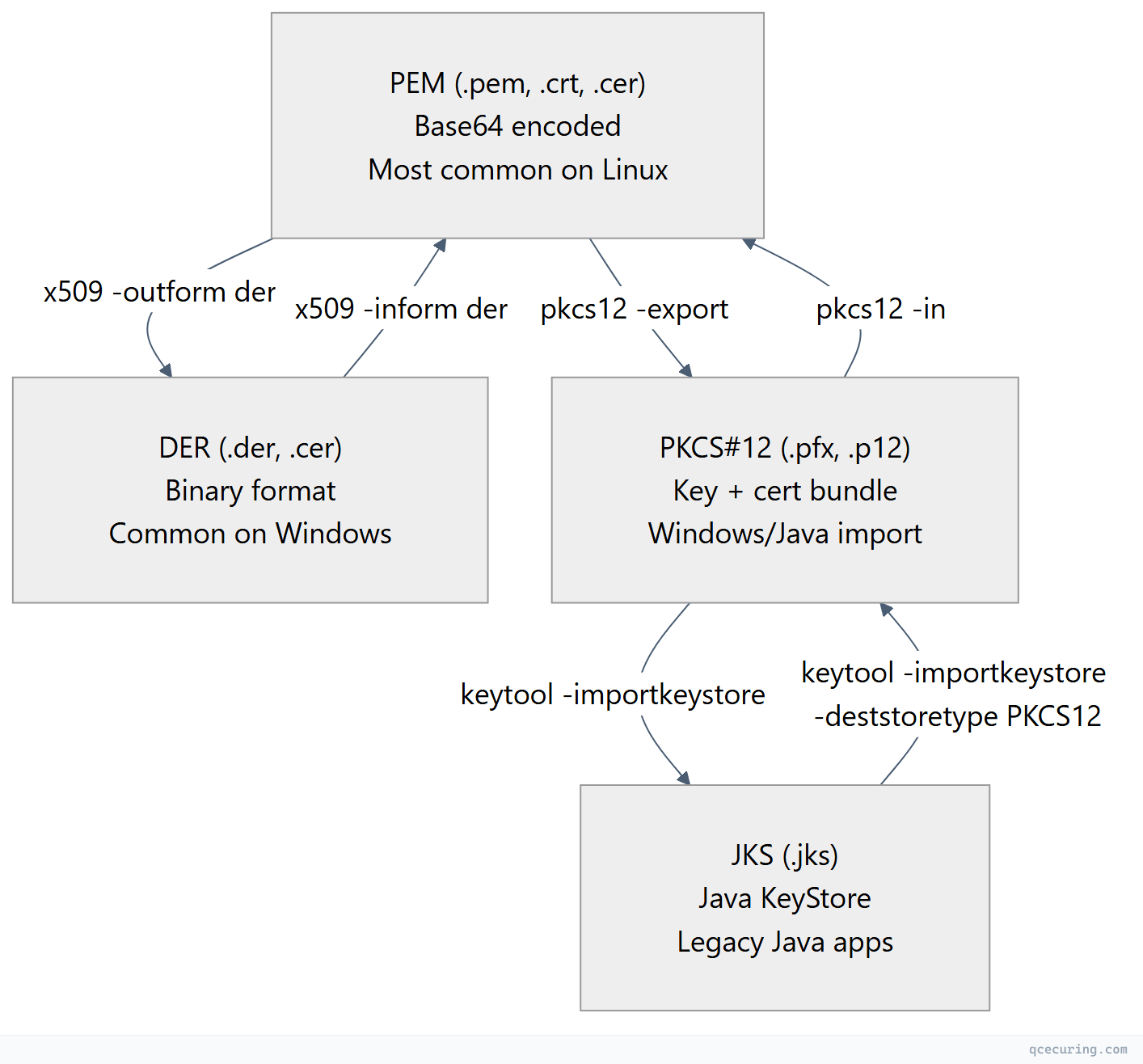
PEM ↔ DER
# PEM to DER
openssl x509 -in cert.pem -outform der -out cert.der

# DER to PEM
openssl x509 -in cert.der -inform der -outform pem -out cert.pem
PEM ↔ PKCS#12 (PFX)
# Create PFX bundle (key + cert + chain)
openssl pkcs12 -export -out bundle.pfx \
  -inkey server.key -in server.crt -certfile ca-chain.crt \
  -passout pass:YourPassword

# Extract everything from PFX
openssl pkcs12 -in bundle.pfx -out everything.pem -nodes -passin pass:YourPassword

# Extract only the private key
openssl pkcs12 -in bundle.pfx -nocerts -out key.pem -nodes

# Extract only the certificates
openssl pkcs12 -in bundle.pfx -nokeys -out certs.pem

# Extract only the client certificate (no CA certs)
openssl pkcs12 -in bundle.pfx -nokeys -clcerts -out client.pem
Key Format Conversions
# Convert PKCS#8 key to traditional RSA format
openssl rsa -in pkcs8.key -out traditional.key

# Convert traditional RSA to PKCS#8
openssl pkcs8 -topk8 -in traditional.key -out pkcs8.key -nocrypt

# Remove passphrase from private key
openssl rsa -in encrypted.key -out decrypted.key

# Add passphrase to private key
openssl rsa -in decrypted.key -out encrypted.key -aes256
Certificate Inspection
# View full certificate details
openssl x509 -in cert.pem -noout -text

# View specific fields
openssl x509 -in cert.pem -noout -subject
openssl x509 -in cert.pem -noout -issuer
openssl x509 -in cert.pem -noout -dates
openssl x509 -in cert.pem -noout -serial
openssl x509 -in cert.pem -noout -fingerprint -sha256
openssl x509 -in cert.pem -noout -ext subjectAltName
openssl x509 -in cert.pem -noout -ext keyUsage
openssl x509 -in cert.pem -noout -ext extendedKeyUsage

# Check if certificate expires within 30 days
openssl x509 -in cert.pem -noout -checkend 2592000
# Exit code 0 = still valid, Exit code 1 = expires within 30 days

# View certificate purpose (what it can be used for)
openssl x509 -in cert.pem -noout -purpose
Cipher Suite Management
# List all available cipher suites
openssl ciphers -v 'ALL'

# List only TLS 1.3 suites
openssl ciphers -v -tls1_3

# List only HIGH security suites
openssl ciphers -v 'HIGH:!aNULL:!MD5'

# Test if a specific cipher is supported
openssl s_client -connect api.acme.com:443 -cipher 'ECDHE-RSA-AES256-GCM-SHA384'

# Recommended cipher string for 2026
# TLS 1.3 (automatic, no configuration needed — always uses AEAD)
# TLS 1.2 (if you must support it):
# ECDHE-ECDSA-AES128-GCM-SHA256:ECDHE-RSA-AES128-GCM-SHA256:ECDHE-ECDSA-AES256-GCM-SHA384:ECDHE-RSA-AES256-GCM-SHA384
Production Hardening Checklist
| Check | Command | Expected Result |
|---|---|---|
| Key length ≥ 2048 | openssl rsa -in key.pem -text -noout | head -1 | ”Private-Key: (4096 bit)“ |
| No SHA-1 signatures | openssl x509 -in cert.pem -noout -text | grep "Signature Algorithm" | sha256WithRSA or better |
| Valid chain | openssl verify -CAfile chain.pem cert.pem | ”cert.pem: OK” |
| SANs present | openssl x509 -in cert.pem -noout -ext subjectAltName | DNS names listed |
| Not expired | openssl x509 -in cert.pem -noout -checkend 2592000 | Exit code 0 |
| OCSP stapling | openssl s_client -connect host:443 -status | ”OCSP Response Status: successful” |
| No weak ciphers | openssl s_client -connect host:443 -cipher 'RC4:DES:3DES' | Handshake fails (good) |
| TLS 1.3 supported | openssl s_client -connect host:443 -tls1_3 | ”Protocol: TLSv1.3” |
Certificate Expiry Monitoring Script
#!/bin/bash
# check-cert-expiry.sh — Alert if any cert expires within N days
# Usage: ./check-cert-expiry.sh 30

THRESHOLD_DAYS=${1:-30}
THRESHOLD_SECS=$((THRESHOLD_DAYS * 86400))

DOMAINS=(
  "api.acme.com"
  "app.acme.com"
  "auth.acme.com"
  "mail.acme.com"
)

echo "Checking certificate expiry (threshold: ${THRESHOLD_DAYS} days)"
echo "━━━━━━━━━━━━━━━━━━━━━━━━━━━━━━━━━━━━━━━━━━━━━━━━━━"

EXIT_CODE=0

for domain in "${DOMAINS[@]}"; do
  expiry=$(echo | openssl s_client -connect "$domain:443" -servername "$domain" 2>/dev/null | \
    openssl x509 -noout -enddate 2>/dev/null | cut -d= -f2)

  if [ -z "$expiry" ]; then
    echo "✗ $domain — CANNOT CONNECT"
    EXIT_CODE=1
    continue
  fi

  expiry_epoch=$(date -d "$expiry" +%s 2>/dev/null || date -j -f "%b %d %T %Y %Z" "$expiry" +%s 2>/dev/null)
  now_epoch=$(date +%s)
  remaining=$((expiry_epoch - now_epoch))
  days_left=$((remaining / 86400))

  if [ $remaining -lt 0 ]; then
    echo "🔴 $domain — EXPIRED ($expiry)"
    EXIT_CODE=1
  elif [ $remaining -lt $THRESHOLD_SECS ]; then
    echo "🟡 $domain — EXPIRES IN $days_left DAYS ($expiry)"
    EXIT_CODE=1
  else
    echo "✓ $domain — OK ($days_left days remaining)"
  fi
done

exit $EXIT_CODE
OpenSSL 4.0 / 3.x vs 1.1.1: Key Differences
| Feature | OpenSSL 1.1.1 (EOL) | OpenSSL 3.x / 4.0 |
|---|---|---|
| Provider architecture | Engine API | Provider API (modular crypto) |
| FIPS module | Separate build | Loadable FIPS provider |
| Deprecated algorithms | All available | MD5, DES, RC4 disabled by default |
| Default security level | Level 1 | Level 2 (112-bit minimum) |
| API changes | Low-level APIs available | Many low-level APIs removed |
| Performance | Baseline | Improved (especially ECDSA) |
| PQC support | None | Experimental (OpenSSL 4.0) |
If you’re still on 1.1.1, your system is running unpatched software with known vulnerabilities. Upgrade immediately.
# Check if you're on an EOL version
openssl version
# If output shows "1.1.1" — you need to upgrade
Common Errors and Fixes
”unable to get local issuer certificate"
# Cause: Missing intermediate CA in the chain
# Diagnosis:
openssl s_client -connect api.acme.com:443 -servername api.acme.com

# Fix: Concatenate cert + intermediate(s) in order
cat server.crt intermediate.crt > fullchain.crt
# Configure web server to use fullchain.crt
"certificate verify failed"
# Cause: CA not in trust store, or chain incomplete
# Fix 1: Specify CA bundle explicitly
openssl s_client -connect api.acme.com:443 -CAfile /path/to/ca-bundle.crt

# Fix 2: Update system CA certificates
# Ubuntu/Debian:
sudo update-ca-certificates
# RHEL/CentOS:
sudo update-ca-trust
"key values mismatch"
# Cause: Private key doesn't match the certificate
# Diagnosis: Compare modulus hashes
openssl x509 -noout -modulus -in cert.pem | openssl md5
openssl rsa -noout -modulus -in key.pem | openssl md5
# If they don't match → wrong key for this cert
"PEM_read_bio_X509: no start line”
# Cause: File is DER format but OpenSSL expects PEM, or file is corrupted
# Fix: Convert DER to PEM
openssl x509 -in cert.der -inform der -out cert.pem -outform pem

# Or check if file has Windows line endings
file cert.pem
# Fix: dos2unix cert.pem
FAQ
Q: What’s the difference between openssl genrsa and openssl genpkey?
genpkey is the modern, unified command that works for all algorithm types (RSA, EC, Ed25519). genrsa is the legacy RSA-only command. Use genpkey for new work — it’s more consistent and supports newer algorithms.
Q: Should I use RSA or ECDSA for my certificates?
For public-facing web servers in 2026: ECDSA P-256 gives you equivalent security to RSA 3072 with 3x faster handshakes. Use RSA 4096 only if you need compatibility with very old clients. See our RSA vs ECC comparison for details.
Q: How do I check if my private key has a passphrase?
openssl rsa -in key.pem -check -noout
# If it prompts for a passphrase → it's encrypted
# If it says "RSA key ok" immediately → no passphrase
Q: Is OpenSSL 3.x backward compatible with 1.1.1?
For CLI usage: mostly yes. Your certificate generation and inspection commands work the same. The main differences: deprecated algorithms (MD5, RC4, DES) are disabled by default, the engine API is replaced by providers, and some low-level C APIs were removed. For command-line operations, your scripts should work unchanged.
Q: How do I test if a server supports a specific TLS version?
openssl s_client -connect host:443 -tls1_3    # Test TLS 1.3
openssl s_client -connect host:443 -tls1_2    # Test TLS 1.2
# If successful → "Protocol: TLSv1.3" in output
# If not supported → handshake failure
Q: What key size should I use in 2026?
- RSA: 3072-bit minimum, 4096-bit recommended for long-lived certs
- ECDSA: P-256 (equivalent to RSA 3072) or P-384 for higher security
- Ed25519: Ideal for SSH keys and internal services
- Post-quantum: Start testing ML-KEM + ML-DSA hybrid modes for future readiness
Related Reading: