
Manual certificate renewal is a solved problem. ACME (Automatic Certificate Management Environment, RFC 8555) handles the entire lifecycle — domain validation, certificate issuance, deployment, and renewal — without a human touching anything. Yet most organizations still have at least some certificates managed manually, renewed via web portals, or tracked in spreadsheets.
This guide covers the practical setup: how to configure ACME automation for the most common environments, which challenge type to use when, and how to handle the edge cases that break automation in production.
How ACME Works — The Full Flow
Here’s what happens every time your ACME client requests or renews a certificate:
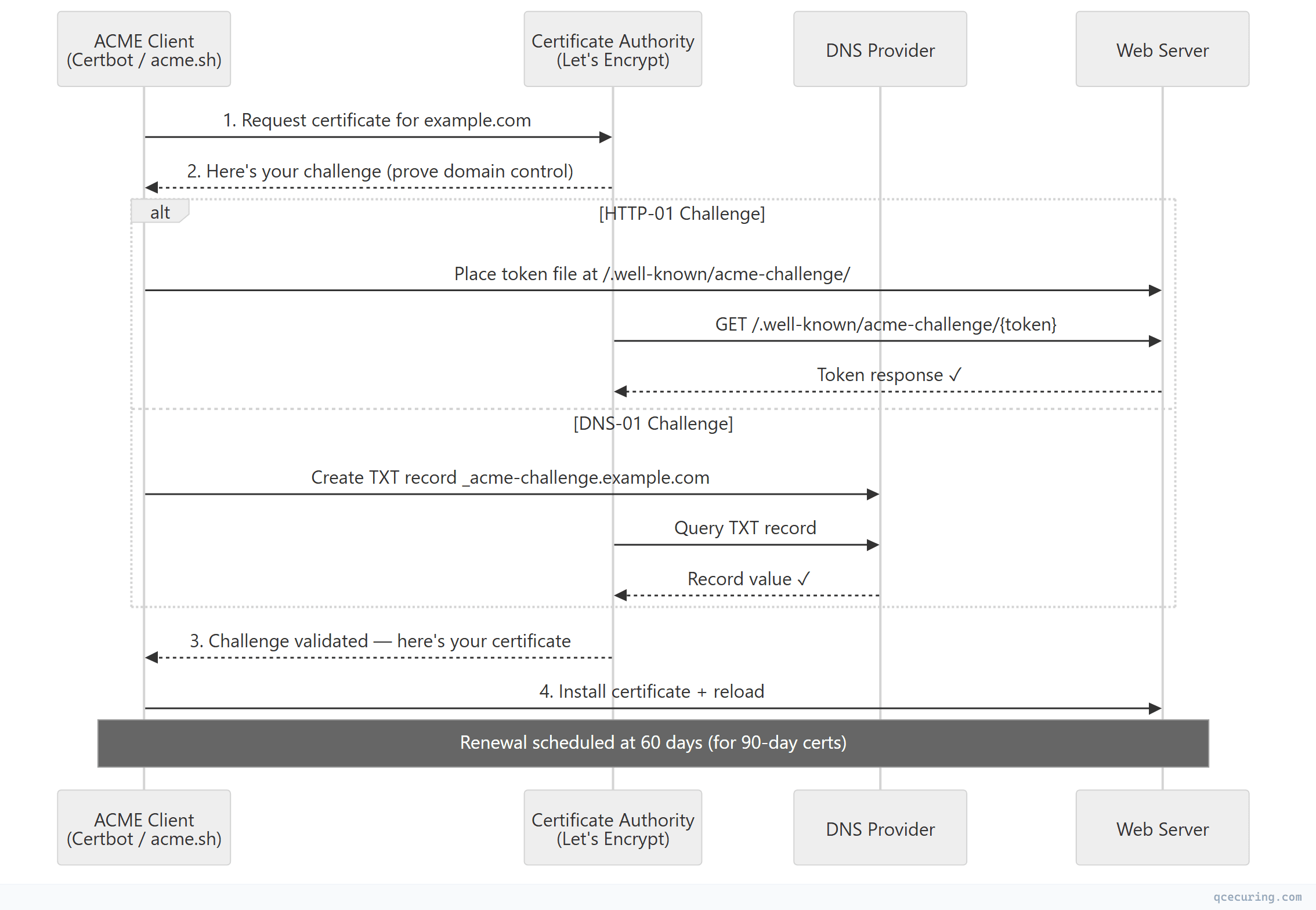
The entire process takes 10-30 seconds. No emails. No portals. No humans.
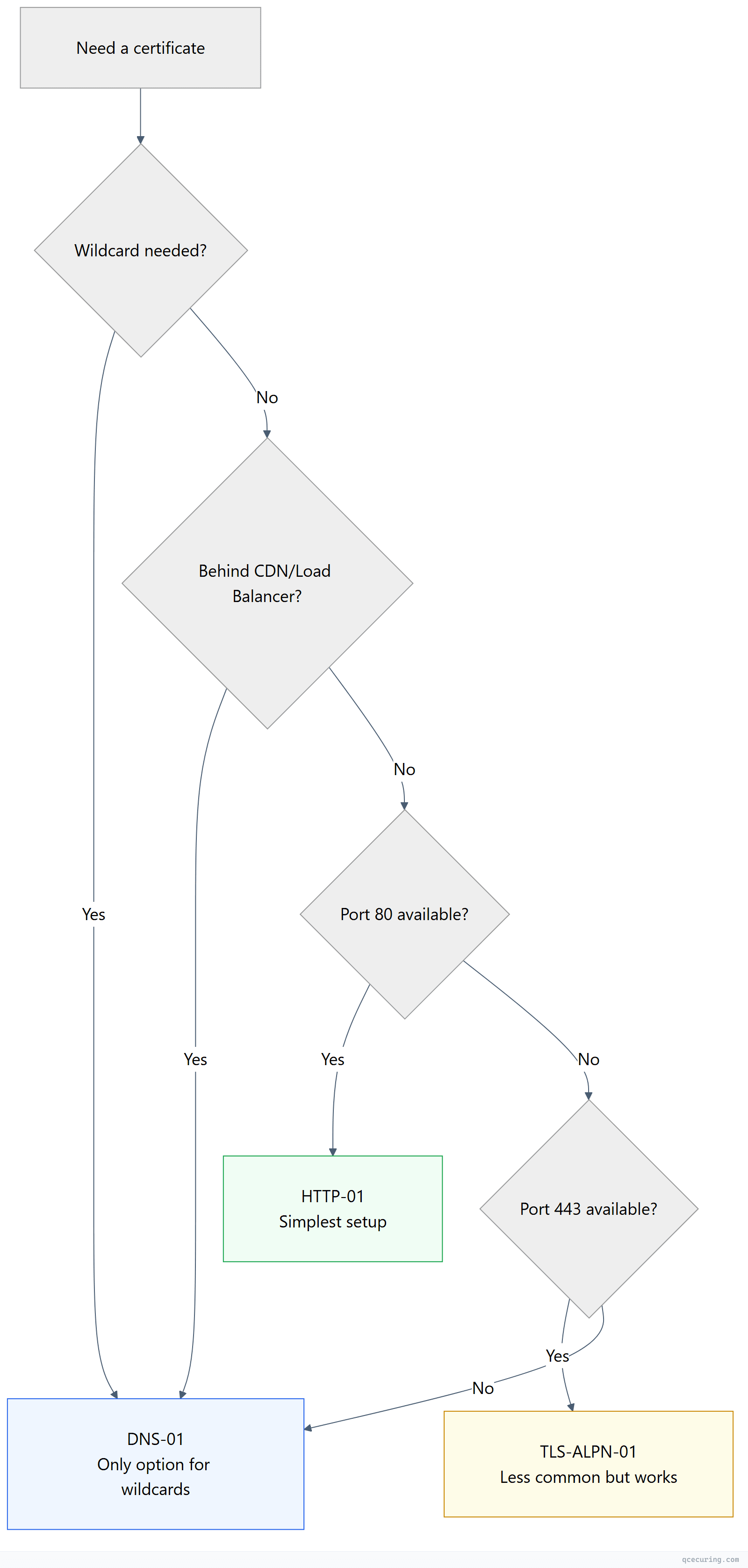
Choosing Your Challenge Type
ACME offers three ways to prove domain control. The right choice depends on your infrastructure:
| Challenge | How It Works | Best For | Limitations |
|---|---|---|---|
| HTTP-01 | Place a file at http://domain/.well-known/acme-challenge/{token} | Simple web servers directly reachable on port 80 | Doesn’t work behind CDNs, can’t do wildcards |
| DNS-01 | Create a TXT record at _acme-challenge.domain | Wildcards, CDN-fronted domains, domains not serving HTTP | Requires DNS API access, propagation delays |
| TLS-ALPN-01 | Respond with a special self-signed cert on port 443 | Servers that only expose port 443 (no port 80) | Less common, fewer client implementations |
Decision tree:
Setup 1: Nginx + Certbot (HTTP-01)
The most common setup. Certbot handles everything.
Install:
# Ubuntu/Debian
apt install certbot python3-certbot-nginx

# RHEL/CentOS
dnf install certbot python3-certbot-nginx
Initial certificate:
certbot --nginx -d example.com -d www.example.com
# Certbot:
# 1. Generates key pair
# 2. Requests certificate via ACME
# 3. Proves domain control via HTTP-01 (temporary Nginx config)
# 4. Installs certificate in Nginx config
# 5. Reloads Nginx
Automatic renewal:
# Certbot installs a systemd timer that runs twice daily
systemctl status certbot.timer

# Manual test of renewal
certbot renew --dry-run

# Add deploy hook for post-renewal actions
certbot renew --deploy-hook "systemctl reload nginx"
Nginx config (after certbot runs):
server {
    listen 443 ssl;
    server_name example.com www.example.com;

    ssl_certificate /etc/letsencrypt/live/example.com/fullchain.pem;
    ssl_certificate_key /etc/letsencrypt/live/example.com/privkey.pem;

    # Certbot manages these files — don't edit manually
    # Renewal happens automatically via systemd timer
}
Setup 2: Wildcard Certificate with DNS-01 (acme.sh + Cloudflare)
For wildcard certificates or domains behind CDNs:
# Install acme.sh
curl https://get.acme.sh | sh

# Configure Cloudflare API token
export CF_Token="your-cloudflare-api-token"
export CF_Zone_ID="your-zone-id"

# Issue wildcard certificate
acme.sh --issue -d "example.com" -d "*.example.com" --dns dns_cf

# Install to Nginx
acme.sh --install-cert -d example.com \
  --key-file /etc/ssl/private/example.com.key \
  --fullchain-file /etc/ssl/certs/example.com.pem \
  --reloadcmd "systemctl reload nginx"
acme.sh automatically renews at 60 days and runs the reload command after each renewal.
Supported DNS providers (50+): Cloudflare, AWS Route53, Google Cloud DNS, Azure DNS, DigitalOcean, Namecheap, GoDaddy, and many more. Each has a specific environment variable for API credentials.
Setup 3: Kubernetes + cert-manager
For Kubernetes environments, cert-manager is the standard:
# Install cert-manager
# kubectl apply -f https://github.com/cert-manager/cert-manager/releases/download/v1.14.0/cert-manager.yaml

# ClusterIssuer for Let's Encrypt
apiVersion: cert-manager.io/v1
kind: ClusterIssuer
metadata:
  name: letsencrypt-prod
spec:
  acme:
    server: https://acme-v02.api.letsencrypt.org/directory
    email: ops@example.com
    privateKeySecretRef:
      name: letsencrypt-prod-key
    solvers:
    - http01:
        ingress:
          class: nginx
    - dns01:
        cloudDNS:
          project: my-gcp-project
      selector:
        dnsNames:
        - "*.example.com"

---
# Certificate resource — cert-manager handles everything
apiVersion: cert-manager.io/v1
kind: Certificate
metadata:
  name: api-tls
  namespace: production
spec:
  secretName: api-tls-secret
  issuerRef:
    name: letsencrypt-prod
    kind: ClusterIssuer
  dnsNames:
  - api.example.com
  - api-v2.example.com
Here’s what cert-manager does behind the scenes:
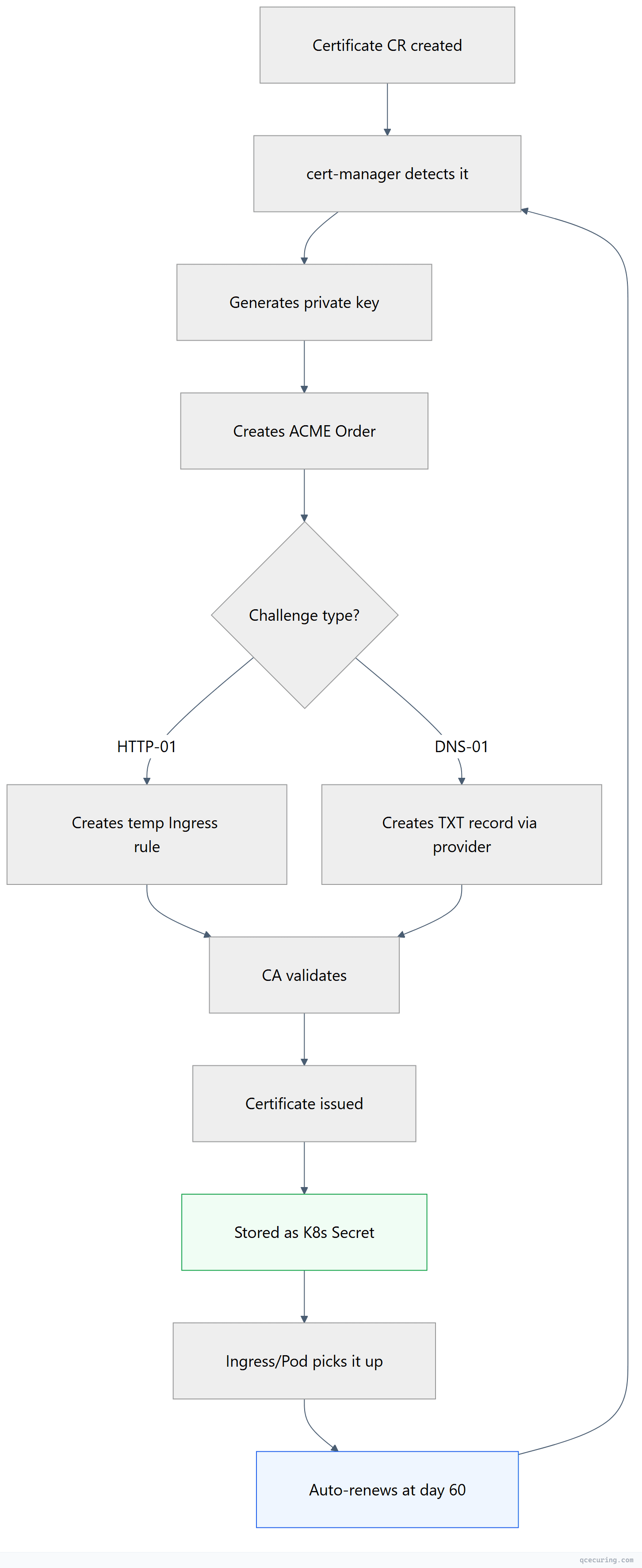
cert-manager automatically:
- Generates the private key
- Creates the ACME order
- Solves the challenge (creates temporary ingress rules or DNS records)
- Stores the certificate as a Kubernetes Secret
- Renews at 2/3 of lifetime (day 60 for 90-day certs)
Related: For a deeper dive into Kubernetes-specific patterns, see our Kubernetes Certificate Management Guide.
Setup 4: Apache + Certbot
# Install
apt install certbot python3-certbot-apache

# Issue and configure
certbot --apache -d example.com -d www.example.com

# Certbot modifies Apache config automatically:
# SSLCertificateFile /etc/letsencrypt/live/example.com/fullchain.pem
# SSLCertificateKeyFile /etc/letsencrypt/live/example.com/privkey.pem
The 47-Day Problem: Why ACME Matters More Than Ever
The CA/Browser Forum is moving toward 47-day certificate lifetimes. When that happens:

With 47-day certs, you’ll need 8 renewals per year per certificate instead of 1. Manual renewal becomes physically impossible at scale. ACME automation isn’t optional anymore — it’s survival.
Handling Common Failures
DNS-01 Propagation Delay
Problem: acme.sh creates the TXT record, but the CA’s validation servers query DNS before the record has propagated. Validation fails.
Fix:
# Increase sleep time between record creation and validation
acme.sh --issue -d "*.example.com" --dns dns_cf --dnssleep 120
# Waits 120 seconds for propagation (default is 20)
HTTP-01 Behind a Reverse Proxy
Problem: The CA hits port 80, but your reverse proxy doesn’t forward /.well-known/acme-challenge/ to the backend where certbot placed the file.
Fix (Nginx):
# Add to your server block (port 80)
location /.well-known/acme-challenge/ {
    root /var/www/certbot;  # Where certbot places challenge files
}
Rate Limits
Problem: Let’s Encrypt limits: 50 certificates per registered domain per week, 5 duplicate certificates per week, 300 new orders per 3 hours.
Fix:
- Use the staging environment for testing:
--server https://acme-staging-v02.api.letsencrypt.org/directory - Combine multiple subdomains into one certificate (SAN) instead of separate certificates
- If you hit limits, wait (there’s no override)
Renewal Succeeds But Service Doesn’t Reload
Problem: Certificate file updated on disk, but Nginx/Apache still serves the old cert from memory.
Fix: Always use a deploy hook:
# Certbot
certbot renew --deploy-hook "systemctl reload nginx"

# acme.sh
acme.sh --install-cert -d example.com --reloadcmd "systemctl reload nginx"
Monitoring Your ACME Automation
Automation that isn’t monitored is automation that fails silently. Here’s the monitoring architecture:
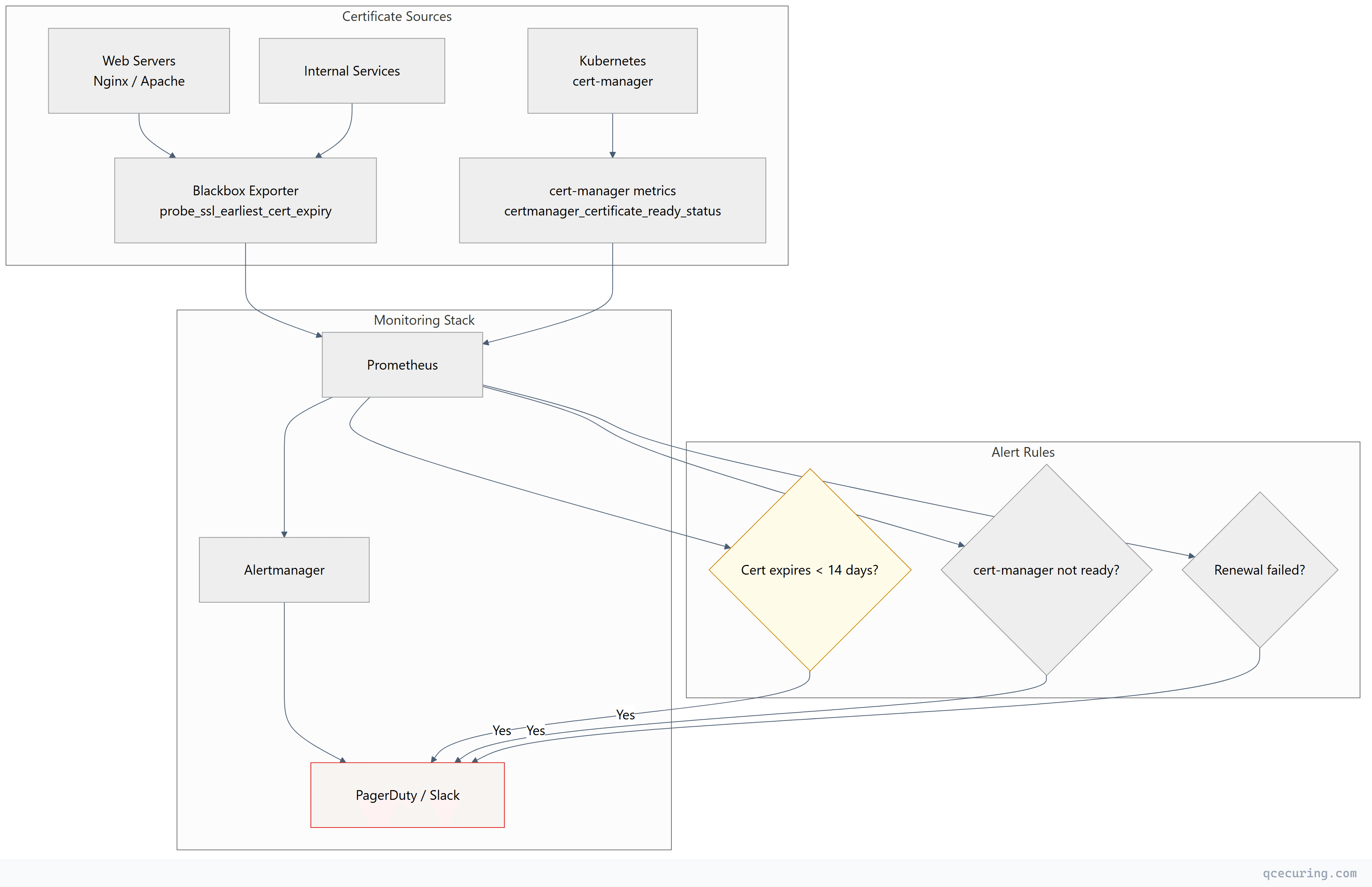
1. Certificate expiry monitoring:
# Prometheus blackbox_exporter checks actual served certificate
probe_ssl_earliest_cert_expiry - time() < 86400 * 14
# Alert if any certificate expires in less than 14 days
2. Renewal log monitoring:
# Check certbot renewal logs for failures
grep -i "failed\|error" /var/log/letsencrypt/letsencrypt.log
3. cert-manager metrics (Kubernetes):
# Alert on certificates not ready
certmanager_certificate_ready_status{condition="False"} == 1

# Alert on certificates expiring soon
certmanager_certificate_expiration_timestamp_seconds - time() < 86400 * 7
ACME for Internal/Private Certificates
ACME isn’t just for public CAs. You can run ACME internally:
| Tool | Type | Best For |
|---|---|---|
| Smallstep step-ca | Private ACME CA | Small-medium internal PKI |
| EJBCA | Enterprise CA | Large orgs needing full PKI features |
| HashiCorp Vault | Secrets + PKI engine | Teams already using Vault |
| Boulder | Let’s Encrypt’s own CA software | Running your own public-style CA |
| QCecuring SSL CLM | Enterprise CLM | Managing ACME + non-ACME certs together |
# Example: Smallstep as internal ACME CA
step-ca --password-file /etc/step/password.txt

# Configure certbot to use your internal CA
certbot certonly --standalone \
  --server https://ca.internal.example.com/acme/acme/directory \
  -d service.internal.example.com
This gives you the same automation benefits for internal services — mTLS between microservices, internal APIs, development environments — without depending on external CAs.
Learn more: What is ACME Protocol covers the protocol internals in depth.
Beyond Let’s Encrypt: Other ACME CAs
ACME isn’t Let’s Encrypt-specific. Other CAs support it:
| CA | Free Tier | Paid Options | Cert Lifetime | Notes |
|---|---|---|---|---|
| Let’s Encrypt | Unlimited DV | — | 90 days | Most popular, highest trust |
| ZeroSSL | 3 free certs | Unlimited paid | 90 days (free) / 1 year (paid) | REST API alternative too |
| Buypass | Unlimited DV | OV/EV available | 180 days | Norwegian CA, longer validity |
| Google Trust Services | Unlimited DV | — | 90 days | Google’s CA, fast issuance |
| SSL.com | — | ACME for paid certs | 1 year | OV/EV via ACME |
All use the same ACME protocol — switch CAs by changing one URL in your client configuration.
When ACME Isn’t Enough
ACME handles DV certificates beautifully. But enterprise environments have certificates that ACME can’t manage:
- OV/EV certificates — require manual organization validation
- Code signing certificates — different issuance process entirely
- Client certificates — for mTLS, device identity, email S/MIME
- Internal CA certificates — unless you run your own ACME-compatible CA
- Legacy systems — mainframes, embedded devices, IoT that can’t run ACME clients
- Multi-CA environments — some certs from DigiCert, some from Sectigo, some internal
For these, you need a Certificate Lifecycle Management platform that handles both ACME-automated and manually-managed certificates in one place.
Quick Reference: ACME Client Comparison
| Client | Language | Best For | Wildcard | Auto-Renewal |
|---|---|---|---|---|
| Certbot | Python | Nginx/Apache on Linux | Yes (DNS-01) | systemd timer |
| acme.sh | Shell | Minimal dependencies, 50+ DNS APIs | Yes | cron job |
| cert-manager | Go | Kubernetes native | Yes | Built-in controller |
| Caddy | Go | Built-in ACME (zero config) | Yes | Automatic |
| Traefik | Go | Docker/K8s reverse proxy | Yes | Automatic |
| win-acme | C# | Windows/IIS | Yes | Scheduled task |
| lego | Go | CLI + library for custom integrations | Yes | Manual/cron |
FAQ
Q: Is ACME only for DV certificates?
Currently, ACME primarily issues DV (Domain Validated) certificates. Some CAs (SSL.com, Sectigo) offer OV/EV via ACME with pre-verified organization accounts, but this isn’t standardized yet.
Q: Can I use ACME for internal/private certificates?
Yes — tools like Smallstep, EJBCA, and HashiCorp Vault support ACME for private CA issuance. Same protocol, your own CA. See the “ACME for Internal Certificates” section above.
Q: What happens if Let’s Encrypt goes down?
Your existing certificates continue working until they expire. Renewals fail until the service recovers. Mitigation: configure a backup CA (ZeroSSL, Buypass) in your automation.
Q: How do I handle multiple servers behind a load balancer?
Use DNS-01 (challenge doesn’t depend on which server the request hits) or run the ACME client on one server and distribute the certificate to all servers via your deployment pipeline.
Q: What’s the difference between Certbot and acme.sh?
Certbot is Python-based with deep Nginx/Apache integration (auto-configures your web server). acme.sh is a pure shell script with no dependencies and supports 50+ DNS providers out of the box. Use Certbot for simple setups, acme.sh for complex DNS-01 scenarios.
Q: How do I prepare for 47-day certificates?
Ensure every certificate in your infrastructure is ACME-automated. Audit for any manual renewals. Read our 47-Day TLS Certificates preparation guide for a complete checklist.
Related Reading: