
Traditional code signing requires managing long-lived private keys — generating them, storing them in HSMs or vaults, rotating them, and praying nobody exfiltrates them. Sigstore’s keyless signing eliminates all of that. Instead of “prove you have this key,” it’s “prove you are this identity.” Your GitHub Actions workflow identity becomes your signing credential, and the proof goes into a public transparency log.
No keys to manage. No secrets to rotate. No HSM bills. Just cryptographic proof that a specific GitHub workflow, in a specific repository, at a specific commit, produced this container image.
How Keyless Signing Works
The “keyless” in keyless signing is slightly misleading — keys still exist, they’re just ephemeral. Here’s the actual flow:
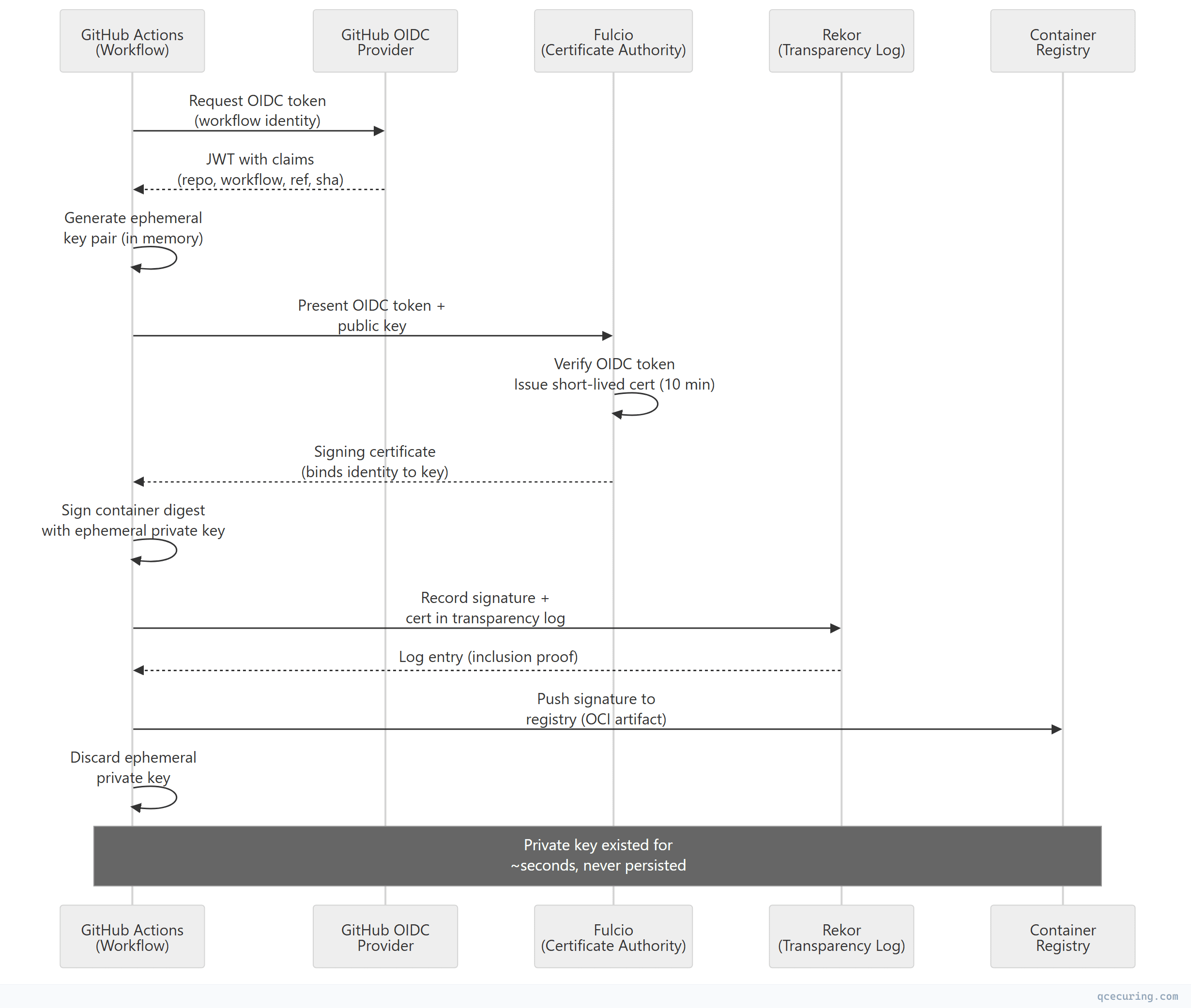
Key insight: The private key lives only in memory for the duration of the signing operation. After signing, it’s discarded. The Fulcio certificate (valid for ~10 minutes) and the Rekor transparency log entry together provide the proof chain:
- Identity: The OIDC token proves which workflow ran
- Binding: The Fulcio certificate binds that identity to the ephemeral public key
- Integrity: The signature proves the artifact wasn’t modified
- Non-repudiation: The Rekor log proves the signature existed at a specific time
GitHub Actions Setup
Basic Keyless Signing
# .github/workflows/build-sign.yml
name: Build and Sign Container Image

on:
  push:
    branches: [main]
    tags: ['v*']

permissions:
  contents: read
  packages: write
  id-token: write  # Required for OIDC token

jobs:
  build-and-sign:
    runs-on: ubuntu-latest
    steps:
      - uses: actions/checkout@v4

      - name: Set up Docker Buildx
        uses: docker/setup-buildx-action@v3

      - name: Login to GitHub Container Registry
        uses: docker/login-action@v3
        with:
          registry: ghcr.io
          username: ${{ github.actor }}
          password: ${{ secrets.GITHUB_TOKEN }}

      - name: Build and push image
        id: build
        uses: docker/build-push-action@v6
        with:
          push: true
          tags: ghcr.io/${{ github.repository }}:${{ github.sha }}

      - name: Install Cosign
        uses: sigstore/cosign-installer@v3

      - name: Sign the container image (keyless)
        env:
          DIGEST: ${{ steps.build.outputs.digest }}
        run: |
          cosign sign --yes \
            ghcr.io/${{ github.repository }}@${DIGEST}
That’s it. No keys, no secrets, no configuration. The id-token: write permission enables the OIDC token request, and cosign sign --yes handles the entire Fulcio + Rekor flow automatically.
With SLSA Provenance Attestation
      - name: Sign with attestation (SLSA provenance)
        env:
          DIGEST: ${{ steps.build.outputs.digest }}
        run: |
          # Sign the image
          cosign sign --yes \
            ghcr.io/${{ github.repository }}@${DIGEST}

          # Attach SLSA provenance attestation
          cosign attest --yes \
            --predicate <(cat <<EOF
          {
            "buildType": "https://github.com/actions/runner",
            "builder": {
              "id": "https://github.com/${{ github.repository }}/actions/runs/${{ github.run_id }}"
            },
            "invocation": {
              "configSource": {
                "uri": "git+https://github.com/${{ github.repository }}@${{ github.ref }}",
                "digest": {"sha1": "${{ github.sha }}"},
                "entryPoint": "${{ github.workflow }}"
              }
            },
            "metadata": {
              "buildStartedOn": "${{ github.event.head_commit.timestamp }}",
              "completeness": {
                "parameters": true,
                "environment": true,
                "materials": true
              }
            }
          }
          EOF
          ) \
            --type slsaprovenance \
            ghcr.io/${{ github.repository }}@${DIGEST}
Multi-Architecture Image Signing
      - name: Build multi-arch and sign
        id: build
        uses: docker/build-push-action@v6
        with:
          push: true
          platforms: linux/amd64,linux/arm64
          tags: |
            ghcr.io/${{ github.repository }}:${{ github.sha }}
            ghcr.io/${{ github.repository }}:latest

      - name: Sign all tags
        run: |
          DIGEST="${{ steps.build.outputs.digest }}"
          # Sign by digest (covers all platforms)
          cosign sign --yes ghcr.io/${{ github.repository }}@${DIGEST}

          # Optionally sign by tag (less secure — tags are mutable)
          # cosign sign --yes ghcr.io/${{ github.repository }}:latest
Verification
Command-Line Verification
# Verify a keyless signature (checks Fulcio + Rekor)
cosign verify \
  --certificate-identity "https://github.com/myorg/myrepo/.github/workflows/build-sign.yml@refs/heads/main" \
  --certificate-oidc-issuer "https://token.actions.githubusercontent.com" \
  ghcr.io/myorg/myrepo@sha256:abc123...

# Verify with regex (allow any workflow in the repo)
cosign verify \
  --certificate-identity-regexp "https://github.com/myorg/myrepo/.*" \
  --certificate-oidc-issuer "https://token.actions.githubusercontent.com" \
  ghcr.io/myorg/myrepo@sha256:abc123...
Output on success:
[
  {
    "critical": {
      "identity": {
        "docker-reference": "ghcr.io/myorg/myrepo"
      },
      "image": {
        "docker-manifest-digest": "sha256:abc123..."
      },
      "type": "cosign container image signature"
    },
    "optional": {
      "Issuer": "https://token.actions.githubusercontent.com",
      "Subject": "https://github.com/myorg/myrepo/.github/workflows/build-sign.yml@refs/heads/main",
      "githubWorkflowRef": "refs/heads/main",
      "githubWorkflowRepository": "myorg/myrepo",
      "githubWorkflowSha": "a1b2c3d4e5f6..."
    }
  }
]
Verify Attestations
# Verify SLSA provenance attestation
cosign verify-attestation \
  --certificate-identity "https://github.com/myorg/myrepo/.github/workflows/build-sign.yml@refs/heads/main" \
  --certificate-oidc-issuer "https://token.actions.githubusercontent.com" \
  --type slsaprovenance \
  ghcr.io/myorg/myrepo@sha256:abc123...
Kubernetes Admission Control
Signing images is only half the story. You need to enforce that only signed images run in your cluster.
Sigstore Policy Controller
# Install policy-controller
helm repo add sigstore https://sigstore.github.io/helm-charts
helm install policy-controller sigstore/policy-controller \
  --namespace cosign-system --create-namespace

# Create a ClusterImagePolicy
apiVersion: policy.sigstore.dev/v1beta1
kind: ClusterImagePolicy
metadata:
  name: require-github-actions-signature
spec:
  images:
    - glob: "ghcr.io/myorg/**"
  authorities:
    - keyless:
        identities:
          - issuer: "https://token.actions.githubusercontent.com"
            subjectRegExp: "https://github.com/myorg/.*"
        ctlog:
          url: "https://rekor.sigstore.dev"
Kyverno Policy
apiVersion: kyverno.io/v1
kind: ClusterPolicy
metadata:
  name: verify-cosign-signature
spec:
  validationFailureAction: Enforce
  background: false
  rules:
    - name: check-image-signature
      match:
        any:
          - resources:
              kinds:
                - Pod
      verifyImages:
        - imageReferences:
            - "ghcr.io/myorg/*"
          attestors:
            - entries:
                - keyless:
                    subject: "https://github.com/myorg/*/.github/workflows/*@refs/heads/main"
                    issuer: "https://token.actions.githubusercontent.com"
                    rekor:
                      url: "https://rekor.sigstore.dev"
Connaisseur (Lightweight Alternative)
# connaisseur values.yaml
validators:
  - name: sigstore
    type: cosign
    trustRoots:
      - name: default
        keyless:
          issuer: "https://token.actions.githubusercontent.com"
          subject: "https://github.com/myorg/.*"

policy:
  - pattern: "ghcr.io/myorg/*"
    validator: sigstore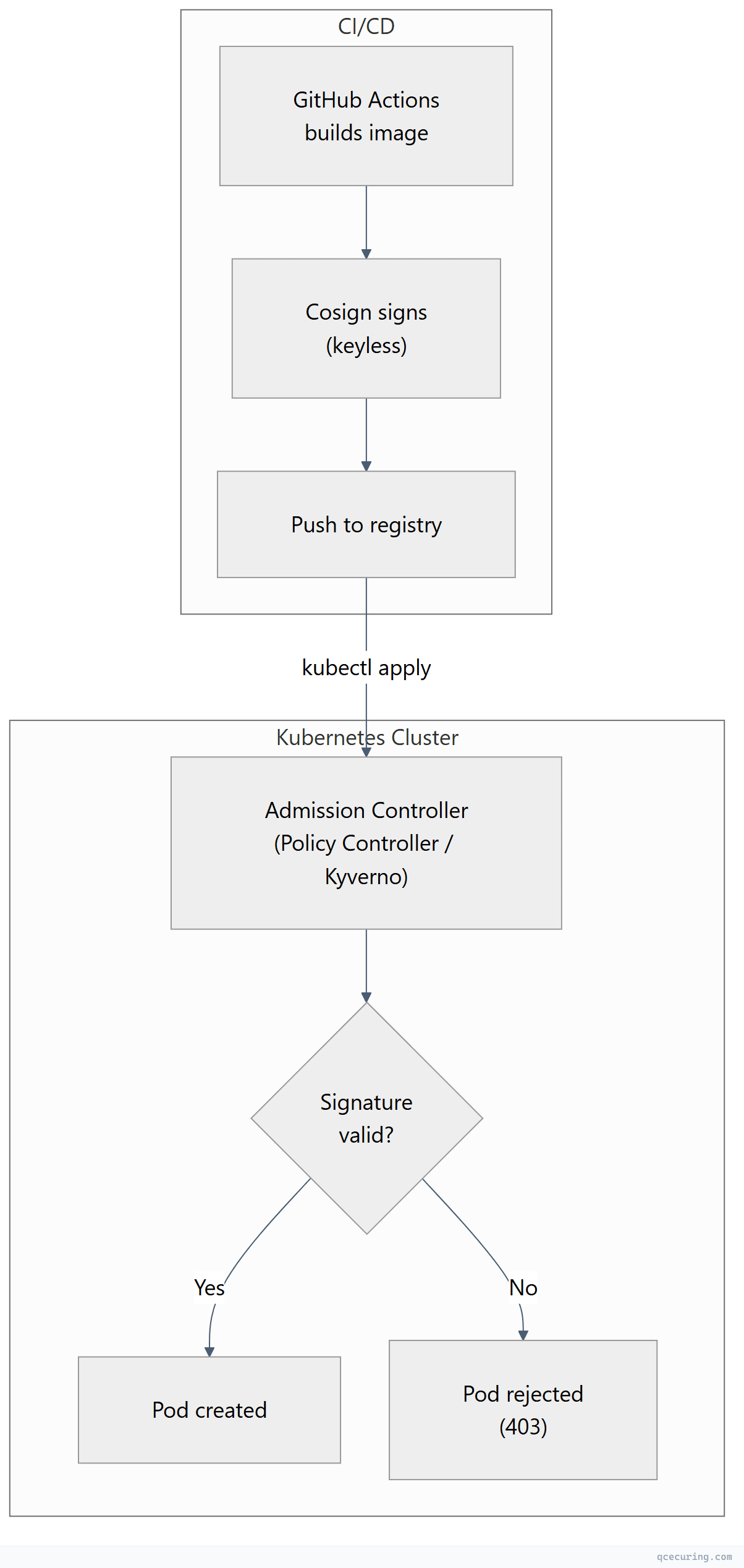
Advanced Patterns
Signing with Custom Annotations
      - name: Sign with metadata
        run: |
          cosign sign --yes \
            -a "build-url=https://github.com/${{ github.repository }}/actions/runs/${{ github.run_id }}" \
            -a "git-sha=${{ github.sha }}" \
            -a "git-ref=${{ github.ref }}" \
            -a "build-date=$(date -u +%Y-%m-%dT%H:%M:%SZ)" \
            ghcr.io/${{ github.repository }}@${{ steps.build.outputs.digest }}
Signing Non-Container Artifacts (Blobs)
      - name: Sign release binary
        run: |
          # Sign a binary file
          cosign sign-blob --yes \
            --output-signature myapp.sig \
            --output-certificate myapp.crt \
            ./dist/myapp-linux-amd64

          # Upload signature and cert as release assets
          gh release upload ${{ github.ref_name }} myapp.sig myapp.crt
Verification:
cosign verify-blob \
  --certificate myapp.crt \
  --signature myapp.sig \
  --certificate-identity "https://github.com/myorg/myrepo/.github/workflows/release.yml@refs/tags/v1.0.0" \
  --certificate-oidc-issuer "https://token.actions.githubusercontent.com" \
  ./myapp-linux-amd64
SBOM Attestation
      - name: Generate and attach SBOM
        run: |
          # Generate SBOM with syft
          syft ghcr.io/${{ github.repository }}@${{ steps.build.outputs.digest }} \
            -o spdx-json > sbom.spdx.json

          # Attach SBOM as signed attestation
          cosign attest --yes \
            --predicate sbom.spdx.json \
            --type spdxjson \
            ghcr.io/${{ github.repository }}@${{ steps.build.outputs.digest }}
Private Sigstore Instance (Enterprise)
For organizations that can’t use the public Sigstore infrastructure:
      - name: Sign with private Sigstore
        env:
          COSIGN_FULCIO_URL: https://fulcio.internal.example.com
          COSIGN_REKOR_URL: https://rekor.internal.example.com
          COSIGN_MIRROR: https://tuf.internal.example.com
          COSIGN_ROOT: /path/to/root.json
        run: |
          cosign sign --yes \
            --fulcio-url=$COSIGN_FULCIO_URL \
            --rekor-url=$COSIGN_REKOR_URL \
            ghcr.io/${{ github.repository }}@${{ steps.build.outputs.digest }}
Understanding the OIDC Claims
The GitHub Actions OIDC token contains claims that Fulcio embeds into the signing certificate. These claims are what you verify against:
| Claim | Certificate Extension | Example Value |
|---|---|---|
iss | Issuer | https://token.actions.githubusercontent.com |
sub | Subject | repo:myorg/myrepo:ref:refs/heads/main |
repository | GitHub Workflow Repository | myorg/myrepo |
workflow_ref | GitHub Workflow Ref | myorg/myrepo/.github/workflows/build.yml@refs/heads/main |
sha | GitHub Workflow SHA | a1b2c3d4e5f6... |
ref | Source Repository Ref | refs/heads/main |
event_name | Build Trigger | push, pull_request, workflow_dispatch |
runner_environment | Runner Type | github-hosted |
Security implication: When verifying, always check both --certificate-identity (the workflow file path) AND --certificate-oidc-issuer. Checking only the issuer means any GitHub Actions workflow could pass verification.
Troubleshooting
”error getting OIDC token”
Error: getting OIDC token: error retrieving token:
  unexpected status code: 403
Fix: Add id-token: write permission to your workflow:
permissions:
  id-token: write
  packages: write
  contents: read
“UNAUTHORIZED: authentication required” on sign
Fix: Ensure you’re logged into the registry before signing:
      - uses: docker/login-action@v3
        with:
          registry: ghcr.io
          username: ${{ github.actor }}
          password: ${{ secrets.GITHUB_TOKEN }}
Verification fails with “no matching signatures”
Causes:
- Wrong
--certificate-identity(must match the exact workflow path + ref) - Image was signed by a different workflow or branch
- Signature was made with a different Rekor instance
# Debug: inspect the signature without verification
cosign triangulate ghcr.io/myorg/myrepo@sha256:abc123...
# Shows where the signature is stored in the registry

# View raw signature data
cosign download signature ghcr.io/myorg/myrepo@sha256:abc123...
”TUF root not found” or “TUF metadata error”
# Initialize/update TUF root
cosign initialize

# Or specify the TUF mirror explicitly
cosign verify --certificate-identity ... \
  --certificate-oidc-issuer ... \
  ghcr.io/myorg/myrepo@sha256:abc123...
Cosign vs Traditional Code Signing
| Aspect | Cosign Keyless | Traditional (Key-Based) |
|---|---|---|
| Key management | None (ephemeral) | HSM, Vault, or file-based |
| Identity proof | OIDC token (workflow identity) | Possession of private key |
| Certificate lifetime | ~10 minutes | 1-3 years |
| Transparency | Public Rekor log | No public record |
| Revocation | Not needed (cert already expired) | CRL/OCSP required |
| Offline verification | Requires Rekor connectivity | Fully offline |
| Multi-signer | Each workflow has unique identity | Shared key = shared identity |
| Compliance | Emerging (SLSA, SSDF) | Established (EV code signing) |
| Cost | Free (public instance) | HSM + CA certificate costs |
When to use keyless: Container images, internal artifacts, CI/CD-produced binaries, SLSA compliance.
When to use traditional: Windows executables (requires EV cert), macOS notarization, regulated industries requiring specific CA chains, air-gapped environments.
FAQ
Q: Is keyless signing actually secure without a persistent key?
Yes. Security comes from the identity proof (OIDC token verified by Fulcio) and the transparency log (Rekor). An attacker would need to compromise GitHub’s OIDC provider, Fulcio’s certificate issuance, AND Rekor’s append-only log simultaneously. The ephemeral key approach actually reduces attack surface — there’s no long-lived key to steal.
Q: Can I use Cosign keyless with GitLab CI, CircleCI, or other providers?
Yes. Any CI system that supports OIDC token issuance works with Fulcio. GitLab CI, CircleCI, Buildkite, and Google Cloud Build all support OIDC. The --certificate-oidc-issuer changes to match the provider (e.g., https://gitlab.com for GitLab).
Q: What happens if Rekor or Fulcio goes down?
Signing fails — you can’t get a certificate from Fulcio or record in Rekor. For production resilience, consider: (1) retry logic in your workflow, (2) fallback to key-based signing, or (3) run a private Sigstore instance. Verification of existing signatures still works if you have cached TUF metadata.
Q: How do I verify images in air-gapped environments?
Cosign supports --offline verification if you bundle the Rekor inclusion proof with the signature. Use cosign sign --tlog-upload=false for environments that can’t reach Rekor, but you lose the transparency guarantee.
Q: Does keyless signing satisfy SLSA Level 3?
Keyless signing with GitHub Actions OIDC satisfies SLSA Build Level 3 requirements for provenance (non-falsifiable, generated by the build service). Combined with actions/attest-build-provenance, you get full SLSA v1.0 compliance.
Q: Can someone forge a signature by creating a workflow with the same path?
No. The OIDC token includes the repository owner (myorg/myrepo), not just the workflow path. A fork at attacker/myrepo would have a different subject claim. Always verify the full certificate-identity including the org/repo prefix.
Related Reading: