
Every Kubernetes service that exposes HTTPS needs a TLS certificate. Manually creating secrets, tracking expiry dates, and rotating certificates across dozens of namespaces doesn’t scale. cert-manager turns certificate management into a declarative Kubernetes-native operation — you define what you want, and it handles issuance, renewal, and rotation automatically.
This guide takes you from zero to production-ready cert-manager, covering installation, issuer configuration, certificate resources, DNS challenges for wildcards, and the troubleshooting steps you’ll need when certificates get stuck in a “not ready” state.
How cert-manager Works
cert-manager runs as a set of controllers in your cluster that watch for Certificate resources and fulfill them by communicating with certificate authorities:
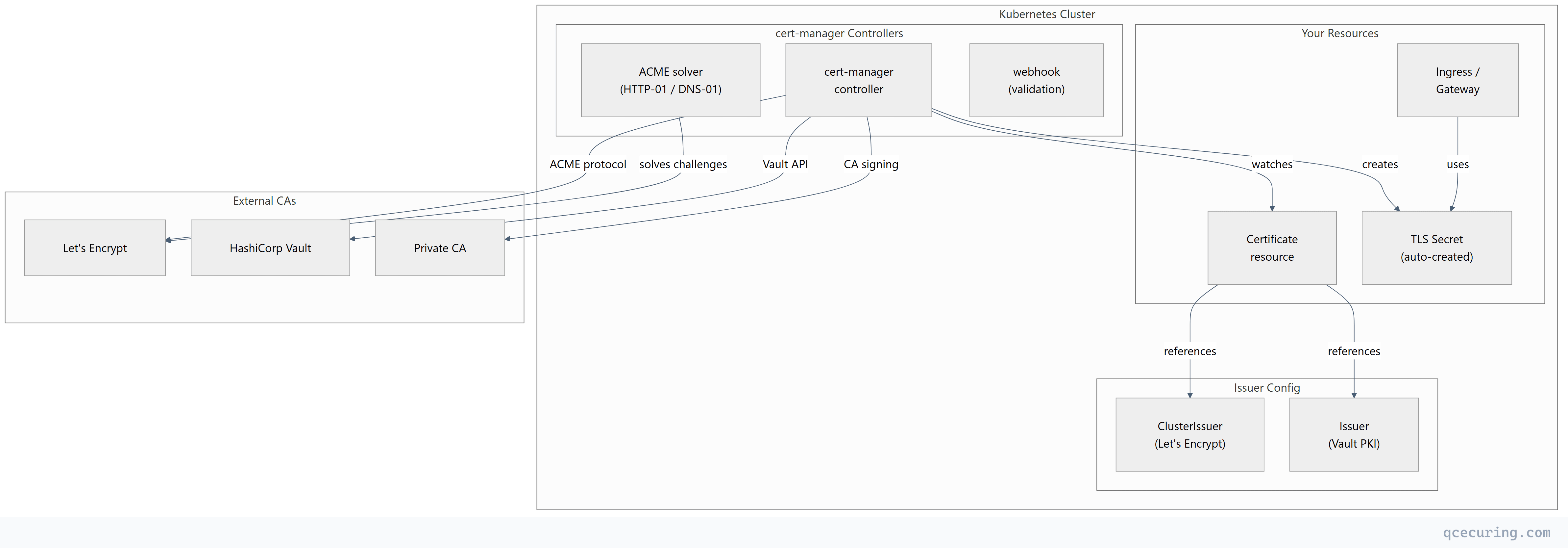
Core concepts:
| Resource | Scope | Purpose |
|---|---|---|
| Issuer | Namespace | Defines how to obtain certificates (CA config, credentials) |
| ClusterIssuer | Cluster-wide | Same as Issuer but available to all namespaces |
| Certificate | Namespace | Declares a desired certificate (domain, issuer, secret name) |
| CertificateRequest | Namespace | Internal — represents a single issuance attempt |
| Order | Namespace | Internal — tracks ACME order lifecycle |
| Challenge | Namespace | Internal — tracks ACME challenge solving |
Installation
Method 1: Helm (Recommended for Production)
# Add the Jetstack Helm repository
helm repo add jetstack https://charts.jetstack.io
helm repo update

# Install cert-manager with CRDs
helm install cert-manager jetstack/cert-manager \
  --namespace cert-manager \
  --create-namespace \
  --version v1.17.1 \
  --set crds.enabled=true \
  --set prometheus.enabled=true \
  --set webhook.timeoutSeconds=30

# Verify installation
kubectl get pods -n cert-manager
Expected output:
NAME                                       READY   STATUS    RESTARTS   AGE
cert-manager-7f4d5b8c9b-x2k4l            1/1     Running   0          45s
cert-manager-cainjector-6c8b4d9f7-m8n2p   1/1     Running   0          45s
cert-manager-webhook-5d9b7c6f4-q9r3t      1/1     Running   0          45s
Method 2: kubectl apply (Quick Start)
# Install cert-manager with all CRDs in one command
kubectl apply -f https://github.com/cert-manager/cert-manager/releases/download/v1.17.1/cert-manager.yaml

# Wait for pods to be ready
kubectl wait --for=condition=Ready pods --all -n cert-manager --timeout=120s
Verify Installation
# Check CRDs are installed
kubectl get crd | grep cert-manager

# Expected:
# certificaterequests.cert-manager.io
# certificates.cert-manager.io
# challenges.acme.cert-manager.io
# clusterissuers.cert-manager.io
# issuers.cert-manager.io
# orders.acme.cert-manager.io

# Test with cmctl (cert-manager CLI)
# Install: https://cert-manager.io/docs/reference/cmctl/
cmctl check api
Configuring Issuers
Let’s Encrypt (ACME) — Production + Staging
Always test with staging first. Let’s Encrypt has strict rate limits on production.
# cluster-issuer-letsencrypt.yaml
apiVersion: cert-manager.io/v1
kind: ClusterIssuer
metadata:
  name: letsencrypt-staging
spec:
  acme:
    server: https://acme-staging-v02.api.letsencrypt.org/directory
    email: platform-team@example.com
    privateKeySecretRef:
      name: letsencrypt-staging-account-key
    solvers:
      - http01:
          ingress:
            ingressClassName: nginx
---
apiVersion: cert-manager.io/v1
kind: ClusterIssuer
metadata:
  name: letsencrypt-prod
spec:
  acme:
    server: https://acme-v02.api.letsencrypt.org/directory
    email: platform-team@example.com
    privateKeySecretRef:
      name: letsencrypt-prod-account-key
    solvers:
      - http01:
          ingress:
            ingressClassName: nginx
kubectl apply -f cluster-issuer-letsencrypt.yaml
# Verify issuer is ready
kubectl get clusterissuer
# NAME READY AGE
# letsencrypt-staging True 10s
# letsencrypt-prod True 10sDNS-01 Challenge (For Wildcards and Private Networks)
HTTP-01 requires your cluster to be publicly reachable. DNS-01 works for:
- Wildcard certificates (
*.example.com) - Internal services not exposed to the internet
- Environments behind firewalls
Cloudflare DNS example:
# Create API token secret
apiVersion: v1
kind: Secret
metadata:
  name: cloudflare-api-token
  namespace: cert-manager
type: Opaque
stringData:
  api-token: "your-cloudflare-api-token-here"
---
apiVersion: cert-manager.io/v1
kind: ClusterIssuer
metadata:
  name: letsencrypt-dns
spec:
  acme:
    server: https://acme-v02.api.letsencrypt.org/directory
    email: platform-team@example.com
    privateKeySecretRef:
      name: letsencrypt-dns-account-key
    solvers:
      - dns01:
          cloudflare:
            apiTokenSecretRef:
              name: cloudflare-api-token
              key: api-token
        selector:
          dnsZones:
            - "example.com"
AWS Route53 DNS example:
apiVersion: cert-manager.io/v1
kind: ClusterIssuer
metadata:
  name: letsencrypt-route53
spec:
  acme:
    server: https://acme-v02.api.letsencrypt.org/directory
    email: platform-team@example.com
    privateKeySecretRef:
      name: letsencrypt-route53-account-key
    solvers:
      - dns01:
          route53:
            region: us-east-1
            # Uses IRSA (IAM Roles for Service Accounts) or instance profile
            # For IRSA, annotate the cert-manager service account:
            # eks.amazonaws.com/role-arn: arn:aws:iam::123456789:role/cert-manager-route53
HashiCorp Vault PKI Issuer
For internal certificates signed by your private CA in Vault:
apiVersion: cert-manager.io/v1
kind: ClusterIssuer
metadata:
  name: vault-pki
spec:
  vault:
    server: https://vault.internal.example.com
    path: pki_int/sign/server-cert
    caBundle: <base64-encoded-vault-ca-cert>
    auth:
      kubernetes:
        role: cert-manager
        mountPath: /v1/auth/kubernetes
        serviceAccountRef:
          name: cert-manager
Self-Signed and CA Issuers (Dev/Testing)
# Self-signed issuer (for bootstrapping)
apiVersion: cert-manager.io/v1
kind: ClusterIssuer
metadata:
  name: selfsigned
spec:
  selfSigned: {}
---
# Create a CA certificate using the self-signed issuer
apiVersion: cert-manager.io/v1
kind: Certificate
metadata:
  name: internal-ca
  namespace: cert-manager
spec:
  isCA: true
  commonName: "Internal Dev CA"
  duration: 87600h  # 10 years
  secretName: internal-ca-key-pair
  issuerRef:
    name: selfsigned
    kind: ClusterIssuer
---
# CA issuer that signs certificates with the above CA
apiVersion: cert-manager.io/v1
kind: ClusterIssuer
metadata:
  name: internal-ca
spec:
  ca:
    secretName: internal-ca-key-pair
Requesting Certificates
Method 1: Certificate Resource (Explicit)
apiVersion: cert-manager.io/v1
kind: Certificate
metadata:
  name: api-tls
  namespace: production
spec:
  secretName: api-tls-secret
  issuerRef:
    name: letsencrypt-prod
    kind: ClusterIssuer
  duration: 2160h    # 90 days
  renewBefore: 720h  # Renew 30 days before expiry
  commonName: api.example.com
  dnsNames:
    - api.example.com
    - api-v2.example.com
  privateKey:
    algorithm: ECDSA
    size: 256
    rotationPolicy: Always
Method 2: Ingress Annotation (Automatic)
The simplest approach — annotate your Ingress and cert-manager creates the Certificate automatically:
apiVersion: networking.k8s.io/v1
kind: Ingress
metadata:
  name: api-ingress
  namespace: production
  annotations:
    cert-manager.io/cluster-issuer: "letsencrypt-prod"
    cert-manager.io/private-key-algorithm: "ECDSA"
    cert-manager.io/private-key-size: "256"
spec:
  ingressClassName: nginx
  tls:
    - hosts:
        - api.example.com
      secretName: api-tls-secret  # cert-manager creates this
  rules:
    - host: api.example.com
      http:
        paths:
          - path: /
            pathType: Prefix
            backend:
              service:
                name: api-service
                port:
                  number: 8080
Method 3: Gateway API (Modern)
apiVersion: gateway.networking.k8s.io/v1
kind: Gateway
metadata:
  name: api-gateway
  namespace: production
  annotations:
    cert-manager.io/cluster-issuer: "letsencrypt-prod"
spec:
  gatewayClassName: nginx
  listeners:
    - name: https
      protocol: HTTPS
      port: 443
      hostname: "api.example.com"
      tls:
        mode: Terminate
        certificateRefs:
          - name: api-tls-secret  # cert-manager creates this
Wildcard Certificate
apiVersion: cert-manager.io/v1
kind: Certificate
metadata:
  name: wildcard-tls
  namespace: production
spec:
  secretName: wildcard-tls-secret
  issuerRef:
    name: letsencrypt-dns  # Must use DNS-01 for wildcards
    kind: ClusterIssuer
  dnsNames:
    - "example.com"
    - "*.example.com"
  privateKey:
    algorithm: ECDSA
    size: 256
Certificate Lifecycle and Renewal
cert-manager automatically renews certificates before they expire. The renewal timeline:
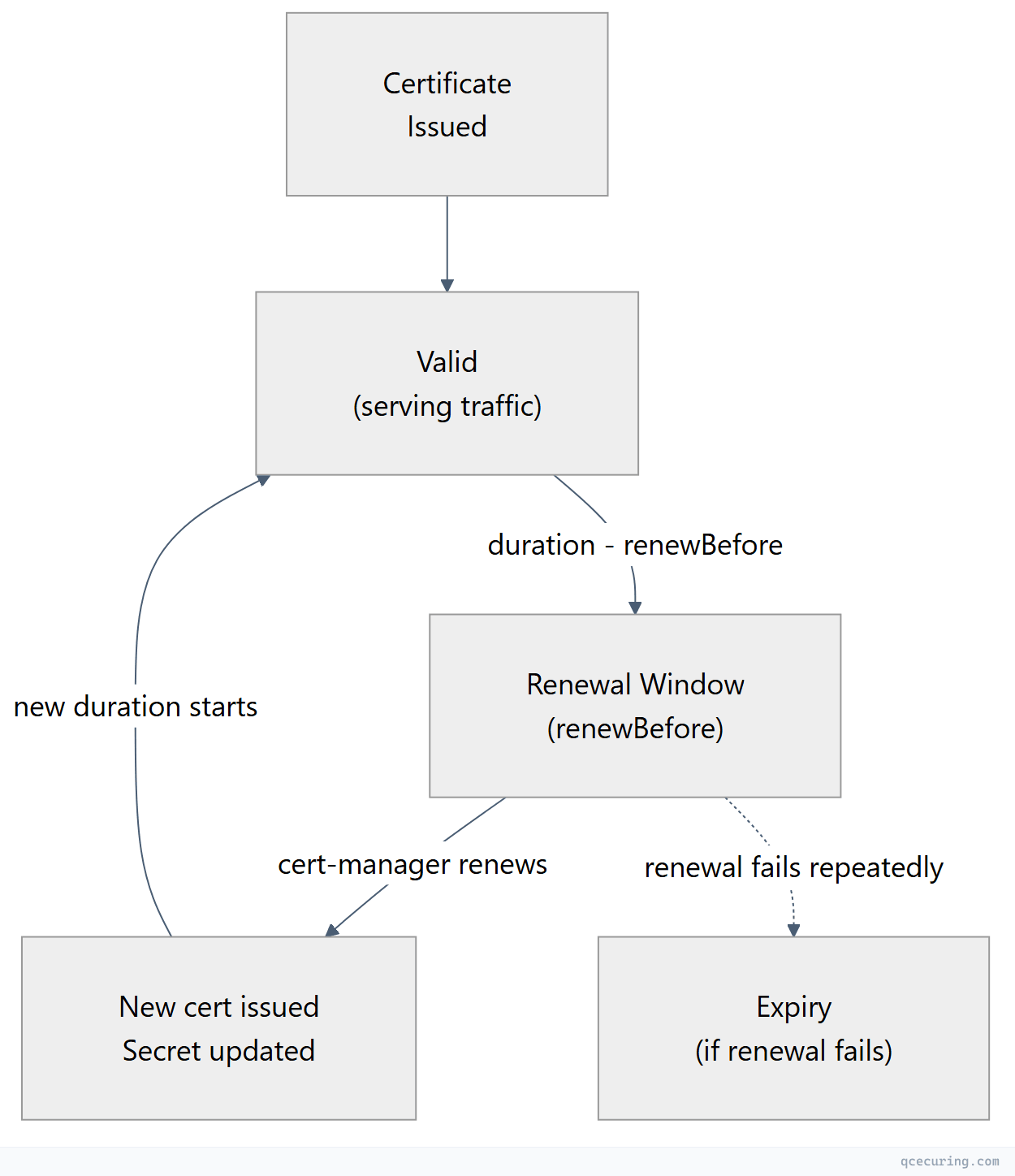
Default behavior:
duration: 90 days (2160h) — matches Let’s EncryptrenewBefore: 30 days (720h) — triggers renewal 30 days before expiryrotationPolicy: Always— generates a new private key on each renewal (recommended)
Monitoring Renewal
# Check certificate status
kubectl get certificates -A

# Detailed status including renewal time
kubectl describe certificate api-tls -n production

# Look for:
#   Status:
#     Conditions:
#       Type: Ready
#       Status: True
#     Not After: 2026-08-09T12:00:00Z
#     Renewal Time: 2026-07-10T12:00:00Z
Troubleshooting
Certificate Stuck in “Not Ready”
The most common issue. Follow the resource chain to find where it’s stuck:
# Step 1: Check Certificate status
kubectl describe certificate api-tls -n production
# Look at Events and Conditions

# Step 2: Check CertificateRequest
kubectl get certificaterequest -n production
kubectl describe certificaterequest api-tls-xxxxx -n production

# Step 3: For ACME issuers, check Order
kubectl get orders -n production
kubectl describe order api-tls-xxxxx -n production

# Step 4: Check Challenge (if Order is pending)
kubectl get challenges -n production
kubectl describe challenge api-tls-xxxxx -n production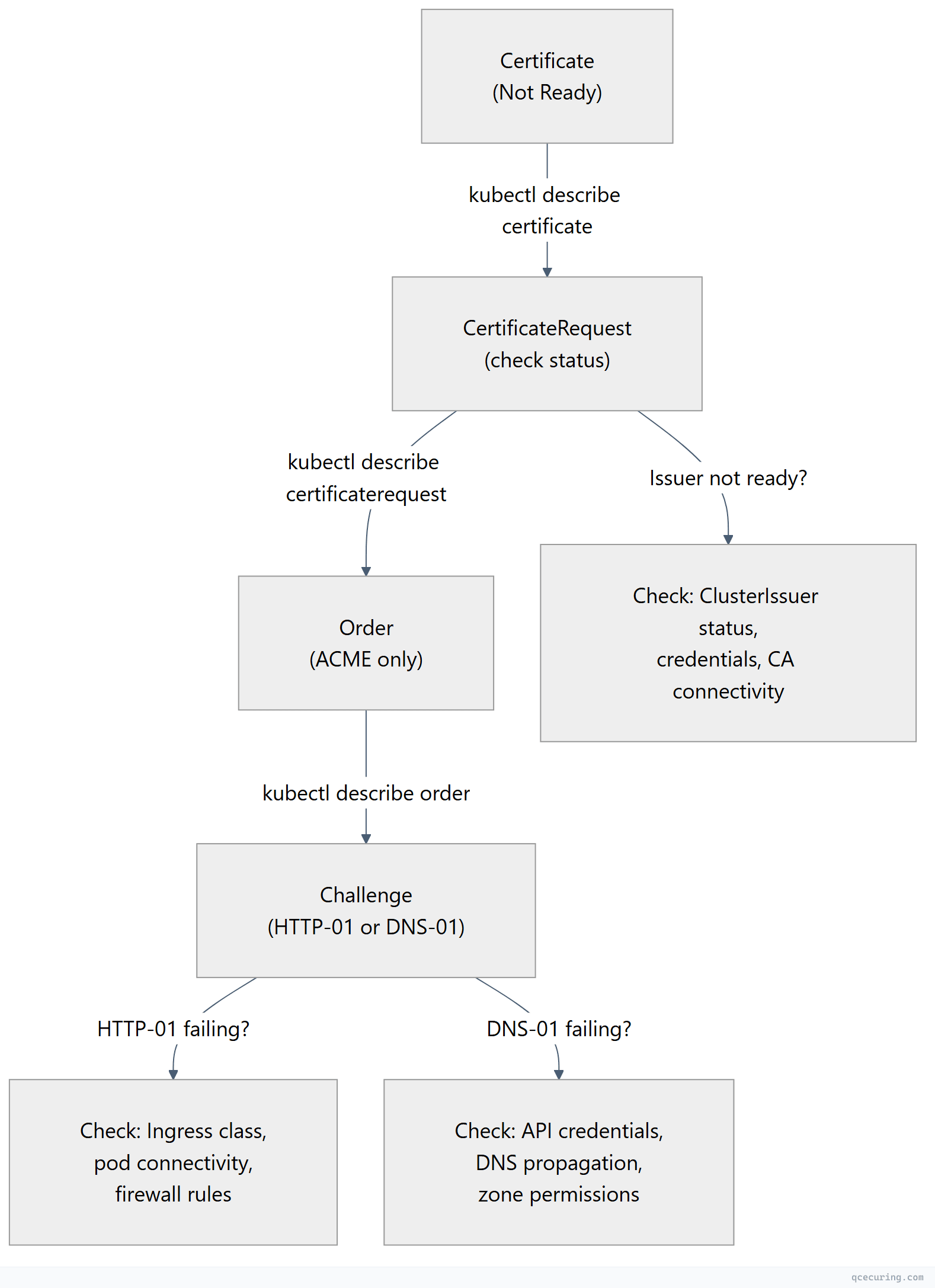
HTTP-01 Challenge Failing
# Check if the solver pod is running
kubectl get pods -n cert-manager -l acme.cert-manager.io/http01-solver=true

# Check if the temporary ingress was created
kubectl get ingress -A | grep cm-acme

# Test the challenge URL manually (from outside the cluster)
curl -v http://api.example.com/.well-known/acme-challenge/test-token

# Common fixes:
# 1. Wrong ingressClassName in the solver config
# 2. Firewall blocking port 80 from Let's Encrypt
# 3. DNS not pointing to the cluster's ingress IP
# 4. Ingress controller not routing /.well-known paths
DNS-01 Challenge Failing
# Check cert-manager controller logs
kubectl logs -n cert-manager deployment/cert-manager -f | grep -i "dns\|challenge\|error"

# Common errors:
# "failed to determine Route53 hosted zone ID" → IAM permissions
# "Timeout" → DNS propagation delay
# "Forbidden" → API token lacks zone edit permissions

# Verify DNS propagation manually
dig -t TXT _acme-challenge.api.example.com @8.8.8.8
Issuer Not Ready
# Check issuer status
kubectl get clusterissuer
kubectl describe clusterissuer letsencrypt-prod

# Common causes:
# - ACME account registration failed (email invalid, server unreachable)
# - Vault connection refused (wrong URL, auth misconfigured)
# - Secret referenced in issuer doesn't exist

# Check cert-manager logs for issuer errors
kubectl logs -n cert-manager deployment/cert-manager | grep -i "issuer\|error\|failed"
Secret Not Updating After Renewal
# Check if the secret exists and has recent data
kubectl get secret api-tls-secret -n production -o jsonpath='{.metadata.annotations}'

# Force re-issuance by deleting the secret (cert-manager recreates it)
kubectl delete secret api-tls-secret -n production

# Or trigger renewal with cmctl
cmctl renew api-tls -n production
Rate Limit Errors (Let’s Encrypt)
# Check order status for rate limit messages
kubectl describe order -n production | grep -i "rate\|limit\|too many"

# Let's Encrypt rate limits (as of 2026):
# - 50 certificates per registered domain per week
# - 5 duplicate certificates per week
# - 300 new orders per account per 3 hours

# Fix: Use staging issuer for testing, consolidate domains into fewer certs
Production Configuration
Resource Limits
# values.yaml for Helm
resources:
  requests:
    cpu: 50m
    memory: 128Mi
  limits:
    cpu: 500m
    memory: 512Mi

# For large clusters (1000+ certificates)
replicaCount: 2
podDisruptionBudget:
  enabled: true
  minAvailable: 1
Prometheus Monitoring
# cert-manager exposes metrics on :9402/metrics
# Key metrics to alert on:

# Certificate expiry (alert if < 7 days and not renewing)
# certmanager_certificate_expiration_timestamp_seconds

# Failed issuance attempts
# certmanager_certificate_ready_status{condition="False"}

# ACME client errors
# certmanager_http_acme_client_request_count{status="error"}
Prometheus alert rules:
apiVersion: monitoring.coreos.com/v1
kind: PrometheusRule
metadata:
  name: cert-manager-alerts
  namespace: monitoring
spec:
  groups:
    - name: cert-manager
      rules:
        - alert: CertificateNotReady
          expr: certmanager_certificate_ready_status{condition="False"} == 1
          for: 30m
          labels:
            severity: warning
          annotations:
            summary: "Certificate {{ $labels.name }} in {{ $labels.namespace }} is not ready"

        - alert: CertificateExpiringSoon
          expr: (certmanager_certificate_expiration_timestamp_seconds - time()) < 604800
          for: 1h
          labels:
            severity: critical
          annotations:
            summary: "Certificate {{ $labels.name }} expires in less than 7 days"
Multi-Cluster Considerations
For organizations running cert-manager across many clusters:
| Challenge | Solution |
|---|---|
| Inconsistent issuer config | GitOps (ArgoCD/Flux) to sync ClusterIssuers across clusters |
| No central visibility | Export cert-manager metrics to central Prometheus/Grafana |
| Rate limits hit across clusters | Use DNS-01 with separate accounts per cluster, or a private CA |
| Secret sprawl | Use external-secrets-operator to sync certs to a central vault |
| Wildcard sharing | Issue wildcard in one cluster, replicate secret to others |
When cert-manager handles issuance per-cluster but you need a unified view of certificate health across 10, 50, or 100 clusters, a centralized CLM platform provides the cross-cluster visibility that cert-manager alone can’t.
cert-manager vs Alternatives
| Feature | cert-manager | AWS ACM | Google Managed Certs | Traefik Built-in |
|---|---|---|---|---|
| Multi-CA support | Yes (ACME, Vault, private CA, Venafi) | AWS only | Google only | ACME only |
| Wildcard certs | Yes (DNS-01) | Yes | No | Yes (DNS-01) |
| Private CA | Yes | ACM Private CA ($$$) | Certificate Authority Service | No |
| Multi-cluster | Per-cluster install | Per-region | Per-project | Per-instance |
| Custom renewal | Configurable | Fixed (60 days) | Fixed | Fixed |
| mTLS support | Yes (with trust-manager) | Limited | No | Limited |
| GitOps friendly | Yes (CRDs) | Terraform/CDK | Terraform | Config file |
| Cost | Free (OSS) | Free (public) / $400/mo (private) | Free (public) | Free |
FAQ
Q: What’s the difference between an Issuer and a ClusterIssuer?
An Issuer is namespace-scoped — it can only issue certificates within its own namespace. A ClusterIssuer is cluster-scoped and can issue certificates in any namespace. Use ClusterIssuers for shared CAs (Let’s Encrypt) and namespace Issuers for team-specific private CAs or when you need different credentials per namespace.
Q: How do I use cert-manager with Istio service mesh?
cert-manager integrates with Istio via the istio-csr agent. Instead of Istio’s built-in CA (istiod), istio-csr requests certificates from cert-manager for workload identity. This lets you use any cert-manager issuer (Vault, private CA) for mesh mTLS certificates.
helm install istio-csr jetstack/cert-manager-istio-csr \
  --namespace cert-manager \
  --set "app.certmanager.issuer.name=vault-pki"
Q: Can cert-manager handle certificate rotation without downtime?
Yes. When cert-manager renews a certificate, it updates the Kubernetes Secret in-place. Ingress controllers (Nginx, Traefik, Envoy) watch for Secret changes and reload the new certificate without dropping connections. Set rotationPolicy: Always to generate a new private key on each renewal for forward secrecy.
Q: How do I migrate existing certificates to cert-manager?
- Create the Certificate resource pointing to the same
secretNameas your existing TLS secret - cert-manager will detect the existing secret and adopt it
- It will renew the certificate when
renewBeforeis reached - Alternatively, delete the old secret and let cert-manager issue a fresh one
Q: Why is my certificate stuck in “Issuing” state?
Check the CertificateRequest and Order resources. Common causes: ACME challenge failing (firewall, DNS), issuer credentials expired, rate limits hit, or the webhook is rejecting the request. Run kubectl describe on each resource in the chain (Certificate → CertificateRequest → Order → Challenge) to find the specific error.
Q: How many certificates can cert-manager handle?
cert-manager has been tested with 10,000+ Certificate resources in a single cluster. Performance depends on the issuer — Let’s Encrypt rate limits are the bottleneck, not cert-manager itself. For private CAs (Vault, internal CA), throughput is limited by the CA’s signing capacity.
Related Reading: