
Code signing in 2026 has split into two worlds. Traditional signing (Windows executables, macOS apps, Java JARs) still requires EV certificates from commercial CAs with HSM-backed private keys. Modern signing (container images, cloud-native artifacts, internal binaries) increasingly uses keyless approaches like Sigstore where identity replaces key possession.
This comparison covers both worlds — because most enterprises need both. Your Windows installer needs an EV certificate from DigiCert. Your container images need Cosign signatures in your CI/CD pipeline. And someone needs to govern all of it.
The Code Signing Landscape
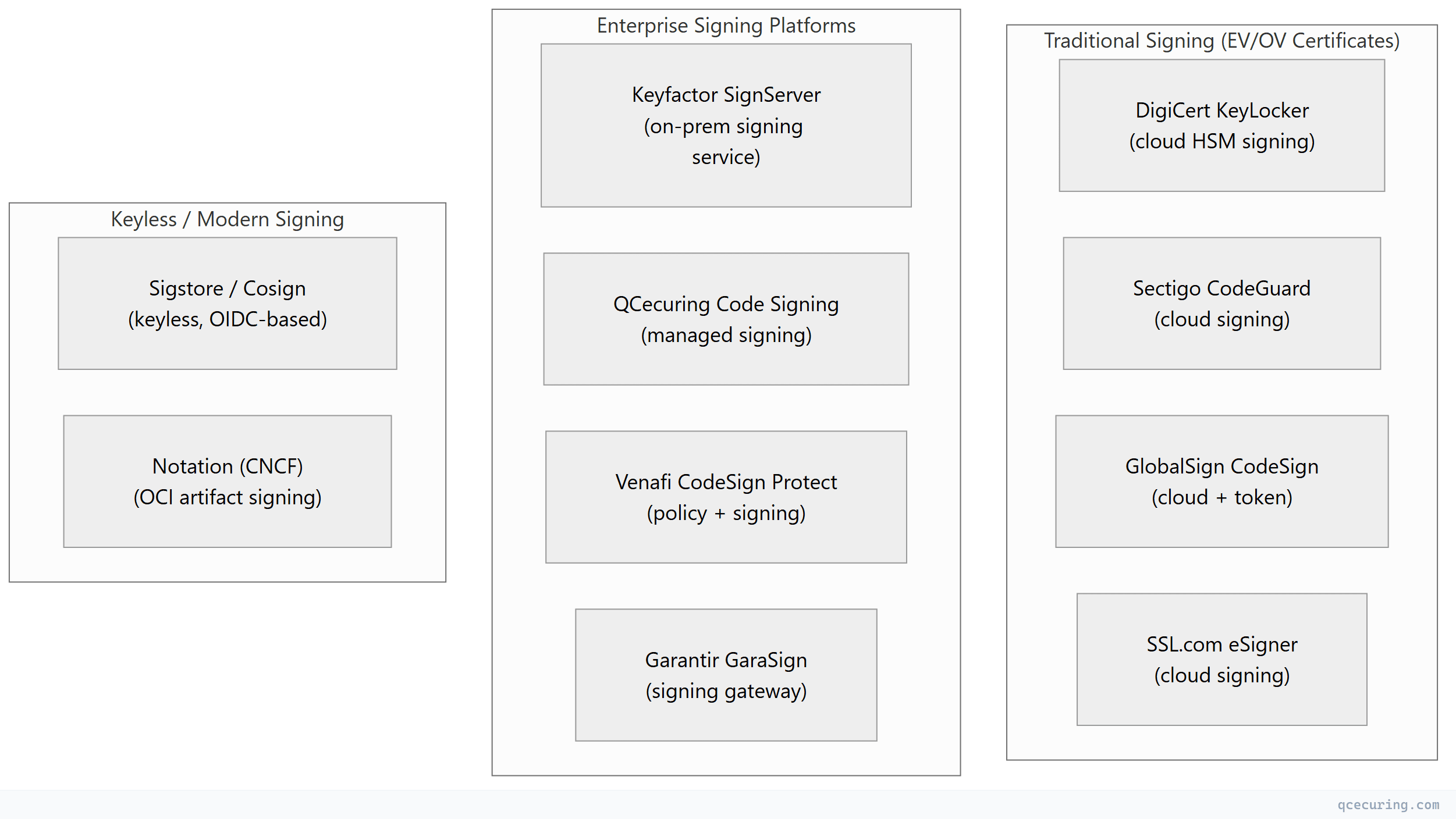
Platform Comparison
| DigiCert KeyLocker | Sectigo CodeGuard | Keyfactor SignServer | Sigstore/Cosign | QCecuring Code Signing | Venafi CodeSign Protect | |
|---|---|---|---|---|---|---|
| Type | Cloud signing service | Cloud signing service | On-prem signing server | Keyless signing | Managed signing | Policy + signing |
| Key storage | DigiCert cloud HSM | Sectigo cloud HSM | Customer HSM/KMS | Ephemeral (no keys) | HSM-backed | Customer HSM |
| EV certificates | Yes (DigiCert-issued) | Yes (Sectigo-issued) | Yes (any CA) | No | Yes (any CA) | Yes (any CA) |
| CI/CD integration | Yes (API + plugins) | Yes (API) | Yes (API + plugins) | Yes (native GitHub/GitLab) | Yes (API) | Yes (API + plugins) |
| Windows Authenticode | Yes | Yes | Yes | No (not for Windows EV) | Yes | Yes |
| macOS notarization | Yes | Yes | Limited | No | Limited | Limited |
| Container images | Limited | Limited | Yes | Yes (primary use case) | Yes | Yes |
| Java JAR signing | Yes | Yes | Yes | Yes (via cosign sign-blob) | Yes | Yes |
| Keyless (OIDC) | No | No | No | Yes (core feature) | No | No |
| Transparency log | No | No | No | Yes (Rekor) | No | No |
| Policy engine | Limited | Limited | Limited | No | Yes | Yes (strongest) |
| Approval workflows | Limited | Limited | Yes | No | Yes | Yes |
| Open source | No | No | Yes (Community) | Yes (Apache 2.0) | No | No |
| Pricing | Per-cert + signing ops | Per-cert + signing ops | License + HSM | Free (public infra) | Platform license | $$$$ |
| Best for | DigiCert customers, Windows signing | Budget-friendly EV signing | Enterprise on-prem signing | Container images, CI/CD | Managed enterprise signing | Large enterprise governance |
Detailed Profiles
DigiCert KeyLocker — Best for Windows/macOS Signing
DigiCert’s cloud-based signing service eliminates hardware tokens. Your EV code signing key lives in DigiCert’s FIPS 140-2 Level 3 cloud HSM. You sign via API or CLI tools (SignTool, jarsigner) without managing physical tokens.
Strengths: No hardware tokens, CI/CD-friendly API, trusted EV certificates, macOS notarization support, timestamping included Limitations: DigiCert certificates only, cloud-dependent (can’t sign offline), per-operation pricing adds up at scale Best for: Software vendors shipping Windows/macOS applications who want to eliminate hardware token management
Sectigo CodeGuard — Best Budget EV Signing
Sectigo offers competitive EV code signing certificate pricing with their CodeGuard cloud signing service. Similar to DigiCert KeyLocker but at lower price points.
Strengths: Lower certificate pricing than DigiCert, cloud HSM (no tokens), API access, timestamping Limitations: Less enterprise features than DigiCert, smaller ecosystem, Sectigo certificates only Best for: Small-to-mid software companies needing EV signing without DigiCert pricing
Keyfactor SignServer — Best for On-Premises Enterprise
SignServer is an open-source (Community) / commercial (Enterprise) signing server that runs on your infrastructure. It connects to your HSM and provides a signing API that CI/CD pipelines call.
Strengths: On-premises (keys never leave your network), any CA’s certificates, HSM-agnostic (PKCS#11), open-source core, supports all signing formats Limitations: Requires infrastructure management, HSM procurement, complex setup, no built-in certificate issuance Best for: Enterprises with strict data sovereignty requirements who want full control over signing infrastructure
Sigstore / Cosign — Best for Container Images & Cloud-Native
Keyless signing using OIDC identity (GitHub Actions, GitLab CI, etc.). No keys to manage — your CI/CD workflow identity is your signing credential. Signatures are recorded in a public transparency log (Rekor).
Strengths: Zero key management, free (public infrastructure), native CI/CD integration, SLSA compliance, transparency log for auditability Limitations: Not for Windows EV signing, requires internet (Fulcio + Rekor), public transparency log (signatures are public), newer ecosystem Best for: Container images, internal binaries, CI/CD artifacts, SLSA compliance
QCecuring Code Signing — Best for Managed Enterprise Signing
QCecuring provides code signing as part of their broader cryptographic security platform — with policy enforcement, approval workflows, and integration with their CLM and CBOM products.
Strengths: Integrated with CLM (certificate lifecycle for signing certs), policy engine, approval workflows, HSM-backed, any CA’s certificates Limitations: Newer product, smaller signing-specific ecosystem than DigiCert/Keyfactor Best for: Organizations wanting unified management of signing certificates alongside TLS certificates and SSH keys
Venafi CodeSign Protect — Best for Signing Governance
Venafi’s approach: they don’t sign code themselves — they govern who can sign, with what key, under what policy. The actual signing happens via your existing tools (SignTool, jarsigner, cosign) but Venafi controls access to the signing keys.
Strengths: Strongest policy engine, approval workflows, key access governance, audit trail, integrates with any signing tool Limitations: Expensive ($$$$$), complex deployment, doesn’t replace your signing infrastructure (adds governance on top), Venafi/CyberArk ecosystem Best for: Large enterprises with multiple development teams needing centralized signing governance
Selection by Use Case
| What You’re Signing | Recommended | Why |
|---|---|---|
| Windows .exe/.msi (public distribution) | DigiCert KeyLocker or Sectigo | EV certificate required for SmartScreen trust |
| macOS .app/.pkg (App Store or notarized) | DigiCert KeyLocker | Apple Developer ID + notarization support |
| Container images (Docker/OCI) | Sigstore/Cosign | Keyless, CI/CD-native, free |
| Java JARs (internal) | SignServer or QCecuring | On-prem, any certificate |
| NuGet/npm packages (internal) | Sigstore or SignServer | Depends on distribution model |
| Firmware/embedded | SignServer or QCecuring | HSM-backed, on-prem, long-lived keys |
| Internal binaries (not public) | Sigstore or SignServer | No EV needed, automation-friendly |
| Multi-team governance | Venafi CodeSign Protect | Policy enforcement across teams |
The EV Code Signing Requirement
For Windows executables distributed publicly, Extended Validation (EV) code signing certificates are effectively mandatory — they provide immediate SmartScreen reputation (no “Unknown Publisher” warning). Since June 2023, EV code signing keys must be stored in HSMs (CA/Browser Forum requirement).
| Provider | EV Certificate Price (Annual) | Cloud HSM Signing | Hardware Token |
|---|---|---|---|
| DigiCert | $499-$699/year | Yes (KeyLocker) | Yes |
| Sectigo | $299-$499/year | Yes (CodeGuard) | Yes |
| GlobalSign | $349-$599/year | Yes (CodeSign Secure) | Yes |
| SSL.com | $299-$499/year | Yes (eSigner) | Yes |
All EV providers now offer cloud HSM signing — eliminating the need for physical USB tokens that break CI/CD automation.
CI/CD Integration Comparison
| Platform | GitHub Actions | GitLab CI | Jenkins | Azure DevOps |
|---|---|---|---|---|
| DigiCert KeyLocker | Plugin + CLI | CLI | Plugin | CLI |
| Sectigo CodeGuard | API | API | API | API |
| SignServer | REST API | REST API | Plugin | REST API |
| Sigstore/Cosign | Native (keyless) | Native (keyless) | Plugin | CLI |
| QCecuring | API | API | API | API |
| Venafi CodeSign | Plugin | Plugin | Plugin | Plugin |
Sigstore has the best CI/CD experience — zero configuration for GitHub Actions (just add id-token: write permission). Traditional signing requires API keys, certificate configuration, and HSM connectivity setup.
The Keyless vs Key-Based Decision
| Factor | Keyless (Sigstore) | Key-Based (Traditional) |
|---|---|---|
| Key management overhead | Zero | Significant (HSM, rotation, access control) |
| Windows EV signing | Not supported | Required |
| Public distribution | Works (but no EV reputation) | Required for OS trust |
| Internal artifacts | Ideal | Overkill |
| Container images | Ideal | Works but unnecessary complexity |
| Compliance (SLSA) | Native | Requires additional tooling |
| Offline verification | Requires Rekor | Fully offline |
| Cost | Free | $300-$700/year (cert) + HSM costs |
The practical answer: Use Sigstore for container images and internal artifacts. Use traditional EV signing for Windows/macOS public distribution. Use a governance platform (QCecuring, Venafi) to manage signing certificates and policies across both.
FAQ
Q: Do I need EV code signing for internal-only software?
No. EV is only needed for public distribution where OS trust (Windows SmartScreen, macOS Gatekeeper) matters. For internal binaries, container images, and artifacts distributed within your organization, standard OV certificates or keyless signing (Sigstore) are sufficient.
Q: Can Sigstore replace DigiCert for Windows signing?
No. Windows Authenticode requires certificates from a trusted CA (DigiCert, Sectigo, etc.) with specific EKU. Sigstore certificates are short-lived and not in Windows trust stores. Use Sigstore for containers/internal artifacts and traditional signing for Windows distribution.
Q: Is SignServer worth the complexity vs cloud signing?
If you have strict requirements around key sovereignty (keys must never leave your premises), regulatory requirements for on-prem HSMs, or very high signing volume (where per-operation cloud pricing becomes expensive) — yes. For most organizations, cloud HSM signing (DigiCert KeyLocker, Sectigo CodeGuard) is simpler and sufficient.
Q: How do I manage code signing certificate lifecycle?
Code signing certificates expire (typically 1-3 years). Use a CLM platform (QCecuring, Venafi) to track expiry, automate renewal, and ensure signing keys are rotated per policy. A signing certificate expiring mid-release is a painful outage.
Q: What about timestamping?
Always timestamp your signatures. A timestamped signature remains valid even after the signing certificate expires. All major platforms include timestamping. Without it, your signed software becomes “untrusted” when the certificate expires — even if it was signed while valid.
Q: Can I use multiple signing approaches in one organization?
Yes — and most enterprises do. Container images → Sigstore. Windows apps → DigiCert EV. Internal tools → SignServer or QCecuring. The key is having governance (who can sign what, with which key, under what approval) across all approaches.
Related Reading: