
Every Java application that communicates over TLS relies on keystores and trust stores. The keytool utility ships with every JDK installation, yet its syntax is notoriously unintuitive — flags change between operations, error messages are cryptic, and one wrong command can corrupt a production keystore. This is the reference you keep open in a terminal tab.
Keytool Fundamentals: Keystores vs Trust Stores
Before diving into commands, understand the two files keytool manages:
| Store | Purpose | Default Location | Contains |
|---|---|---|---|
| KeyStore | Holds your private keys + certificates | Application-specific | Private keys, signed certs, cert chains |
| TrustStore | Holds CA certificates you trust | $JAVA_HOME/lib/security/cacerts | CA root certs, intermediate certs |
The JVM uses the trust store to validate remote certificates during TLS handshakes. If a server’s CA isn’t in your trust store, you get PKIX path building failed — the single most common Java TLS error.
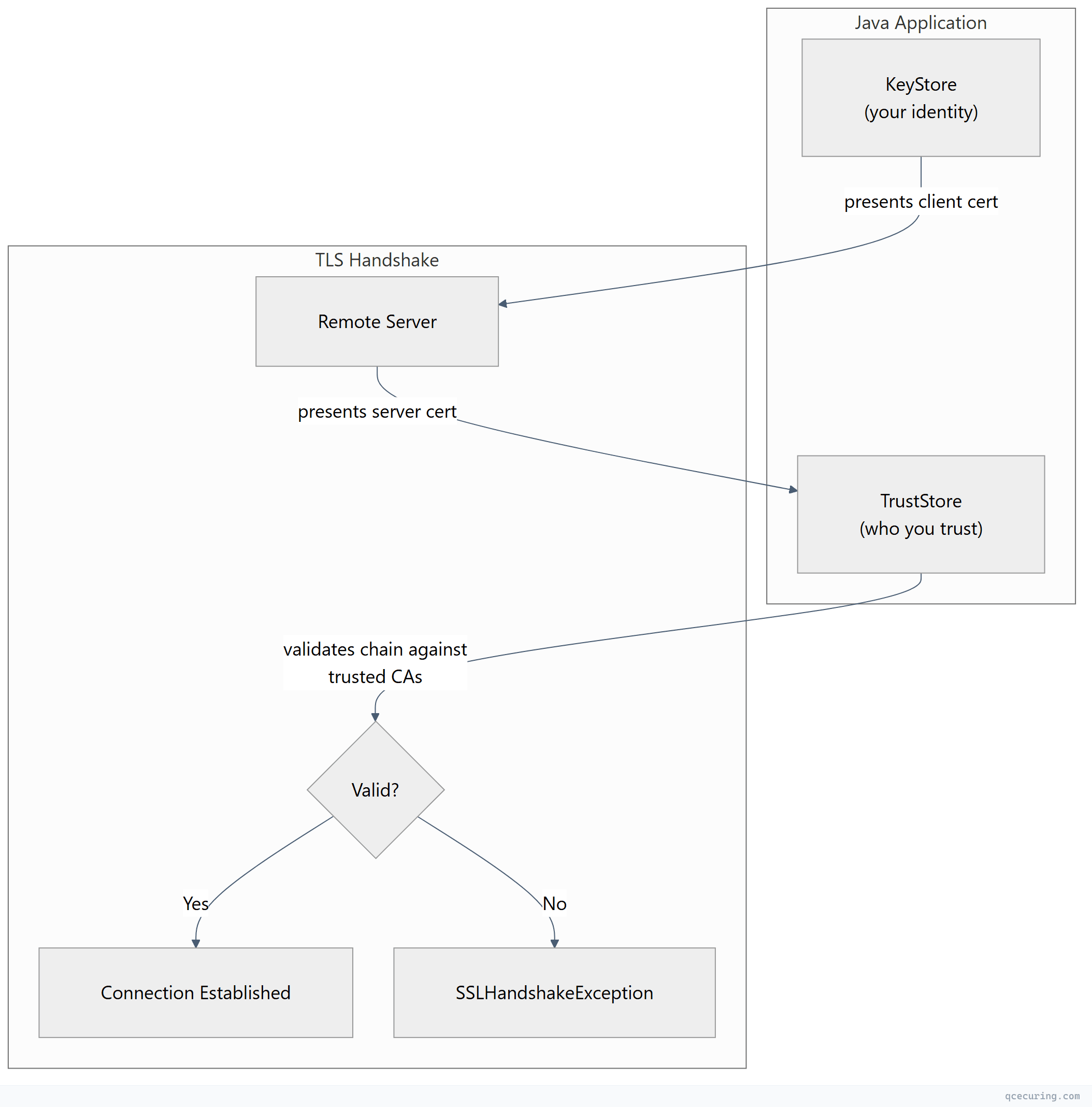
Default trust store password: changeit (yes, really — and most production systems never change it).
Keystore Format Comparison
Java supports multiple keystore formats. Choosing the right one matters:
| Format | Extension | Default Since | Key Protection | Interoperability | Recommendation |
|---|---|---|---|---|---|
| JKS | .jks | JDK 1.2 | Proprietary | Java only | Legacy — migrate away |
| JCEKS | .jceks | JDK 1.4 | Stronger encryption | Java only | Legacy — migrate away |
| PKCS12 | .p12, .pfx | JDK 9 (default) | Standard | Cross-platform | Use this |
| BCFKS | .bcfks | Bouncy Castle | FIPS-compliant | BC-dependent | FIPS environments only |
Since JDK 9, PKCS12 is the default keystore type. If you’re still creating JKS keystores, stop. PKCS12 is an industry standard that works with OpenSSL, Windows, macOS Keychain, and every other TLS toolkit.
Creating Keystores and Key Pairs
Generate a New Key Pair with Self-Signed Certificate
# Generate RSA 4096-bit key pair in PKCS12 keystore
keytool -genkeypair \
  -alias server \
  -keyalg RSA \
  -keysize 4096 \
  -sigalg SHA256withRSA \
  -validity 365 \
  -storetype PKCS12 \
  -keystore server.p12 \
  -storepass changeit \
  -dname "CN=api.example.com, OU=Engineering, O=Acme Corp, L=San Francisco, ST=California, C=US" \
  -ext "SAN=dns:api.example.com,dns:*.api.example.com"
Generate an ECDSA Key Pair
# ECDSA P-256 — faster handshakes, smaller keys
keytool -genkeypair \
  -alias server-ec \
  -keyalg EC \
  -groupname secp256r1 \
  -sigalg SHA256withECDSA \
  -validity 365 \
  -storetype PKCS12 \
  -keystore server-ec.p12 \
  -storepass changeit \
  -dname "CN=api.example.com, O=Acme Corp, C=US" \
  -ext "SAN=dns:api.example.com"
Generate a CSR (Certificate Signing Request)
# Generate CSR from existing key pair
keytool -certreq \
  -alias server \
  -keystore server.p12 \
  -storetype PKCS12 \
  -storepass changeit \
  -file server.csr \
  -ext "SAN=dns:api.example.com,dns:*.api.example.com"

# Verify CSR contents with OpenSSL
openssl req -in server.csr -noout -text
Gotcha: The -ext SAN flag in -certreq only works in JDK 8u112+. Older versions silently ignore it, producing a CSR without SANs. Always verify the CSR output.
Importing Certificates
Import a CA Root Certificate into Trust Store
# Import a root CA into the JVM trust store
keytool -importcert \
  -alias my-root-ca \
  -file root-ca.crt \
  -keystore "$JAVA_HOME/lib/security/cacerts" \
  -storepass changeit \
  -noprompt

# Verify it was added
keytool -list \
  -keystore "$JAVA_HOME/lib/security/cacerts" \
  -storepass changeit \
  -alias my-root-ca
Import a Signed Certificate Chain
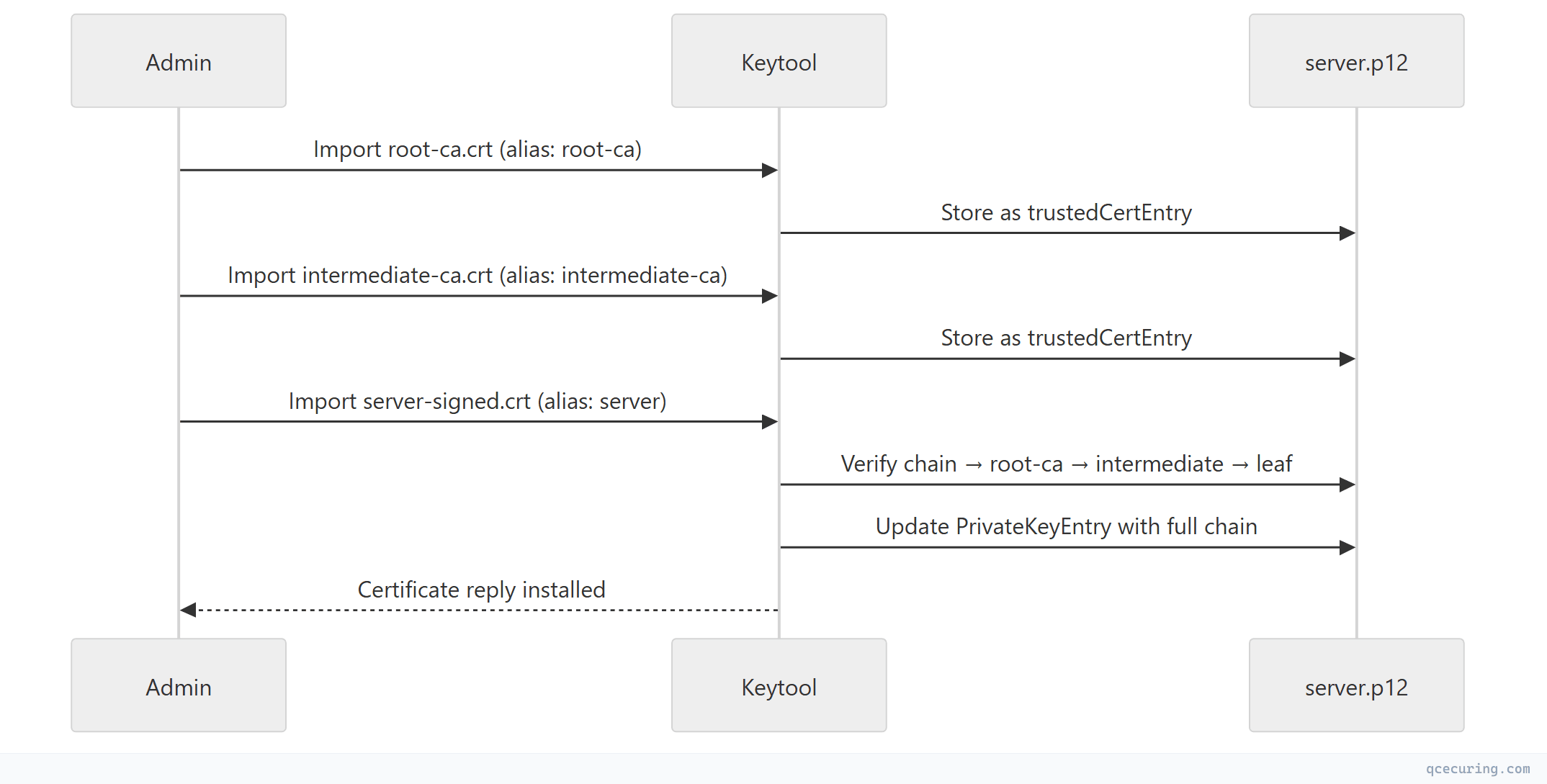
After your CA signs your CSR, import the chain in order:
# Step 1: Import root CA
keytool -importcert \
  -alias root-ca \
  -file root-ca.crt \
  -keystore server.p12 \
  -storetype PKCS12 \
  -storepass changeit \
  -noprompt

# Step 2: Import intermediate CA
keytool -importcert \
  -alias intermediate-ca \
  -file intermediate-ca.crt \
  -keystore server.p12 \
  -storetype PKCS12 \
  -storepass changeit \
  -noprompt

# Step 3: Import your signed server certificate (must match the private key alias)
keytool -importcert \
  -alias server \
  -file server-signed.crt \
  -keystore server.p12 \
  -storetype PKCS12 \
  -storepass changeit
Critical order: Root first, then intermediates, then your leaf certificate. If you import the leaf before its issuer chain, keytool rejects it with “Failed to establish chain from reply.”
Listing and Inspecting Keystore Contents
List All Entries
# Summary view
keytool -list \
  -keystore server.p12 \
  -storetype PKCS12 \
  -storepass changeit

# Verbose view (shows full certificate details)
keytool -list -v \
  -keystore server.p12 \
  -storetype PKCS12 \
  -storepass changeit

# RFC/PEM format output (useful for piping to OpenSSL)
keytool -list -rfc \
  -keystore server.p12 \
  -storetype PKCS12 \
  -storepass changeit
Inspect a Specific Alias
# Show full details for one entry
keytool -list -v \
  -keystore server.p12 \
  -storetype PKCS12 \
  -storepass changeit \
  -alias server
Check Certificate Expiry Dates
# Quick expiry check for all entries
keytool -list -v \
  -keystore server.p12 \
  -storetype PKCS12 \
  -storepass changeit | grep -A2 "Alias name\|Valid from"
Format Conversion
Convert JKS to PKCS12
# Migrate legacy JKS to PKCS12 (recommended)
keytool -importkeystore \
  -srckeystore legacy.jks \
  -srcstoretype JKS \
  -srcstorepass oldpassword \
  -destkeystore modern.p12 \
  -deststoretype PKCS12 \
  -deststorepass newpassword

# Migrate a single alias only
keytool -importkeystore \
  -srckeystore legacy.jks \
  -srcstoretype JKS \
  -srcstorepass oldpassword \
  -srcalias mykey \
  -destkeystore modern.p12 \
  -deststoretype PKCS12 \
  -deststorepass newpassword
Convert PKCS12 to JKS (When Legacy Systems Require It)
keytool -importkeystore \
  -srckeystore modern.p12 \
  -srcstoretype PKCS12 \
  -srcstorepass password \
  -destkeystore legacy.jks \
  -deststoretype JKS \
  -deststorepass password
Import PEM Certificate + Key into PKCS12 (via OpenSSL)
Keytool cannot directly import PEM private keys. Use OpenSSL as an intermediary:
# Step 1: Create PKCS12 from PEM files using OpenSSL
openssl pkcs12 -export \
  -in server.crt \
  -inkey server.key \
  -certfile ca-chain.crt \
  -out server.p12 \
  -name "server" \
  -passout pass:changeit

# Step 2: (Optional) Import into JKS if needed
keytool -importkeystore \
  -srckeystore server.p12 \
  -srcstoretype PKCS12 \
  -srcstorepass changeit \
  -destkeystore server.jks \
  -deststoretype JKS \
  -deststorepass changeit
Export Certificate from Keystore to PEM
# Export certificate in DER format
keytool -exportcert \
  -alias server \
  -keystore server.p12 \
  -storetype PKCS12 \
  -storepass changeit \
  -file server.der

# Convert DER to PEM with OpenSSL
openssl x509 -inform der -in server.der -out server.pem

# Or export directly as PEM (RFC format)
keytool -exportcert \
  -alias server \
  -keystore server.p12 \
  -storetype PKCS12 \
  -storepass changeit \
  -rfc \
  -file server.pem
Managing the JVM Trust Store (cacerts)
Find Your cacerts Location
# Find JAVA_HOME
java -XshowSettings:properties 2>&1 | grep java.home

# cacerts is at: $JAVA_HOME/lib/security/cacerts
# Default password: changeit
List All Trusted CAs
keytool -list \
  -keystore "$JAVA_HOME/lib/security/cacerts" \
  -storepass changeit | grep "trustedCertEntry"
Add a Custom CA to cacerts
# Import your organization's internal CA
keytool -importcert \
  -alias acme-internal-ca \
  -file acme-root-ca.crt \
  -keystore "$JAVA_HOME/lib/security/cacerts" \
  -storepass changeit \
  -noprompt
Remove a CA from cacerts
keytool -delete \
  -alias acme-internal-ca \
  -keystore "$JAVA_HOME/lib/security/cacerts" \
  -storepass changeit
Production warning: Modifying cacerts affects every Java application using that JRE. For application-specific trust, use a custom trust store via JVM flags:
java -Djavax.net.ssl.trustStore=/path/to/custom-truststore.p12 \
     -Djavax.net.ssl.trustStorePassword=password \
     -Djavax.net.ssl.trustStoreType=PKCS12 \
     -jar myapp.jar
Configuring Java Applications
Spring Boot (application.yml)
server:
  ssl:
    enabled: true
    key-store: classpath:keystore.p12
    key-store-password: ${KEYSTORE_PASSWORD}
    key-store-type: PKCS12
    key-alias: server
    # For mTLS — require client certificates
    client-auth: need
    trust-store: classpath:truststore.p12
    trust-store-password: ${TRUSTSTORE_PASSWORD}
    trust-store-type: PKCS12
    protocol: TLS
    enabled-protocols: TLSv1.3,TLSv1.2
    ciphers:
      - TLS_AES_256_GCM_SHA384
      - TLS_AES_128_GCM_SHA256
      - TLS_ECDHE_RSA_WITH_AES_256_GCM_SHA384
Tomcat (server.xml)
<Connector port="8443" protocol="org.apache.coyote.http11.Http11NioProtocol"
           maxThreads="150" SSLEnabled="true">
    <SSLHostConfig protocols="TLSv1.2+TLSv1.3"
                   ciphers="TLS_AES_256_GCM_SHA384,TLS_AES_128_GCM_SHA256,TLS_ECDHE_RSA_WITH_AES_256_GCM_SHA384">
        <Certificate certificateKeystoreFile="/opt/tomcat/conf/server.p12"
                     certificateKeystorePassword="changeit"
                     certificateKeystoreType="PKCS12"
                     certificateKeyAlias="server" />
    </SSLHostConfig>
</Connector>
JVM System Properties (Any Java App)
# KeyStore (your identity)
-Djavax.net.ssl.keyStore=/path/to/keystore.p12
-Djavax.net.ssl.keyStorePassword=password
-Djavax.net.ssl.keyStoreType=PKCS12

# TrustStore (who you trust)
-Djavax.net.ssl.trustStore=/path/to/truststore.p12
-Djavax.net.ssl.trustStorePassword=password
-Djavax.net.ssl.trustStoreType=PKCS12

# Debug TLS (extremely verbose — use for troubleshooting only)
-Djavax.net.debug=ssl:handshake:verbose
Troubleshooting Common Errors
”keytool error: java.io.IOException: Keystore was tampered with, or password was incorrect”
Causes:
- Wrong password (most common)
- Keystore file is corrupted
- Wrong store type specified (JKS vs PKCS12)
Fix:
# Try with explicit store type
keytool -list -keystore store.p12 -storetype PKCS12 -storepass yourpassword

# If you forgot the password, there's no recovery — regenerate the keystore
# For cacerts, the default is always "changeit"
“keytool error: java.lang.Exception: Failed to establish chain from reply”
Cause: You’re importing a signed certificate but the issuer chain isn’t in the keystore yet.
Fix: Import root and intermediate CAs first, then import your signed certificate:
keytool -importcert -alias root -file root.crt -keystore store.p12 -storepass pass -noprompt
keytool -importcert -alias inter -file intermediate.crt -keystore store.p12 -storepass pass -noprompt
keytool -importcert -alias server -file signed.crt -keystore store.p12 -storepass pass
“PKIX path building failed: unable to find valid certification path to requested target”
The most common Java TLS error. The remote server’s CA isn’t in your trust store.
Diagnosis:
# Download the server's certificate chain
openssl s_client -connect remote-server.com:443 -servername remote-server.com -showcerts \
  2>/dev/null | openssl x509 -outform PEM > remote-cert.pem

# Check which CA signed it
openssl x509 -in remote-cert.pem -noout -issuer

# Import the missing CA into your trust store
keytool -importcert \
  -alias remote-ca \
  -file remote-ca.crt \
  -keystore "$JAVA_HOME/lib/security/cacerts" \
  -storepass changeit \
  -noprompt
“java.security.UnrecoverableKeyException: Cannot recover key”
Cause: The key password differs from the store password (common in JKS, not in PKCS12).
Fix:
# In JKS, key password and store password can differ
# Specify key password explicitly:
keytool -list -v -keystore store.jks -storepass storepass -keypass keypass -alias mykey

# Better fix: migrate to PKCS12 where key password = store password
keytool -importkeystore \
  -srckeystore store.jks -srcstoretype JKS -srcstorepass storepass \
  -destkeystore store.p12 -deststoretype PKCS12 -deststorepass newpass \
  -srckeypass keypass
Keytool Quick Reference Table
| Operation | Command |
|---|---|
| Generate key pair | keytool -genkeypair -alias name -keyalg RSA -keysize 4096 -keystore ks.p12 |
| Generate CSR | keytool -certreq -alias name -keystore ks.p12 -file req.csr |
| Import certificate | keytool -importcert -alias name -file cert.crt -keystore ks.p12 |
| Export certificate | keytool -exportcert -alias name -keystore ks.p12 -rfc -file cert.pem |
| List entries | keytool -list -v -keystore ks.p12 |
| Delete entry | keytool -delete -alias name -keystore ks.p12 |
| Change alias | keytool -changealias -alias old -destalias new -keystore ks.p12 |
| Change password | keytool -storepasswd -keystore ks.p12 |
| Convert JKS→P12 | keytool -importkeystore -srckeystore old.jks -destkeystore new.p12 -deststoretype PKCS12 |
| Print cert file | keytool -printcert -file cert.crt |
| Print remote cert | keytool -printcert -sslserver host:443 |
Automation: Scripting Keytool Operations
Batch Import Multiple CAs
#!/bin/bash
# import-cas.sh — Import all CA certificates from a directory into a trust store

TRUSTSTORE="/opt/app/truststore.p12"
STOREPASS="changeit"
CA_DIR="/opt/certs/trusted-cas"

for cert_file in "$CA_DIR"/*.crt; do
  alias=$(basename "$cert_file" .crt | tr '[:upper:]' '[:lower:]' | tr ' ' '-')
  echo "Importing: $alias from $cert_file"
  keytool -importcert \
    -alias "$alias" \
    -file "$cert_file" \
    -keystore "$TRUSTSTORE" \
    -storetype PKCS12 \
    -storepass "$STOREPASS" \
    -noprompt
done

echo "Trust store now contains $(keytool -list -keystore $TRUSTSTORE -storepass $STOREPASS | grep -c 'trustedCertEntry') trusted CAs"
Certificate Expiry Monitor for Java Keystores
#!/bin/bash
# check-keystore-expiry.sh — Alert on certificates expiring within N days

KEYSTORE="/opt/app/server.p12"
STOREPASS="changeit"
THRESHOLD_DAYS=30

# Get all aliases
aliases=$(keytool -list -keystore "$KEYSTORE" -storetype PKCS12 -storepass "$STOREPASS" | \
  grep "Entry," | awk -F, '{print $1}')

for alias in $aliases; do
  expiry=$(keytool -list -v -keystore "$KEYSTORE" -storetype PKCS12 \
    -storepass "$STOREPASS" -alias "$alias" 2>/dev/null | \
    grep "Valid from" | sed 's/.*until: //')

  if [ -n "$expiry" ]; then
    expiry_epoch=$(date -d "$expiry" +%s 2>/dev/null)
    now_epoch=$(date +%s)
    days_left=$(( (expiry_epoch - now_epoch) / 86400 ))

    if [ "$days_left" -lt "$THRESHOLD_DAYS" ]; then
      echo "WARNING: '$alias' expires in $days_left days ($expiry)"
    fi
  fi
done
Production Best Practices
- Always use PKCS12 — JKS is proprietary and deprecated since JDK 9
- Never use
changeitin production — rotate keystore passwords and store them in a secrets manager (Vault, AWS Secrets Manager) - Separate keystores from trust stores — don’t mix your private keys with trusted CAs in the same file
- Use application-specific trust stores — don’t modify the global
cacertsunless every app on that JVM needs the CA - Automate certificate renewal — keytool commands in cron jobs break; use a CLM platform for Java environments at scale
- Enable TLS debugging selectively —
-Djavax.net.debug=ssl:handshakeis invaluable for troubleshooting but generates massive logs in production - Pin your JDK version — cacerts contents change between JDK updates; a JDK upgrade can break trust if a CA was removed
FAQ
Q: What’s the difference between a keystore and a trust store in Java?
A keystore holds your private keys and certificates (your identity). A trust store holds CA certificates you trust (other identities). Technically they’re the same file format — the difference is how the JVM uses them. The keystore is referenced by javax.net.ssl.keyStore and the trust store by javax.net.ssl.trustStore.
Q: How do I check if a private key matches a certificate in a keystore?
# Export the certificate and check its public key fingerprint
keytool -exportcert -alias server -keystore store.p12 -storepass pass -rfc | \
  openssl x509 -noout -modulus | openssl md5

# Compare with the key's modulus (requires extracting via PKCS12→OpenSSL)
openssl pkcs12 -in store.p12 -nocerts -nodes -passin pass:pass | \
  openssl rsa -noout -modulus | openssl md5
If both MD5 hashes match, the key and certificate correspond.
Q: Can I use keytool without a password prompt?
Yes, pass -storepass and -noprompt flags. For scripting, also use -keypass if the key password differs from the store password (JKS only — PKCS12 uses a single password).
Q: How do I migrate from JKS to PKCS12 without downtime?
- Convert:
keytool -importkeystore -srckeystore app.jks -destkeystore app.p12 -deststoretype PKCS12 - Update your application config to point to the new
.p12file with-storetype PKCS12 - Test in staging
- Deploy — the switch is a config change, not a certificate change
Q: Why does keytool say “Warning: The JKS keystore uses a proprietary format”?
This is JDK 9+ telling you to migrate to PKCS12. It’s not an error — your keystore still works. But you should migrate: keytool -importkeystore -srckeystore old.jks -destkeystore new.p12 -deststoretype PKCS12
Q: How do I view a remote server’s certificate with keytool?
keytool -printcert -sslserver api.example.com:443This shows the full certificate details including SANs, issuer, validity dates, and signature algorithm — without needing OpenSSL.
Related Reading: