
The TLS handshake is the negotiation that happens before any encrypted data flows. When it fails, the connection dies immediately — no partial success, no fallback, just a cryptic error message and a broken service. “SSL handshake failed” is the single most common TLS error, and it has at least a dozen distinct causes that all produce similar-looking symptoms.
This guide covers every cause systematically, with the exact OpenSSL commands to diagnose each one and the specific fix for each scenario.
The TLS Handshake in 30 Seconds
Before diagnosing failures, understand what’s supposed to happen:
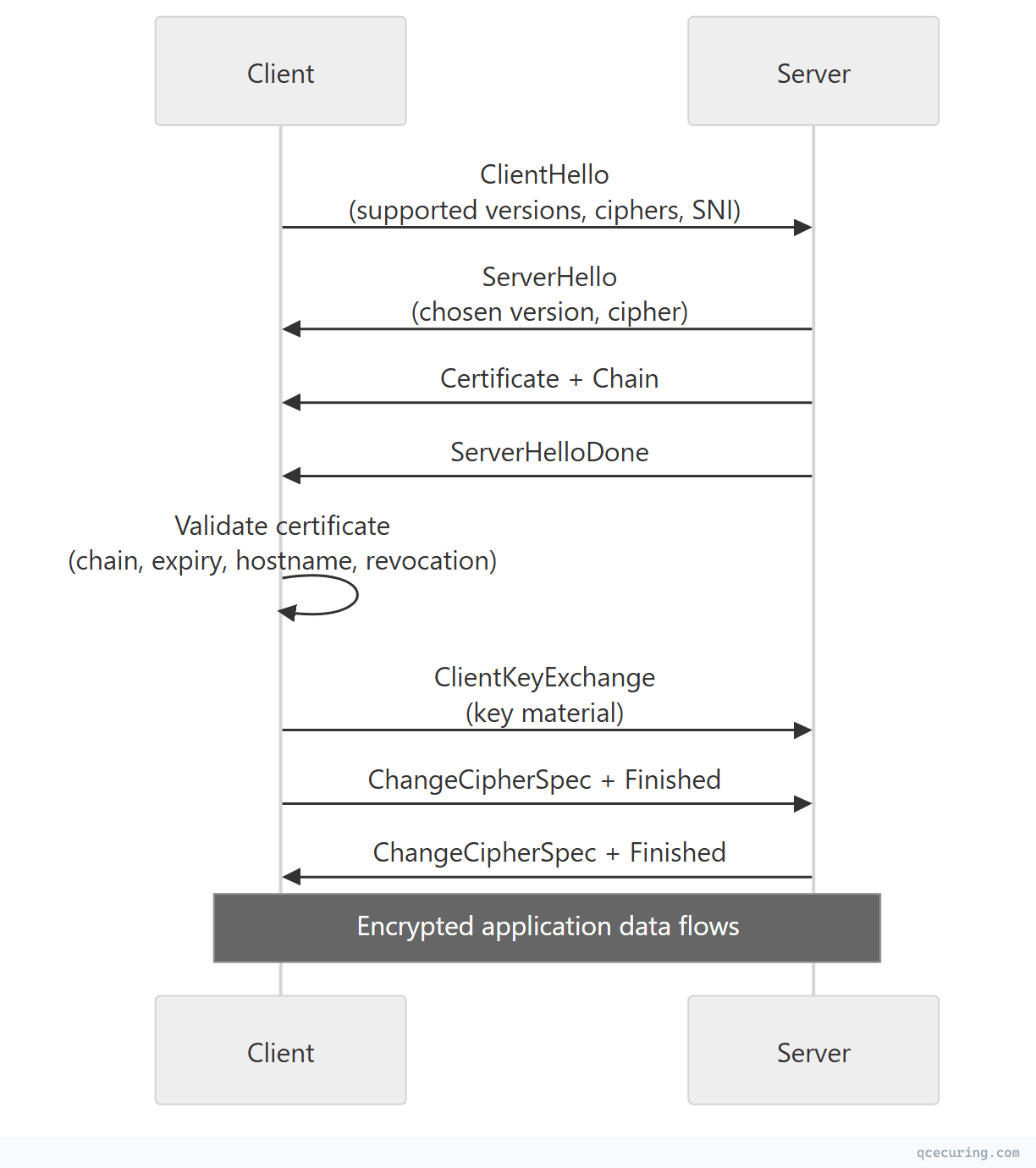
A handshake failure means one of these steps broke. The error message tells you which step, if you know how to read it.
Quick Diagnosis Command
Before diving into specific errors, run this single command to get a complete picture:
openssl s_client -connect server.example.com:443 \
  -servername server.example.com \
  -showcerts \
  -tlsextdebug \
  -state 2>&1 | head -80
This shows:
- Protocol version negotiated (or failure)
- Certificate chain presented
- Cipher suite selected
- Any error at each handshake state
- TLS extensions exchanged
Cause 1: Certificate Has Expired
Error messages:
SSL_ERROR_EXPIRED_CERT_KEY_USAGE(Firefox)NET::ERR_CERT_DATE_INVALID(Chrome)certificate has expired(OpenSSL)CERTIFICATE_EXPIRED(curl)
Diagnosis:
# Check certificate expiry
openssl s_client -connect server.example.com:443 -servername server.example.com 2>/dev/null | \
  openssl x509 -noout -dates

# Output:
# notBefore=Jan 15 00:00:00 2026 GMT
# notAfter=Apr 15 23:59:59 2026 GMT  ← EXPIRED if today is after this

# Check if it expires within N days (exit code 1 = expires soon)
openssl s_client -connect server.example.com:443 -servername server.example.com 2>/dev/null | \
  openssl x509 -noout -checkend 0
Fix:
- Renew the certificate from your CA
- Deploy the new certificate to the server
- Reload the web server (
nginx -s reload/systemctl reload apache2) - Verify:
openssl s_client -connect server.example.com:443 2>/dev/null | openssl x509 -noout -dates
Prevention: Automate certificate renewal with ACME/Certbot or a CLM platform. Set monitoring alerts at 30, 14, and 7 days before expiry.
Cause 2: Incomplete Certificate Chain
Error messages:
unable to get local issuer certificate(OpenSSL)SSL_ERROR_UNKNOWN_CA_CERT(Firefox)NET::ERR_CERT_AUTHORITY_INVALID(Chrome)PKIX path building failed(Java)
The server presents its leaf certificate but not the intermediate CA certificate(s). The client can’t build a chain to a trusted root.
Diagnosis:
# Show the full chain the server presents
openssl s_client -connect server.example.com:443 -servername server.example.com -showcerts 2>/dev/null

# Count certificates in the chain (should be 2-3, not 1)
openssl s_client -connect server.example.com:443 -servername server.example.com 2>/dev/null | \
  grep -c "BEGIN CERTIFICATE"

# Verify the chain explicitly
openssl s_client -connect server.example.com:443 -servername server.example.com 2>/dev/null | \
  grep "Verify return code"
# "Verify return code: 21 (unable to verify the first certificate)" = missing intermediate
Fix:
# Concatenate your cert + intermediate(s) in order: leaf first, then intermediate(s)
cat server.crt intermediate.crt > fullchain.crt

# For Nginx:
# ssl_certificate /etc/nginx/certs/fullchain.crt;

# For Apache:
# SSLCertificateFile /etc/httpd/certs/server.crt
# SSLCertificateChainFile /etc/httpd/certs/intermediate.crt

# Verify the chain is correct
openssl verify -CAfile /etc/ssl/certs/ca-certificates.crt fullchain.crt
Cause 3: Protocol Version Mismatch
Error messages:
no protocols available(OpenSSL)SSL_ERROR_PROTOCOL_VERSION_ALERT(Firefox)ERR_SSL_VERSION_OR_CIPHER_MISMATCH(Chrome)tlsv1 alert protocol version(OpenSSL)
The client and server don’t share a common TLS version. Most commonly: server only supports TLS 1.2+ but client is trying TLS 1.0/1.1, or vice versa.
Diagnosis:
# Test each protocol version
openssl s_client -connect server.example.com:443 -tls1_3 2>&1 | grep "Protocol"
openssl s_client -connect server.example.com:443 -tls1_2 2>&1 | grep "Protocol"
openssl s_client -connect server.example.com:443 -tls1_1 2>&1 | grep "Protocol"
openssl s_client -connect server.example.com:443 -tls1 2>&1 | grep "Protocol"

# If all fail, the server might not be listening on 443 or TLS isn't configured
Fix (server-side):
# Nginx — enable TLS 1.2 and 1.3
ssl_protocols TLSv1.2 TLSv1.3;
# Apache — enable TLS 1.2 and 1.3
SSLProtocol -all +TLSv1.2 +TLSv1.3Fix (client-side): Update the client. If it only supports TLS 1.0/1.1, it’s dangerously outdated. For legacy systems that can’t be updated, consider a TLS-terminating reverse proxy.
Cause 4: Cipher Suite Mismatch
Error messages:
no shared cipher(OpenSSL server-side)handshake failure(OpenSSL client-side)ERR_SSL_VERSION_OR_CIPHER_MISMATCH(Chrome)SSL_ERROR_NO_CYPHER_OVERLAP(Firefox)
The client and server don’t share any cipher suites. Common when a server is hardened to only accept modern ciphers but the client is old.
Diagnosis:
# See what cipher the server selected (or if it failed)
openssl s_client -connect server.example.com:443 -servername server.example.com 2>/dev/null | \
  grep "Cipher is"

# Test a specific cipher
openssl s_client -connect server.example.com:443 \
  -cipher 'ECDHE-RSA-AES256-GCM-SHA384' 2>&1 | grep "Cipher is"

# List all ciphers the server accepts
nmap --script ssl-enum-ciphers -p 443 server.example.com
Fix:
# Nginx — balanced cipher list (modern + reasonable compatibility)
ssl_ciphers 'ECDHE-ECDSA-AES128-GCM-SHA256:ECDHE-RSA-AES128-GCM-SHA256:ECDHE-ECDSA-AES256-GCM-SHA384:ECDHE-RSA-AES256-GCM-SHA384:DHE-RSA-AES128-GCM-SHA256:DHE-RSA-AES256-GCM-SHA384';
ssl_prefer_server_ciphers on;
Cause 5: Hostname Mismatch (SNI)
Error messages:
SSL_ERROR_BAD_CERT_DOMAIN(Firefox)NET::ERR_CERT_COMMON_NAME_INVALID(Chrome)hostname mismatch(curl)
The certificate’s SAN (Subject Alternative Name) doesn’t include the domain the client is connecting to.
Diagnosis:
# Check what SANs the certificate has
openssl s_client -connect server.example.com:443 -servername server.example.com 2>/dev/null | \
  openssl x509 -noout -ext subjectAltName

# Output: DNS:www.example.com, DNS:example.com
# If "server.example.com" isn't listed, that's the problem

# Also check: is SNI being sent? (critical for shared hosting)
openssl s_client -connect server.example.com:443 -servername server.example.com 2>/dev/null | \
  grep "Server certificate"
# vs without SNI:
openssl s_client -connect server.example.com:443 2>/dev/null | \
  grep "Server certificate"
# If different certs are returned, SNI configuration is the issue
Fix:
- Reissue the certificate with the correct domain(s) in the SAN
- Or add a wildcard SAN (
*.example.com) if appropriate - Ensure the server’s SNI configuration maps the hostname to the correct certificate
Cause 6: Self-Signed or Untrusted CA
Error messages:
self signed certificate(OpenSSL)self signed certificate in certificate chain(OpenSSL)NET::ERR_CERT_AUTHORITY_INVALID(Chrome)DEPTH_ZERO_SELF_SIGNED_CERT(Node.js)
Diagnosis:
# Check if the certificate is self-signed
openssl s_client -connect server.example.com:443 -servername server.example.com 2>/dev/null | \
  openssl x509 -noout -issuer -subject
# If Issuer == Subject, it's self-signed

# Check the verify error
openssl s_client -connect server.example.com:443 -servername server.example.com 2>&1 | \
  grep "verify error"
# "verify error:num=18:self signed certificate"
# "verify error:num=19:self signed certificate in certificate chain"
Fix:
- For production: Replace with a certificate from a trusted CA (Let’s Encrypt, DigiCert, etc.)
- For internal services: Add your internal CA’s root certificate to the client’s trust store
- For development: Use
mkcertfor locally-trusted development certificates
# Add internal CA to system trust store (Ubuntu/Debian)
sudo cp internal-ca.crt /usr/local/share/ca-certificates/
sudo update-ca-certificates

# Add to Java trust store
keytool -importcert -alias internal-ca -file internal-ca.crt \
  -keystore $JAVA_HOME/lib/security/cacerts -storepass changeit -noprompt
Cause 7: Client Certificate Required (mTLS)
Error messages:
SSL_ERROR_HANDSHAKE_FAILURE_ALERT(Firefox)sslv3 alert handshake failure(OpenSSL)SSL routines:ssl3_read_bytes:tlsv1 alert unknown ca(OpenSSL)
The server requires a client certificate (mutual TLS) but the client didn’t present one, or presented one signed by an untrusted CA.
Diagnosis:
# Check if server requests client cert
openssl s_client -connect server.example.com:443 -servername server.example.com 2>&1 | \
  grep "Acceptable client certificate CA names"
# If this section appears, the server wants mTLS

# Connect with a client certificate
openssl s_client -connect server.example.com:443 \
  -servername server.example.com \
  -cert client.crt \
  -key client.key \
  -CAfile ca-chain.crt
Fix:
- Provide the correct client certificate and key
- Ensure the client cert is signed by a CA the server trusts
- Check the server’s
ssl_client_certificate(Nginx) orSSLCACertificateFile(Apache) includes the client’s CA
Cause 8: Key Mismatch (Certificate vs Private Key)
Error messages:
SSL_CTX_use_PrivateKey_file ... key values mismatch(Nginx error log)AH02565: Certificate and private key ... do not match(Apache error log)- Server refuses to start or drops connections immediately
Diagnosis:
# Compare certificate and key modulus (must match)
openssl x509 -noout -modulus -in server.crt | openssl md5
openssl rsa -noout -modulus -in server.key | openssl md5

# If the MD5 hashes differ, the key doesn't match the certificate
Fix:
- Find the correct private key that matches the certificate
- Or regenerate a new CSR with the existing key and get a new certificate
- Or generate a new key pair and request a new certificate
Cause 9: OCSP Stapling Failure
Error messages:
OCSP response: no response sent(OpenSSL)- Intermittent handshake failures (OCSP responder timeout)
Some clients (especially in strict mode) reject certificates when OCSP stapling is configured but the server can’t reach the OCSP responder.
Diagnosis:
# Check if OCSP stapling is working
openssl s_client -connect server.example.com:443 -servername server.example.com -status 2>/dev/null | \
  grep "OCSP Response Status"
# "OCSP Response Status: successful" = working
# "OCSP response: no response sent" = broken stapling
Fix:
# Nginx — ensure resolver is configured for OCSP
ssl_stapling on;
ssl_stapling_verify on;
resolver 8.8.8.8 8.8.4.4 valid=300s;
resolver_timeout 5s;
ssl_trusted_certificate /etc/nginx/certs/ca-chain.pem;
Cause 10: Firewall or Proxy Interference
Error messages:
Connection reset by peerduring handshakeSSL_ERROR_SYSCALL(OpenSSL)- Handshake works from one network but not another
Diagnosis:
# Test from different networks
# Check if a proxy is intercepting TLS
openssl s_client -connect server.example.com:443 -servername server.example.com 2>/dev/null | \
  openssl x509 -noout -issuer
# If the issuer is your corporate proxy (e.g., "Zscaler", "Palo Alto"), TLS inspection is active

# Check for TCP-level issues
curl -v --connect-timeout 5 https://server.example.com 2>&1 | grep -i "ssl\|tls\|handshake"
Fix:
- Add the proxy’s CA certificate to the client’s trust store
- Whitelist the destination in the TLS inspection policy
- Check firewall rules allow port 443 traffic to complete (some firewalls drop large ClientHello messages)
Cause 11: DH Parameter Too Small
Error messages:
dh key too small(OpenSSL)SSL_ERROR_WEAK_SERVER_EPHEMERAL_DH_KEY(Firefox)ERR_SSL_WEAK_SERVER_EPHEMERAL_DH_KEY(Chrome)
The server’s Diffie-Hellman parameters are less than 2048 bits.
Diagnosis:
# Check DH parameter size
openssl s_client -connect server.example.com:443 -servername server.example.com 2>/dev/null | \
  grep "Server Temp Key"
# "Server Temp Key: DH, 1024 bits" = too small
# "Server Temp Key: ECDH, P-256, 256 bits" = fine (ECDHE)
Fix:
# Generate strong DH parameters
openssl dhparam -out /etc/nginx/dhparam.pem 4096

# Nginx config
ssl_dhparam /etc/nginx/dhparam.pem;

# Better: prefer ECDHE ciphers (no DH params needed)
ssl_ciphers 'ECDHE-ECDSA-AES128-GCM-SHA256:ECDHE-RSA-AES128-GCM-SHA256:ECDHE-ECDSA-AES256-GCM-SHA384:ECDHE-RSA-AES256-GCM-SHA384';
Cause 12: TLS Extension Issues
Large ClientHello (TLS 1.3 + Many Extensions)
Some middleboxes (firewalls, load balancers) drop ClientHello messages larger than a certain size, especially with TLS 1.3’s larger key_share extension.
# Test with minimal extensions
openssl s_client -connect server.example.com:443 \
  -servername server.example.com \
  -no_tls1_3 2>&1 | grep "Protocol"
# If TLS 1.2 works but 1.3 doesn't, a middlebox is likely truncating the ClientHello
Missing SNI Extension
Old clients or misconfigured tools that don’t send SNI get the server’s default certificate (which may not match the requested hostname).
# Without SNI (gets default cert)
openssl s_client -connect server.example.com:443 2>/dev/null | openssl x509 -noout -subject

# With SNI (gets correct cert)
openssl s_client -connect server.example.com:443 -servername server.example.com 2>/dev/null | openssl x509 -noout -subject
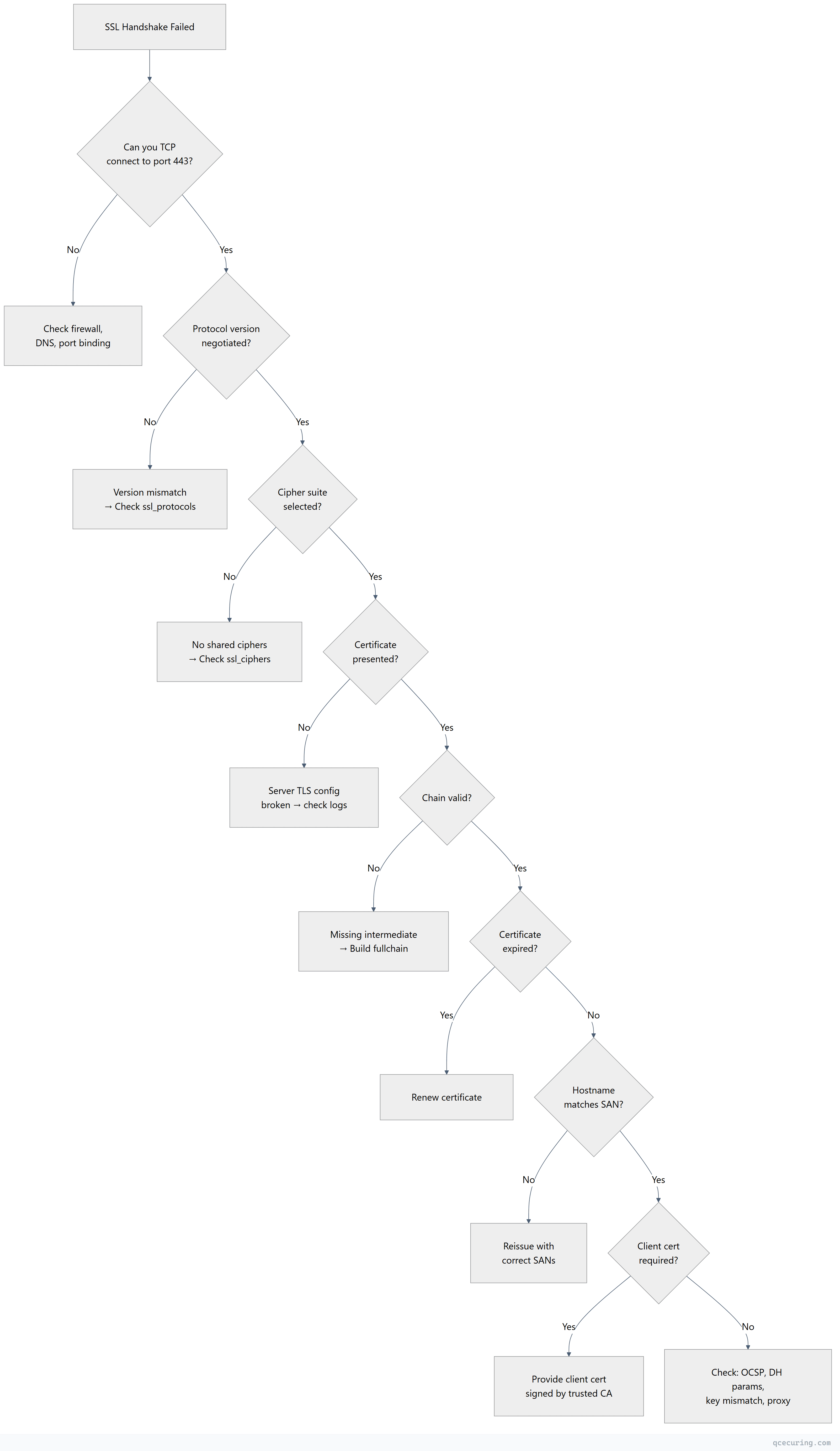
Systematic Debugging Flowchart
Platform-Specific Error Messages
| Platform | Error | Most Likely Cause |
|---|---|---|
| Chrome | NET::ERR_CERT_DATE_INVALID | Expired certificate |
| Chrome | ERR_SSL_VERSION_OR_CIPHER_MISMATCH | Protocol or cipher incompatibility |
| Chrome | NET::ERR_CERT_AUTHORITY_INVALID | Untrusted CA or missing intermediate |
| Firefox | SSL_ERROR_NO_CYPHER_OVERLAP | No shared cipher suites |
| Firefox | SEC_ERROR_EXPIRED_CERTIFICATE | Expired certificate |
| curl | SSL certificate problem: unable to get local issuer certificate | Missing intermediate or CA not in trust store |
| curl | SSL_ERROR_SYSCALL | Connection reset (firewall, proxy) |
| Java | PKIX path building failed | CA not in Java cacerts trust store |
| Java | SSLHandshakeException: Received fatal alert: handshake_failure | Cipher/protocol mismatch or mTLS required |
| Node.js | UNABLE_TO_VERIFY_LEAF_SIGNATURE | Missing intermediate certificate |
| Python | SSL: CERTIFICATE_VERIFY_FAILED | CA not in system trust store |
| Go | x509: certificate signed by unknown authority | CA not trusted |
| .NET | AuthenticationException: The remote certificate is invalid | Any chain/expiry/hostname issue |
FAQ
Q: The handshake works from my machine but fails from the server. Why?
Different trust stores. Your machine has the CA in its trust store; the server doesn’t. For server-to-server connections, ensure the calling server’s trust store includes the remote server’s CA. On Linux, check /etc/ssl/certs/ or the application-specific trust store (Java cacerts, Node.js NODE_EXTRA_CA_CERTS).
Q: How do I fix “SSL handshake failed” in Nginx error logs?
Check the Nginx error log (/var/log/nginx/error.log) for the specific SSL error. Common ones: “no shared cipher” (cipher mismatch), “certificate verify failed” (mTLS CA issue), “PEM_read_bio” (corrupted cert/key file). The error log gives you the exact cause that the client-side error message obscures.
Q: Can a clock skew cause handshake failures?
Yes. If the client’s clock is significantly wrong, it may reject a valid certificate as “not yet valid” or “expired.” NTP synchronization issues are a surprisingly common cause of intermittent TLS failures, especially on VMs and containers.
Q: Why does the handshake fail only for some clients?
Different clients support different protocol versions and cipher suites. An old Android device might only support TLS 1.0 with RC4 — if your server requires TLS 1.2+ with AEAD ciphers, that client can’t connect. Use SSL Labs to see your server’s compatibility matrix.
Q: How do I debug TLS handshake failures in Java applications?
Enable TLS debugging with the JVM flag:
-Djavax.net.debug=ssl:handshake:verboseThis prints every handshake message to stderr, showing exactly where the failure occurs (ClientHello, ServerHello, certificate validation, etc.).
Q: The certificate is valid but Chrome still shows an error. What else could it be?
Check for: (1) HSTS preload with an expired cert cached, (2) Certificate Transparency requirement not met (missing SCT), (3) a browser extension intercepting TLS, (4) corporate proxy injecting its own certificate. Try incognito mode to rule out extensions and cached state.
Related Reading: