

You’re seeing this in your browser, monitoring, or logs:
NET::ERR_CERT_DATE_INVALIDSSL_ERROR_EXPIRED_CERT_ALERTcertificate has expiredx509: certificate has expired or is not yet validYour site is down. Users are getting security warnings. Revenue is bleeding. Here’s how to fix it right now.
Fastest Fix: 60-Second Diagnosis
Run this from any machine that can reach your server:
echo | openssl s_client -connect yourdomain.com:443 -servername yourdomain.com 2>/dev/null | openssl x509 -noout -datesOutput:
notBefore=Jan 15 00:00:00 2025 GMT
notAfter=Jan 14 23:59:59 2026 GMT    ← This date has passed
If notAfter is in the past, your certificate is expired. Continue below.
Check how long it’s been expired:
echo | openssl s_client -connect yourdomain.com:443 -servername yourdomain.com 2>/dev/null | openssl x509 -noout -enddate -checkend 0If it says Certificate will expire — it’s already expired.
Emergency Renewal: Let’s Encrypt (Certbot)
If you’re using Let’s Encrypt, this is the fastest path back online:
# Attempt automatic renewal
sudo certbot renew --force-renewal

# If that fails, renew a specific certificate
sudo certbot certonly --nginx -d yourdomain.com -d www.yourdomain.com

# Or for Apache
sudo certbot certonly --apache -d yourdomain.com -d www.yourdomain.com

# Or standalone (stops web server temporarily)
sudo systemctl stop nginx
sudo certbot certonly --standalone -d yourdomain.com -d www.yourdomain.com
sudo systemctl start nginx
If Certbot fails with authorization errors:
# Check DNS is pointing to this server
dig +short yourdomain.com

# Use DNS challenge if HTTP validation fails
sudo certbot certonly --manual --preferred-challenges dns -d yourdomain.com
After renewal, verify the new certificate:
sudo certbot certificatesEmergency Renewal: Commercial CA (DigiCert, Sectigo, GlobalSign)
For commercial certificates:
- Log into your CA’s portal (DigiCert CertCentral, Sectigo, etc.)
- Find the expired certificate and click Reissue/Renew
- Generate a new CSR if required:
openssl req -new -newkey rsa:2048 -nodes \
  -keyout yourdomain.key \
  -out yourdomain.csr \
-subj "/CN=yourdomain.com/O=Your Company/L=City/ST=State/C=US"- Submit the CSR to your CA portal
- Complete domain validation (email, DNS CNAME, or HTTP file)
- Download the new certificate once issued
Most commercial CAs can reissue within minutes if domain validation is already cached.
Emergency Response Flow
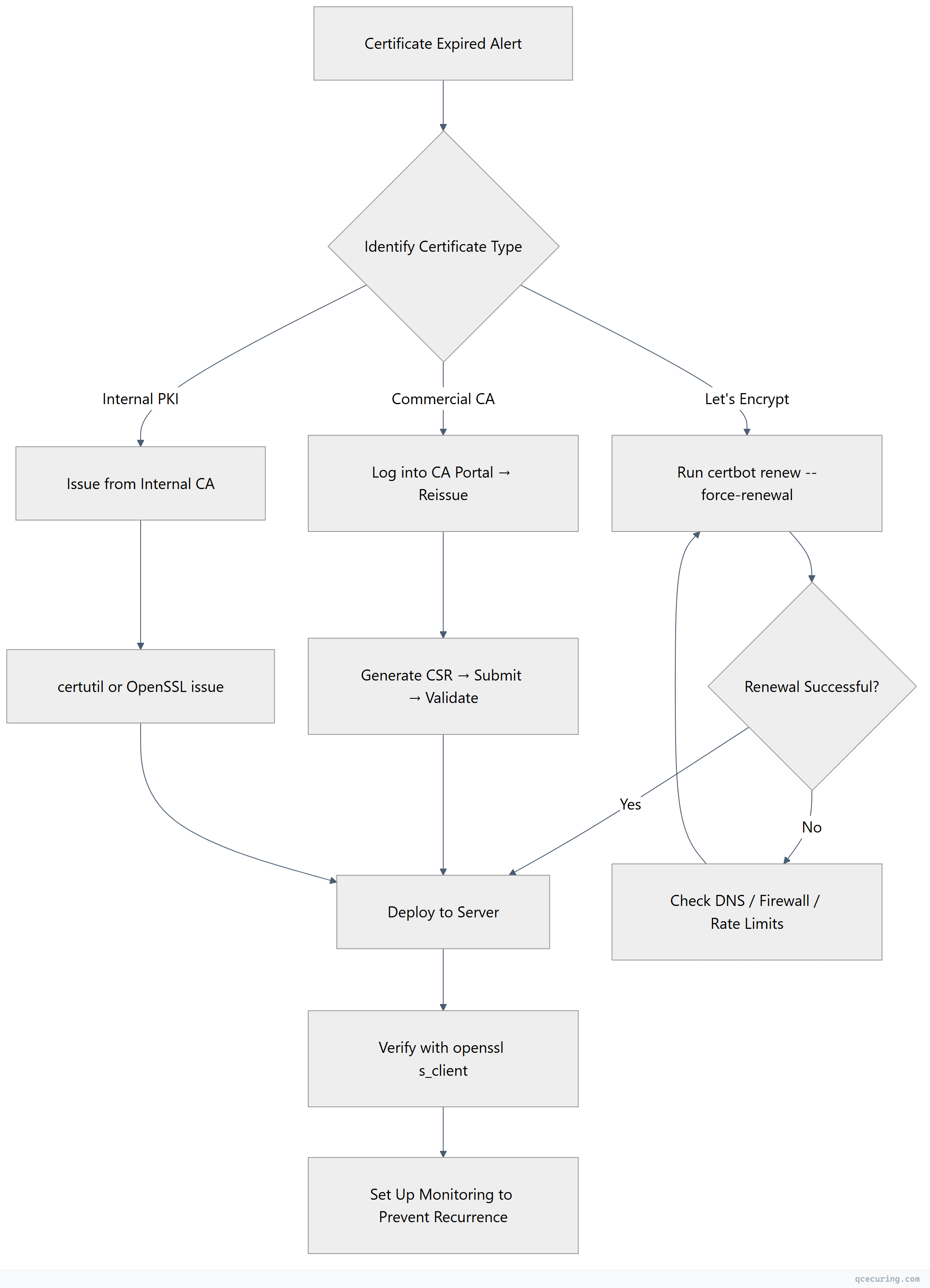
Deploy the New Certificate
Nginx
# Copy new cert files
sudo cp fullchain.pem /etc/nginx/ssl/yourdomain.com/fullchain.pem
sudo cp privkey.pem /etc/nginx/ssl/yourdomain.com/privkey.pem

# Test config before reload
sudo nginx -t

# Reload without downtime
sudo systemctl reload nginx
Verify your Nginx SSL config points to the right files:
server {
    listen 443 ssl;
    server_name yourdomain.com;
    ssl_certificate /etc/nginx/ssl/yourdomain.com/fullchain.pem;
    ssl_certificate_key /etc/nginx/ssl/yourdomain.com/privkey.pem;
}
Apache
# Copy new cert files
sudo cp yourdomain.crt /etc/apache2/ssl/yourdomain.crt
sudo cp yourdomain.key /etc/apache2/ssl/yourdomain.key
sudo cp chain.crt /etc/apache2/ssl/chain.crt

# Test config
sudo apachectl configtest

# Reload
sudo systemctl reload apache2
Apache SSL config:
<VirtualHost *:443>
    ServerName yourdomain.com
    SSLEngine on
    SSLCertificateFile /etc/apache2/ssl/yourdomain.crt
    SSLCertificateKeyFile /etc/apache2/ssl/yourdomain.key
    SSLCertificateChainFile /etc/apache2/ssl/chain.crt
</VirtualHost>
IIS (Windows Server)
# Import the new certificate (PFX format)
$password = ConvertTo-SecureString -String "YourPfxPassword" -Force -AsPlainText
Import-PfxCertificate -FilePath "C:\certs\yourdomain.pfx" -CertStoreLocation Cert:\LocalMachine\My -Password $password

# Get the new certificate thumbprint
$cert = Get-ChildItem Cert:\LocalMachine\My | Where-Object { $_.Subject -like "*yourdomain.com*" } | Sort-Object NotAfter -Descending | Select-Object -First 1

# Bind to IIS site
$binding = Get-WebBinding -Name "YourSiteName" -Protocol https
$binding.AddSslCertificate($cert.Thumbprint, "My")

# Or via netsh for non-IIS HTTPS services
netsh http update sslcert ipport=0.0.0.0:443 certhash=$($cert.Thumbprint) appid='{your-app-guid}'
AWS ALB / CloudFront
# Upload new certificate to ACM
aws acm import-certificate \
  --certificate fileb://yourdomain.crt \
  --private-key fileb://yourdomain.key \
  --certificate-chain fileb://chain.crt \
  --region us-east-1

# Or request a new ACM certificate (auto-renews)
aws acm request-certificate \
  --domain-name yourdomain.com \
  --subject-alternative-names www.yourdomain.com \
  --validation-method DNS

# Update ALB listener to use new cert ARN
aws elbv2 modify-listener \
  --listener-arn arn:aws:elasticloadbalancing:... \
  --certificates CertificateArn=arn:aws:acm:...
HAProxy
# Combine cert + key into single PEM
cat yourdomain.crt chain.crt yourdomain.key > /etc/haproxy/certs/yourdomain.pem

# Test config
haproxy -c -f /etc/haproxy/haproxy.cfg

# Reload
sudo systemctl reload haproxy
Verify the Fix
After deploying, confirm the new certificate is live:
# Check expiry date
echo | openssl s_client -connect yourdomain.com:443 -servername yourdomain.com 2>/dev/null | openssl x509 -noout -dates

# Check full chain
echo | openssl s_client -connect yourdomain.com:443 -servername yourdomain.com 2>/dev/null | openssl x509 -noout -subject -issuer -dates

# Verify chain is complete (no missing intermediates)
echo | openssl s_client -connect yourdomain.com:443 -servername yourdomain.com 2>/dev/null -showcerts
Check from multiple locations (CDN caching can serve old certs):
# Force bypass CDN cache
curl -vI --resolve yourdomain.com:443:ORIGIN_IP https://yourdomain.com 2>&1 | grep -E "expire|subject|issuer"
Prevent This From Happening Again
Set up automated renewal (Let’s Encrypt)
# Verify the timer is active
sudo systemctl status certbot.timer

# If not active, enable it
sudo systemctl enable --now certbot.timer

# Test renewal works
sudo certbot renew --dry-run
Set up expiry monitoring
# Simple cron-based check (runs daily at 9 AM)
# Add to /etc/cron.d/cert-check:
0 9 * * * root echo | openssl s_client -connect yourdomain.com:443 -servername yourdomain.com 2>/dev/null | openssl x509 -noout -checkend 2592000 || echo "CERT EXPIRING WITHIN 30 DAYS" | mail -s "Certificate Alert" ops@company.com
Multi-domain monitoring script
#!/bin/bash
DOMAINS="yourdomain.com api.yourdomain.com app.yourdomain.com"
WARN_DAYS=30

for domain in $DOMAINS; do
  expiry=$(echo | openssl s_client -connect "$domain:443" -servername "$domain" 2>/dev/null | openssl x509 -noout -enddate | cut -d= -f2)
  expiry_epoch=$(date -d "$expiry" +%s)
  now_epoch=$(date +%s)
  days_left=$(( (expiry_epoch - now_epoch) / 86400 ))

  if [ "$days_left" -lt "$WARN_DAYS" ]; then
    echo "WARNING: $domain expires in $days_left days ($expiry)"
  fi
done
Use ACME automation for commercial certs
Many commercial CAs now support ACME protocol. Configure your automation tool to handle renewal automatically:
# Example: Certbot with a commercial CA's ACME endpoint
certbot certonly --server https://acme.ca-provider.com/v2/directory \
  --eab-kid YOUR_KID --eab-hmac-key YOUR_HMAC \
  -d yourdomain.com
Common Pitfalls During Emergency Renewal
Intermediate certificate missing: Your server cert is valid but the chain is incomplete. Browsers show expired/untrusted errors.
# Download the intermediate from your CA and concatenate
cat yourdomain.crt intermediate.crt > fullchain.crt
Old certificate cached in CDN: Purge the CDN cache or wait for TTL.
# CloudFlare
curl -X POST "https://api.cloudflare.com/client/v4/zones/ZONE_ID/purge_cache" \
  -H "Authorization: Bearer TOKEN" \
  -H "Content-Type: application/json" \
  --data '{"purge_everything":true}'
Certificate and key mismatch: If you generated a new key during CSR creation, make sure you’re using the matching key.
# Compare modulus of cert and key (must match)
openssl x509 -noout -modulus -in yourdomain.crt | md5sum
openssl rsa -noout -modulus -in yourdomain.key | md5sum
Let’s Encrypt rate limits: If you’ve hit the 5 duplicates/week limit, use the staging server to test, then wait or use a different domain.
FAQ
How long does it take for browsers to see the new certificate after deployment?
Immediately for direct connections. If you’re behind a CDN (CloudFlare, CloudFront, Akamai), you may need to purge the edge cache or wait for the TTL to expire (typically 5-15 minutes). Some CDNs require you to re-upload the certificate through their dashboard.
Can I temporarily disable HTTPS to restore service while I fix the certificate?
Technically yes, but don’t. Redirecting HTTPS to HTTP will still show the certificate error first. If you have HSTS enabled, browsers will refuse to connect over HTTP entirely. The fastest path is always to fix the certificate, not work around it.
My certificate expired months ago. Can I still renew it?
Yes. Expiration doesn’t prevent renewal — it just means the old cert is no longer valid. For Let’s Encrypt, run certbot renew --force-renewal. For commercial CAs, you may need to purchase a new certificate rather than renew, but the process is the same. Domain validation will be required again.
Why did my auto-renewal fail silently?
Common causes: (1) Certbot timer/cron was disabled during a server migration. (2) Port 80 is blocked by firewall, so HTTP-01 challenge fails. (3) DNS changed and no longer points to the server. (4) Certbot package was updated and broke the renewal hook. Check sudo certbot renew --dry-run and look at /var/log/letsencrypt/letsencrypt.log.
The certificate shows valid dates but browsers still say it’s expired. Why?
You’re likely serving an expired intermediate certificate in the chain. The leaf certificate is fine, but the intermediate it chains to has expired. Download the current intermediate from your CA’s repository and rebuild the fullchain. Run openssl s_client -connect yourdomain.com:443 -showcerts to see all certificates in the chain and check each one’s dates.
Related Reading
- OpenSSL Complete Guide — master the tool you’ll use for every certificate operation
- Let’s Encrypt Certbot Complete Setup Guide — set up automated renewal properly
- Certificate Outages: The Hidden Cost — why monitoring pays for itself
- Nginx SSL/TLS Configuration Hardening Guide — secure your deployment after the emergency