
You’re here because something just broke and you’re staring at “SSL handshake failed.” Here’s the fastest path to fixing it.
Run this first — it tells you everything:
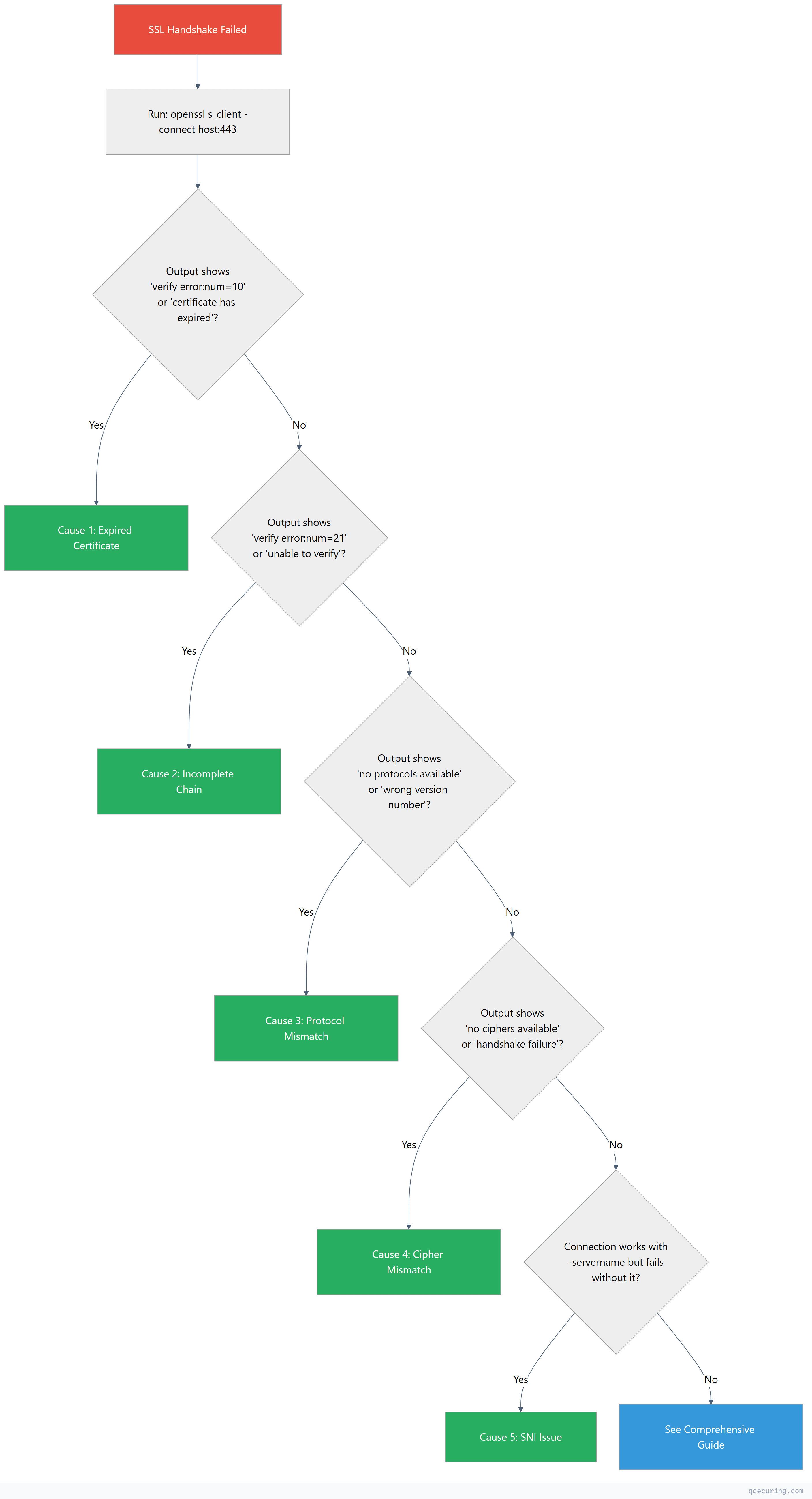
openssl s_client -connect yourserver.com:443 -servername yourserver.com 2>&1 | head -30Look at the output and jump to the matching cause below.
Quick Decision Tree
Cause 1: Expired Certificate
You’ll see:
verify error:num=10:certificate has expiredDiagnose:
openssl s_client -connect yourserver.com:443 -servername yourserver.com 2>/dev/null | openssl x509 -noout -datesOutput shows notAfter in the past.
Fix (Nginx):
# Check current cert expiry
openssl x509 -in /etc/nginx/ssl/cert.pem -noout -enddate

# If using Let's Encrypt/Certbot:
sudo certbot renew --force-renewal
sudo systemctl reload nginx

# If using a commercial cert, replace the file:
sudo cp /path/to/new-cert.pem /etc/nginx/ssl/cert.pem
sudo cp /path/to/new-key.pem /etc/nginx/ssl/key.pem
sudo nginx -t && sudo systemctl reload nginx
Fix (Apache):
sudo certbot renew --force-renewal
sudo systemctl reload apache2
Time to fix: 2 minutes if you have a new cert. 5 minutes with Certbot auto-renewal.
Cause 2: Incomplete Certificate Chain
You’ll see:
verify error:num=21:unable to verify the first certificateOr the Certificate chain section shows only 1 certificate (missing intermediates).
Diagnose:
openssl s_client -connect yourserver.com:443 -servername yourserver.com 2>/dev/null | grep -A2 "Certificate chain"If you see only 0 s: (your cert) without 1 s: (intermediate), the chain is incomplete.
Fix (Nginx):
# Download the intermediate from your CA, then concatenate:
cat your-domain-cert.pem intermediate-ca.pem > fullchain.pem

# Update nginx config
# ssl_certificate /etc/nginx/ssl/fullchain.pem;  (not just cert.pem)

sudo nginx -t && sudo systemctl reload nginx
Fix (Apache):
# In your Apache vhost config, add:
# SSLCertificateChainFile /etc/apache2/ssl/intermediate.pem

sudo apachectl configtest && sudo systemctl reload apache2
Verify the fix:
openssl s_client -connect yourserver.com:443 -servername yourserver.com 2>/dev/null | grep "Verify return code"
# Should show: Verify return code: 0 (ok)
Time to fix: 3 minutes. Most common cause of handshake failures.
Cause 3: Protocol Mismatch
You’ll see:
no protocols availableor
wrong version numberor
alert protocol versionDiagnose:
# Test which TLS versions the server supports
openssl s_client -connect yourserver.com:443 -tls1_2 2>&1 | grep "Protocol"
openssl s_client -connect yourserver.com:443 -tls1_3 2>&1 | grep "Protocol"
If both fail, the server may only support TLS 1.0/1.1 (deprecated) or the client only supports TLS 1.3 while the server only has TLS 1.2.
Fix (Nginx — enable TLS 1.2 + 1.3):
# /etc/nginx/nginx.conf or site config
ssl_protocols TLSv1.2 TLSv1.3;
sudo nginx -t && sudo systemctl reload nginxFix (Apache):
SSLProtocol all -SSLv3 -TLSv1 -TLSv1.1sudo apachectl configtest && sudo systemctl reload apache2Fix (client-side — if server is fine but client is old):
# Force a specific TLS version in curl
curl --tlsv1.2 https://yourserver.com

# In Python requests
import requests
import urllib3
requests.get('https://yourserver.com', verify=True)
# If using old Python, upgrade: pip install --upgrade requests urllib3
Time to fix: 1 minute (server config change).
Cause 4: Cipher Suite Mismatch
You’ll see:
no ciphers availableor
handshake failureor
SSL alert number 40Diagnose:
# See what ciphers the server accepts
nmap --script ssl-enum-ciphers -p 443 yourserver.com

# Or test a specific cipher
openssl s_client -connect yourserver.com:443 -cipher 'ECDHE-RSA-AES256-GCM-SHA384'
Fix (Nginx — modern cipher configuration):
ssl_ciphers 'ECDHE-ECDSA-AES128-GCM-SHA256:ECDHE-RSA-AES128-GCM-SHA256:ECDHE-ECDSA-AES256-GCM-SHA384:ECDHE-RSA-AES256-GCM-SHA384';
ssl_prefer_server_ciphers on;
sudo nginx -t && sudo systemctl reload nginxFix (Apache):
SSLCipherSuite ECDHE-ECDSA-AES128-GCM-SHA256:ECDHE-RSA-AES128-GCM-SHA256:ECDHE-ECDSA-AES256-GCM-SHA384:ECDHE-RSA-AES256-GCM-SHA384
SSLHonorCipherOrder on
Fix (if client is the problem): Update the client’s OpenSSL/TLS library. Old clients (OpenSSL < 1.1.0) don’t support modern ciphers.
openssl version
# If < 1.1.0, upgrade OpenSSL
Time to fix: 2 minutes.
Cause 5: SNI (Server Name Indication) Issue
You’ll see: The connection works when you specify -servername but fails without it, or you get the wrong certificate back.
Diagnose:
# With SNI (correct)
openssl s_client -connect yourserver.com:443 -servername yourserver.com 2>/dev/null | openssl x509 -noout -subject

# Without SNI (shows default/wrong cert)
openssl s_client -connect yourserver.com:443 2>/dev/null | openssl x509 -noout -subject
If these show different certificates, the client isn’t sending SNI.
Fix (Nginx — ensure default server is configured):
# Add a default server block that returns 444 for unknown hosts
server {
    listen 443 ssl default_server;
    ssl_certificate /etc/nginx/ssl/default-cert.pem;
    ssl_certificate_key /etc/nginx/ssl/default-key.pem;
    return 444;
}

# Your actual server block
server {
    listen 443 ssl;
    server_name yourserver.com;
    ssl_certificate /etc/nginx/ssl/yourserver-fullchain.pem;
    ssl_certificate_key /etc/nginx/ssl/yourserver-key.pem;
}
Fix (client-side):
# curl sends SNI by default. If using a custom client:
# Ensure your HTTP library sends the Host header matching the cert's CN/SAN

# Python requests — SNI is automatic with modern urllib3
# Java — SNI is automatic with Java 8+
# If behind a proxy, ensure the proxy forwards SNI
Fix (old clients that don’t support SNI): Use a dedicated IP address for the domain (one cert per IP) instead of relying on SNI-based virtual hosting.
Time to fix: 5 minutes.
Still Broken? Full Diagnostic
If none of the above matched, run the full diagnostic:
# Complete handshake debug with all extensions
openssl s_client -connect yourserver.com:443 \
  -servername yourserver.com \
  -showcerts \
  -tlsextdebug \
  -state \
  -msg 2>&1 | tee handshake-debug.txt
Then check our comprehensive SSL handshake failure guide which covers 12+ additional causes including:
- Client certificate authentication failures
- OCSP stapling issues
- Certificate key mismatch
- Firewall/proxy interference
- HSTS and certificate pinning conflicts
Prevent Future Handshake Failures
The five causes above account for ~90% of handshake failures in production. Prevent them:
| Cause | Prevention |
|---|---|
| Expired cert | Automated renewal (ACME/Certbot) or monitoring alerts at 30/14/7 days |
| Incomplete chain | Always deploy fullchain.pem, test after every cert rotation |
| Protocol mismatch | Standardize on TLS 1.2+1.3, test with testssl.sh |
| Cipher mismatch | Use Mozilla SSL Configuration Generator, test quarterly |
| SNI issues | Test with and without -servername, configure default server |
QCecuring SSL Certificate Lifecycle Management monitors all of these automatically — certificate expiry, chain completeness, protocol versions, and cipher configurations across every endpoint in your infrastructure.
FAQ
What’s the difference between “SSL handshake failed” and “certificate verify failed”?
“SSL handshake failed” means the TLS connection couldn’t be established at all — the client and server couldn’t agree on parameters. “Certificate verify failed” means the handshake partially succeeded but the client rejected the server’s certificate (expired, untrusted, wrong hostname). Different errors, different fixes. For certificate verify failures, see our certificate verify failed guide.
Does this error mean my site was hacked?
No. SSL handshake failures are almost always configuration issues — expired certs, missing intermediates, or protocol mismatches. They’re operational problems, not security incidents.
Why did it suddenly break if I didn’t change anything?
Three common reasons: (1) Your certificate expired (they have fixed lifetimes), (2) A browser or OS update dropped support for an old TLS version or cipher your server uses, (3) An intermediate CA certificate expired (rare but happens).
Should I disable SSL verification to fix this?
Never in production. Disabling verification (verify=False, rejectUnauthorized: false, -k in curl) removes all security guarantees. It’s acceptable for 30-second debugging to confirm the issue is certificate-related, then fix the actual cause.
How do I test if my fix worked from a different location?
Use an external tool to avoid local cache issues:
# From a different machine or use an online checker
curl -I https://yourserver.com
# Look for HTTP/2 200 (success) vs connection errors

# Or use SSL Labs (comprehensive but slow)
# https://www.ssllabs.com/ssltest/
Related Reading
- SSL Handshake Failed: All Causes & Fixes (Comprehensive Guide) — the full 12+ cause deep dive
- OpenSSL Complete Guide — master the diagnostic tool
- Nginx SSL/TLS Configuration & Hardening — proper server setup
- What is a TLS Handshake — understand the protocol