
AD CS errors are notoriously cryptic. “The RPC server is unavailable” could mean ten different things. “The certificate template is not available” might be a permissions issue, a publishing issue, or a version mismatch. This guide covers every common AD CS error with the exact diagnostic commands and fixes — organized by symptom so you can find your error fast.
Diagnostic Toolkit
Before diving into specific errors, these commands are your starting point:
# Check CA service status
certutil -ping
certutil -CAInfo

# Check CA configuration
certutil -getreg CA

# View recent failed requests
certutil -view -restrict "Disposition=31" -out "RequestID,CommonName,DispositionMessage" | Select-Object -First 20

# Check published templates
certutil -CATemplates

# Verify CRL validity
certutil -verify -urlfetch server.crt

# Check CA certificate chain
certutil -verify -urlfetch ca-cert.crt

# Event logs
Get-WinEvent -LogName "Application" -FilterXPath "*[System[Provider[@Name='Microsoft-Windows-CertificationAuthority']]]" | Select-Object -First 20 TimeCreated, Id, Message
Error: “The RPC server is unavailable” (0x800706BA)
The most common AD CS connectivity error. Multiple causes:
Cause 1: CA service not running
# Check service status
Get-Service certsvc
# If stopped:
Start-Service certsvc

# Check why it stopped
Get-WinEvent -LogName "System" -FilterXPath "*[System[Provider[@Name='Service Control Manager'] and EventID=7034]]" |
  Where-Object { $_.Message -like "*CertSvc*" } | Select-Object -First 5
Cause 2: Firewall blocking RPC
# Test RPC connectivity from client to CA
Test-NetConnection -ComputerName CA-SERVER -Port 135
# Port 135 = RPC Endpoint Mapper

# Also need dynamic RPC ports (49152-65535) or configured static port
# Check CA's RPC port:
certutil -getreg CA\InterfaceFlags
Cause 3: DNS resolution failure
# Verify CA hostname resolves
Resolve-DnsName CA-SERVER.contoso.com
nslookup CA-SERVER.contoso.com
Cause 4: CA certificate expired
# Check CA certificate validity
certutil -ca.cert | findstr "NotAfter"
# If expired, the CA service won't start properly
Error: “The certificate template is not available”
Cause 1: Template not published on the CA
# List templates published on the CA
certutil -CATemplates

# If your template isn't listed, publish it:
Add-CATemplate -Name "YourTemplateName" -Force
Cause 2: Permissions — user lacks Enroll permission
# Check who can enroll in the template
$templateDN = "CN=YourTemplate,CN=Certificate Templates,CN=Public Key Services,CN=Services,CN=Configuration,DC=contoso,DC=com"
Get-ADObject $templateDN -Properties nTSecurityDescriptor |
  Select-Object -ExpandProperty nTSecurityDescriptor |
  Select-Object -ExpandProperty Access |
  Where-Object { $_.ObjectType -eq "0e10c968-78fb-11d2-90d4-00c04f79dc55" } # Enroll OID
Cause 3: Template version incompatibility
# Check template schema version
certutil -template "YourTemplate" | findstr "Schema Version"
# V3 templates require Windows Server 2008+ CA
# V4 templates require Windows Server 2012+ CA
Cause 4: Template superseded
If another template supersedes yours, the original becomes unavailable. Check the “Superseded Templates” tab on the newer template.
Error: “Certificate Enrollment Denied” (0x80094012)
Cause 1: CA manager approval required
# Check if template requires CA manager approval
certutil -template "YourTemplate" | findstr "CA Manager"
# If yes: approve pending requests in certsrv.msc → Pending Requests
Cause 2: Request doesn’t meet template constraints
# Check the denial reason in the CA database
certutil -view -restrict "Disposition=31,RequestID>=1000" -out "RequestID,CommonName,DispositionMessage"
# Common: key size too small, wrong CSP, missing required fields
Cause 3: Enrollment agent restrictions
If the CA has enrollment agent restrictions configured, only specific agents can enroll on behalf of specific users.
Error: Auto-Enrollment Not Working
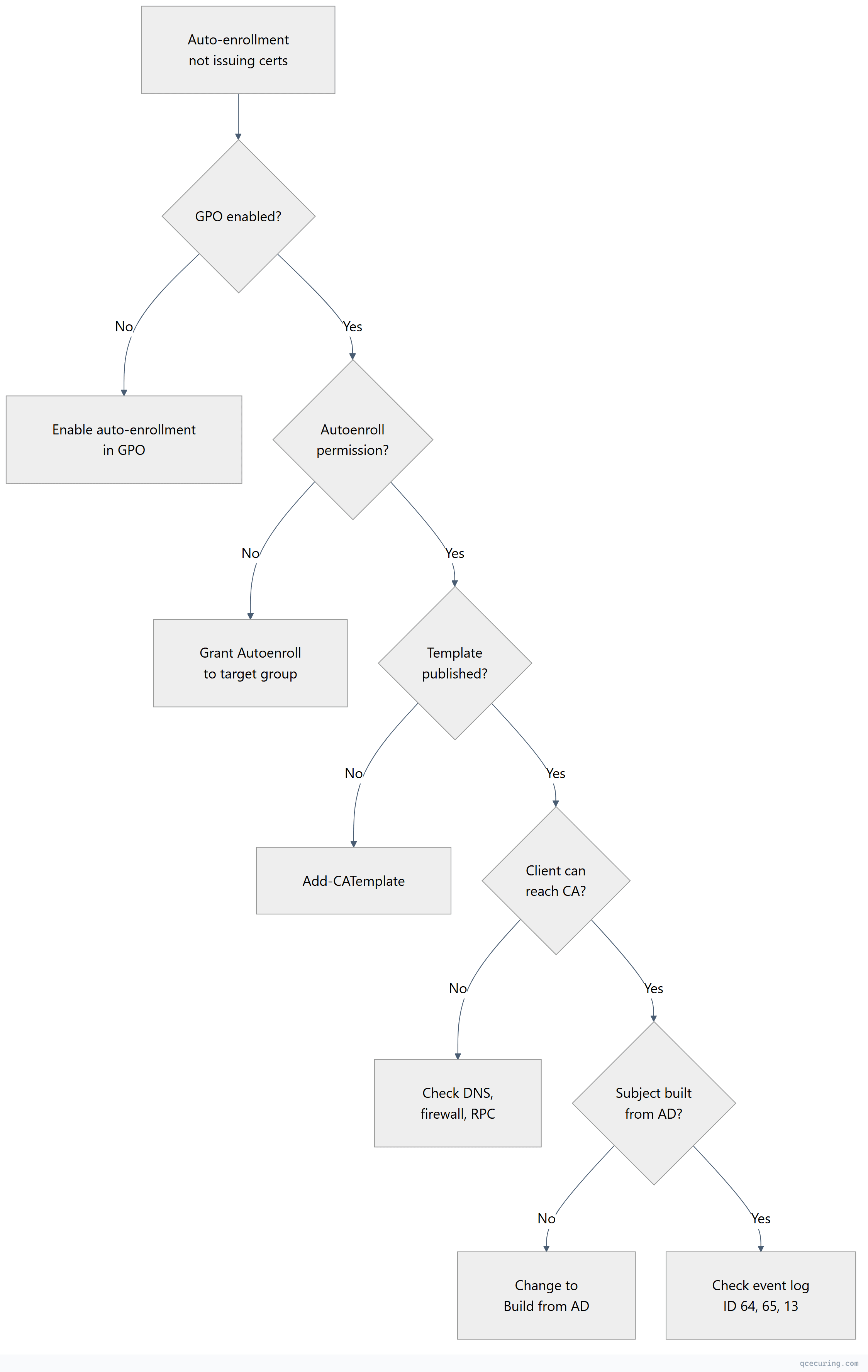
Diagnostic steps:
# 1. Verify GPO is applied
gpresult /r | findstr "Auto-Enrollment"

# 2. Force auto-enrollment
certutil -pulse

# 3. Check auto-enrollment event log
Get-WinEvent -LogName "Application" -FilterXPath "*[System[Provider[@Name='Microsoft-Windows-CertificateServicesClient-AutoEnrollment']]]" |
  Select-Object -First 10 TimeCreated, Id, Message

# Key Event IDs:
# 13 = Auto-enrollment triggered successfully
# 64 = Template not available (permissions or publishing)
# 65 = Template found, enrollment attempted

# 4. Verify template permissions include BOTH Enroll AND Autoenroll
Error: CRL Expired or Unreachable
Symptoms: Certificate validation fails, applications reject certificates, Event ID 82 on CA.
# Check CRL validity
certutil -URL http://pki.contoso.com/CertEnroll/CA.crl

# Check when CRL was last published
certutil -getCRL

# Force CRL publication
certutil -CRL

# Check CRL distribution point accessibility
Invoke-WebRequest "http://pki.contoso.com/CertEnroll/CA.crl" -UseBasicParsing

# Check LDAP CDP
certutil -verify -urlfetch cert.cer
Common fixes:
# If CRL publication failed — check permissions on the file share/web server
# The CA computer account needs Write access to the CRL publication folder

# If CRL is expired — publish immediately
certutil -CRL

# If delta CRL is causing issues — disable temporarily
certutil -setreg CA\CRLDeltaPeriodUnits 0
Restart-Service certsvc
Error: “The revocation function was unable to check revocation”
# Test revocation checking for a specific certificate
certutil -verify -urlfetch certificate.cer

# This shows EACH CDP/AIA/OCSP URL and whether it's reachable
# Look for: "ERROR" next to URLs

# Common causes:
# 1. CRL URL unreachable (firewall, DNS, web server down)
# 2. CRL expired (CA didn't publish on schedule)
# 3. OCSP responder down or certificate expired
# 4. Client can't reach LDAP CDP (non-domain-joined client)
Fix for non-domain clients: Ensure HTTP CDP is configured and accessible. LDAP CDPs only work for domain-joined machines.
Error: “The certificate chain could not be built to a trusted root”
# Check what's in the client's trust store
certutil -store Root | findstr "Subject"

# Check the CA certificate chain
certutil -verify -urlfetch ca-cert.cer

# If root CA cert is missing from client trust store:
# Option 1: GPO distribution (domain-joined)
# Option 2: Manual import
certutil -addstore Root root-ca.cer

# If intermediate CA cert is missing:
certutil -addstore CA intermediate-ca.cer

# Verify the full chain
certutil -verify -urlfetch server.cer
Error: CA Database Full or Corrupted
# Check database size
$dbPath = (certutil -getreg CA\DBDirectory).Value
Get-Item "$dbPath\*.edb" | Select-Object Name, @{N='SizeMB';E={$_.Length/1MB}}

# If database is very large (>10GB), clean up expired certificates
# WARNING: Test in non-production first
certutil -deleterow <date> Cert
# Example: delete certs that expired before 2024
certutil -deleterow 1/1/2024 Cert

# Compact the database (requires CA service stop)
Stop-Service certsvc
esentutl /d "$dbPath\certdb.edb"
Start-Service certsvc
Error: “Access Denied” When Requesting Certificates
# Check CA security permissions
certutil -getreg CA\Security

# Check if the user/computer has "Request Certificates" permission on the CA
# certsrv.msc → Right-click CA → Properties → Security tab

# Check if the user has Enroll permission on the template
# certtmpl.msc → Right-click template → Properties → Security tab

# For DCOM access issues:
# Component Services → Computers → My Computer → DCOM Config → CertSrv Request
# Check Launch and Activation Permissions
Error: CA Certificate Renewal Failures
# Check CA certificate expiry
certutil -ca.cert | findstr "NotBefore\|NotAfter"

# Renew CA certificate (same key)
certutil -renewCert ReuseKeys

# Renew CA certificate (new key — recommended)
certutil -renewCert

# If renewal fails because the parent CA is offline:
# 1. Generate renewal request: certutil -renewCert > renewal.req
# 2. Transport to parent CA (USB for offline root)
# 3. Submit: certreq -submit renewal.req
# 4. Retrieve: certreq -retrieve <RequestID> renewed-ca.cer
# 5. Install: certutil -installcert renewed-ca.cer
Quick Reference: Event IDs
| Event ID | Source | Meaning |
|---|---|---|
| 7 | CertificationAuthority | CA started successfully |
| 8 | CertificationAuthority | CA stopped |
| 20 | CertificationAuthority | Certificate issued |
| 21 | CertificationAuthority | Certificate denied |
| 22 | CertificationAuthority | Certificate revoked |
| 39 | Kerberos-KDC | Weak certificate mapping (KB5014754 warning) |
| 41 | CertificationAuthority | CRL published |
| 82 | CertificationAuthority | CRL publication failed |
| 100 | CertificationAuthority | CA certificate expiring |
| 13 | AutoEnrollment | Auto-enrollment triggered |
| 64 | AutoEnrollment | Template not available |
FAQ
Q: How do I find why a specific certificate request was denied?
certutil -view -restrict "RequestID=<ID>" -out "Request.DispositionMessage,Request.StatusCode"The DispositionMessage gives the exact reason (permissions, template constraints, key size, etc.).
Q: The CA service won’t start after a server reboot. What do I check?
- Check if the CA certificate is valid (
certutil -ca.cert) - Check if the CA private key is accessible (
certutil -verifykeys) - Check the database integrity (
esentutl /g <dbpath>\certdb.edb) - Check Event Log for specific error messages
- If HSM-backed: verify HSM connectivity
Q: How do I move a CA to a new server?
You can’t simply move it — you must back up and restore:
certutil -backup <path>(backs up DB + private key)- Install AD CS role on new server with same CA name
certutil -restore <path>(restores DB + key)- Update DNS/CDP/AIA to point to new server
Q: Auto-enrollment works for some users but not others. Why?
Check: (1) Are they in the security group with Autoenroll permission? (2) Is GPO applied to their OU? (3) Do they have network connectivity to the CA? (4) Is there a conflicting GPO disabling auto-enrollment? Run gpresult /r on an affected machine.
Q: How do I troubleshoot “The request subject name is invalid”?
The certificate request contains a subject name that doesn’t match template requirements. If the template uses “Build from AD,” the subject comes from AD attributes — check that the user/computer has the required attributes populated (CN, email, UPN, DNS name).
Related Reading: