
“Certificate verify failed” is the error that makes developers add verify=False and move on. Don’t. That disables all TLS security — you’re now vulnerable to man-in-the-middle attacks, and your production traffic is unprotected.
The fix is almost always one of five things: missing intermediate certificate, corporate proxy intercepting TLS, outdated CA bundle, self-signed certificate not in the trust store, or expired certificate. This guide gives you the exact diagnosis and fix for each language.
The Error Messages
Each language reports the same underlying problem differently:
Python (requests/urllib3):
requests.exceptions.SSLError: HTTPSConnectionPool(host='api.example.com', port=443):
Max retries exceeded with url: / (Caused by SSLError(SSLCertVerificationError(1,
'[SSL: CERTIFICATE_VERIFY_FAILED] certificate verify failed: unable to get local issuer certificate (_ssl.c:1007)')))
Node.js:
Error: unable to verify the first certificate
    at TLSSocket.onConnectSecure (node:_tls_wrap:1674:34)
code: 'UNABLE_TO_VERIFY_LEAF_SIGNATURE'
or
Error: self-signed certificate in certificate chain
code: 'SELF_SIGNED_CERT_IN_CHAIN'
Java:
javax.net.ssl.SSLHandshakeException: PKIX path building failed:
sun.security.provider.certpath.SunCertPathBuilderException:
unable to find valid certification path to requested target
Same root cause, different error strings. Let’s fix them.
Diagnosis Flowchart
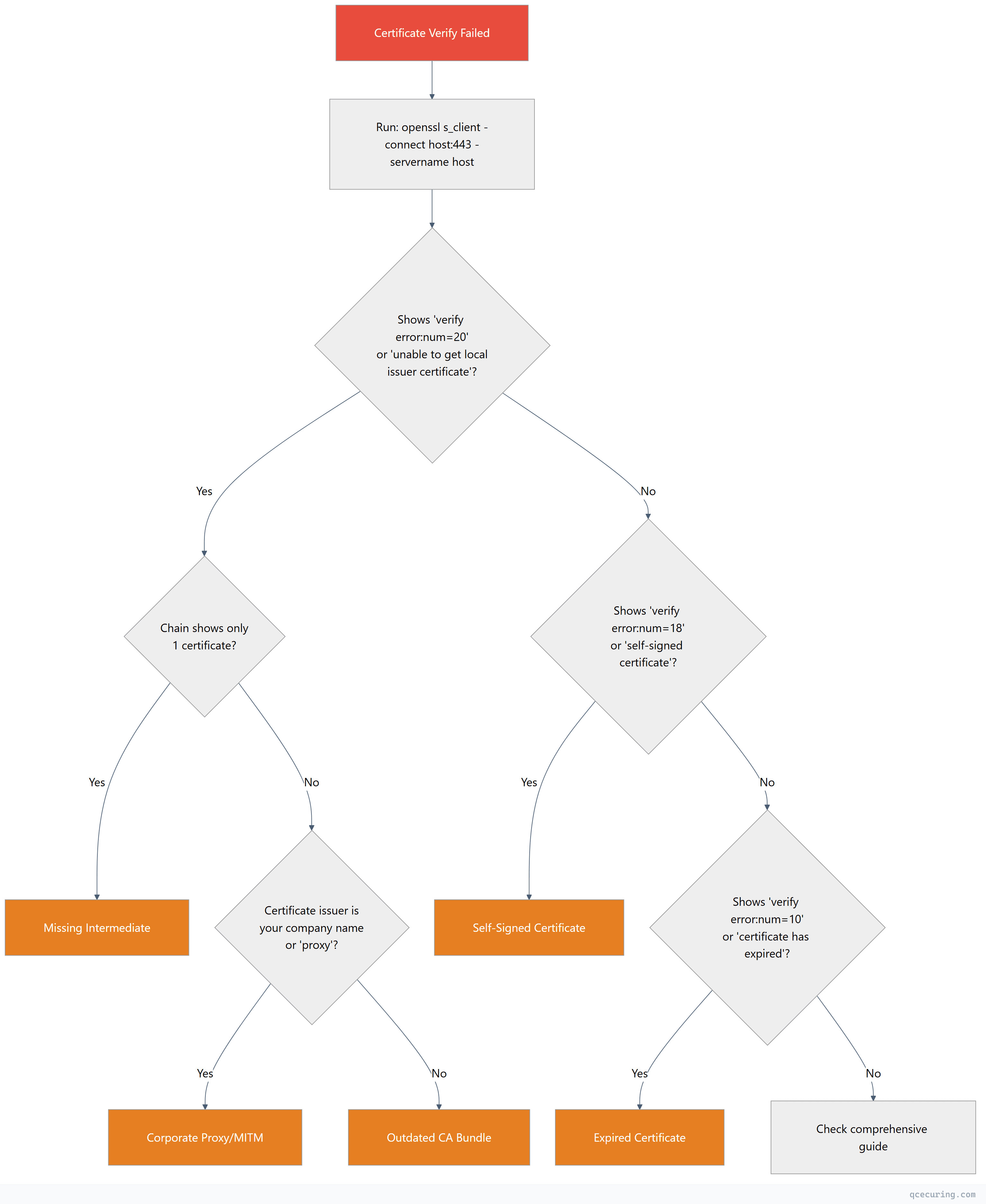
First step for any language — confirm the issue with OpenSSL:
openssl s_client -connect api.example.com:443 -servername api.example.com -showcerts 2>/dev/null | grep -E "(Certificate chain|verify error|subject|issuer)"This tells you exactly what’s wrong before you touch any code.
Cause 1: Missing Intermediate Certificate
The server isn’t sending the full certificate chain. Your browser might work (browsers cache intermediates), but programmatic clients fail.
Confirm It’s This
openssl s_client -connect api.example.com:443 -servername api.example.com 2>/dev/null | grep "verify error"
# Output: verify error:num=21:unable to verify the first certificate
And the chain shows only one certificate (depth 0):
openssl s_client -connect api.example.com:443 -servername api.example.com 2>/dev/null | grep "^[[:space:]]*[0-9]"
# Only shows "0 s:" — missing "1 s:" (intermediate)
Fix: Server-Side (Best)
Tell the server admin to configure the full chain. This is the correct fix.
Fix: Client-Side (When You Can’t Fix the Server)
Python:
import requests
import certifi

# Option 1: Provide the full chain manually
response = requests.get('https://api.example.com/data', verify='/path/to/custom-ca-bundle.pem')

# Option 2: Download the intermediate and append to certifi bundle
# First, get the intermediate cert:
# openssl s_client -connect api.example.com:443 -servername api.example.com 2>/dev/null | openssl x509 > server.pem
# Then find the intermediate from the CA's repository and append:
import certifi
print(certifi.where())  # Shows path to CA bundle
# Append intermediate to that file (or use a custom bundle)
Node.js:
const https = require('node:https');
const fs = require('node:fs');

// Option 1: Provide the intermediate CA cert
const agent = new https.Agent({
  ca: fs.readFileSync('/path/to/intermediate-ca.pem')
});

const response = await fetch('https://api.example.com/data', { agent });

// Option 2: Use NODE_EXTRA_CA_CERTS environment variable
// NODE_EXTRA_CA_CERTS=/path/to/intermediate-ca.pem node app.js
Java:
# Download the intermediate certificate, then import it:
keytool -importcert \
  -alias intermediate-ca \
  -file intermediate-ca.pem \
  -keystore $JAVA_HOME/lib/security/cacerts \
  -storepass changeit \
  -noprompt

# Or use a custom truststore:
keytool -importcert \
  -alias intermediate-ca \
  -file intermediate-ca.pem \
  -keystore /app/custom-truststore.jks \
  -storepass mypassword \
  -noprompt
// Use custom truststore in Java
System.setProperty("javax.net.ssl.trustStore", "/app/custom-truststore.jks");
System.setProperty("javax.net.ssl.trustStorePassword", "mypassword");Cause 2: Corporate Proxy / MITM Inspection
Your corporate network intercepts TLS traffic with a proxy that re-signs everything with an internal CA certificate. Your OS/browser trusts this CA (IT pushed it via group policy), but your programming language’s CA bundle doesn’t include it.
Confirm It’s This
openssl s_client -connect api.example.com:443 -servername api.example.com 2>/dev/null | grep "issuer"
# If issuer shows your company name, "Zscaler", "Palo Alto", "Blue Coat", etc. — it's a proxy
Fix
Get the proxy’s root CA certificate from your IT department (usually a .pem or .crt file).
Python:
import requests

# Option 1: Point to the corporate CA bundle
response = requests.get('https://api.example.com/data', verify='/path/to/corporate-ca-bundle.pem')

# Option 2: Set environment variable (affects all requests)
# export REQUESTS_CA_BUNDLE=/path/to/corporate-ca-bundle.pem

# Option 3: Append corporate CA to certifi bundle
# pip install pip-system-certs  (auto-uses system trust store)
# Best Python fix: use pip-system-certs to inherit OS trust store
pip install pip-system-certs
# Now Python requests uses the same CAs your browser trustsNode.js:
# Set the environment variable before running your app
export NODE_EXTRA_CA_CERTS=/path/to/corporate-root-ca.pem
node app.js
// Or in code (before any HTTPS requests):
const tls = require('node:tls');
const fs = require('node:fs');
const corporateCA = fs.readFileSync('/path/to/corporate-root-ca.pem');
const originalCreateSecureContext = tls.createSecureContext;
tls.createSecureContext = function(options) {
const context = originalCreateSecureContext(options);
context.context.addCACert(corporateCA);
return context;
};Java:
# Import the corporate CA into Java's truststore
keytool -importcert \
  -alias corporate-proxy-ca \
  -file /path/to/corporate-root-ca.pem \
  -keystore $JAVA_HOME/lib/security/cacerts \
  -storepass changeit \
  -noprompt

# Verify it was added
keytool -list -keystore $JAVA_HOME/lib/security/cacerts -storepass changeit | grep corporate
Cause 3: Outdated CA Bundle
Your language’s CA bundle doesn’t include the root CA that signed the server’s certificate. This happens when:
- A new CA was created (e.g., ISRG Root X2 for Let’s Encrypt)
- You’re running an old OS or old Python/Node version
- The
certifipackage in Python is outdated
Confirm It’s This
# The server chain is complete (has intermediates) but verification still fails
openssl s_client -connect api.example.com:443 -servername api.example.com 2>/dev/null | grep "Verify return code"
# Shows: Verify return code: 20 (unable to get local issuer certificate)
# BUT the chain shows multiple certificates (intermediates present)
Fix
Python:
# Update certifi (Python's CA bundle)
pip install --upgrade certifi

# Check current certifi version and path
python -c "import certifi; print(certifi.__version__); print(certifi.where())"

# If still failing, update Python itself (older Python ships older certifi)
# Python 3.12+ includes recent CA bundles
# Verify certifi is being used
import certifi
import requests
response = requests.get('https://api.example.com/data', verify=certifi.where())Node.js:
# Node.js uses the OS CA bundle by default (since Node 12+)
# Update your OS CA certificates:

# Ubuntu/Debian
sudo apt update && sudo apt install --only-upgrade ca-certificates
sudo update-ca-certificates

# RHEL/CentOS/Fedora
sudo dnf update ca-certificates
sudo update-ca-trust

# macOS
# CA bundle updates come with macOS updates
# If running Node in a container, update the base image:
# FROM node:20-slim (not node:16-slim)
# RUN apt-get update && apt-get install -y ca-certificatesJava:
# Java uses its own truststore (cacerts), not the OS bundle
# Update Java to get the latest CA certificates
# Or manually update the truststore:

# Download Mozilla's CA bundle and import
curl -o cacert.pem https://curl.se/ca/cacert.pem

# Import all CAs (use a script for bulk import)
# Or upgrade Java — each Java release includes updated CAs
java -version
# If < Java 17, consider upgrading
Cause 4: Self-Signed Certificate
The server uses a self-signed certificate (common in development, internal services, IoT devices). Your client doesn’t trust it because it’s not signed by a public CA.
Confirm It’s This
openssl s_client -connect internal-api.local:443 2>/dev/null | grep "verify error"
# Output: verify error:num=18:self-signed certificate
# Or: verify error:num=19:self-signed certificate in certificate chain
Fix (Proper Way — Add to Trust Store)
Python:
import requests

# Export the self-signed cert first:
# openssl s_client -connect internal-api.local:443 2>/dev/null | openssl x509 > internal-api.pem

# Then use it:
response = requests.get('https://internal-api.local/data', verify='/path/to/internal-api.pem')
# Or add to system trust store so all tools trust it:
# Ubuntu/Debian
sudo cp internal-api.pem /usr/local/share/ca-certificates/internal-api.crt
sudo update-ca-certificates
# Then Python with pip-system-certs will pick it up automaticallyNode.js:
# Add to system trust store (see above), then:
export NODE_EXTRA_CA_CERTS=/path/to/internal-api.pem
node app.js
// Or in code:
const https = require('node:https');
const fs = require('node:fs');
const agent = new https.Agent({
ca: fs.readFileSync('/path/to/internal-api.pem')
});
const response = await fetch('https://internal-api.local/data', { agent });Java:
# Import the self-signed cert into Java's truststore
keytool -importcert \
  -alias internal-api \
  -file internal-api.pem \
  -keystore $JAVA_HOME/lib/security/cacerts \
  -storepass changeit \
  -noprompt
What About verify=False?
# ⚠️ SECURITY WARNING: NEVER use this in production
# Only for 30-second debugging to confirm the issue is cert-related
response = requests.get('https://api.example.com/data', verify=False)
# If this works, the problem IS certificate verification — now fix it properly
// ⚠️ SECURITY WARNING: NEVER use this in production
// Only for debugging
process.env.NODE_TLS_REJECT_UNAUTHORIZED = '0';
// Or per-request:
const agent = new https.Agent({ rejectUnauthorized: false });Disabling verification means any attacker on the network can intercept your traffic. It’s acceptable for 30 seconds of debugging. It’s never acceptable in deployed code.
Cause 5: Expired Certificate
The server’s certificate (or an intermediate in the chain) has expired.
Confirm It’s This
openssl s_client -connect api.example.com:443 -servername api.example.com 2>/dev/null | openssl x509 -noout -dates
# notAfter shows a date in the past
Fix
This is a server-side problem. The certificate needs to be renewed.
If you control the server:
# Let's Encrypt / Certbot
sudo certbot renew --force-renewal
sudo systemctl reload nginx  # or apache2

# Commercial cert — reissue from your CA's portal and redeploy
If you don’t control the server: Contact the server administrator. There’s no safe client-side fix for an expired certificate — the server needs a new cert.
If it’s an expired intermediate (not the leaf cert):
# Check each cert in the chain
openssl s_client -connect api.example.com:443 -servername api.example.com -showcerts 2>/dev/null | \
  awk '/BEGIN CERTIFICATE/,/END CERTIFICATE/{print}' | \
  while openssl x509 -noout -subject -dates 2>/dev/null; do echo "---"; done
If an intermediate expired, the server needs to update its chain file with the current intermediate from the CA.
Docker and Container-Specific Fixes
Containers are the most common environment for certificate verify failures because minimal base images often have outdated or missing CA bundles.
# Dockerfile fix for Python
FROM python:3.12-slim
RUN apt-get update && apt-get install -y ca-certificates && rm -rf /var/lib/apt/lists/*
# For corporate CAs:
COPY corporate-ca.pem /usr/local/share/ca-certificates/corporate-ca.crt
RUN update-ca-certificates
RUN pip install pip-system-certs

# Dockerfile fix for Node.js
FROM node:20-slim
RUN apt-get update && apt-get install -y ca-certificates && rm -rf /var/lib/apt/lists/*
COPY corporate-ca.pem /usr/local/share/ca-certificates/corporate-ca.crt
RUN update-ca-certificates
ENV NODE_EXTRA_CA_CERTS=/usr/local/share/ca-certificates/corporate-ca.crt

# Dockerfile fix for Java
FROM eclipse-temurin:21-jre
COPY corporate-ca.pem /tmp/corporate-ca.pem
RUN keytool -importcert -alias corporate-ca -file /tmp/corporate-ca.pem \
    -keystore $JAVA_HOME/lib/security/cacerts -storepass changeit -noprompt
CI/CD Pipeline Fixes
Certificate verify failures in CI/CD are usually caused by corporate proxies or missing CA bundles in runner images.
GitHub Actions:
- name: Add Corporate CA
  run: |
    echo "${{ secrets.CORPORATE_CA_PEM }}" > /usr/local/share/ca-certificates/corporate.crt
    sudo update-ca-certificates

- name: Set Node.js CA
  run: echo "NODE_EXTRA_CA_CERTS=/usr/local/share/ca-certificates/corporate.crt" >> $GITHUB_ENV

- name: Set Python CA
  run: echo "REQUESTS_CA_BUNDLE=/etc/ssl/certs/ca-certificates.crt" >> $GITHUB_ENV
GitLab CI:
before_script:
  - cp $CORPORATE_CA_FILE /usr/local/share/ca-certificates/corporate.crt
  - update-ca-certificates
  - export NODE_EXTRA_CA_CERTS=/etc/ssl/certs/ca-certificates.crt
  - export REQUESTS_CA_BUNDLE=/etc/ssl/certs/ca-certificates.crt
Quick Reference Table
| Cause | Python Fix | Node.js Fix | Java Fix |
|---|---|---|---|
| Missing intermediate | verify='/path/to/chain.pem' | NODE_EXTRA_CA_CERTS=chain.pem | keytool -importcert |
| Corporate proxy | pip install pip-system-certs | NODE_EXTRA_CA_CERTS=proxy-ca.pem | Import proxy CA to cacerts |
| Outdated CA bundle | pip install --upgrade certifi | Update OS ca-certificates | Upgrade Java version |
| Self-signed cert | verify='/path/to/cert.pem' | ca: fs.readFileSync(cert) | keytool -importcert |
| Expired cert | Fix server-side | Fix server-side | Fix server-side |
FAQ
Why does my browser work but my code doesn’t?
Browsers maintain their own CA trust stores (updated frequently), cache intermediate certificates from previous connections, and implement AIA (Authority Information Access) fetching to download missing intermediates on the fly. Programming languages don’t do any of this — they require the complete chain to be presented by the server or available in the local trust store.
Is it safe to use verify=False / rejectUnauthorized=false?
Only for temporary debugging (less than a minute) to confirm the issue is certificate-related. Never in production, staging, or any environment where real data flows. It disables all certificate validation, making your connection vulnerable to interception. If you see this in production code, treat it as a critical security bug.
Why does CERTIFICATE_VERIFY_FAILED happen after a Python upgrade?
Python bundles the certifi package which contains Mozilla’s CA bundle. When you upgrade Python, you might get a newer certifi that removed an old CA root (cross-signed roots expire). Or your code was relying on a system CA that the new Python version doesn’t read. Fix: pip install --upgrade certifi and ensure you’re using the system trust store with pip-system-certs.
How do I fix this in a Docker container?
Add ca-certificates package and run update-ca-certificates. For corporate CAs, COPY the CA cert into /usr/local/share/ca-certificates/ before running update-ca-certificates. See the Docker section above for language-specific Dockerfiles.
What’s NODE_EXTRA_CA_CERTS and when should I use it?
NODE_EXTRA_CA_CERTS is an environment variable that tells Node.js to load additional CA certificates on top of its built-in bundle. Set it to a PEM file containing your corporate CA, self-signed cert, or any CA not in the default bundle. It’s the cleanest fix for Node.js certificate issues because it doesn’t require code changes.
Why does Java have its own trust store separate from the OS?
Java uses a file called cacerts (a JKS/PKCS12 keystore) in $JAVA_HOME/lib/security/. This was a design decision from the 1990s for cross-platform consistency — Java apps behave the same regardless of OS. The downside: when your OS trust store gets updated (new CAs, revoked CAs), Java doesn’t automatically pick up those changes. You need to either upgrade Java or manually import certificates with keytool.
Related Reading
- OpenSSL Complete Guide — master the diagnostic tool used throughout this guide
- Certificate Chain of Trust Explained — understand why chains matter
- Java Keytool Commands Reference — complete keytool reference for Java trust store management
- SSL Handshake Failed: All Causes & Fixes — when the problem is the handshake itself, not certificate verification
- What is a TLS Certificate — certificate fundamentals