
“Certificate not ready” is the cert-manager equivalent of a blank stare. It tells you something is wrong but not what. The actual problem could be anywhere in the resource chain — the Issuer might be misconfigured, the ACME challenge might be failing, DNS might not be propagating, or the webhook might be rejecting the request.
This guide walks through the systematic debugging process: follow the resource chain from Certificate → CertificateRequest → Order → Challenge, and at each step, the exact kubectl commands to identify the failure.
The Resource Chain
Every cert-manager certificate issuance creates a chain of resources. The failure is always at one specific point:
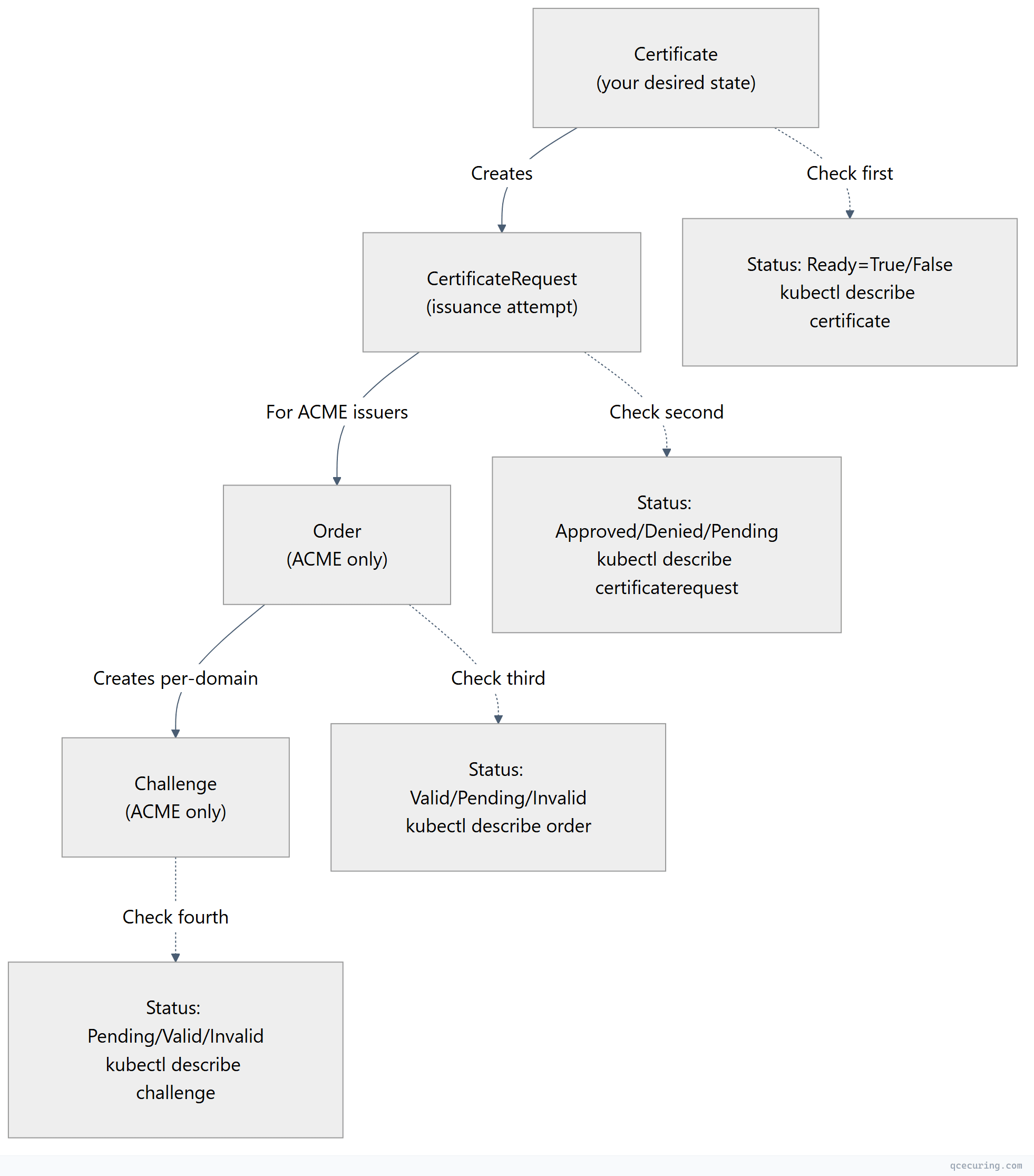
Debugging rule: Start at the Certificate and work down. The first resource with an error is where the problem lives.
Step 1: Check the Certificate
# List all certificates and their status
kubectl get certificates -A

# Example output:
# NAMESPACE   NAME      READY   SECRET          AGE
# prod        api-tls   False   api-tls-secret  45m   ← PROBLEM

# Get details
kubectl describe certificate api-tls -n prod
What to look for in the output:
Status:
  Conditions:
    - Type: Ready
      Status: "False"
      Reason: "MissingData"  # or "Issuing", "RequestDenied", etc.
      Message: "Issuing certificate as Secret does not exist"
  # or
      Reason: "RequestDenied"
Message: "The CSR was denied"| Reason | Meaning | Next Step |
|---|---|---|
Issuing | Certificate is being issued (in progress) | Check CertificateRequest |
MissingData | Secret doesn’t exist yet | Check CertificateRequest |
RequestDenied | Issuer rejected the request | Check CertificateRequest for denial reason |
DoesNotExist | Referenced issuer doesn’t exist | Check issuer name/kind/namespace |
Pending | Waiting for approval (if approval required) | Check approval controller |
Step 2: Check the CertificateRequest
# Find the CertificateRequest for your Certificate
kubectl get certificaterequest -n prod

# Get details
kubectl describe certificaterequest api-tls-xxxxx -n prod
Common CertificateRequest issues:
“Issuer not found”
Events:
  Type: Warning
  Reason: IssuerNotFound
  Message: Referenced "ClusterIssuer" not found: clusterissuer.cert-manager.io "letsencrypt-prod" not found
Fix: Check the issuer name matches exactly (case-sensitive):
kubectl get clusterissuer
kubectl get issuer -n prod

# Common mistake: using "Issuer" kind when it's a "ClusterIssuer" or vice versa
“Issuer not ready”
Events:
  Type: Warning
  Reason: IssuerNotReady
  Message: Referenced issuer does not have a Ready status condition
Fix: Check the issuer itself:
kubectl describe clusterissuer letsencrypt-prod

# Common causes:
# - ACME account registration failed (bad email, server unreachable)
# - Vault token expired
# - CA secret doesn't exist
“Request denied by webhook”
Events:
  Type: Warning
  Reason: Denied
  Message: "cert-manager.io: Certificate request has been denied"
Fix: Check cert-manager webhook logs and any approval policies:
kubectl logs -n cert-manager deployment/cert-manager-webhookStep 3: Check the Order (ACME Issuers Only)
kubectl get orders -n prod
kubectl describe order api-tls-xxxxx -n prod
Common Order issues:
Order stuck in “Pending”
Status:
  State: pending
  Authorizations:
    - URL: https://acme-v02.api.letsencrypt.org/acme/authz/...
      Identifier: api.example.com
      Challenges:
        - Type: http-01
          Status: pending
Meaning: The ACME challenge hasn’t been solved yet. Check the Challenge resource.
Order “Invalid”
Status:
  State: invalid
  Reason: "order is invalid"
Causes:
- Challenge failed (timeout, wrong response)
- Rate limit hit
- Domain authorization expired
Fix: Delete the Order (cert-manager will create a new one):
kubectl delete order api-tls-xxxxx -n prod
# cert-manager automatically creates a new Order
Step 4: Check the Challenge (ACME Only)
kubectl get challenges -n prod
kubectl describe challenge api-tls-xxxxx -n prod
HTTP-01 Challenge Failing
“Waiting for HTTP-01 challenge propagation”
# Check if the solver pod is running
kubectl get pods -n cert-manager -l acme.cert-manager.io/http01-solver=true

# Check if the temporary ingress was created
kubectl get ingress -A | grep cm-acme

# Test the challenge URL from outside the cluster
curl -v http://api.example.com/.well-known/acme-challenge/<token>
# Should return the challenge response (not 404)
Common HTTP-01 fixes:
| Problem | Fix |
|---|---|
| Solver pod not running | Check cert-manager logs, resource limits |
| Ingress not created | Wrong ingressClassName in solver config |
| 404 on challenge URL | Ingress controller not routing /.well-known paths |
| Timeout | Firewall blocking port 80 from Let’s Encrypt |
| DNS not pointing to cluster | Update DNS A record to cluster ingress IP |
| Multiple ingress controllers | Specify the correct one in solver config |
# Check cert-manager controller logs for challenge errors
kubectl logs -n cert-manager deployment/cert-manager -f | grep -i "challenge\|error\|failed"
DNS-01 Challenge Failing
“Waiting for DNS-01 challenge propagation”
# Check if the TXT record was created
dig -t TXT _acme-challenge.api.example.com @8.8.8.8

# If no record: check DNS provider credentials
kubectl logs -n cert-manager deployment/cert-manager | grep -i "dns\|route53\|cloudflare"
Common DNS-01 fixes:
| Problem | Fix |
|---|---|
| ”Forbidden” / “Unauthorized” | API token lacks zone edit permissions |
| ”Timeout” | DNS propagation delay (increase propagationTimeout) |
| “Zone not found” | Wrong zone ID or domain not in the configured zone |
| Record created but not resolving | DNS propagation delay — wait or check nameservers |
| Wrong DNS provider | Check solver selector matches your domain |
# Increase propagation timeout in the issuer
spec:
  acme:
    solvers:
      - dns01:
          cloudflare:
            apiTokenSecretRef:
              name: cloudflare-token
              key: api-token
          # Add propagation check settings
          cnameStrategy: Follow
Step 5: Check cert-manager Controller Logs
When the resource chain doesn’t give enough info:
# Full cert-manager controller logs
kubectl logs -n cert-manager deployment/cert-manager --tail=100

# Filter for errors
kubectl logs -n cert-manager deployment/cert-manager | grep -i "error\|failed\|denied" | tail -30

# Watch logs in real-time
kubectl logs -n cert-manager deployment/cert-manager -f
Common log patterns:
| Log Message | Meaning | Fix |
|---|---|---|
Failed to determine zone | DNS provider can’t find the zone | Check zone permissions, domain spelling |
context deadline exceeded | Timeout connecting to ACME server or DNS | Check network connectivity, firewall |
rate limited | Let’s Encrypt rate limit hit | Wait, or use staging issuer for testing |
account not found | ACME account key secret deleted | Delete issuer, recreate (new account) |
no matching solver | No solver configured for this domain | Add solver selector for the domain |
Common Scenarios
Certificate Was Working, Now Stuck on Renewal
# Check if the old secret still exists
kubectl get secret api-tls-secret -n prod -o jsonpath='{.metadata.annotations}'

# Force renewal
cmctl renew api-tls -n prod

# Or delete the secret to trigger re-issuance
kubectl delete secret api-tls-secret -n prod
Certificate Works in One Namespace But Not Another
# Check if you're using Issuer (namespace-scoped) vs ClusterIssuer
# Issuer only works in its own namespace
kubectl get issuer -n prod
kubectl get clusterissuer

# If using Issuer, it must exist in the SAME namespace as the Certificate
Wildcard Certificate Not Issuing
# Wildcards REQUIRE DNS-01 challenge (HTTP-01 can't validate wildcards)
# Check your issuer uses dns01 solver:
kubectl describe clusterissuer letsencrypt-prod | grep -A 10 "solvers"

# Ensure the solver covers your domain:
# selector:
#   dnsZones:
#     - "example.com"
Certificate Issued But Ingress Still Shows Old Cert
# Check if the ingress references the correct secret
kubectl get ingress api-ingress -n prod -o jsonpath='{.spec.tls[0].secretName}'

# Check if the secret was updated
kubectl get secret api-tls-secret -n prod -o jsonpath='{.metadata.annotations.cert-manager\.io/certificate-name}'

# Restart ingress controller to pick up new cert (if it doesn't auto-reload)
kubectl rollout restart deployment ingress-nginx-controller -n ingress-nginx
The Nuclear Option: Full Reset
If nothing works and you want to start fresh for a specific certificate:
# Delete everything in the chain
kubectl delete certificate api-tls -n prod
kubectl delete certificaterequest -n prod -l cert-manager.io/certificate-name=api-tls
kubectl delete order -n prod -l cert-manager.io/certificate-name=api-tls
kubectl delete challenge -n prod -l cert-manager.io/certificate-name=api-tls
kubectl delete secret api-tls-secret -n prod

# Recreate the Certificate resource
kubectl apply -f certificate.yaml

# Watch it progress
kubectl get certificate api-tls -n prod -w
Monitoring cert-manager Health
# Quick health check
cmctl check api

# Check all certificates across cluster
kubectl get certificates -A -o custom-columns=\
  NAMESPACE:.metadata.namespace,\
  NAME:.metadata.name,\
  READY:.status.conditions[0].status,\
  EXPIRY:.status.notAfter,\
  RENEWAL:.status.renewalTime

# Prometheus metrics (if enabled)
# certmanager_certificate_ready_status{condition="False"} — certificates not ready
# certmanager_certificate_expiration_timestamp_seconds — expiry timestamps
# certmanager_http_acme_client_request_count{status="error"} — ACME errors
FAQ
Q: How long should I wait before assuming something is stuck?
HTTP-01 challenges typically complete in 1-5 minutes. DNS-01 can take 5-15 minutes (DNS propagation). If a Certificate has been “not ready” for more than 15 minutes, something is wrong — start debugging.
Q: Can I use cmctl to debug?
Yes — cmctl (cert-manager CLI) is invaluable:
cmctl status certificate api-tls -n prod  # Shows full status chain
cmctl renew api-tls -n prod               # Force renewal
cmctl check api                           # Verify cert-manager is healthy
Q: Why does my certificate keep re-issuing every few minutes?
Usually a conflict: something is deleting the Secret (another controller, Helm upgrade, ArgoCD sync). Check if the Secret has ownerReferences pointing to the Certificate. Also check if renewBefore is set too close to duration.
Q: How do I debug in a cluster where I can’t access external URLs?
For HTTP-01: the solver pod must be reachable from the internet. If your cluster is private, use DNS-01 instead (doesn’t require inbound connectivity). For DNS-01: cert-manager needs outbound access to your DNS provider’s API.
Q: cert-manager webhook is CrashLooping. What do I do?
kubectl logs -n cert-manager deployment/cert-manager-webhook
# Common causes: TLS certificate for webhook expired, resource limits too low
# Fix: delete the webhook secret and restart
kubectl delete secret cert-manager-webhook-ca -n cert-manager
kubectl rollout restart deployment cert-manager-webhook -n cert-manager
Q: I hit Let’s Encrypt rate limits. Now what?
Wait. Rate limits reset after 1 week for most limits. In the meantime: (1) switch to staging issuer for testing, (2) consolidate domains into fewer certificates, (3) check if you’re accidentally creating duplicate Orders.
Related Reading: