
SOX doesn’t mention “encryption” or “cryptography” anywhere in its text. Not once. Yet every SOX audit includes cryptographic controls as a critical component of IT General Controls (ITGC). Why? Because Section 404 requires management to assess the effectiveness of internal controls over financial reporting — and in 2026, financial data that isn’t encrypted is financial data that isn’t controlled.
This guide maps exactly which cryptographic controls your SOX auditors expect, how to implement them, and what evidence to produce during assessment.
What SOX Actually Requires
The Sarbanes-Oxley Act of 2002 has two sections that drive cryptographic requirements:
Section 302: CEO and CFO must personally certify that financial reports are accurate and that internal controls are effective.
Section 404: Management must assess and report on the effectiveness of internal controls over financial reporting (ICFR). External auditors must attest to this assessment.
Neither section says “use AES-256” or “rotate your certificates.” But the PCAOB (Public Company Accounting Oversight Board) auditing standards and the COSO framework that underpins SOX both require controls that, in practice, demand cryptography:
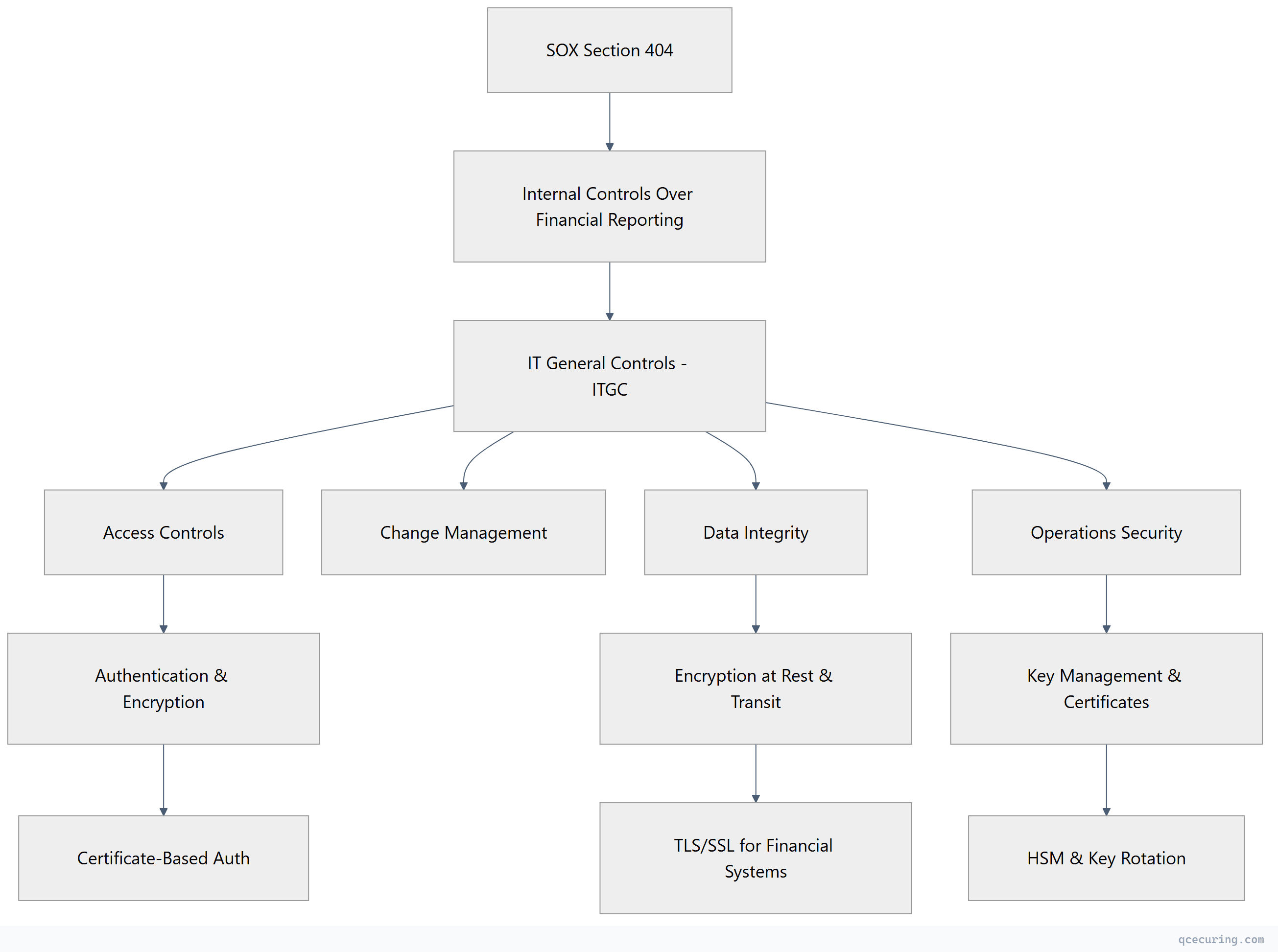
The 7 Cryptographic Controls SOX Auditors Check
1. Encryption of Financial Data in Transit
Every system that transmits financial data must use encrypted channels. This includes:
- Database connections (ERP → reporting tools)
- API calls between financial systems
- File transfers (bank feeds, payment files, reconciliation data)
- Email containing financial information
- Remote access to financial applications
What auditors look for:
- TLS 1.2 or 1.3 on all financial system connections
- No plaintext protocols (FTP, HTTP, Telnet) touching financial data
- Certificate validity and proper chain configuration
- Cipher suite configuration (no weak ciphers)
Evidence to produce:
# Show TLS configuration for financial system
openssl s_client -connect erp.company.com:443 -servername erp.company.com

# Verify no weak protocols
openssl s_client -connect erp.company.com:443 -tls1 2>/dev/null
# Should FAIL (TLS 1.0 disabled)

# Show cipher suite configuration
openssl s_client -connect erp.company.com:443 -cipher 'RC4:DES:3DES' 2>/dev/null
# Should FAIL (weak ciphers disabled)
2. Encryption of Financial Data at Rest
Stored financial data must be encrypted. This covers:
- Database encryption (TDE or column-level)
- File system encryption for financial documents
- Backup encryption
- Archive encryption
What auditors look for:
- Transparent Data Encryption (TDE) enabled on financial databases
- Encryption key management procedures documented
- Key rotation evidence (annual minimum)
- Backup media encryption
Evidence to produce:
-- SQL Server: Verify TDE is enabled
SELECT db.name, db.is_encrypted, dm.encryption_state
FROM sys.databases db
LEFT JOIN sys.dm_database_encryption_keys dm ON db.database_id = dm.database_id
WHERE db.name IN ('FinanceDB', 'GeneralLedger', 'AccountsPayable');
3. Certificate Management for Financial Systems
Certificates authenticate financial systems and protect data flows. Unmanaged certificates create control gaps:
- Expired certificates = potential data exposure window
- Self-signed certificates on financial systems = no trust verification
- Shared certificates across environments = control boundary violation
What auditors look for:
- Certificate inventory for all financial systems
- Renewal process documented and followed
- No expired certificates on production financial systems
- Separation between production and non-production certificates
- Certificate monitoring with alerting
Evidence to produce:
- Certificate inventory report (all certs on financial systems with expiry dates)
- Renewal tickets/records showing timely renewal
- Monitoring dashboard showing alert configuration
- Policy document defining certificate standards
4. Key Management Procedures
Cryptographic keys protecting financial data must be governed:
- Key generation using approved methods (FIPS-validated where applicable)
- Key storage in hardware (HSM) or approved key management systems
- Key rotation on defined schedules
- Key destruction procedures when no longer needed
- Separation of duties (no single person controls all keys)
What auditors look for:
- Key management policy document
- Evidence of key rotation (logs, tickets)
- HSM or KMS usage for high-value keys
- Dual control / split knowledge for master keys
- Key destruction records
5. Access Control with Cryptographic Authentication
Access to financial systems must use strong authentication:
- Multi-factor authentication for privileged access
- Certificate-based authentication for service accounts
- SSH key management for system access
- No shared credentials or static API keys
What auditors look for:
- MFA enforcement evidence (policy + technical control)
- Service account authentication method (certificates preferred over passwords)
- SSH key inventory and rotation records
- Privileged access management (PAM) integration
6. Change Management for Cryptographic Infrastructure
Changes to encryption, certificates, or keys must follow change management:
- Certificate renewals tracked as changes
- Cipher suite modifications approved and documented
- Key rotation events logged
- Algorithm changes (e.g., SHA-1 → SHA-256 migration) planned and approved
What auditors look for:
- Change tickets for certificate operations
- Approval records for cryptographic changes
- Rollback procedures documented
- Post-change verification evidence
7. Monitoring and Incident Response
Cryptographic failures must be detected and responded to:
- Certificate expiry monitoring with alerting
- Failed authentication attempt logging
- Encryption failure detection
- Incident response procedures for key compromise
What auditors look for:
- Monitoring tool configuration (screenshots, alert rules)
- Alert history showing response within SLA
- Incident response plan covering cryptographic events
- Tabletop exercise records
SOX vs Other Frameworks: Cryptographic Requirements Compared
| Control Area | SOX (ITGC) | PCI DSS 4.0 | HIPAA | SOC 2 |
|---|---|---|---|---|
| Encryption in transit | Required (implied) | Explicit (Req 4) | Addressable | Required (CC6.7) |
| Encryption at rest | Required (implied) | Explicit (Req 3) | Addressable | Required (CC6.1) |
| Key management | Required (implied) | Explicit (Req 3.5-3.7) | Addressable | Required (CC6.1) |
| Certificate management | Required (implied) | Not explicit | Not explicit | Required (CC6.6) |
| Algorithm standards | Not specified | Explicit (strong crypto) | Not specified | Not specified |
| Key rotation | Required (implied) | Explicit (annual) | Not specified | Required |
| HSM usage | Not required | Required for PIN keys | Not required | Not required |
| Audit logging | Required | Required | Required | Required |
Key insight: SOX is less prescriptive than PCI DSS about specific algorithms or key lengths. But auditors apply “reasonable” standards — which in practice means following NIST guidelines.
Building Your SOX Cryptographic Control Framework
Step 1: Identify Financial Systems
Map every system that processes, stores, or transmits financial data:
- ERP (SAP, Oracle, NetSuite, Dynamics)
- General ledger
- Accounts payable/receivable
- Payroll systems
- Banking interfaces (SWIFT, ACH, wire)
- Financial reporting tools (Hyperion, Workiva)
- Tax systems
- Expense management
- Procurement systems
Step 2: Map Data Flows
For each system, document:
- What financial data flows in/out
- What protocol is used (HTTPS, SFTP, database connection)
- What encryption protects it
- What certificates are involved
- Who manages the keys
Step 3: Implement Controls
| Control | Implementation | Evidence |
|---|---|---|
| TLS everywhere | Enforce TLS 1.2+ on all financial system connections | TLS scan reports, configuration screenshots |
| Database encryption | Enable TDE on all financial databases | Database encryption status queries |
| Certificate management | Deploy CLM platform, configure monitoring | Certificate inventory, renewal logs |
| Key rotation | Define rotation schedule, automate where possible | Rotation tickets, KMS audit logs |
| Access control | MFA + certificate-based auth for privileged access | IAM configuration, access reviews |
| Change management | Route all crypto changes through ITSM | Change tickets with approvals |
| Monitoring | Certificate expiry alerts, failed auth alerts | Alert configuration, response records |
Step 4: Produce Audit Evidence
Your auditor needs:
- Policy documents — Cryptographic standards policy, key management policy, certificate management policy
- Technical evidence — Configuration screenshots, scan reports, TLS test results
- Operational evidence — Renewal tickets, rotation logs, alert response records
- Management attestation — Quarterly reviews showing controls are operating effectively
Common SOX Audit Findings (Cryptographic)
| Finding | Risk Level | Remediation |
|---|---|---|
| Expired certificates on financial systems | High | Implement CLM with automated renewal |
| TLS 1.0/1.1 still enabled | High | Disable legacy protocols, enforce TLS 1.2+ |
| No certificate inventory | High | Deploy certificate discovery and scanning |
| Shared service account passwords (no certificates) | High | Migrate to certificate-based service auth |
| No key rotation evidence | Medium | Implement automated rotation with audit trail |
| Self-signed certificates in production | Medium | Replace with CA-issued certificates |
| No monitoring for certificate expiry | Medium | Deploy monitoring with alerting |
| Encryption keys stored in application config | High | Migrate to HSM or KMS |
| No change management for certificate renewals | Medium | Integrate cert ops with ITSM |
| Weak cipher suites (RC4, 3DES) | Medium | Update cipher configuration |
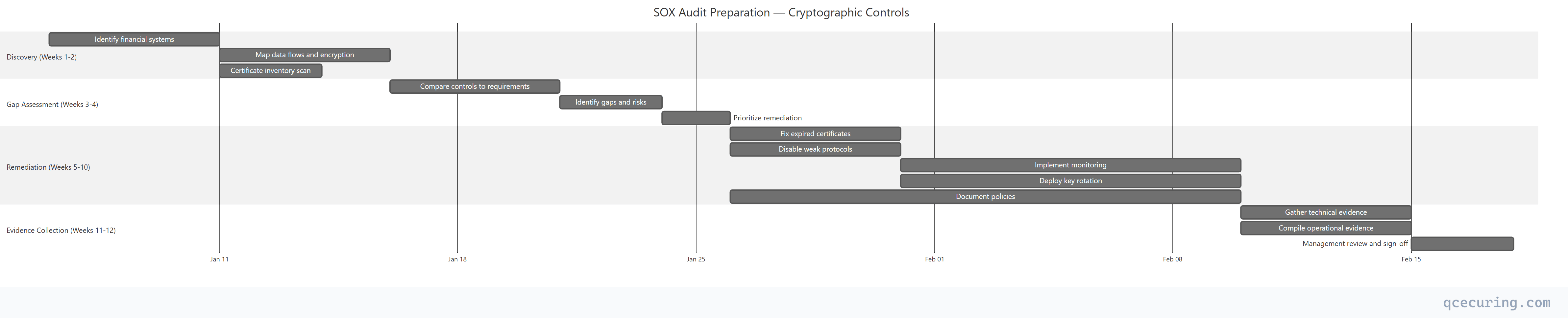
SOX Audit Timeline: Crypto Preparation
Automation: Reducing SOX Compliance Cost
Manual SOX compliance for cryptographic controls is expensive:
- Certificate inventory: 2-3 days per quarter (manual scanning)
- Renewal tracking: Ongoing spreadsheet maintenance
- Evidence collection: 1-2 weeks before each audit
- Key rotation: Manual procedures with high error risk
Automated certificate lifecycle management reduces this to:
- Certificate inventory: Continuous, real-time (zero manual effort)
- Renewal tracking: Automated with alerting (zero missed renewals)
- Evidence collection: One-click audit reports
- Key rotation: Policy-driven automation with full audit trail
Organizations using CLM platforms report 80% reduction in audit preparation time for cryptographic controls.
FAQ
Q: Does SOX explicitly require encryption?
No. SOX doesn’t mention encryption, TLS, or any specific technology. But Section 404 requires effective internal controls over financial reporting. In 2026, transmitting or storing financial data without encryption would be considered a control deficiency by any reasonable auditor.
Q: What encryption standard does SOX require?
SOX doesn’t specify. In practice, auditors expect alignment with NIST guidelines: AES-256 for data at rest, TLS 1.2+ for data in transit, RSA 2048+ or ECC P-256+ for certificates. Following NIST SP 800-131A transition recommendations satisfies most auditors.
Q: Is a certificate outage a SOX violation?
Potentially. If an expired certificate causes a financial system to become unavailable or forces a fallback to an unencrypted connection, that’s a control failure. If it affects the integrity or availability of financial reporting, it could be a material weakness or significant deficiency.
Q: Do we need an HSM for SOX compliance?
Not explicitly required. But if your encryption keys protect financial data and are stored in application configuration files or on disk without protection, auditors will flag it. HSM or cloud KMS (AWS KMS, Azure Key Vault) demonstrates proper key protection.
Q: How often must we rotate encryption keys for SOX?
SOX doesn’t specify a rotation frequency. Industry practice is annual rotation for data encryption keys, with more frequent rotation for high-risk keys. Document your rotation policy and follow it consistently — auditors care more about consistency than frequency.
Q: Does SOX apply to private companies?
SOX primarily applies to publicly traded companies registered with the SEC. However, private companies preparing for IPO, those with public debt, and subsidiaries of public companies often adopt SOX controls proactively. Many private companies also adopt SOX-like controls for SOC 2 compliance.
Related Reading: