
You’ve seen the padlock icon in your browser. You’ve run openssl x509 -text and been hit with a wall of output. But do you actually know what each field in an X.509 certificate means, why it’s there, and what breaks when it’s wrong?
X.509 is the ITU-T standard (defined in RFC 5280) that specifies the format of public key certificates used in TLS, code signing, email encryption, and every PKI system on the planet. Every certificate you’ve ever encountered follows this structure. Here’s what’s inside.
Certificate Structure Overview
An X.509v3 certificate contains three main sections:
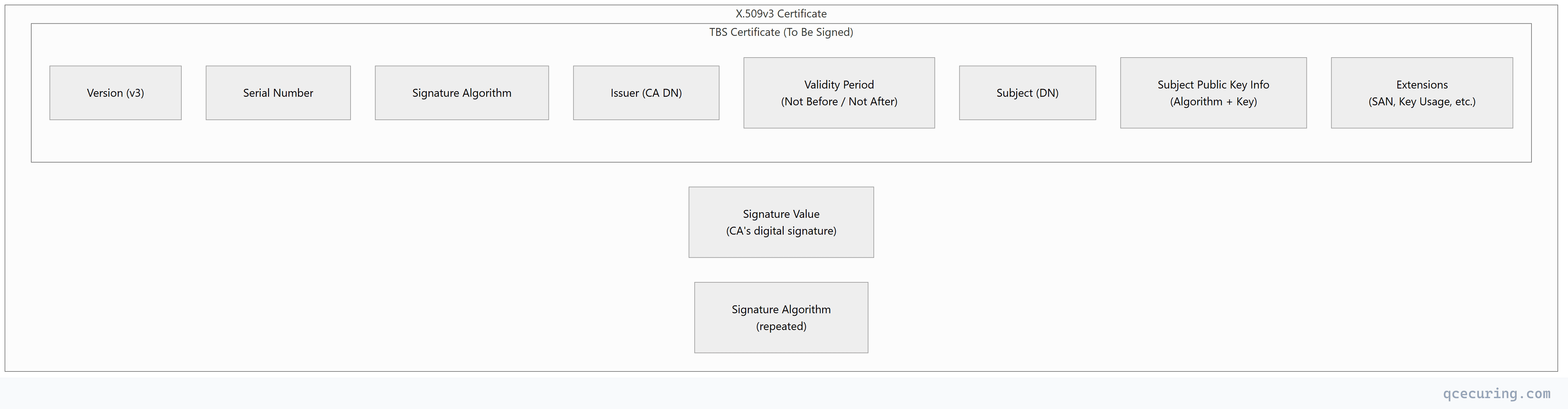
The CA signs the entire “TBS Certificate” block. If any field is modified after signing, the signature becomes invalid — that’s how certificate integrity works.
Core Fields
Version
Version: 3 (0x2)Almost every certificate in use today is v3 (the value 0x2 because versioning is zero-indexed). Version 3 added extensions — without them, you can’t have SANs, Key Usage, or any modern PKI feature.
| Version | Extensions | Usage |
|---|---|---|
| v1 | No | Obsolete — never issue these |
| v2 | No (added issuer/subject unique IDs) | Obsolete |
| v3 | Yes | Everything since ~2000 |
Serial Number
Serial Number: 04:e3:a5:b8:c2:9f:7d:01:a4:56:78:9b:cd:ef:12:34A unique identifier assigned by the CA. Every certificate issued by a given CA must have a unique serial number. It’s used for:
- CRL entries — revocation lists reference certificates by serial number
- OCSP queries — “Is serial X from issuer Y revoked?”
- CT logs — Certificate Transparency indexes by serial + issuer
Requirements:
- Must be unique per CA (RFC 5280)
- Must be a positive integer
- Should be at least 64 bits of entropy (CA/Browser Forum Baseline Requirements)
- Maximum 20 octets
What goes wrong: Some legacy CAs used sequential serial numbers (1, 2, 3…) which made them predictable. Modern CAs use random serial numbers to prevent collision attacks.
Signature Algorithm
Signature Algorithm: sha256WithRSAEncryptionAppears twice in the certificate — once in the TBS section (what the CA intended to use) and once outside (what was actually used). They must match. This field tells validators which algorithm to use when verifying the CA’s signature.
| Algorithm | OID | Status (2026) |
|---|---|---|
sha256WithRSAEncryption | 1.2.840.113549.1.1.11 | Standard |
sha384WithRSAEncryption | 1.2.840.113549.1.1.12 | Recommended for high-security |
sha512WithRSAEncryption | 1.2.840.113549.1.1.13 | Acceptable |
ecdsa-with-SHA256 | 1.2.840.10045.4.3.2 | Preferred (smaller, faster) |
ecdsa-with-SHA384 | 1.2.840.10045.4.3.3 | Preferred for P-384 keys |
sha1WithRSAEncryption | 1.2.840.113549.1.1.5 | REJECTED — browsers distrust |
Issuer
Issuer: C=US, O=Let's Encrypt, CN=R3The Distinguished Name (DN) of the CA that signed this certificate. This field is how the client finds the next certificate in the chain during validation.
Components (RDN attributes):
| Attribute | OID | Example | Required |
|---|---|---|---|
| CN (Common Name) | 2.5.4.3 | R3 | Yes |
| O (Organization) | 2.5.4.10 | Let's Encrypt | Recommended |
| OU (Org Unit) | 2.5.4.11 | Certificate Services | Deprecated by CA/B Forum |
| C (Country) | 2.5.4.6 | US | Recommended |
| ST (State) | 2.5.4.8 | California | Optional |
| L (Locality) | 2.5.4.7 | San Francisco | Optional |
Validity Period
Not Before: May 11 00:00:00 2026 GMT
Not After : Aug  9 23:59:59 2026 GMT
The time window during which the certificate is valid. Clients reject certificates outside this window.
Current trends:
- Public TLS certificates: 90 days (Let’s Encrypt) → moving to 47 days (Apple/Google proposal)
- Internal certificates: 1-2 years typical
- CA certificates: 5-20 years
- Code signing: 1-3 years
Gotcha: Time synchronization matters. If a client’s clock is wrong by even a few minutes, it may reject a valid certificate as “not yet valid” or “expired.” NTP failures cause certificate validation failures.
Subject
Subject: CN=api.example.comThe entity the certificate identifies. For TLS server certificates, this historically contained the domain name in the CN field. Modern practice: the CN is informational only — actual hostname matching uses the SAN extension.
CA/Browser Forum rules (since 2012):
- Clients MUST use SAN for hostname matching
- CN is only checked if SAN is absent (legacy fallback)
- New certificates SHOULD include the CN value in the SAN as well
Subject Public Key Info
Subject Public Key Info:
    Public Key Algorithm: rsaEncryption
        RSA Public-Key: (2048 bit)
        Modulus: 00:b5:a8:...
        Exponent: 65537 (0x10001)
Contains the public key that corresponds to the private key held by the certificate subject. This is what clients use to:
- Verify signatures made by the subject
- Encrypt data that only the subject can decrypt
- Perform key exchange (ECDHE with the server’s key)
| Algorithm | Key Info Shown | Typical Sizes |
|---|---|---|
| RSA | Modulus + Exponent | 2048, 3072, 4096 bits |
| ECDSA | Curve name + Public point | P-256, P-384 |
| Ed25519 | Public key (32 bytes) | Fixed 256 bits |
Extensions (The Important Part)
Extensions are what make X.509v3 certificates useful. Each extension has:
- OID — unique identifier
- Critical flag — if
true, clients MUST understand it or reject the certificate - Value — the extension data
Subject Alternative Name (SAN)
X509v3 Subject Alternative Name:
    DNS:api.example.com, DNS:*.example.com, DNS:www.example.com
The most important extension for TLS certificates. This is where hostname matching actually happens. A certificate without a SAN is useless for HTTPS in modern browsers.
SAN types:
| Type | Example | Use Case |
|---|---|---|
| DNS | api.example.com | Standard domain matching |
| DNS (wildcard) | *.example.com | Matches one subdomain level |
| IP | 192.168.1.100 | Direct IP access (internal) |
| Email (rfc822) | user@example.com | S/MIME email certificates |
| URI | spiffe://cluster.local/ns/prod/sa/api | SPIFFE workload identity |
Wildcard rules:
*.example.commatchesapi.example.combut NOTexample.comitself*.example.comdoes NOT matchsub.api.example.com(only one level)- You cannot have
*.*example.comor*.com - Include both
example.comand*.example.comin the SAN for full coverage
Key Usage
X509v3 Key Usage: critical
    Digital Signature, Key Encipherment
Restricts what the public key can be used for. This is marked critical — clients must enforce it.
| Bit | Name | Used For |
|---|---|---|
| 0 | Digital Signature | TLS handshake (ECDHE), code signing |
| 1 | Non-Repudiation | Document signing (rare) |
| 2 | Key Encipherment | RSA key exchange (legacy TLS) |
| 3 | Data Encipherment | Direct data encryption (rare) |
| 4 | Key Agreement | DH/ECDH key agreement |
| 5 | Key Cert Sign | CA certificates only — signs other certs |
| 6 | CRL Sign | CA certificates only — signs CRLs |
| 7 | Encipher Only | With Key Agreement |
| 8 | Decipher Only | With Key Agreement |
Common combinations:
| Certificate Type | Key Usage |
|---|---|
| TLS server (RSA) | Digital Signature, Key Encipherment |
| TLS server (ECDSA) | Digital Signature |
| CA certificate | Key Cert Sign, CRL Sign |
| Code signing | Digital Signature |
| S/MIME (sign + encrypt) | Digital Signature, Key Encipherment |
Extended Key Usage (EKU)
X509v3 Extended Key Usage:
    TLS Web Server Authentication, TLS Web Client Authentication
Further restricts the certificate’s purpose beyond Key Usage. Not marked critical in most certificates, but clients enforce it anyway.
| OID | Name | Purpose |
|---|---|---|
| 1.3.6.1.5.5.7.3.1 | Server Authentication | TLS server certificate |
| 1.3.6.1.5.5.7.3.2 | Client Authentication | mTLS client certificate |
| 1.3.6.1.5.5.7.3.3 | Code Signing | Sign executables |
| 1.3.6.1.5.5.7.3.4 | Email Protection | S/MIME |
| 1.3.6.1.5.5.7.3.8 | Time Stamping | Trusted timestamps |
| 1.3.6.1.5.5.7.3.9 | OCSP Signing | OCSP responder |
| 1.3.6.1.4.311.20.2.2 | Smart Card Logon | Windows smart card auth |
| 1.3.6.1.5.2.3.5 | KDC Authentication | Domain controller |
What goes wrong: A certificate with only “Server Authentication” EKU cannot be used for mTLS client auth. A code signing certificate cannot be used for TLS. Mismatched EKU is a common cause of “certificate not valid for requested usage” errors.
Basic Constraints
X509v3 Basic Constraints: critical
    CA:TRUE, pathlen:0
Identifies whether the certificate is a CA certificate (can sign other certificates) or an end-entity certificate.
| Value | Meaning |
|---|---|
CA:FALSE | End-entity certificate (server, client, code signing) |
CA:TRUE | Certificate Authority — can issue certificates |
CA:TRUE, pathlen:0 | CA that can only sign end-entity certs (not sub-CAs) |
CA:TRUE, pathlen:1 | CA that can sign one level of sub-CAs |
Security critical: If a leaf certificate has CA:TRUE (or missing Basic Constraints), it could theoretically be used to sign fraudulent certificates. This was the basis of several real-world attacks before browsers started enforcing this strictly.
Authority Information Access (AIA)
Authority Information Access:
    OCSP - URI:http://ocsp.letsencrypt.org
    CA Issuers - URI:http://cert.int-x3.letsencrypt.org/
Tells clients where to find:
- OCSP responder — for real-time revocation checking
- CA Issuers — URL to download the issuing CA’s certificate (chain building)
CRL Distribution Points (CDP)
X509v3 CRL Distribution Points:
    Full Name:
        URI:http://crl.example.com/issuing-ca.crl
URL where clients can download the Certificate Revocation List to check if this certificate has been revoked.
Subject Key Identifier (SKI) & Authority Key Identifier (AKI)
X509v3 Subject Key Identifier:
    A8:4A:6A:63:04:7D:DD:BA:E6:D1:39:B7:A6:45:65:EF:F3:A8:EC:A1

X509v3 Authority Key Identifier:
    keyid:14:2E:B3:17:B7:58:56:CB:AE:50:09:40:E6:1F:AF:9D:8B:14:C2:C6
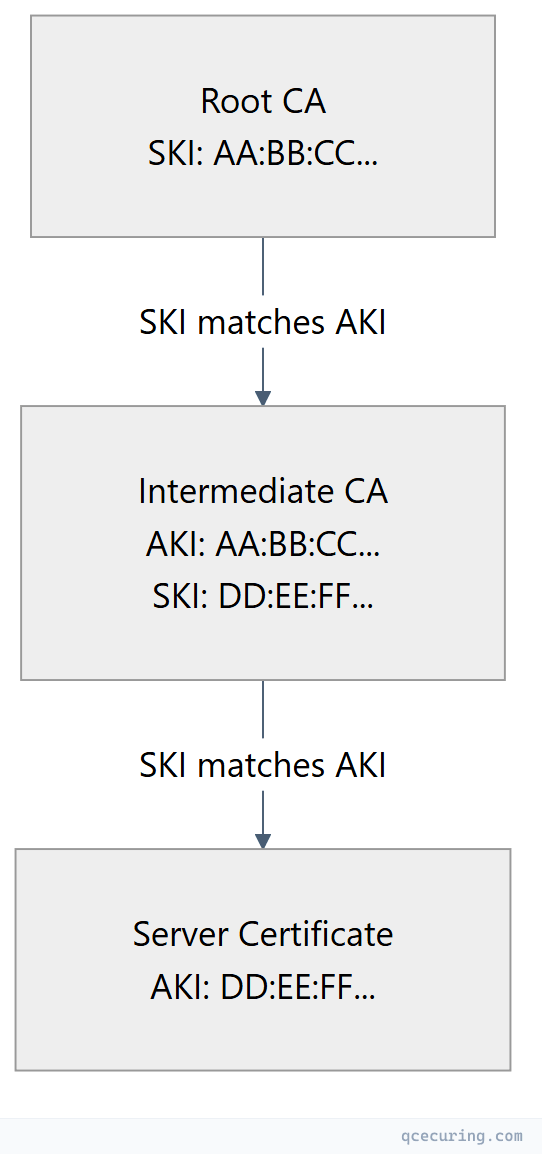
Used for chain building. The AKI in a certificate matches the SKI of its issuer. This is how clients link certificates together into a chain without relying solely on subject/issuer DN matching.
Certificate Policies
X509v3 Certificate Policies:
    Policy: 2.23.140.1.2.1 (Domain Validated)
    Policy: 1.3.6.1.4.1.44947.1.1.1
        CPS: http://cps.letsencrypt.org
Indicates the policy under which the certificate was issued:
| OID | Validation Level |
|---|---|
| 2.23.140.1.2.1 | Domain Validated (DV) |
| 2.23.140.1.2.2 | Organization Validated (OV) |
| 2.23.140.1.1 | Extended Validation (EV) |
The Thumbprint (Fingerprint)
The thumbprint is NOT a field inside the certificate — it’s a hash computed over the entire DER-encoded certificate. It’s used as a unique identifier for a specific certificate.
# SHA-256 thumbprint (preferred)
openssl x509 -in cert.pem -noout -fingerprint -sha256
# SHA256 Fingerprint=A1:B2:C3:D4:E5:F6:...

# SHA-1 thumbprint (legacy — still used by Windows)
openssl x509 -in cert.pem -noout -fingerprint -sha1
Where thumbprints are used:
- Windows certificate store references (certificate pinning)
- IIS SSL bindings
- Azure App Service certificate selection
- Certificate pinning in mobile apps (deprecated practice)
- Identifying specific certificates in logs and monitoring
Decoding Certificates with OpenSSL
Full Certificate Decode
# Decode all fields from a PEM file
openssl x509 -in cert.pem -noout -text

# Decode from a live server
openssl s_client -connect api.example.com:443 -servername api.example.com 2>/dev/null | \
  openssl x509 -noout -text
Extract Specific Fields
# Subject and Issuer
openssl x509 -in cert.pem -noout -subject -issuer

# Validity dates
openssl x509 -in cert.pem -noout -dates

# Serial number
openssl x509 -in cert.pem -noout -serial

# SANs only
openssl x509 -in cert.pem -noout -ext subjectAltName

# Key usage
openssl x509 -in cert.pem -noout -ext keyUsage,extendedKeyUsage

# Public key details
openssl x509 -in cert.pem -noout -pubkey | openssl pkey -pubin -text -noout

# Check if certificate is a CA
openssl x509 -in cert.pem -noout -ext basicConstraints
Decode DER Format
# DER (binary) certificates need -inform der
openssl x509 -in cert.der -inform der -noout -text
Field-Level Troubleshooting
| Symptom | Field to Check | Common Cause |
|---|---|---|
| ”Hostname mismatch” | SAN | Domain not listed in SAN entries |
| ”Certificate not valid for requested usage” | EKU | Wrong Extended Key Usage for the operation |
| ”Unable to get local issuer certificate” | AKI / Issuer | Missing intermediate; AKI doesn’t match any cert in chain |
| ”Certificate has expired” | Validity (Not After) | Certificate past its expiry date |
| ”Certificate is not yet valid” | Validity (Not Before) | Clock skew or certificate deployed before activation |
| ”Self-signed certificate” | Issuer = Subject | Root CA not in trust store, or actually self-signed |
| ”Certificate signature failure” | Signature Algorithm | Corrupted cert, or algorithm not supported by client |
| ”Path length constraint exceeded” | Basic Constraints (pathlen) | Too many intermediate CAs in chain |
| ”Key too small” | Subject Public Key Info | RSA < 2048 bits rejected by modern clients |
FAQ
Q: What’s the difference between the serial number and the thumbprint?
The serial number is assigned by the CA and stored inside the certificate. It’s unique per CA but not globally unique. The thumbprint is a hash computed over the entire certificate — it’s globally unique and computed by the client, not stored in the certificate itself. Use serial + issuer for revocation queries; use thumbprint for pinning or identifying a specific certificate.
Q: Why do some certificates have an empty Subject field?
RFC 5280 allows an empty Subject if the SAN extension is present and marked critical. Let’s Encrypt and other modern CAs still include a CN in the Subject for compatibility, but technically only the SAN matters for hostname validation.
Q: Can a certificate have multiple key usages?
Yes. Key Usage bits are combined — a TLS server certificate typically has both “Digital Signature” and “Key Encipherment.” A CA certificate has “Key Cert Sign” and “CRL Sign.” The combination must match the certificate’s intended purpose.
Q: What does “critical” mean on an extension?
If an extension is marked critical, any client that doesn’t understand that extension MUST reject the certificate. Non-critical extensions can be ignored by clients that don’t support them. Key Usage and Basic Constraints are almost always critical. SAN is typically non-critical (for backward compatibility with very old clients).
Q: How do I check if a certificate supports a specific domain?
Check the SAN extension, not the Subject CN:
openssl x509 -in cert.pem -noout -ext subjectAltName
# Output: DNS:example.com, DNS:*.example.com, DNS:api.example.com
If the domain isn’t listed in the SAN, the certificate won’t work for that domain — regardless of what’s in the CN.
Q: What’s the maximum size of an X.509 certificate?
There’s no hard limit in the standard, but practical limits exist. Most certificates are 1-3 KB. Certificates with many SANs (100+ domains) or post-quantum signatures (ML-DSA) can reach 5-10 KB. Some TLS implementations have buffer limits around 16 KB for the entire certificate chain.
Related Reading: