
Active Directory Certificate Services has been the backbone of enterprise PKI since Windows Server 2003. Two decades later, it still issues the majority of internal certificates in Fortune 500 environments — domain controller certs, user authentication, Wi-Fi (802.1X), VPN, code signing, and device identity. Yet most AD CS deployments were set up by someone who clicked “Next” through a wizard ten years ago, and nobody has touched the architecture since.
This guide covers how AD CS should be designed — not just installed — for an enterprise that needs to scale, survive audits, and eventually migrate to modern alternatives.
AD CS Role Services
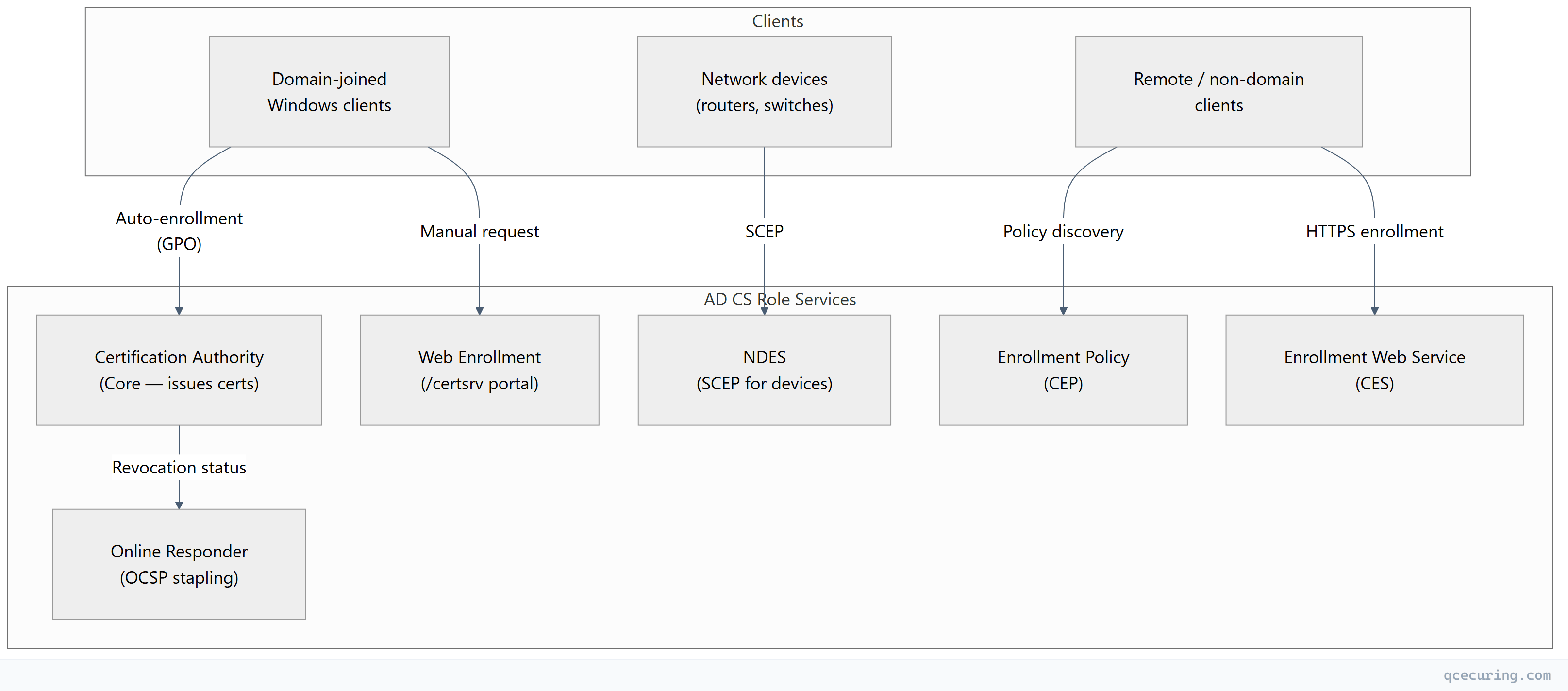
AD CS isn’t a single service. It’s a collection of role services that work together:
| Role Service | Purpose | Required? |
|---|---|---|
| Certification Authority (CA) | Issues and manages certificates | Yes |
| CA Web Enrollment | Browser-based certificate request portal (/certsrv) | Optional |
| Online Responder (OCSP) | Real-time certificate revocation checking | Recommended |
| Network Device Enrollment (NDES) | SCEP for routers, switches, MDM devices | If needed |
| Certificate Enrollment Policy (CEP) | Policy distribution for remote clients | For extranet |
| Certificate Enrollment Web Service (CES) | HTTPS-based enrollment for remote clients | For extranet |
Architecture Patterns
1-Tier Architecture (Don’t Do This in Production)
A single CA that is both root and issuer. The root CA private key is online and exposed to the network.
When it’s acceptable: Lab environments, proof-of-concept, isolated test networks.
Why it fails in production: If the single CA is compromised, your entire PKI is destroyed with no recovery path. You can’t rotate the root without re-issuing every certificate in the environment.
2-Tier Architecture (Standard Enterprise)
The recommended minimum for production:
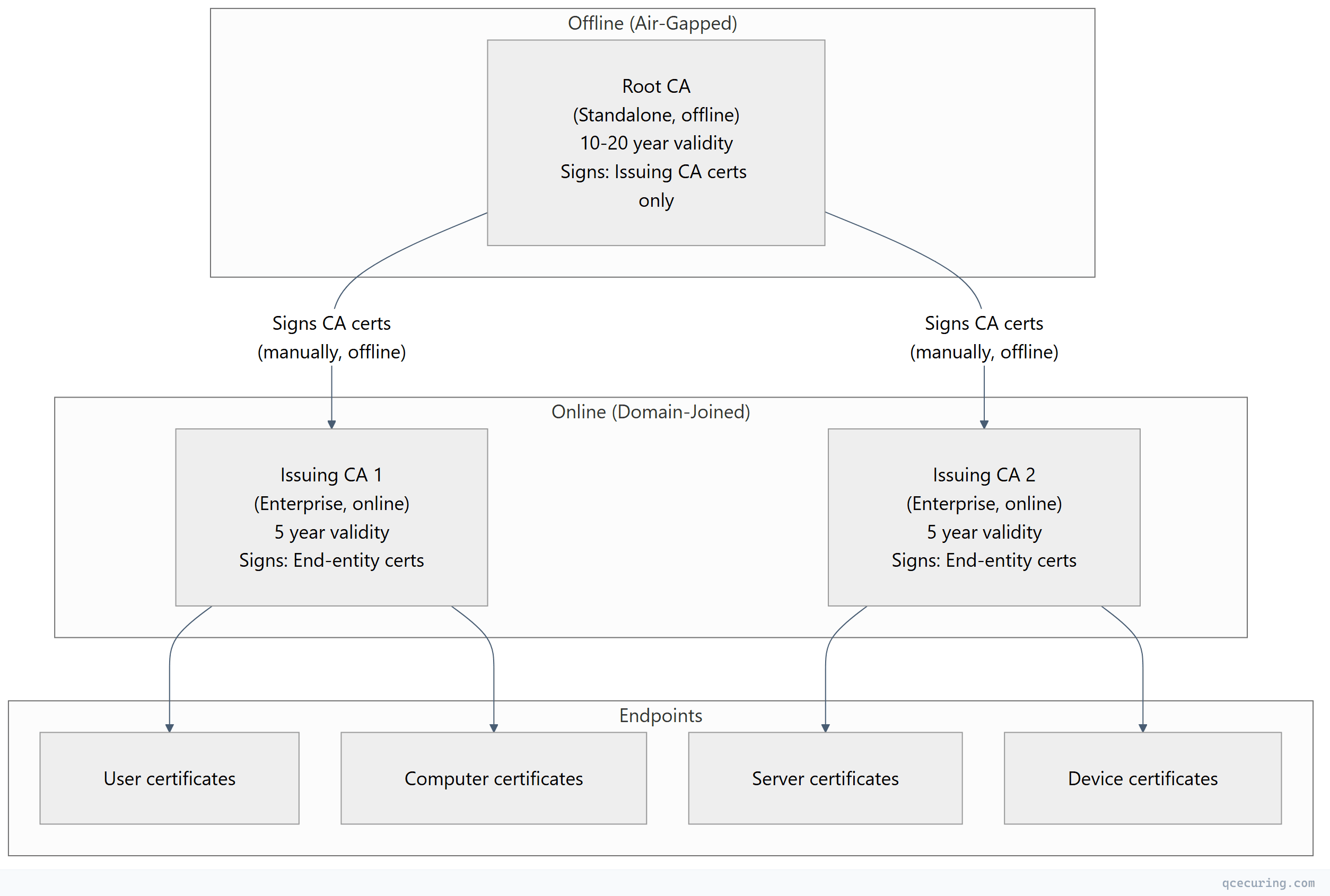
Design decisions:
| Decision | Recommendation | Rationale |
|---|---|---|
| Root CA OS | Windows Server Core (no GUI) | Minimal attack surface |
| Root CA domain membership | Standalone (NOT domain-joined) | Survives domain compromise |
| Root CA network | Air-gapped (no NIC) | Key never exposed to network |
| Root CA validity | 20 years | Outlives multiple issuing CA generations |
| Issuing CA validity | 5 years | Renewed from offline root |
| Issuing CA domain membership | Enterprise (domain-joined) | Required for auto-enrollment, templates |
| Number of issuing CAs | 2+ (for HA and separation) | One CA down doesn’t stop enrollment |
3-Tier Architecture (High-Security / Regulated)
Adds a Policy CA layer between root and issuing CAs:
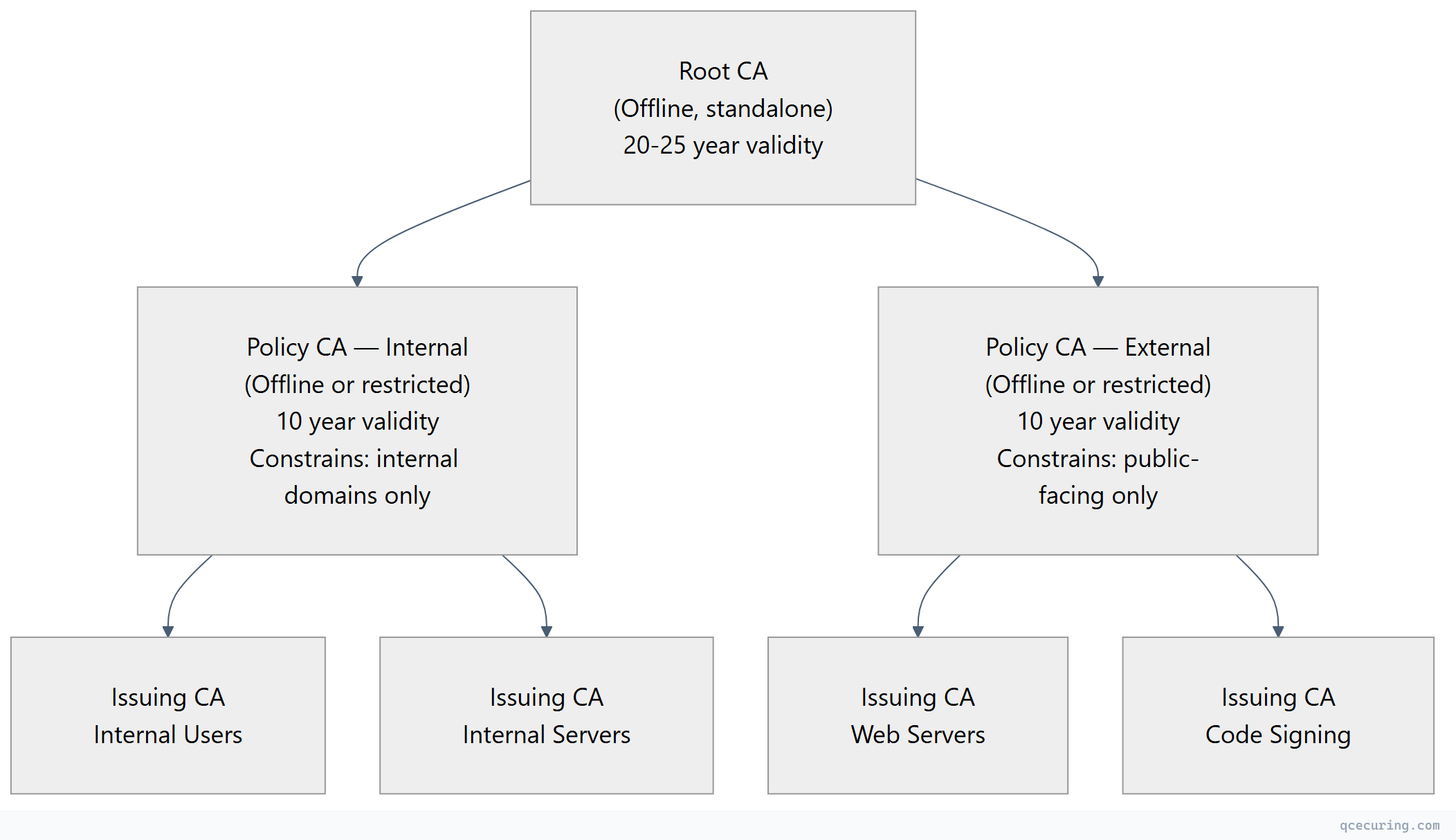
When to use 3-tier:
- Government / defense (FISMA, CNSA requirements)
- Financial services with strict separation of duties
- Organizations with multiple business units needing independent policy control
- Cross-certification with external PKI hierarchies
Offline Root CA Setup
The root CA is the trust anchor for your entire PKI. It must be protected accordingly.
Installation
# On a standalone (non-domain-joined) Windows Server Core
# Install CA role
Install-WindowsFeature -Name ADCS-Cert-Authority -IncludeManagementTools

# Configure as standalone root CA
Install-AdcsCertificationAuthority `
  -CAType StandaloneRootCA `
  -CACommonName "Contoso Root CA" `
  -KeyLength 4096 `
  -HashAlgorithmName SHA256 `
  -CryptoProviderName "RSA#Microsoft Software Key Storage Provider" `
  -ValidityPeriod Years `
  -ValidityPeriodUnits 20
Root CA Configuration
# Set CRL and AIA distribution points
# These URLs must be reachable by clients, even though the root CA is offline
# Publish CRL to a web server or AD

# Configure CRL publication interval (6 months for root — it's offline most of the time)
certutil -setreg CA\CRLPeriodUnits 6
certutil -setreg CA\CRLPeriod "Months"
certutil -setreg CA\CRLOverlapUnits 2
certutil -setreg CA\CRLOverlapPeriod "Weeks"

# Configure AIA (Authority Information Access)
# Remove default LDAP (root is not domain-joined)
certutil -setreg CA\CACertPublicationURLs "1:C:\Windows\system32\CertSrv\CertEnroll\%1_%3%4.crt\n2:http://pki.contoso.com/CertEnroll/%1_%3%4.crt"

# Configure CDP (CRL Distribution Point)
certutil -setreg CA\CRLPublicationURLs "1:C:\Windows\system32\CertSrv\CertEnroll\%3%8%9.crl\n2:http://pki.contoso.com/CertEnroll/%3%8%9.crl"

# Set maximum certificate validity the root CA will issue (for subordinate CAs)
certutil -setreg CA\ValidityPeriodUnits 10
certutil -setreg CA\ValidityPeriod "Years"

# Restart the CA service
Restart-Service certsvc

# Publish the initial CRL
certutil -CRL
Exporting Root CA Certificate and CRL
After configuring the root CA, export its certificate and CRL to distribute to the domain:
# Copy root CA cert and CRL to USB drive for transport to domain
# (Root CA has no network — use removable media)
Copy-Item "C:\Windows\system32\CertSrv\CertEnroll\*.crt" "D:\RootCA\"
Copy-Item "C:\Windows\system32\CertSrv\CertEnroll\*.crl" "D:\RootCA\"
On a domain-joined server, publish to AD and the web server:
# Publish root CA cert to AD (all domain machines will trust it)
certutil -dspublish -f "D:\RootCA\Contoso Root CA.crt" RootCA

# Publish root CRL to AD
certutil -dspublish -f "D:\RootCA\Contoso Root CA.crl"

# Copy to web server for HTTP CDP/AIA
Copy-Item "D:\RootCA\*" "\\pki-web\CertEnroll\"
Enterprise Issuing CA Setup
The issuing CA handles day-to-day certificate operations. It’s domain-joined and online.
Installation
# On a domain-joined Windows Server
Install-WindowsFeature -Name ADCS-Cert-Authority, ADCS-Web-Enrollment -IncludeManagementTools

# Generate CSR for the root CA to sign
Install-AdcsCertificationAuthority `
  -CAType EnterpriseSubordinateCA `
  -CACommonName "Contoso Issuing CA 01" `
  -KeyLength 4096 `
  -HashAlgorithmName SHA256 `
  -CryptoProviderName "RSA#Microsoft Software Key Storage Provider" `
  -OutputCertRequestFile "C:\IssuingCA-Request.req"
Sign the Issuing CA Certificate (On Root CA)
# Transport the .req file to the offline root CA via USB

# On the root CA — submit and issue the request
certreq -submit "D:\Requests\IssuingCA-Request.req"
# Note the Request ID (e.g., 2)

# Issue the certificate
certutil -resubmit 2

# Retrieve the signed certificate
certreq -retrieve 2 "D:\Signed\Contoso Issuing CA 01.crt"
Install the Signed Certificate
# Back on the issuing CA server — install the signed cert
certutil -installcert "D:\Signed\Contoso Issuing CA 01.crt"

# Start the CA service
Start-Service certsvc
Configure Issuing CA Settings
# Set CRL publication (daily for issuing CA — it's online)
certutil -setreg CA\CRLPeriodUnits 1
certutil -setreg CA\CRLPeriod "Days"
certutil -setreg CA\CRLOverlapUnits 8
certutil -setreg CA\CRLOverlapPeriod "Hours"

# Enable Delta CRLs (for large environments)
certutil -setreg CA\CRLDeltaPeriodUnits 12
certutil -setreg CA\CRLDeltaPeriod "Hours"

# Configure AIA and CDP
certutil -setreg CA\CACertPublicationURLs "1:C:\Windows\system32\CertSrv\CertEnroll\%1_%3%4.crt\n2:ldap:///CN=%7,CN=AIA,CN=Public Key Services,CN=Services,%6%11\n3:http://pki.contoso.com/CertEnroll/%1_%3%4.crt"

certutil -setreg CA\CRLPublicationURLs "1:C:\Windows\system32\CertSrv\CertEnroll\%3%8%9.crl\n6:ldap:///CN=%7%8,CN=%2,CN=CDP,CN=Public Key Services,CN=Services,%6%10\n2:http://pki.contoso.com/CertEnroll/%3%8%9.crl"

# Set maximum validity for issued certificates
certutil -setreg CA\ValidityPeriodUnits 2
certutil -setreg CA\ValidityPeriod "Years"

# Enable auditing
certutil -setreg CA\AuditFilter 127

# Restart
Restart-Service certsvc
certutil -CRL
Certificate Template Strategy
Templates define what certificates your CA issues. A well-designed template strategy prevents certificate sprawl and enforces security policy.
Template Versioning
| Version | Minimum CA OS | Key Features |
|---|---|---|
| V1 | Windows 2000 | Basic — no SANs, limited EKU control |
| V2 | Windows 2003 | Auto-enrollment, SANs, key archival |
| V3 | Windows 2008 | CNG providers, Suite B crypto |
| V4 | Windows 2012 | Key attestation, renewal with same key |
Always use V2 or higher. V1 templates can’t be modified and lack critical features.
Recommended Template Set
| Template | Purpose | Key Usage | Validity | Auto-Enroll |
|---|---|---|---|---|
| Workstation Auth | Computer identity (802.1X, IPsec) | Client Auth | 1 year | Yes |
| User Auth | User identity (smart card, Wi-Fi) | Client Auth + Smart Card Logon | 1 year | Yes |
| Web Server | Internal HTTPS services | Server Auth | 1 year | No |
| Domain Controller | DC authentication | Client Auth + Server Auth + KDC Auth | 1 year | Yes |
| OCSP Response Signing | Online Responder | OCSP Signing | 2 weeks | Yes |
| Code Signing | Internal code/script signing | Code Signing | 1 year | No |
| IPsec | VPN tunnel authentication | Client Auth + Server Auth | 2 years | No |
Template Security Best Practices
# View template permissions
Get-ADObject -SearchBase "CN=Certificate Templates,CN=Public Key Services,CN=Services,CN=Configuration,DC=contoso,DC=com" `
  -Filter { Name -eq "WebServer" } -Properties nTSecurityDescriptor |
  Select-Object -ExpandProperty nTSecurityDescriptor |
  Select-Object -ExpandProperty Access

# Key rules:
# 1. Only grant Enroll to groups that NEED the template
# 2. Never grant Enroll to "Authenticated Users" on sensitive templates
# 3. Use "Autoenroll" permission separately from "Enroll"
# 4. Require CA manager approval for high-value templates (code signing, CA certs)
Preventing ESC Vulnerabilities (AD CS Attacks)
AD CS misconfigurations are a top Active Directory attack vector. The “Certified Pre-Owned” research identified multiple escalation paths:
| Vulnerability | Misconfiguration | Fix |
|---|---|---|
| ESC1 | Template allows requestor to specify SAN + low-privilege enrollment | Remove “Supply in request” or restrict enrollment |
| ESC2 | Template with Any Purpose or no EKU + auto-enroll | Set specific EKUs, restrict enrollment |
| ESC3 | Certificate Request Agent template available to low-privilege users | Restrict enrollment to CA admins only |
| ESC4 | Low-privilege users can modify template ACL | Audit template permissions, remove write access |
| ESC6 | EDITF_ATTRIBUTESUBJECTALTNAME2 flag enabled on CA | Disable: certutil -setreg policy\EditFlags -EDITF_ATTRIBUTESUBJECTALTNAME2 |
| ESC7 | Low-privilege user has ManageCA or ManageCertificates on CA | Audit CA security, restrict to PKI admins |
| ESC8 | HTTP enrollment (CEP/CES/Web Enrollment) without HTTPS | Enforce HTTPS, disable HTTP bindings |
# Check for ESC6 (dangerous flag)
certutil -getreg policy\EditFlags
# If EDITF_ATTRIBUTESUBJECTALTNAME2 is set, disable it:
certutil -setreg policy\EditFlags -EDITF_ATTRIBUTESUBJECTALTNAME2
Restart-Service certsvc

# Audit all templates for ESC1 (SAN in request + broad enrollment)
Get-ADObject -SearchBase "CN=Certificate Templates,CN=Public Key Services,CN=Services,CN=Configuration,DC=contoso,DC=com" `
  -Filter * -Properties msPKI-Certificate-Name-Flag, msPKI-Enrollment-Flag |
  Where-Object { $_.'msPKI-Certificate-Name-Flag' -band 1 } |
  Select-Object Name
CRL Distribution Architecture
Certificate Revocation Lists must be accessible to every client that validates certificates. If CRL distribution fails, certificate validation fails — and depending on the application, connections either break or silently skip revocation checking.
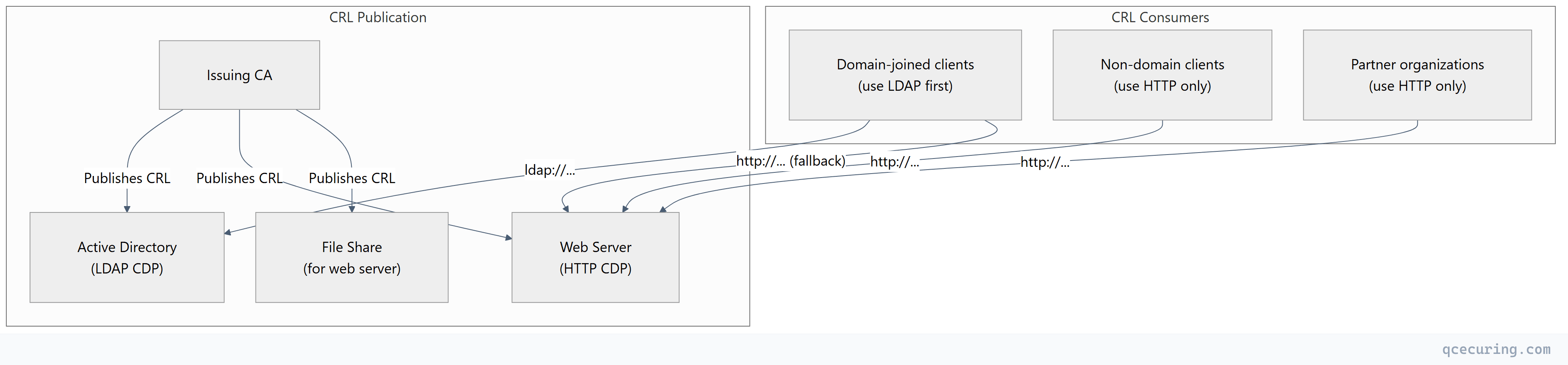
CDP priority order:
- LDAP — fastest for domain-joined clients (already connected to AD)
- HTTP — universal fallback, works for all clients
- File — never used by clients directly; used for publishing to the web server
High-Availability CRL Distribution
# Use a DNS alias (CNAME) for the HTTP CDP
# pki.contoso.com → load-balanced web servers

# IIS configuration for CRL hosting
# Enable double escaping (required for delta CRL filenames with '+')
Set-WebConfigurationProperty -Filter "/system.webServer/security/requestFiltering" `
  -PSPath "IIS:\Sites\PKI" -Name "allowDoubleEscaping" -Value $true

# Set appropriate cache headers (CRL validity = 1 day, cache for 12 hours)
Set-WebConfigurationProperty -Filter "/system.webServer/staticContent/clientCache" `
  -PSPath "IIS:\Sites\PKI" -Name "cacheControlMode" -Value "UseMaxAge"
Set-WebConfigurationProperty -Filter "/system.webServer/staticContent/clientCache" `
  -PSPath "IIS:\Sites\PKI" -Name "cacheControlMaxAge" -Value "12:00:00"
Auto-Enrollment Configuration
Auto-enrollment is AD CS’s killer feature — certificates are issued and renewed automatically via Group Policy without user or admin intervention.
GPO Configuration
# Create or edit a GPO linked to the target OU
# Computer Configuration → Policies → Windows Settings → Security Settings →
#   Public Key Policies → Certificate Services Client - Auto-Enrollment

# Settings:
#   Configuration Model: Enabled
#   ✓ Renew expired certificates, update pending certificates, remove revoked certificates
#   ✓ Update certificates that use certificate templates
Template Requirements for Auto-Enrollment
The template must have:
- Autoenroll permission granted to the target security group
- Enroll permission granted to the same group
- Template published on the issuing CA (
Add-CATemplate) - Subject built from AD (not “Supply in request”) for auto-enrollment
Verifying Auto-Enrollment
# Force Group Policy update
gpupdate /force

# Trigger certificate auto-enrollment manually
certutil -pulse

# Check enrolled certificates
certutil -store My

# Check auto-enrollment event log
Get-WinEvent -LogName "Application" -FilterXPath "*[System[Provider[@Name='Microsoft-Windows-CertificateServicesClient-AutoEnrollment']]]" |
  Select-Object -First 10 TimeCreated, Message
High Availability
Active-Passive CA Clustering (Legacy)
Windows Server Failover Clustering for the CA role:
- Both nodes share a storage volume for the CA database
- Only one node is active at a time
- Automatic failover if the active node fails
- Same CA name and certificates on both nodes
Active-Active with Multiple Issuing CAs (Recommended)
Instead of clustering, deploy multiple independent issuing CAs:
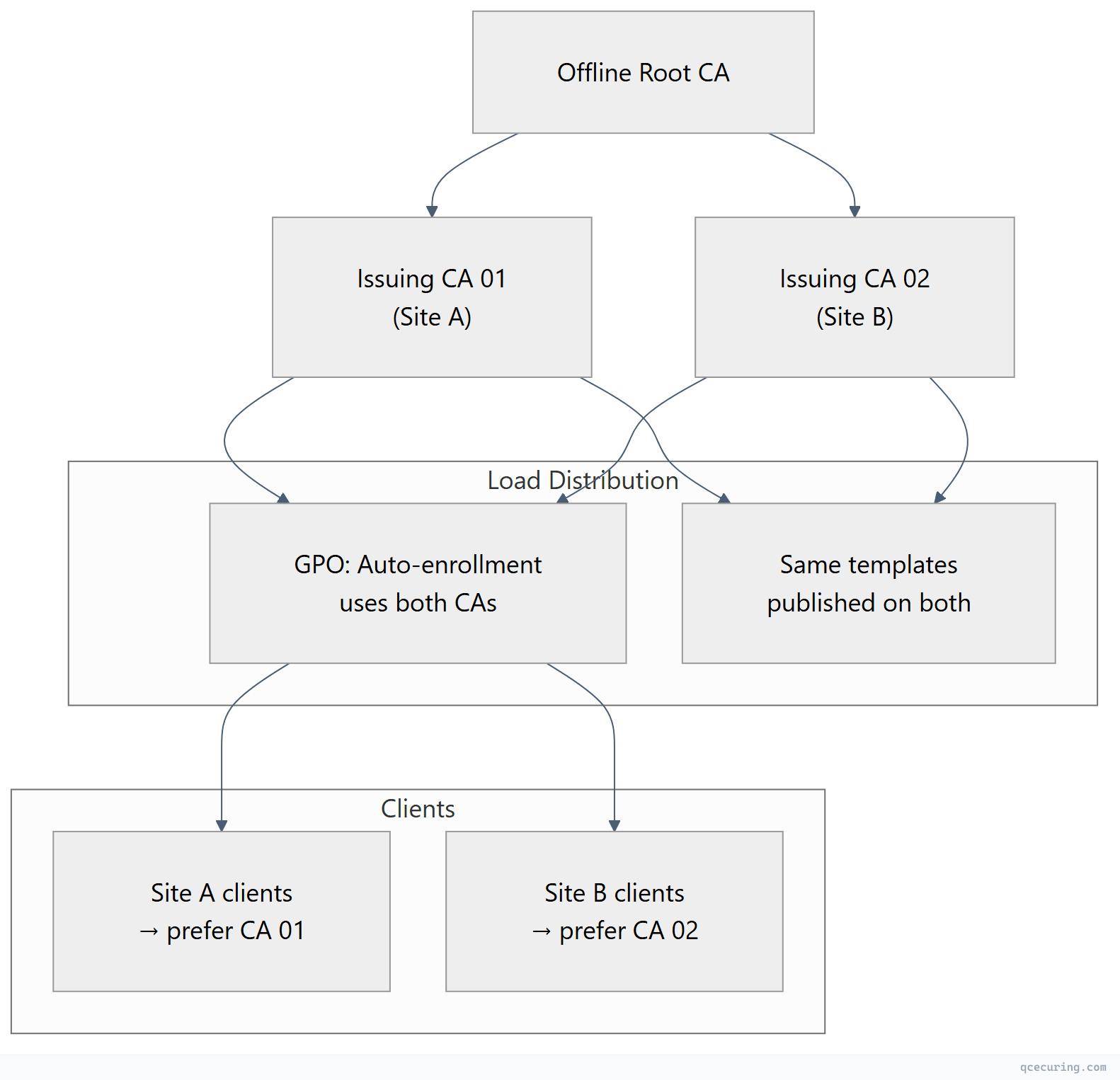
Advantages over clustering:
- No shared storage dependency
- Geographic distribution (CA per site)
- Independent maintenance windows
- If one CA is compromised, revoke only its cert — the other continues operating
Monitoring and Maintenance
Critical Monitoring Points
| What to Monitor | Alert Threshold | Impact if Missed |
|---|---|---|
| CA certificate expiry | 6 months before | All issued certs become untrusted |
| CRL publication | Failed publication | Clients can’t validate revocation |
| CRL expiry | 50% of CRL validity | Clients reject all certs from this CA |
| CA database size | >5GB or >100K certs | Performance degradation |
| Certificate template changes | Any modification | Potential security misconfiguration |
| Failed enrollment requests | >10/hour | Indicates misconfiguration or attack |
Maintenance Script
# ad-cs-health-check.ps1 — Run daily

# Check CA service status
$caStatus = Get-Service certsvc
if ($caStatus.Status -ne "Running") {
    Write-Warning "CA service is NOT running!"
}

# Check CA certificate validity
$caCert = Get-ChildItem Cert:\LocalMachine\My |
  Where-Object { $_.Extensions | Where-Object { $_.Oid.Value -eq "2.5.29.19" -and $_.CertificateAuthority } }
$daysToExpiry = ($caCert.NotAfter - (Get-Date)).Days
if ($daysToExpiry -lt 180) {
    Write-Warning "CA certificate expires in $daysToExpiry days!"
}

# Check CRL validity
$crlPath = "C:\Windows\system32\CertSrv\CertEnroll"
$crlFiles = Get-ChildItem "$crlPath\*.crl"
foreach ($crl in $crlFiles) {
    $crlInfo = certutil -dump $crl.FullName | Select-String "Next Update"
    Write-Output "CRL: $($crl.Name) — $crlInfo"
}

# Check for failed requests in the last 24 hours
$failedRequests = certutil -view -restrict "Disposition=31,Request.SubmittedWhen>=$(Get-Date).AddDays(-1)" -out "RequestID,CommonName,Disposition"
Write-Output "Failed requests (last 24h): $($failedRequests.Count)"

# Check database size
$dbPath = (certutil -getreg CA\DBDirectory).Value
$dbSize = (Get-Item "$dbPath\*.edb" | Measure-Object -Property Length -Sum).Sum / 1GB
Write-Output "CA database size: $([math]::Round($dbSize, 2)) GB"
Migration Considerations
AD CS isn’t going away tomorrow, but the industry is moving toward:
- Shorter certificate lifetimes (47-day TLS certs) that AD CS wasn’t designed for
- Cloud-native workloads that need certificates without domain-join
- ACME protocol support that AD CS lacks natively
- Post-quantum readiness that requires algorithm agility
Hybrid Approach
Most enterprises will run AD CS alongside modern solutions for years:
| Use Case | Keep on AD CS | Move to Modern |
|---|---|---|
| Domain controller certs | Yes | No |
| User smart card / Windows Hello | Yes | No |
| 802.1X (wired/wireless) | Yes | Maybe (RADIUS + modern CA) |
| Internal web servers | Transition | cert-manager, ACME |
| Kubernetes workloads | No | cert-manager + Vault |
| Public-facing TLS | No | Let’s Encrypt / commercial CA |
| IoT / network devices | NDES (limited) | Modern SCEP or EST |
FAQ
Q: Should I use an HSM for my AD CS private keys?
For the root CA — absolutely. The root key is the single most valuable cryptographic asset in your organization. For issuing CAs, an HSM is recommended for regulated environments (PCI DSS, HIPAA, government) but optional for others. The cost-benefit depends on your threat model and compliance requirements.
Q: How often should I bring the offline root CA online?
Only to sign new issuing CA certificates or publish a new CRL. With a 6-month CRL validity, that means twice a year minimum. Some organizations use 1-year CRL validity and only power on the root CA annually. Document the procedure — the person who set it up may not be around when it’s needed.
Q: Can I rename or move an AD CS CA after installation?
No. The CA name is embedded in every certificate it has ever issued, in CRL distribution points, and in Active Directory objects. Renaming requires building a new CA and migrating. This is why getting the naming convention right during initial design matters.
Q: What happens if my CRL expires and I can’t publish a new one?
Clients that perform hard-fail revocation checking (rare) will reject all certificates from that CA. Most Windows clients use soft-fail (if CRL is unreachable, assume certificate is valid) — which means expired CRLs create a security gap rather than an outage. Either way, fix it immediately.
Q: How do I decommission an old issuing CA?
- Stop issuing new certificates (remove all templates)
- Wait for all issued certificates to expire or be replaced
- Revoke the CA certificate from the root CA
- Publish a final CRL
- Remove the CA from AD (
certutil -dsdel) - Uninstall the role
- Keep backups of the CA database for the certificate retention period
Q: Is AD CS free?
The software is included with Windows Server licensing. But the operational cost is significant — dedicated servers, HSMs, offline root CA hardware, skilled PKI administrators, and ongoing maintenance. Many organizations underestimate the TCO, which is why managed CLM platforms that extend or replace AD CS are gaining adoption.
Related Reading: