
Apache HTTPD still powers roughly 30% of all websites. Despite the rise of Nginx and Caddy, Apache remains the default on RHEL, CentOS, and many enterprise Linux distributions. Getting TLS right on Apache means understanding mod_ssl directives, VirtualHost scoping, and the quirks that differ between Debian-based and Red Hat-based systems.
This guide covers everything from initial mod_ssl installation through production hardening — protocol selection, cipher suites, HSTS, OCSP stapling, Let’s Encrypt automation, SNI multi-site hosting, and mutual TLS. Every config block is copy-paste ready.
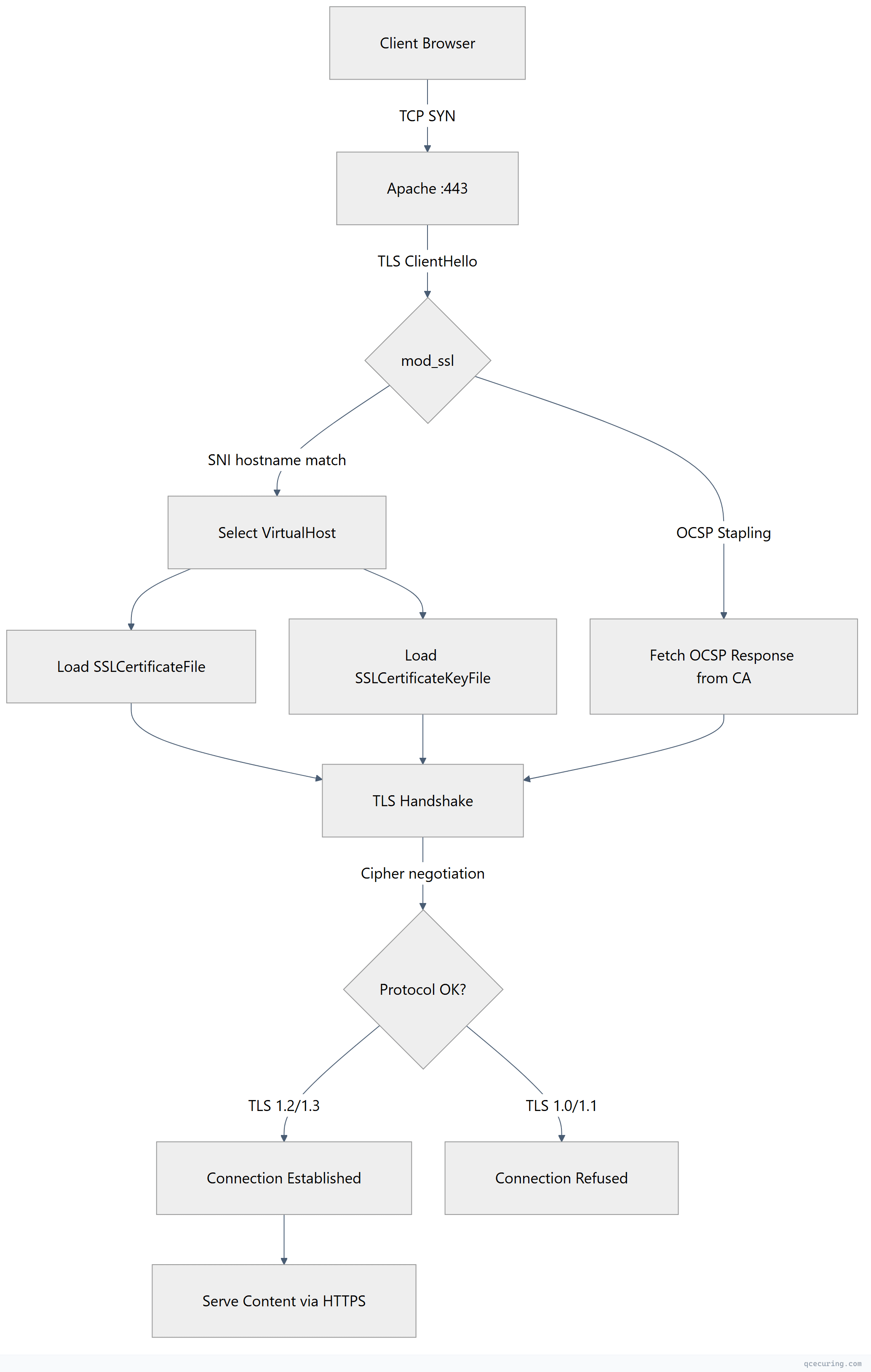
How Apache TLS Works: Request Flow
Installing mod_ssl
Ubuntu / Debian
sudo apt update
sudo apt install apache2
sudo a2enmod ssl
sudo a2enmod headers
sudo a2enmod rewrite
sudo systemctl restart apache2
RHEL / CentOS / Rocky Linux
sudo dnf install httpd mod_ssl
sudo systemctl enable httpd
sudo systemctl start httpd
On RHEL-based systems, mod_ssl installs a default config at /etc/httpd/conf.d/ssl.conf. You’ll want to replace its contents with a hardened configuration.
Basic HTTPS VirtualHost Configuration
Ubuntu/Debian — /etc/apache2/sites-available/example.com-ssl.conf
<VirtualHost *:443>
    ServerName example.com
    ServerAlias www.example.com
    DocumentRoot /var/www/example.com/public

    SSLEngine on
    SSLCertificateFile /etc/letsencrypt/live/example.com/fullchain.pem
    SSLCertificateKeyFile /etc/letsencrypt/live/example.com/privkey.pem

    # Protocol hardening
    SSLProtocol all -SSLv3 -TLSv1 -TLSv1.1
    SSLCipherSuite ECDHE-ECDSA-AES128-GCM-SHA256:ECDHE-RSA-AES128-GCM-SHA256:ECDHE-ECDSA-AES256-GCM-SHA384:ECDHE-RSA-AES256-GCM-SHA384:ECDHE-ECDSA-CHACHA20-POLY1305:ECDHE-RSA-CHACHA20-POLY1305
    SSLHonorCipherOrder on

    # HSTS
    Header always set Strict-Transport-Security "max-age=63072000; includeSubDomains; preload"

    # Security headers
    Header always set X-Content-Type-Options "nosniff"
    Header always set X-Frame-Options "DENY"
    Header always set Referrer-Policy "strict-origin-when-cross-origin"

    # Logging
    ErrorLog ${APACHE_LOG_DIR}/example.com-ssl-error.log
    CustomLog ${APACHE_LOG_DIR}/example.com-ssl-access.log combined
</VirtualHost>
Enable the site:
sudo a2ensite example.com-ssl.conf
sudo apachectl configtest
sudo systemctl reload apache2
RHEL/CentOS — /etc/httpd/conf.d/example.com-ssl.conf
<VirtualHost *:443>
    ServerName example.com
    ServerAlias www.example.com
    DocumentRoot /var/www/example.com/public

    SSLEngine on
    SSLCertificateFile /etc/pki/tls/certs/example.com.crt
    SSLCertificateKeyFile /etc/pki/tls/private/example.com.key
    SSLCertificateChainFile /etc/pki/tls/certs/example.com-chain.crt

    SSLProtocol all -SSLv3 -TLSv1 -TLSv1.1
    SSLCipherSuite ECDHE-ECDSA-AES128-GCM-SHA256:ECDHE-RSA-AES128-GCM-SHA256:ECDHE-ECDSA-AES256-GCM-SHA384:ECDHE-RSA-AES256-GCM-SHA384:ECDHE-ECDSA-CHACHA20-POLY1305:ECDHE-RSA-CHACHA20-POLY1305
    SSLHonorCipherOrder on

    Header always set Strict-Transport-Security "max-age=63072000; includeSubDomains; preload"
    Header always set X-Content-Type-Options "nosniff"
    Header always set X-Frame-Options "DENY"

    ErrorLog /var/log/httpd/example.com-ssl-error.log
    CustomLog /var/log/httpd/example.com-ssl-access.log combined
</VirtualHost>
Reload:
sudo apachectl configtest
sudo systemctl reload httpd
Certificate File Paths Explained
Apache uses three directives for certificate files:
| Directive | Purpose | Example Path |
|---|---|---|
SSLCertificateFile | Server certificate (or full chain in Apache 2.4.8+) | /etc/letsencrypt/live/domain/fullchain.pem |
SSLCertificateKeyFile | Private key | /etc/letsencrypt/live/domain/privkey.pem |
SSLCertificateChainFile | Intermediate CA certificates (deprecated in 2.4.8+) | /etc/pki/tls/certs/chain.crt |
Since Apache 2.4.8, you can include the full chain in SSLCertificateFile (leaf + intermediates concatenated). The separate SSLCertificateChainFile directive still works but is no longer required.
Protocol Hardening: Disable TLS 1.0 and 1.1
# Allow only TLS 1.2 and TLS 1.3
SSLProtocol all -SSLv3 -TLSv1 -TLSv1.1
For Apache 2.4.36+ with OpenSSL 1.1.1+, you can also set TLS 1.3 cipher suites separately:
SSLProtocol all -SSLv3 -TLSv1 -TLSv1.1
SSLCipherSuite ECDHE-ECDSA-AES128-GCM-SHA256:ECDHE-RSA-AES128-GCM-SHA256:ECDHE-ECDSA-AES256-GCM-SHA384:ECDHE-RSA-AES256-GCM-SHA384:ECDHE-ECDSA-CHACHA20-POLY1305:ECDHE-RSA-CHACHA20-POLY1305
SSLCipherSuite TLSv1.3 TLS_AES_256_GCM_SHA384:TLS_CHACHA20_POLY1305_SHA256:TLS_AES_128_GCM_SHA256
SSLHonorCipherOrder on
Verify your protocol configuration:
# Test TLS 1.0 (should fail)
openssl s_client -connect example.com:443 -tls1 2>&1 | grep -i "alert\|error"

# Test TLS 1.2 (should succeed)
openssl s_client -connect example.com:443 -tls1_2 -brief

# Test TLS 1.3 (should succeed)
openssl s_client -connect example.com:443 -tls1_3 -brief
OCSP Stapling
OCSP stapling eliminates the need for clients to contact the CA’s OCSP responder directly. Apache fetches and caches the OCSP response, then staples it to the TLS handshake.
# Global settings (in ssl.conf or global config)
SSLUseStapling on
SSLStaplingCache shmcb:/var/run/ocsp(128000)
SSLStaplingResponderTimeout 5
SSLStaplingReturnResponderErrors off

# Per-VirtualHost (optional — override CA responder URL)
SSLStaplingForceURL http://ocsp.example-ca.com
The SSLStaplingCache directive must be placed outside any <VirtualHost> block — it’s a global setting.
Verify OCSP stapling is working:
openssl s_client -connect example.com:443 -servername example.com -status 2>/dev/null | grep -A 5 "OCSP Response"Expected output:
OCSP Response Status: successful (0x0)HTTP to HTTPS Redirect
<VirtualHost *:80>
    ServerName example.com
    ServerAlias www.example.com

    RewriteEngine On
    RewriteCond %{HTTPS} off
    RewriteRule ^(.*)$ https://%{HTTP_HOST}%{REQUEST_URI} [L,R=301]
</VirtualHost>
Or the simpler approach without mod_rewrite:
<VirtualHost *:80>
    ServerName example.com
    ServerAlias www.example.com
    Redirect permanent / https://example.com/
</VirtualHost>
Let’s Encrypt with Certbot for Apache
Certbot has a dedicated Apache plugin that handles certificate installation and VirtualHost configuration automatically.
Installation
# Ubuntu/Debian
sudo apt install certbot python3-certbot-apache

# RHEL/CentOS
sudo dnf install certbot python3-certbot-apache
Obtain and Install Certificate
# Interactive — Certbot modifies your VirtualHost config
sudo certbot --apache -d example.com -d www.example.com

# Non-interactive (for automation)
sudo certbot --apache --non-interactive --agree-tos --email admin@example.com -d example.com -d www.example.com
Certificate-Only (No Apache Config Changes)
sudo certbot certonly --apache -d example.com -d www.example.comAuto-Renewal
Certbot installs a systemd timer or cron job automatically. Verify:
sudo certbot renew --dry-runCheck the timer:
systemctl list-timers | grep certbotSNI: Multiple Sites on One IP
Server Name Indication (SNI) allows Apache to serve different certificates for different domains on the same IP address and port. Every modern client supports SNI.
# Site 1
<VirtualHost *:443>
    ServerName app.example.com
    SSLEngine on
    SSLCertificateFile /etc/letsencrypt/live/app.example.com/fullchain.pem
    SSLCertificateKeyFile /etc/letsencrypt/live/app.example.com/privkey.pem
    DocumentRoot /var/www/app
</VirtualHost>

# Site 2
<VirtualHost *:443>
    ServerName api.example.com
    SSLEngine on
    SSLCertificateFile /etc/letsencrypt/live/api.example.com/fullchain.pem
    SSLCertificateKeyFile /etc/letsencrypt/live/api.example.com/privkey.pem
    DocumentRoot /var/www/api
</VirtualHost>

# Site 3 — wildcard
<VirtualHost *:443>
    ServerName *.example.com
    SSLEngine on
    SSLCertificateFile /etc/letsencrypt/live/example.com/fullchain.pem
    SSLCertificateKeyFile /etc/letsencrypt/live/example.com/privkey.pem
    DocumentRoot /var/www/wildcard
</VirtualHost>
Apache matches VirtualHosts in order. Place specific ServerName entries before wildcard entries.
Mutual TLS (mTLS) — Client Certificate Authentication
mTLS requires clients to present a certificate during the TLS handshake. Useful for API-to-API communication, zero-trust architectures, and internal services.
<VirtualHost *:443>
    ServerName internal-api.example.com
    SSLEngine on
    SSLCertificateFile /etc/pki/tls/certs/server.crt
    SSLCertificateKeyFile /etc/pki/tls/private/server.key

    # Client certificate verification
    SSLVerifyClient require
    SSLVerifyDepth 3
    SSLCACertificateFile /etc/pki/tls/certs/client-ca-bundle.crt

    # Optional: restrict by client cert attributes
    <Location /admin>
        SSLRequire %{SSL_CLIENT_S_DN_O} eq "My Organization"
    </Location>

    # Pass client cert info to application
    SSLOptions +StdEnvVars +ExportCertData
    RequestHeader set X-Client-DN "%{SSL_CLIENT_S_DN}s"
    RequestHeader set X-Client-Verify "%{SSL_CLIENT_VERIFY}s"
</VirtualHost>
SSLVerifyClient options:
none— No client certificate requestedoptional— Client certificate requested but not requiredrequire— Client must present a valid certificateoptional_no_ca— Client certificate requested, CA validation skipped
Common Apache SSL Errors and Fixes
AH02572: Failed to configure at least one certificate and key
Cause: Certificate and key files don’t match, or file paths are wrong.
# Verify cert and key match
openssl x509 -noout -modulus -in /path/to/cert.crt | openssl md5
openssl rsa -noout -modulus -in /path/to/key.key | openssl md5
# Both MD5 hashes must be identical
AH02565: Certificate and private key do not match
Cause: You’re using a certificate from a different key pair.
# Check which key signed the certificate
openssl x509 -noout -text -in cert.crt | grep "Public Key"
openssl rsa -noout -text -in key.key | grep "Public-Key"
Regenerate the CSR with the correct key and reissue the certificate.
AH01909: RSA certificate configured for server does not include an ID which matches the server name
Cause: The ServerName in your VirtualHost doesn’t match any SAN (Subject Alternative Name) or CN in the certificate.
# Check certificate SANs
openssl x509 -noout -text -in cert.crt | grep -A 1 "Subject Alternative Name"
Ensure your certificate covers the exact domain (or wildcard) specified in ServerName.
SSL Library Error: error:0A0000C1:SSL routines::no shared cipher
Cause: No overlap between server cipher suite and client capabilities. Usually means your cipher string is too restrictive or the certificate type (RSA vs ECDSA) doesn’t match the configured ciphers.
# Test which ciphers your server accepts
nmap --script ssl-enum-ciphers -p 443 example.com
Permission Denied on Key File
# Key file permissions should be restrictive
sudo chmod 600 /etc/letsencrypt/live/example.com/privkey.pem
sudo chown root:root /etc/letsencrypt/live/example.com/privkey.pem

# Apache must be able to read it during startup (runs as root initially)
sudo apachectl configtest
Global Hardening Configuration
For a complete hardened setup, place these directives in your global SSL configuration file:
Ubuntu/Debian — /etc/apache2/conf-available/ssl-hardening.conf
# TLS Protocol and Cipher Configuration
SSLProtocol all -SSLv3 -TLSv1 -TLSv1.1
SSLCipherSuite ECDHE-ECDSA-AES128-GCM-SHA256:ECDHE-RSA-AES128-GCM-SHA256:ECDHE-ECDSA-AES256-GCM-SHA384:ECDHE-RSA-AES256-GCM-SHA384:ECDHE-ECDSA-CHACHA20-POLY1305:ECDHE-RSA-CHACHA20-POLY1305
SSLCipherSuite TLSv1.3 TLS_AES_256_GCM_SHA384:TLS_CHACHA20_POLY1305_SHA256:TLS_AES_128_GCM_SHA256
SSLHonorCipherOrder on
SSLCompression off
SSLSessionTickets off

# OCSP Stapling (global)
SSLUseStapling on
SSLStaplingCache shmcb:/var/run/ocsp(128000)
SSLStaplingResponderTimeout 5
SSLStaplingReturnResponderErrors off
Enable it:
sudo a2enconf ssl-hardening
sudo apachectl configtest
sudo systemctl reload apache2
RHEL/CentOS — /etc/httpd/conf.d/ssl-hardening.conf
SSLProtocol all -SSLv3 -TLSv1 -TLSv1.1
SSLCipherSuite ECDHE-ECDSA-AES128-GCM-SHA256:ECDHE-RSA-AES128-GCM-SHA256:ECDHE-ECDSA-AES256-GCM-SHA384:ECDHE-RSA-AES256-GCM-SHA384:ECDHE-ECDSA-CHACHA20-POLY1305:ECDHE-RSA-CHACHA20-POLY1305
SSLCipherSuite TLSv1.3 TLS_AES_256_GCM_SHA384:TLS_CHACHA20_POLY1305_SHA256:TLS_AES_128_GCM_SHA256
SSLHonorCipherOrder on
SSLCompression off
SSLSessionTickets off

SSLUseStapling on
SSLStaplingCache shmcb:/run/httpd/ocsp(128000)
SSLStaplingResponderTimeout 5
SSLStaplingReturnResponderErrors off
Testing Your Configuration
SSL Labs
Submit your domain to SSL Labs for a comprehensive grade. Target: A+.
Command-Line Verification
# Full handshake details
openssl s_client -connect example.com:443 -servername example.com

# Check certificate expiry
openssl s_client -connect example.com:443 -servername example.com 2>/dev/null | openssl x509 -noout -dates

# Verify HSTS header
curl -sI https://example.com | grep -i strict-transport

# Check supported protocols
nmap --script ssl-enum-ciphers -p 443 example.com

# Verify no TLS 1.0/1.1
openssl s_client -connect example.com:443 -tls1 2>&1 | grep -i "handshake\|error"
openssl s_client -connect example.com:443 -tls1_1 2>&1 | grep -i "handshake\|error"
FAQ
Q: What’s the difference between SSLCertificateFile and SSLCertificateChainFile?
Since Apache 2.4.8, SSLCertificateFile can contain the full chain (leaf + intermediates concatenated). SSLCertificateChainFile is deprecated but still functional for older configs. If you’re on Apache 2.4.8+, just put the full chain in SSLCertificateFile and skip SSLCertificateChainFile entirely.
Q: Why does Apache show “AH02572” after certificate renewal?
The renewed certificate doesn’t match the private key. This happens when you regenerate the key during renewal but point SSLCertificateKeyFile to the old key path. Verify with openssl x509 -noout -modulus -in cert.crt | openssl md5 and compare against the key’s modulus.
Q: Can I use the same certificate for multiple VirtualHosts?
Yes — if it’s a wildcard certificate or a multi-SAN certificate covering all the domains. Each VirtualHost can reference the same SSLCertificateFile and SSLCertificateKeyFile paths.
Q: How do I force Apache to prefer server cipher order?
Set SSLHonorCipherOrder on. This tells Apache to use the server’s cipher preference (the order in your SSLCipherSuite directive) rather than the client’s preference. This ensures the strongest cipher is always selected.
Q: Where should SSLStaplingCache be placed?
It must be placed in the global server config, outside any <VirtualHost> block. Placing it inside a VirtualHost causes Apache to fail with a syntax error. On Debian, put it in /etc/apache2/conf-available/ssl-hardening.conf. On RHEL, put it in /etc/httpd/conf.d/ssl-hardening.conf.
Q: How do I configure Apache for both RSA and ECDSA certificates?
Apache 2.4.8+ supports multiple SSLCertificateFile directives in the same VirtualHost. Apache automatically selects the appropriate certificate based on the cipher negotiated:
SSLCertificateFile /etc/certs/example.com-rsa.crt
SSLCertificateKeyFile /etc/certs/example.com-rsa.key
SSLCertificateFile /etc/certs/example.com-ecdsa.crt
SSLCertificateKeyFile /etc/certs/example.com-ecdsa.key
Related Reading: