

You’re seeing this stack trace:
javax.net.ssl.SSLHandshakeException: PKIX path building failed:
sun.security.provider.certpath.SunCertPathBuilderException:
unable to find valid certification path to requested target
Or in a longer stack trace:
Caused by: sun.security.validator.ValidatorException: PKIX path building failed:
sun.security.provider.certpath.SunCertPathBuilderException:
unable to find valid certification path to requested target
    at sun.security.validator.PKIXValidator.doBuild(PKIXValidator.java:439)
    at sun.security.validator.PKIXValidator.engineValidate(PKIXValidator.java:306)
    at sun.security.ssl.X509TrustManagerImpl.validate(X509TrustManagerImpl.java:130)
    at sun.security.ssl.X509TrustManagerImpl.checkTrusted(X509TrustManagerImpl.java:190)
    at sun.security.ssl.X509TrustManagerImpl.checkServerTrusted(X509TrustManagerImpl.java:133)
This is the #1 SSL error in Java. It means the JVM’s trust store (cacerts) doesn’t contain the CA certificate that signed the server’s SSL certificate. Here’s how to fix it properly — without disabling certificate validation.
Fastest Fix
90% of the time, you need to import the server’s CA certificate into Java’s cacerts trust store:
# Step 1: Download the server's certificate chain
openssl s_client -connect targetserver.com:443 -servername targetserver.com -showcerts 2>/dev/null | sed -n '/-----BEGIN CERTIFICATE-----/,/-----END CERTIFICATE-----/p' > server-chain.pem

# Step 2: Extract the root/intermediate CA cert (last cert in the chain)
# Or use the specific CA cert your server uses

# Step 3: Import into Java's cacerts
keytool -importcert -trustcacerts -alias targetserver-ca \
  -file server-chain.pem \
  -keystore "$JAVA_HOME/lib/security/cacerts" \
  -storepass changeit -noprompt

# Step 4: Restart your Java application
If that doesn’t work, read on for the specific cause.
How Java Certificate Validation Works
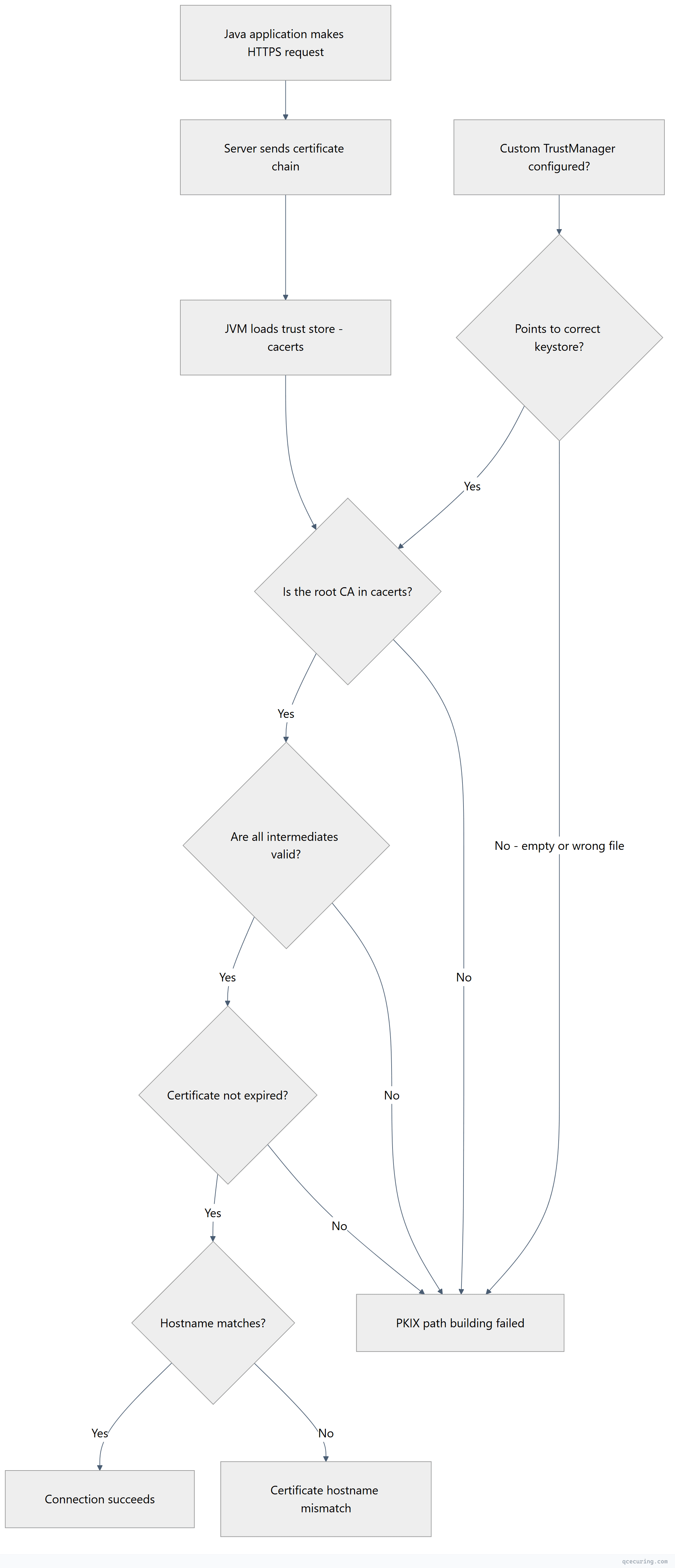
Java uses its own trust store (cacerts) independent of the operating system’s trust store. Even if your browser trusts a certificate, Java might not — because cacerts hasn’t been updated or is missing the specific CA.
Cause 1: CA Certificate Not in Java’s cacerts
The most common cause. The server uses a CA that isn’t in your JDK’s default trust store.
Diagnose:
# Find your Java trust store
echo $JAVA_HOME/lib/security/cacerts

# Java 8 and earlier:
echo $JAVA_HOME/jre/lib/security/cacerts

# List all trusted CAs
keytool -list -keystore "$JAVA_HOME/lib/security/cacerts" -storepass changeit | grep -i "your-ca-name"
Fix — import the CA certificate:
# Download the CA cert from the server
openssl s_client -connect targetserver.com:443 -servername targetserver.com 2>/dev/null | openssl x509 -out target-ca.pem

# If you need the intermediate (not just the leaf):
openssl s_client -connect targetserver.com:443 -servername targetserver.com -showcerts 2>/dev/null | awk '/BEGIN CERT/{i++}i==2' RS='-----END CERTIFICATE-----' ORS='-----END CERTIFICATE-----\n' > intermediate-ca.pem

# Import into cacerts
keytool -importcert -trustcacerts \
  -alias target-server-ca \
  -file target-ca.pem \
  -keystore "$JAVA_HOME/lib/security/cacerts" \
  -storepass changeit -noprompt
Verify the import:
keytool -list -keystore "$JAVA_HOME/lib/security/cacerts" -storepass changeit -alias target-server-caFor a complete keytool reference, see our Java keytool commands guide.
Cause 2: Self-Signed Certificate
What’s happening: The target server uses a self-signed certificate (common in development, internal services, or test environments).
Fix — import the self-signed cert:
# Download the self-signed certificate
openssl s_client -connect internal-service.corp.com:443 2>/dev/null | openssl x509 -out self-signed.pem

# Verify it's self-signed (issuer == subject)
openssl x509 -in self-signed.pem -noout -issuer -subject

# Import into cacerts
keytool -importcert -trustcacerts \
  -alias internal-service \
  -file self-signed.pem \
  -keystore "$JAVA_HOME/lib/security/cacerts" \
  -storepass changeit -noprompt
For development environments, use a custom trust store instead of modifying the global cacerts:
# Create a project-specific trust store
keytool -importcert -trustcacerts \
  -alias dev-server \
  -file self-signed.pem \
  -keystore ./dev-truststore.jks \
  -storepass devpassword -noprompt

# Run your app with the custom trust store
java -Djavax.net.ssl.trustStore=./dev-truststore.jks \
     -Djavax.net.ssl.trustStorePassword=devpassword \
     -jar your-app.jar
Cause 3: Corporate Proxy Intercepting HTTPS
What’s happening: Your corporate proxy (Zscaler, Palo Alto, Blue Coat) terminates HTTPS and re-signs traffic with an internal CA. Java doesn’t trust that CA.
Diagnose:
# Check what CA the server presents (through the proxy)
openssl s_client -connect google.com:443 2>/dev/null | openssl x509 -noout -issuer

# If issuer shows your company name or proxy vendor instead of a public CA, you're proxied
Fix — import the proxy CA into cacerts:
# Get the proxy CA certificate from your IT team
# Or export it from your browser (it's the root CA in the chain for any HTTPS site)

# Import the proxy root CA
keytool -importcert -trustcacerts \
  -alias corporate-proxy-ca \
  -file corporate-proxy-ca.pem \
  -keystore "$JAVA_HOME/lib/security/cacerts" \
  -storepass changeit -noprompt

# If there's an intermediate proxy CA too:
keytool -importcert -trustcacerts \
  -alias corporate-proxy-intermediate \
  -file corporate-proxy-intermediate.pem \
  -keystore "$JAVA_HOME/lib/security/cacerts" \
  -storepass changeit -noprompt
Important: You need to do this for every JDK installation on the machine (if you have multiple Java versions).
Cause 4: JDK Upgrade Removed a CA
What’s happening: When you upgrade Java, the new JDK comes with its own cacerts file. Any custom CAs you imported into the old JDK’s cacerts are gone.
Diagnose:
# Check if the CA exists in the new JDK
keytool -list -keystore "$JAVA_HOME/lib/security/cacerts" -storepass changeit | grep -i "your-alias"
Fix — re-import after upgrade:
# If you kept the old cacerts, export and re-import:
keytool -exportcert -alias your-ca-alias \
  -keystore /path/to/old-jdk/lib/security/cacerts \
  -storepass changeit -file exported-ca.pem

keytool -importcert -trustcacerts -alias your-ca-alias \
  -file exported-ca.pem \
  -keystore "$JAVA_HOME/lib/security/cacerts" \
  -storepass changeit -noprompt
Prevent this: Keep a script that imports all required custom CAs, and run it after every JDK upgrade:
#!/bin/bash
# import-custom-cas.sh — run after JDK upgrades
CACERTS="$JAVA_HOME/lib/security/cacerts"
STOREPASS="changeit"

for cert in /opt/custom-certs/*.pem; do
  ALIAS=$(basename "$cert" .pem)
  keytool -importcert -trustcacerts -alias "$ALIAS" \
    -file "$cert" -keystore "$CACERTS" \
    -storepass "$STOREPASS" -noprompt 2>/dev/null
  echo "Imported: $ALIAS"
done
Cause 5: Custom TrustStore Not Configured
What’s happening: Your application specifies a custom trust store via javax.net.ssl.trustStore but the file is empty, doesn’t exist, or doesn’t contain the required CAs.
Diagnose:
# Check if your app sets a custom trust store
grep -r "trustStore" src/ config/ application.properties application.yml

# Check JVM arguments
ps aux | grep java | grep trustStore
Fix — ensure the custom trust store has the right CAs:
# List contents of the custom trust store
keytool -list -keystore /path/to/custom-truststore.jks -storepass yourpassword

# If empty, initialize it with the default CAs plus your custom ones:
cp "$JAVA_HOME/lib/security/cacerts" /path/to/custom-truststore.jks

# Then add your custom CA:
keytool -importcert -trustcacerts -alias custom-ca \
  -file your-ca.pem \
  -keystore /path/to/custom-truststore.jks \
  -storepass yourpassword -noprompt
Spring Boot Configuration
application.properties:
# Point to a custom trust store
server.ssl.trust-store=classpath:truststore.jks
server.ssl.trust-store-password=changeit
server.ssl.trust-store-type=JKS

# For outbound HTTPS calls (RestTemplate, WebClient):
# Set via JVM args instead:
# -Djavax.net.ssl.trustStore=/path/to/truststore.jks
# -Djavax.net.ssl.trustStorePassword=changeit
application.yml:
server:
  ssl:
    trust-store: classpath:truststore.jks
    trust-store-password: changeit
    trust-store-type: JKS
Programmatic configuration for RestTemplate:
import org.apache.http.ssl.SSLContextBuilder;
import org.apache.http.impl.client.CloseableHttpClient;
import org.apache.http.impl.client.HttpClients;
import org.springframework.http.client.HttpComponentsClientHttpRequestFactory;
import org.springframework.web.client.RestTemplate;

import java.io.File;
import javax.net.ssl.SSLContext;

// Load custom trust store
SSLContext sslContext = SSLContextBuilder.create()
    .loadTrustMaterial(
        new File("/path/to/truststore.jks"),
        "changeit".toCharArray()
    )
    .build();

CloseableHttpClient httpClient = HttpClients.custom()
    .setSSLContext(sslContext)
    .build();

RestTemplate restTemplate = new RestTemplate(
    new HttpComponentsClientHttpRequestFactory(httpClient)
);
This approach maintains full certificate validation while using a custom trust store. It does not disable security.
Maven and Gradle Build Fixes
Maven — PKIX error when downloading dependencies:
# Pass trust store to Maven via MAVEN_OPTS
export MAVEN_OPTS="-Djavax.net.ssl.trustStore=$JAVA_HOME/lib/security/cacerts -Djavax.net.ssl.trustStorePassword=changeit"

# Or in .mvn/jvm.config (project-level):
echo "-Djavax.net.ssl.trustStore=/path/to/cacerts" > .mvn/jvm.config
echo "-Djavax.net.ssl.trustStorePassword=changeit" >> .mvn/jvm.config
Gradle — PKIX error when downloading dependencies:
# In gradle.properties:
systemProp.javax.net.ssl.trustStore=/path/to/cacerts
systemProp.javax.net.ssl.trustStorePassword=changeit

# Or via environment variable:
export GRADLE_OPTS="-Djavax.net.ssl.trustStore=$JAVA_HOME/lib/security/cacerts -Djavax.net.ssl.trustStorePassword=changeit"
Both — if behind a corporate proxy:
Import the proxy CA into the JDK’s cacerts (see Cause 3 above). This is the cleanest fix because Maven and Gradle will automatically use the JDK’s default trust store.
Docker and Container Fixes
Dockerfile — import CA at build time:
FROM eclipse-temurin:21-jre

# Copy custom CA certificate
COPY corporate-ca.pem /tmp/corporate-ca.pem

# Import into Java's cacerts
RUN keytool -importcert -trustcacerts -alias corporate-ca \
    -file /tmp/corporate-ca.pem \
    -keystore $JAVA_HOME/lib/security/cacerts \
    -storepass changeit -noprompt && \
    rm /tmp/corporate-ca.pem

COPY app.jar /app/app.jar
ENTRYPOINT ["java", "-jar", "/app/app.jar"]
Kubernetes — mount CA as a secret:
apiVersion: v1
kind: Pod
metadata:
  name: java-app
spec:
  containers:
    - name: app
      image: your-app:latest
      env:
        - name: JAVA_OPTS
          value: "-Djavax.net.ssl.trustStore=/etc/ssl/custom/truststore.jks -Djavax.net.ssl.trustStorePassword=changeit"
      volumeMounts:
        - name: truststore
          mountPath: /etc/ssl/custom
          readOnly: true
  volumes:
    - name: truststore
      secret:
        secretName: java-truststore
Create the Kubernetes secret:
# Create trust store with your custom CA
keytool -importcert -trustcacerts -alias custom-ca \
  -file ca.pem -keystore truststore.jks \
  -storepass changeit -noprompt

# Create the secret
kubectl create secret generic java-truststore --from-file=truststore.jks
What NOT to Do
You’ll find code online that “fixes” this by disabling certificate validation entirely:
// DO NOT USE THIS IN PRODUCTION
// This disables ALL certificate checking — any attacker can intercept your traffic
TrustManager[] trustAllCerts = new TrustManager[] {
    new X509TrustManager() {
        public X509Certificate[] getAcceptedIssuers() { return null; }
        public void checkClientTrusted(X509Certificate[] certs, String authType) {}
        public void checkServerTrusted(X509Certificate[] certs, String authType) {}
    }
};
This code accepts any certificate from any server, including an attacker’s. It completely removes TLS security. Never deploy this to production. If you see this in your codebase, replace it with a properly configured trust store.
Locating cacerts Across Java Versions
| Java Version | cacerts Location |
|---|---|
| Java 8 | $JAVA_HOME/jre/lib/security/cacerts |
| Java 9+ | $JAVA_HOME/lib/security/cacerts |
| macOS (Homebrew) | /opt/homebrew/opt/openjdk/libexec/openjdk.jdk/Contents/Home/lib/security/cacerts |
| Windows | C:\Program Files\Java\jdk-21\lib\security\cacerts |
| Docker (Temurin) | /opt/java/openjdk/lib/security/cacerts |
| Docker (Alpine) | /opt/java/openjdk/lib/security/cacerts |
Find it programmatically:
# From the command line
java -XshowSettings:all 2>&1 | grep "java.home"

# Then append /lib/security/cacerts (Java 9+) or /jre/lib/security/cacerts (Java 8)
FAQ
What is the default password for Java’s cacerts?
The default password is changeit. It has been the default since Java was created. While you can change it with keytool -storepasswd, most organizations leave it as-is because the trust store contains only public CA certificates (not private keys).
Do I need to restart my application after importing a certificate?
Yes. Java loads the trust store at startup. After importing a certificate into cacerts, you must restart the JVM for it to take effect. There’s no way to reload the trust store at runtime without custom code.
Why does this work in my browser but fail in Java?
Browsers use the operating system’s trust store (or their own, like Chrome Root Store). Java uses its own cacerts file, which is separate. A CA trusted by your OS/browser might not be in Java’s cacerts — especially after a JDK upgrade or with newer CAs.
I’m getting this error only in my CI/CD pipeline. Why?
CI/CD environments (Jenkins, GitHub Actions, GitLab CI) use their own JDK installations with default cacerts. If your application connects to internal services with custom CAs, you need to import those CAs into the CI environment’s JDK. Add a build step that runs keytool -importcert before your tests.
Can I use PKCS12 format instead of JKS for the trust store?
Yes. Java 9+ defaults to PKCS12 for new keystores. You can convert:
keytool -importkeystore \
  -srckeystore cacerts -srcstoretype JKS \
  -destkeystore cacerts.p12 -deststoretype PKCS12 \
  -srcstorepass changeit -deststorepass changeit
Then reference it with -Djavax.net.ssl.trustStoreType=PKCS12.
How do I fix this for a specific connection without changing the global cacerts?
Use a custom SSLContext scoped to that connection (see the Spring Boot RestTemplate example above). This lets you trust additional CAs for one service without affecting the global trust store. This is the recommended approach for microservices that connect to internal services with custom CAs.
Related Reading
- Java Keytool Commands Reference — complete keytool command guide
- OpenSSL Complete Guide — diagnose certificate issues from the command line
- Fix Certificate Verify Failed (Python, Node, Java) — related errors in other languages
- Certificate Chain of Trust Explained — understand why chains matter
- What is a TLS Certificate — foundational concepts