
You’re seeing one of these errors:
SSL certificate problem: unable to get local issuer certificateverify error:num=20:unable to get local issuer certificatecurl: (60) SSL certificate problem: unable to get local issuer certificatefatal: unable to access 'https://github.com/...': SSL certificate problem: unable to get local issuer certificatenpm ERR! unable to get local issuer certificatepip install: SSL: CERTIFICATE_VERIFY_FAILED - unable to get local issuer certificateThe cause is always the same: the client can’t find the CA certificate that signed the server’s certificate. Either the CA bundle is missing/outdated, the server isn’t sending intermediate certificates, or a corporate proxy is intercepting HTTPS with its own CA.
Fastest Fix
Identify which tool is failing and jump to that section:
| Tool | Jump to |
|---|---|
openssl s_client | OpenSSL Fix |
curl | curl Fix |
git clone/push/pull | Git Fix |
npm install | npm Fix |
pip install | pip Fix |
docker pull/build | Docker Fix |
| Corporate proxy | Proxy Fix |
Why This Error Happens
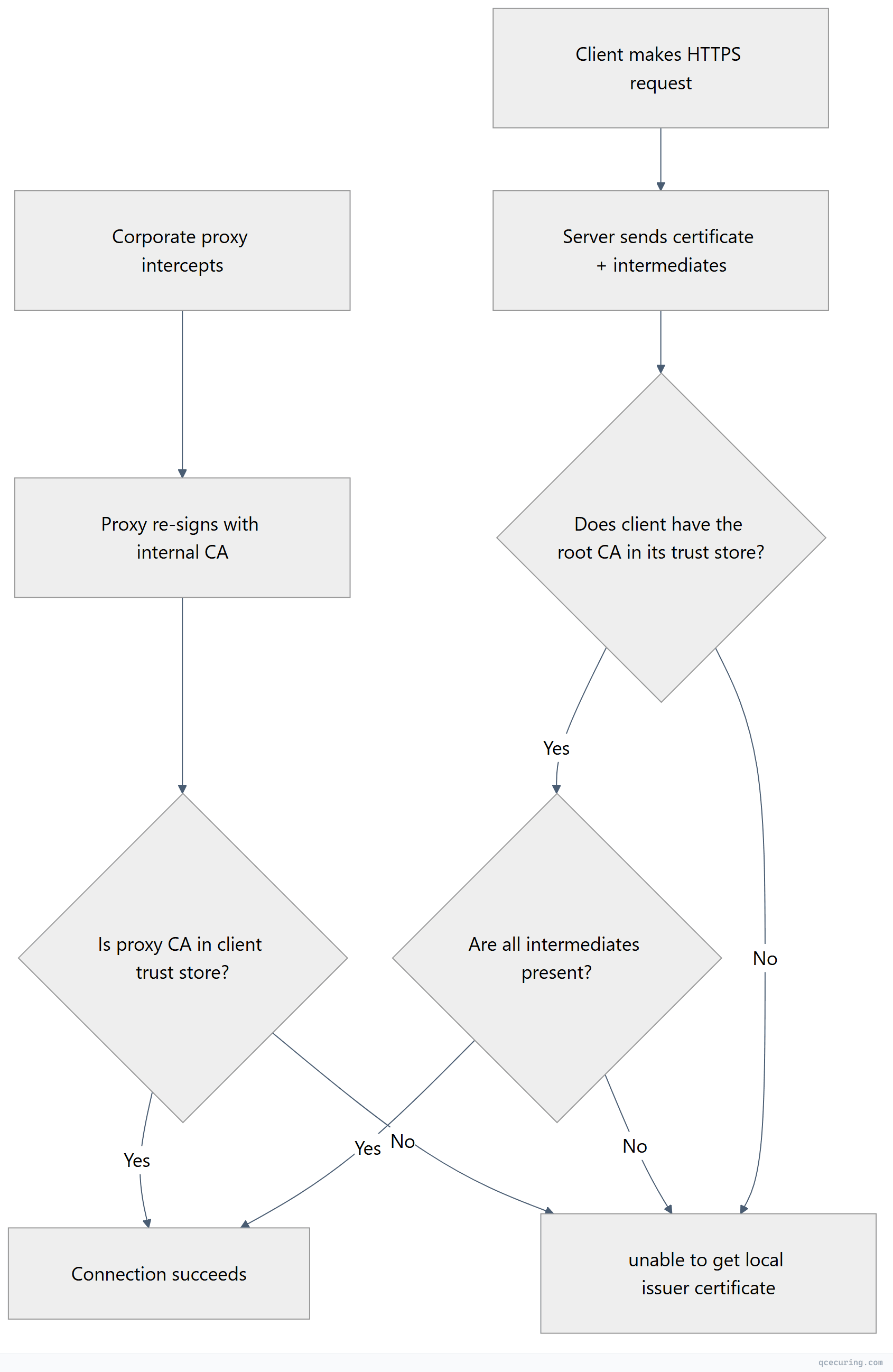
The “local issuer” is the CA certificate stored locally on your machine. When OpenSSL (or any tool using it) can’t find the CA that signed the server’s cert, it can’t verify the chain and throws this error.
Three root causes:
- Missing CA bundle — The tool doesn’t know where to find root CA certificates
- Missing intermediate — The server isn’t sending the full chain
- Corporate proxy — A proxy re-signs traffic with an internal CA your tool doesn’t trust
Fix for OpenSSL
The error:
$ openssl s_client -connect example.com:443
# ...
verify error:num=20:unable to get local issuer certificate
Verify return code: 20 (unable to get local issuer certificate)
Fix — specify the CA bundle explicitly:
# Find your system CA bundle
# Ubuntu/Debian:
openssl s_client -connect example.com:443 -CAfile /etc/ssl/certs/ca-certificates.crt

# RHEL/CentOS/Fedora:
openssl s_client -connect example.com:443 -CAfile /etc/pki/tls/certs/ca-bundle.crt

# macOS (Homebrew OpenSSL):
openssl s_client -connect example.com:443 -CAfile /opt/homebrew/etc/openssl@3/cert.pem

# macOS (system):
openssl s_client -connect example.com:443 -CAfile /etc/ssl/cert.pem
Fix — if the CA bundle is missing or outdated:
# Ubuntu/Debian — install/update CA certificates
sudo apt update && sudo apt install -y ca-certificates
sudo update-ca-certificates

# RHEL/CentOS/Fedora
sudo yum install -y ca-certificates
sudo update-ca-trust

# macOS (Homebrew)
brew install ca-certificates
Fix — if the server is missing intermediates:
# Check what the server sends
openssl s_client -connect example.com:443 -servername example.com -showcerts 2>/dev/null | grep "s:"

# If only 1 cert shows (depth 0), intermediates are missing
# This is a SERVER-SIDE fix — the server admin needs to configure the full chain
For a complete reference on OpenSSL commands, see our OpenSSL complete guide.
Fix for curl
The error:
$ curl https://example.com
curl: (60) SSL certificate problem: unable to get local issuer certificate
More details here: https://curl.se/docs/sslcerts.html
Fix 1 — point curl to the CA bundle:
# Specify CA bundle explicitly
curl --cacert /etc/ssl/certs/ca-certificates.crt https://example.com

# Set it permanently via environment variable
export CURL_CA_BUNDLE=/etc/ssl/certs/ca-certificates.crt

# Or in ~/.curlrc for persistence
echo "cacert=/etc/ssl/certs/ca-certificates.crt" >> ~/.curlrc
Fix 2 — update the CA bundle:
# Ubuntu/Debian
sudo apt update && sudo apt install -y ca-certificates
sudo update-ca-certificates

# RHEL/CentOS
sudo yum install -y ca-certificates
sudo update-ca-trust

# macOS
brew install curl  # Homebrew curl uses its own CA bundle
Fix 3 — if behind a corporate proxy, add the proxy CA:
# Get the proxy's CA certificate (ask your IT team or export from browser)
# Then add it to the system trust store
sudo cp corporate-proxy-ca.pem /usr/local/share/ca-certificates/corporate-proxy.crt
sudo update-ca-certificates

# Or pass it directly to curl
curl --cacert /path/to/corporate-proxy-ca.pem https://example.com
Do NOT use -k or --insecure as a permanent fix. It disables all certificate verification.
Fix for Git
The error:
$ git clone https://github.com/user/repo.git
fatal: unable to access 'https://github.com/user/repo.git/': SSL certificate problem: unable to get local issuer certificate
Fix 1 — update Git’s CA bundle:
# Tell Git where the CA bundle is
git config --global http.sslCAInfo /etc/ssl/certs/ca-certificates.crt

# On macOS with Homebrew:
git config --global http.sslCAInfo /opt/homebrew/etc/openssl@3/cert.pem

# On Windows (Git for Windows):
git config --global http.sslCAInfo "C:/Program Files/Git/mingw64/etc/ssl/certs/ca-bundle.crt"
Fix 2 — update system CA certificates:
# Ubuntu/Debian
sudo apt update && sudo apt install -y ca-certificates
sudo update-ca-certificates

# Then reset Git's CA config to use system default
git config --global --unset http.sslCAInfo
Fix 3 — corporate proxy (add internal CA to Git’s bundle):
# Find Git's current CA bundle
git config --global http.sslCAInfo
# Or: git config --system http.sslCAInfo

# Append your corporate CA to it
cat /path/to/corporate-ca.pem >> "$(git config --global http.sslCAInfo)"

# Or create a combined bundle
cat /etc/ssl/certs/ca-certificates.crt corporate-ca.pem > ~/combined-ca-bundle.pem
git config --global http.sslCAInfo ~/combined-ca-bundle.pem
Do NOT use git config --global http.sslVerify false — it disables all HTTPS security for every Git operation.
Fix for npm
The error:
$ npm install
npm ERR! code UNABLE_TO_GET_ISSUER_CERT_LOCALLY
npm ERR! unable to get local issuer certificate
Fix 1 — point npm to the correct CA bundle:
# Set the CA file for npm
npm config set cafile /etc/ssl/certs/ca-certificates.crt

# On macOS:
npm config set cafile /opt/homebrew/etc/openssl@3/cert.pem

# On Windows:
npm config set cafile "C:\Program Files\Git\mingw64\etc\ssl\certs\ca-bundle.crt"
Fix 2 — add a corporate proxy CA:
# Export your corporate CA cert (PEM format), then:
npm config set cafile /path/to/corporate-ca-bundle.pem

# Or combine with system CAs:
cat /etc/ssl/certs/ca-certificates.crt /path/to/corporate-ca.pem > ~/npm-ca-bundle.pem
npm config set cafile ~/npm-ca-bundle.pem
Fix 3 — Node.js environment variable:
# Set for the current session
export NODE_EXTRA_CA_CERTS=/path/to/corporate-ca.pem

# Make permanent in ~/.bashrc or ~/.zshrc
echo 'export NODE_EXTRA_CA_CERTS=/path/to/corporate-ca.pem' >> ~/.bashrc
Do NOT use npm config set strict-ssl false — it disables certificate verification for all package downloads, exposing you to supply chain attacks.
Fix for pip
The error:
$ pip install requests
WARNING: pip is configured with locations that require TLS/SSL, however the ssl module in Python is not available.
ERROR: Could not fetch URL https://pypi.org/simple/requests/: There was a problem confirming the ssl certificate: ... unable to get local issuer certificate
Fix 1 — point pip to the CA bundle:
# Specify CA bundle for a single install
pip install --cert /etc/ssl/certs/ca-certificates.crt requests

# Set permanently in pip config
pip config set global.cert /etc/ssl/certs/ca-certificates.crt

# Or via environment variable
export REQUESTS_CA_BUNDLE=/etc/ssl/certs/ca-certificates.crt
export SSL_CERT_FILE=/etc/ssl/certs/ca-certificates.crt
Fix 2 — update certifi (Python’s built-in CA bundle):
pip install --upgrade certifi

# Find where certifi stores its bundle
python -c "import certifi; print(certifi.where())"
Fix 3 — add corporate CA to certifi’s bundle:
# Find certifi's CA bundle location
CERTIFI_PATH=$(python -c "import certifi; print(certifi.where())")

# Append your corporate CA
cat /path/to/corporate-ca.pem >> "$CERTIFI_PATH"
Fix for Docker
The error:
$ docker pull nginx
Error response from daemon: Get "https://registry-1.docker.io/v2/": x509: certificate signed by unknown authority
Fix 1 — add CA to Docker daemon:
# Create the certs directory for the registry
sudo mkdir -p /etc/docker/certs.d/registry-1.docker.io/

# Copy your CA certificate
sudo cp /path/to/ca.pem /etc/docker/certs.d/registry-1.docker.io/ca.crt

# Restart Docker
sudo systemctl restart docker
Fix 2 — for private registries behind corporate proxy:
# Add the corporate CA to the system trust store
sudo cp corporate-ca.pem /usr/local/share/ca-certificates/corporate-ca.crt
sudo update-ca-certificates

# Restart Docker to pick up the new CA
sudo systemctl restart docker
Fix 3 — inside Dockerfile (for build-time HTTPS requests):
FROM ubuntu:22.04

# Add corporate CA certificate
COPY corporate-ca.pem /usr/local/share/ca-certificates/corporate-ca.crt
RUN update-ca-certificates

# Now pip/curl/wget will trust the corporate CA
RUN pip install requests
Fix for Corporate Proxy
If you’re behind a corporate proxy (Zscaler, Palo Alto, Blue Coat, Forcepoint), the proxy terminates and re-signs all HTTPS traffic with its own CA certificate. Every tool on your machine needs to trust that CA.
Step 1 — Get the proxy CA certificate:
# Export from Chrome: Settings → Privacy and Security → Security → Manage certificates
# Find the proxy CA (e.g., "Zscaler Root CA") → Export as PEM/Base64

# Or extract it via OpenSSL:
openssl s_client -connect google.com:443 -proxy proxy.corp.com:8080 2>/dev/null | openssl x509 -out proxy-ca.pem
Step 2 — Add to system trust store:
# Ubuntu/Debian
sudo cp proxy-ca.pem /usr/local/share/ca-certificates/proxy-ca.crt
sudo update-ca-certificates

# RHEL/CentOS
sudo cp proxy-ca.pem /etc/pki/ca-trust/source/anchors/proxy-ca.pem
sudo update-ca-trust

# macOS
sudo security add-trusted-cert -d -r trustRoot -k /Library/Keychains/System.keychain proxy-ca.pem

# Windows (PowerShell as Admin)
Import-Certificate -FilePath proxy-ca.pem -CertStoreLocation Cert:\LocalMachine\Root
Step 3 — Configure individual tools:
# Git
git config --global http.sslCAInfo /etc/ssl/certs/ca-certificates.crt

# npm
export NODE_EXTRA_CA_CERTS=/usr/local/share/ca-certificates/proxy-ca.crt

# pip
export REQUESTS_CA_BUNDLE=/etc/ssl/certs/ca-certificates.crt

# curl (should work automatically after step 2)
curl https://google.com  # test it
Diagnosing: Is It the Server or the Client?
Run this to determine where the problem is:
# Test with explicit CA bundle — if this works, your tool's CA config is wrong
openssl s_client -connect example.com:443 -servername example.com -CAfile /etc/ssl/certs/ca-certificates.crt 2>/dev/null | grep "Verify return code"

# If return code is 0: problem is client-side (tool can't find the CA bundle)
# If return code is 20: problem is server-side (server not sending full chain) OR your CA bundle is outdated

# Check what the server sends
openssl s_client -connect example.com:443 -servername example.com -showcerts 2>/dev/null | grep -E "depth|s:|i:"
If depth=0 is the only entry, the server isn’t sending intermediates. That’s a server-side fix. If you see the full chain but still get the error, your local CA bundle doesn’t include the root CA.
FAQ
What’s the difference between “unable to get local issuer certificate” and “certificate verify failed”?
“Unable to get local issuer certificate” is a specific sub-error of certificate verification failure. It means the tool found the certificate but couldn’t locate the CA that signed it in the local trust store. “Certificate verify failed” is the broader category that includes hostname mismatches, expiry, and other issues. See our certificate verify failed guide for other verification errors.
Is it safe to use --insecure or disable SSL verification?
Only for a 30-second diagnostic to confirm the issue is certificate-related. Never as a permanent fix. Disabling verification means any attacker on the network can intercept your traffic, inject malicious packages (npm, pip), or tamper with your Git repositories.
Why does this work in my browser but fail in curl/Git/npm?
Browsers have their own trust stores and can fetch missing intermediates via AIA (Authority Information Access) extensions. Command-line tools like curl, Git, and npm rely on the system CA bundle and don’t fetch missing intermediates. If the server doesn’t send the full chain, browsers may still work while CLI tools fail.
I added the CA certificate but still get the error. Why?
Common reasons: (1) The certificate is in DER format but the tool expects PEM — convert with openssl x509 -inform DER -in cert.der -out cert.pem. (2) You added it to the wrong trust store (system vs. tool-specific). (3) You need to restart the service/tool after adding. (4) You added the intermediate but not the root, or vice versa.
How do I find which CA bundle my tool is using?
# OpenSSL default
openssl version -d  # Shows OPENSSLDIR — look for cert.pem or certs/ there

# Python/pip
python -c "import ssl; print(ssl.get_default_verify_paths())"

# Node.js — uses compiled-in Mozilla CA bundle unless NODE_EXTRA_CA_CERTS is set
node -e "console.log(require('tls').rootCertificates.length + ' root CAs loaded')"

# Git
git config --global http.sslCAInfo
Does this error mean the server’s certificate is invalid?
Not necessarily. The certificate might be perfectly valid — your machine just can’t verify it because it’s missing the CA certificate locally. It’s like having a valid passport but the border agent doesn’t have your country in their system. The fix is updating your local trust store, not changing the server certificate (unless the server is genuinely misconfigured with missing intermediates).
Related Reading
- OpenSSL Complete Guide — master the diagnostic tool used throughout this guide
- Certificate Chain of Trust Explained — understand why chains matter
- Fix Certificate Verify Failed (Python, Node, Java) — related verification errors
- Certificate Formats: PEM, DER, PFX, P7B — when format conversion is needed
- What is a TLS Certificate — foundational concepts