
Most enterprises don’t pick one key management system — they end up with three. AWS KMS manages cloud-native encryption keys. HashiCorp Vault handles secrets and dynamic credentials for applications. And somewhere in a data center, a hardware HSM protects the root keys that everything else depends on. The challenge isn’t choosing between them — it’s making them work together as a coherent key hierarchy.
This guide covers the integration architecture: how Vault uses AWS KMS for auto-unseal, how Vault connects to HSMs via PKCS#11 for FIPS-compliant key storage, and how applications consume keys from this layered system without knowing (or caring) where the keys physically live.
The Three-Layer Key Management Architecture
Each system serves a different purpose in the key hierarchy:
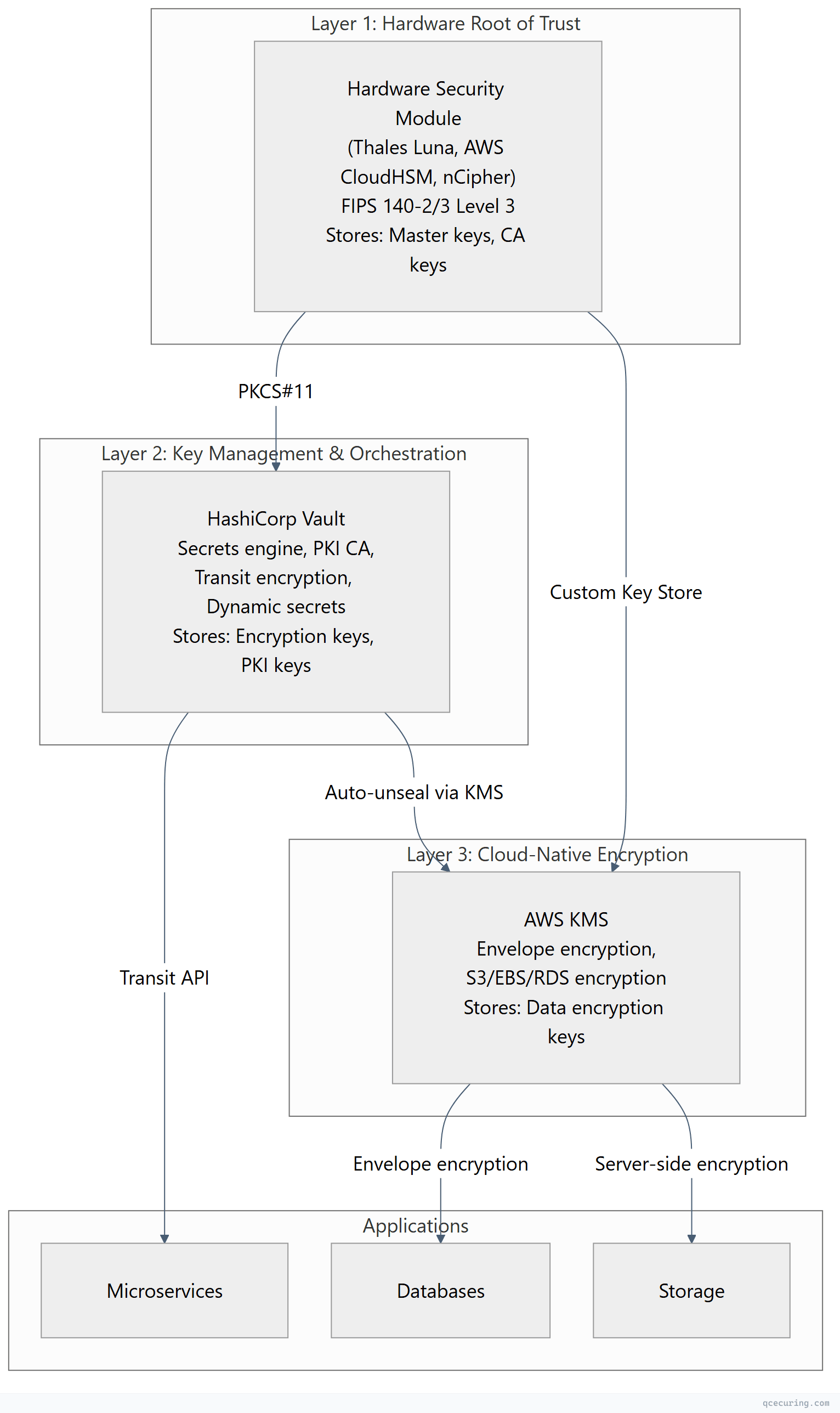
| Layer | System | Protects | FIPS Level | Key Lifetime |
|---|---|---|---|---|
| Hardware root | HSM (PKCS#11) | Master keys, CA private keys | Level 3 | Years (never exported) |
| Orchestration | HashiCorp Vault | Encryption keys, PKI, secrets | Level 2 (with HSM seal) | Months to years |
| Cloud-native | AWS KMS | Data encryption keys (DEKs) | Level 2 (or Level 3 with CloudHSM) | Per-object or per-service |
Vault Auto-Unseal with AWS KMS
Vault encrypts its storage backend with a master key. By default, this master key is split into Shamir shares that operators must provide at startup. AWS KMS auto-unseal replaces this with a KMS key — Vault starts automatically without human intervention.
Configuration
# vault-config.hcl
storage "raft" {
  path = "/opt/vault/data"
  node_id = "vault-1"
}

listener "tcp" {
  address     = "0.0.0.0:8200"
  tls_cert_file = "/opt/vault/tls/vault.crt"
  tls_key_file  = "/opt/vault/tls/vault.key"
}

# Auto-unseal with AWS KMS
seal "awskms" {
  region     = "us-east-1"
  kms_key_id = "arn:aws:kms:us-east-1:123456789012:key/abcd1234-5678-90ab-cdef-example"

  # Optional: use a specific IAM role
  # role_arn = "arn:aws:iam::123456789012:role/vault-kms-unseal"
}

api_addr = "https://vault.internal.example.com:8200"
cluster_addr = "https://vault-1.internal.example.com:8201"
IAM Policy for Vault
{
  "Version": "2012-10-17",
  "Statement": [
    {
      "Effect": "Allow",
      "Action": [
        "kms:Encrypt",
        "kms:Decrypt",
        "kms:DescribeKey"
      ],
      "Resource": "arn:aws:kms:us-east-1:123456789012:key/abcd1234-5678-90ab-cdef-example"
    }
  ]
}
How It Works
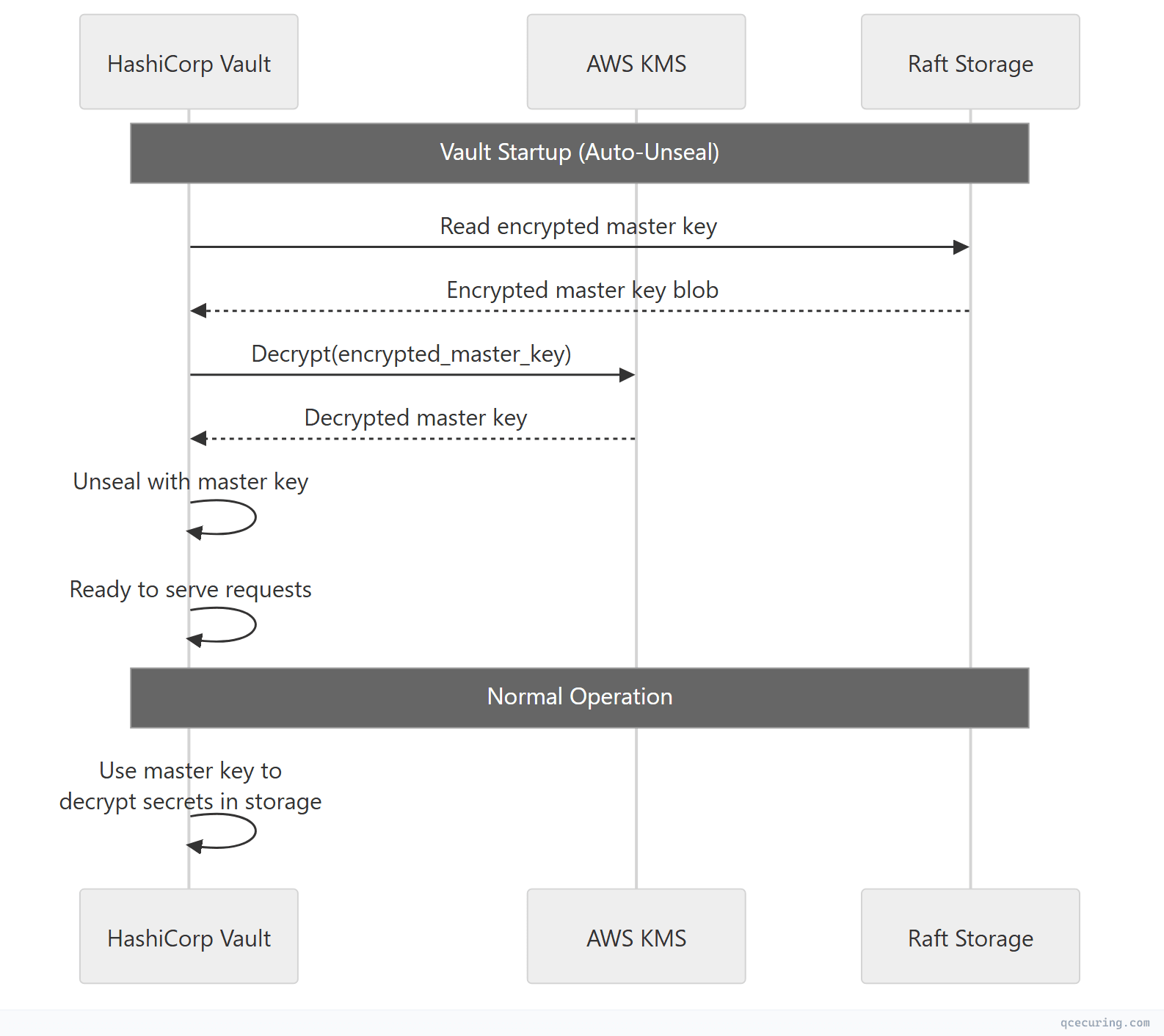
Security consideration: If AWS KMS is unavailable, Vault can’t unseal. This creates a dependency on AWS availability. For maximum resilience, use a multi-region KMS key or maintain Shamir recovery keys as a backup unseal mechanism.
Vault with HSM via PKCS#11 (Vault Enterprise)
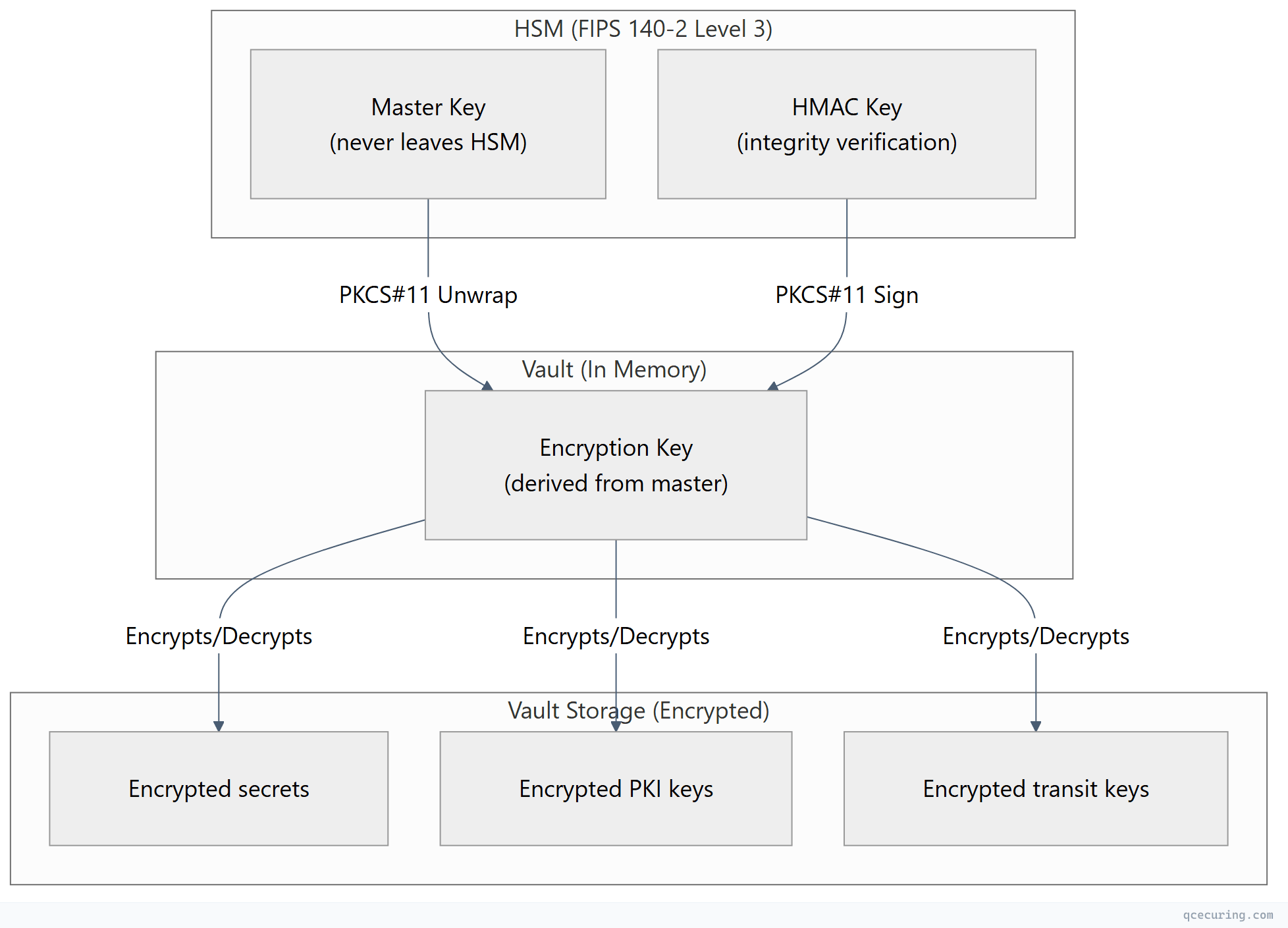
For FIPS 140-2 Level 3 compliance, Vault Enterprise can use an HSM as its seal mechanism and for the Transit secrets engine. The HSM stores the master key — it never exists in software.
PKCS#11 Seal Configuration
# vault-config.hcl (Enterprise with HSM)
seal "pkcs11" {
  lib            = "/usr/lib/softhsm/libsofthsm2.so"  # HSM PKCS#11 library path
  slot           = "0"
  pin            = "env:VAULT_HSM_PIN"
  key_label      = "vault-master-key"
  hmac_key_label = "vault-hmac-key"
  generate_key   = "true"

  # For Thales Luna:
  # lib = "/usr/lib/libCryptoki2_64.so"

  # For AWS CloudHSM:
  # lib = "/opt/cloudhsm/lib/libcloudhsm_pkcs11.so"

  # For nCipher/Entrust:
  # lib = "/opt/nfast/toolkits/pkcs11/libcknfast.so"
}
AWS CloudHSM as PKCS#11 Backend
# Install CloudHSM client
wget https://s3.amazonaws.com/cloudhsmv2-software/CloudHsmClient/EL7/cloudhsm-pkcs11-latest.el7.x86_64.rpm
sudo yum install -y ./cloudhsm-pkcs11-latest.el7.x86_64.rpm

# Configure CloudHSM client
sudo /opt/cloudhsm/bin/configure -a <HSM_IP>

# Initialize the PKCS#11 library
/opt/cloudhsm/bin/pkcs11-tool --module /opt/cloudhsm/lib/libcloudhsm_pkcs11.so \
  --login --pin <CU_USER>:<CU_PASSWORD> --list-slots
Vault configuration for CloudHSM:
seal "pkcs11" {
  lib            = "/opt/cloudhsm/lib/libcloudhsm_pkcs11.so"
  slot           = "1"
  pin            = "env:CLOUDHSM_PIN"  # Format: "CU_user:password"
  key_label      = "vault-master-key"
  hmac_key_label = "vault-hmac-key"
  generate_key   = "true"
}
Key Hierarchy with HSM
Vault Transit Engine with AWS KMS
Vault’s Transit secrets engine provides encryption-as-a-service. Applications send plaintext to Vault, get ciphertext back — without ever handling encryption keys directly.
Setup
# Enable transit secrets engine
vault secrets enable transit

# Create an encryption key
vault write -f transit/keys/payment-data \
  type=aes256-gcm96 \
  auto_rotate_period=90d

# Create a key backed by AWS KMS (Vault Enterprise)
vault write transit/keys/regulated-data \
  type=managed_key \
  managed_key_name=aws-kms-key \
  managed_key_id=arn:aws:kms:us-east-1:123456789012:key/example-key-id
Application Usage
# Encrypt data
vault write transit/encrypt/payment-data \
  plaintext=$(echo -n "4111-1111-1111-1111" | base64)

# Response:
# ciphertext: vault:v1:8SDd3WHDOjf7mq69CyCqYjBXAiQQAVZRkFM13ok481zoCmHnSeDX9vyf7w==

# Decrypt data
vault write transit/decrypt/payment-data \
  ciphertext="vault:v1:8SDd3WHDOjf7mq69CyCqYjBXAiQQAVZRkFM13ok481zoCmHnSeDX9vyf7w=="

# Response:
# plaintext: NDExMS0xMTExLTExMTEtMTExMQ==  (base64 of "4111-1111-1111-1111")
Key Rotation (Zero-Downtime)
# Rotate the encryption key (new version created)
vault write -f transit/keys/payment-data/rotate

# Old ciphertext still decrypts (Vault keeps all key versions)
# New encryptions use the latest version

# Rewrap existing ciphertext with the new key version (batch operation)
vault write transit/rewrap/payment-data \
  ciphertext="vault:v1:old-ciphertext-here"
# Returns: vault:v2:new-ciphertext-with-latest-key
Vault PKI Secrets Engine with HSM-Protected Keys
For issuing certificates where the CA private key must be HSM-protected:
# Enable PKI secrets engine
vault secrets enable -path=pki_root pki
vault secrets tune -max-lease-ttl=87600h pki_root

# Generate root CA with HSM-backed key (Enterprise)
vault write pki_root/root/generate/kms \
  managed_key_name=hsm-root-ca-key \
  common_name="Enterprise Root CA" \
  ttl=87600h \
  key_type=rsa \
  key_bits=4096

# Enable intermediate PKI
vault secrets enable -path=pki_int pki
vault secrets tune -max-lease-ttl=43800h pki_int

# Generate intermediate CSR
vault write pki_int/intermediate/generate/internal \
  common_name="Enterprise Issuing CA" \
  key_type=rsa \
  key_bits=4096

# Sign intermediate with root
vault write pki_root/root/sign-intermediate \
  csr=@pki_int_csr.pem \
  format=pem_bundle \
  ttl=43800h

# Configure roles for certificate issuance
vault write pki_int/roles/server-cert \
  allowed_domains="example.com,internal.example.com" \
  allow_subdomains=true \
  max_ttl=8760h \
  key_type=ecdsa \
  key_bits=256 \
  require_cn=false
Issuing Certificates
# Issue a certificate (short-lived, automated)
vault write pki_int/issue/server-cert \
  common_name="api.internal.example.com" \
  alt_names="api-v2.internal.example.com" \
  ttl=720h

# Response includes:
# - certificate (PEM)
# - issuing_ca (PEM)
# - private_key (PEM)
# - serial_number
# - expiration
AWS KMS Custom Key Store (CloudHSM-Backed)
For organizations that need AWS KMS convenience with HSM-level key protection:
# Create a CloudHSM cluster
aws cloudhsmv2 create-cluster \
  --hsm-type hsm1.medium \
  --subnet-ids subnet-abc123 subnet-def456

# Create a custom key store backed by CloudHSM
aws kms create-custom-key-store \
  --custom-key-store-name "production-hsm-keystore" \
  --cloud-hsm-cluster-id cluster-abc123 \
  --key-store-password "HSM_kmsuser_password" \
  --trust-anchor-certificate file://customerCA.crt

# Connect the custom key store
aws kms connect-custom-key-store \
  --custom-key-store-id cks-abc123

# Create a KMS key in the custom key store (HSM-backed)
aws kms create-key \
  --origin AWS_CLOUDHSM \
  --custom-key-store-id cks-abc123 \
  --description "HSM-backed encryption key for regulated data"
This gives you:
- AWS KMS API for all operations (familiar to developers)
- CloudHSM hardware protection (FIPS 140-2 Level 3)
- Keys never leave the HSM in plaintext
- Full AWS service integration (S3, EBS, RDS use this key transparently)
PKCS#11 Deep Dive
PKCS#11 (Cryptoki) is the standard API for applications to communicate with cryptographic tokens (HSMs, smart cards). Understanding it is essential for any HSM integration.
Key Concepts
| Concept | Description |
|---|---|
| Slot | A logical reader/connection to a token |
| Token | The HSM or cryptographic device |
| Session | An active connection to a token |
| Object | A key, certificate, or data stored on the token |
| Mechanism | A cryptographic algorithm (AES, RSA, ECDSA) |
| PIN | Authentication credential for the token |
Common PKCS#11 Operations
# List available slots
pkcs11-tool --module /path/to/libpkcs11.so --list-slots

# List objects (keys, certs) on the token
pkcs11-tool --module /path/to/libpkcs11.so --login --pin $PIN --list-objects

# Generate an AES-256 key on the HSM
pkcs11-tool --module /path/to/libpkcs11.so --login --pin $PIN \
  --keygen --key-type AES:32 --label "app-encryption-key" --id 01

# Generate an RSA-4096 key pair on the HSM
pkcs11-tool --module /path/to/libpkcs11.so --login --pin $PIN \
  --keypairgen --key-type RSA:4096 --label "ca-signing-key" --id 02

# Sign data with an HSM-stored key
pkcs11-tool --module /path/to/libpkcs11.so --login --pin $PIN \
  --sign --mechanism SHA256-RSA-PKCS --id 02 --input-file data.bin
PKCS#11 Library Paths by Vendor
| HSM Vendor | PKCS#11 Library Path |
|---|---|
| AWS CloudHSM | /opt/cloudhsm/lib/libcloudhsm_pkcs11.so |
| Thales Luna | /usr/lib/libCryptoki2_64.so |
| Entrust nShield | /opt/nfast/toolkits/pkcs11/libcknfast.so |
| Utimaco | /opt/utimaco/lib/libcs_pkcs11_R3.so |
| SoftHSM (testing) | /usr/lib/softhsm/libsofthsm2.so |
| YubiHSM | /usr/lib/libyubihsm_pkcs11.so |
Production Architecture Example
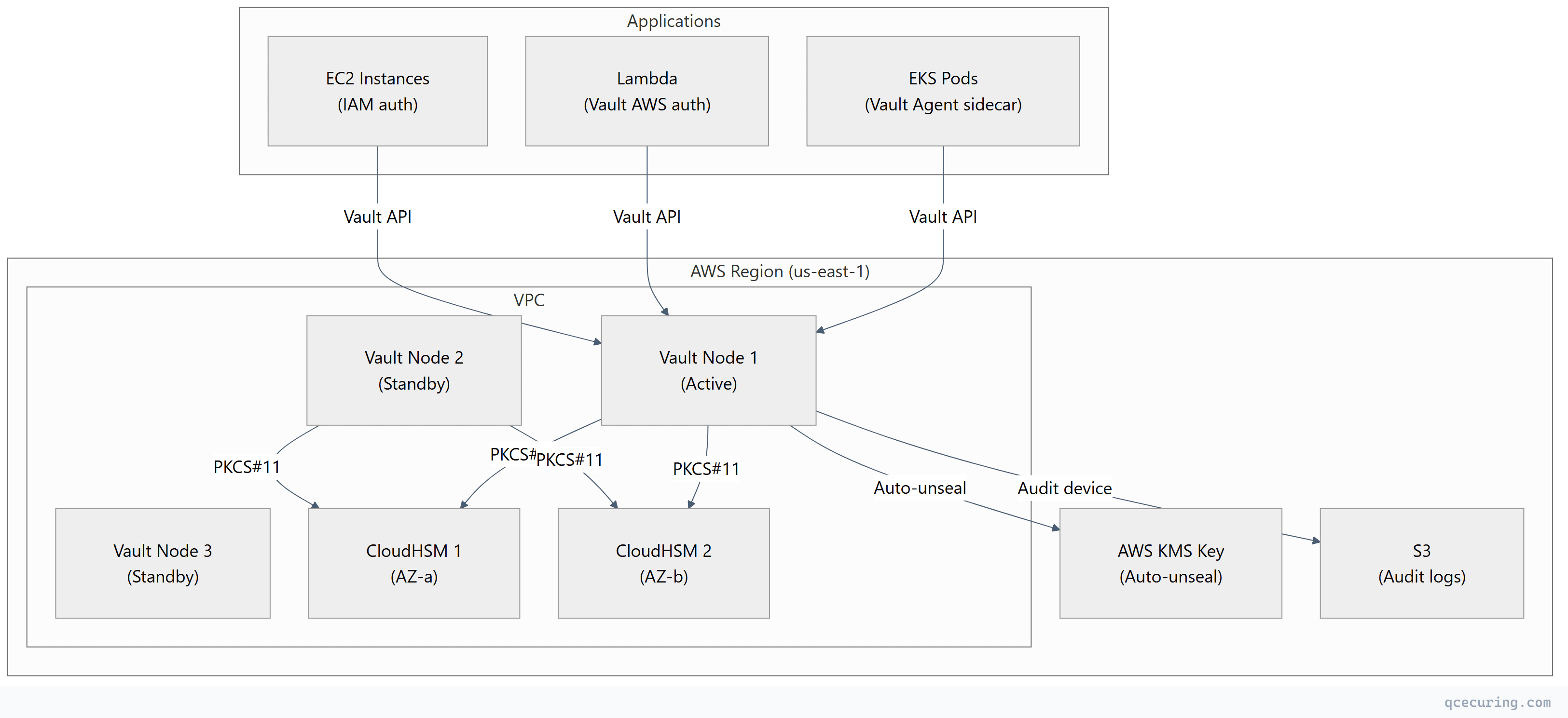
Deployment Checklist
| Component | Configuration | HA Strategy |
|---|---|---|
| Vault cluster | 3-5 nodes, Raft storage | Auto-failover, multi-AZ |
| CloudHSM | 2+ HSMs across AZs | Automatic replication |
| KMS key | Multi-region key | Cross-region failover |
| Network | Private subnets, no internet | VPC endpoints for KMS |
| Auth | AWS IAM, Kubernetes, AppRole | Per-workload identity |
| Audit | File + syslog + S3 | Immutable audit trail |
| Backup | Raft snapshots to S3 | Encrypted, cross-region |
Choosing the Right Layer for Each Key
| Key Type | Where to Store | Why |
|---|---|---|
| Root CA private key | HSM (PKCS#11) | Highest value, never exported, FIPS required |
| Issuing CA private key | Vault PKI (HSM-backed) | Needs API access for issuance, HSM protection |
| TLS server keys | Vault PKI (auto-issued) | Short-lived, automated, no HSM needed |
| Application encryption keys | Vault Transit | Centralized, audited, rotatable |
| AWS service encryption (S3, EBS) | AWS KMS | Native integration, no application changes |
| Database TDE master key | AWS KMS (CloudHSM-backed) | FIPS + native DB integration |
| Signing keys (code, JWT) | HSM or Vault Transit | High-value, audit trail required |
| SSH CA keys | Vault SSH engine | Dynamic, short-lived certificates |
| Kubernetes secrets | Vault + External Secrets Operator | Centralized, rotated, audited |
FAQ
Q: Do I need all three (KMS + Vault + HSM)?
Not necessarily. Small teams can start with AWS KMS alone. Add Vault when you need dynamic secrets, PKI, or multi-cloud key management. Add HSM when compliance requires FIPS 140-2 Level 3 or when you need hardware-protected root keys. Most enterprises end up with all three because each solves a different problem.
Q: Can Vault replace AWS KMS entirely?
For application-level encryption (Transit engine), yes. But Vault can’t replace KMS for AWS-native service encryption (S3 SSE, EBS encryption, RDS encryption). Those services only integrate with KMS. Use Vault for application secrets and KMS for infrastructure encryption.
Q: What happens if the HSM fails?
With a properly configured HSM cluster (2+ devices), keys are replicated. If one HSM fails, the other continues serving. If ALL HSMs fail simultaneously (extremely rare), Vault can’t unseal and applications can’t access HSM-protected keys. This is why HSM clusters span availability zones and have documented disaster recovery procedures.
Q: Is SoftHSM acceptable for production?
No. SoftHSM is a software emulation of an HSM — it provides the PKCS#11 API but no hardware protection. Keys exist in software memory and on disk. Use SoftHSM for development and testing only. For production, use a FIPS-validated hardware HSM or cloud HSM service.
Q: How do I migrate from KMS-only to KMS + Vault?
- Deploy Vault with KMS auto-unseal (Vault depends on KMS, not the other way around)
- Enable the Transit engine for new application encryption needs
- Gradually migrate applications from direct KMS calls to Vault Transit API
- Keep KMS for AWS-native service encryption (S3, EBS, RDS)
- Add HSM backing when compliance requires it
Q: What’s the latency impact of HSM-backed operations?
HSM operations add 1-5ms per cryptographic operation (sign, decrypt, unwrap) compared to software-only. For Vault auto-unseal, this happens once at startup. For Transit engine operations, Vault caches the decrypted key in memory — the HSM is only accessed during key rotation or Vault restart, not on every encrypt/decrypt call.
Related Reading: