
SSH key sprawl is one of the most underestimated security risks in enterprise environments. The average large organization has 10x more SSH keys than employees — accumulated over years, never rotated, with unknown owners. A single compromised SSH key provides persistent, unmonitored access to production systems.
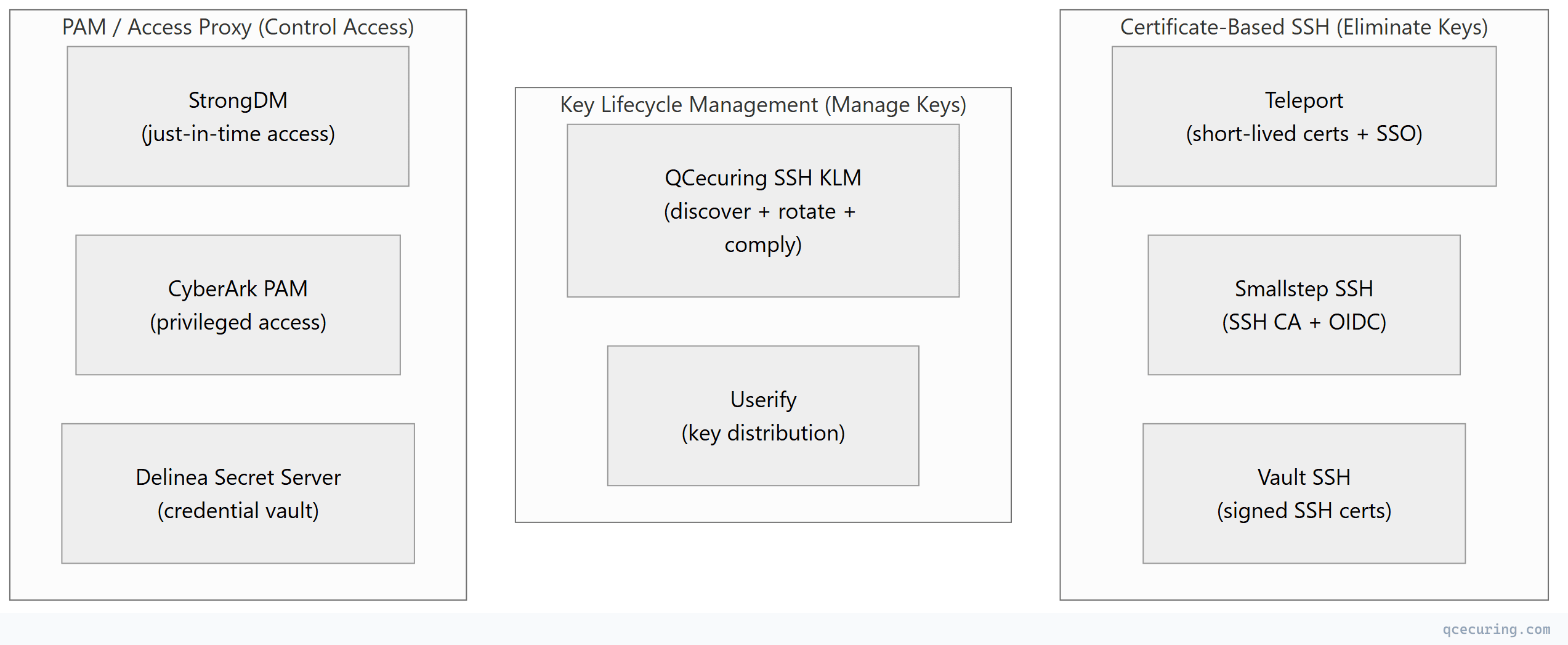
The tools in this comparison take different approaches to solving this problem: some eliminate keys entirely (certificate-based), some manage existing keys (lifecycle management), and some control access without managing keys directly (PAM/proxy).
Tool Categories
Platform Comparison
| Teleport | QCecuring SSH KLM | HashiCorp Vault SSH | StrongDM | CyberArk PAM | Smallstep SSH | |
|---|---|---|---|---|---|---|
| Approach | Replace keys with certs | Manage existing keys | SSH certificate CA | Access proxy | Privileged access vault | SSH CA + OIDC |
| Open source | Yes (Community) | No | Yes (OSS) | No | No | Yes (step-ca) |
| SSH certificates | Yes (built-in CA) | Supports (not issues) | Yes (signs certs) | No (proxy-based) | No (credential injection) | Yes (built-in CA) |
| Key discovery | N/A | Yes (core feature) | No | No | Limited | No |
| Key rotation | N/A (no keys) | Yes (automated) | No | No | Yes (credential rotation) | N/A (no keys) |
| Session recording | Yes (full replay) | No | No | Yes (full replay) | Yes (full replay) | No |
| SSO integration | Yes (OIDC/SAML) | No | Yes (via Vault auth) | Yes (OIDC/SAML) | Yes (LDAP/SAML) | Yes (OIDC) |
| Multi-protocol | SSH + K8s + DB + RDP | SSH + TLS (via QCecuring CLM) | SSH (+ other secrets) | SSH + K8s + DB + RDP | SSH + RDP + DB + apps | SSH |
| Compliance reports | Access audit | Key lifecycle compliance | Audit logs | Access audit | Full PAM compliance | Audit logs |
| Deployment | Agent per server | Agent for discovery | Vault cluster | Proxy (no server agent) | Complex (multiple components) | step-ca + agents |
| Pricing | $$-$$$ | $$ | Free (OSS) / $$$ (Enterprise) | $$$ | $$$$ | Free (OSS) / $$ |
| Best for | Zero-trust, modern infra | Key governance, compliance | Vault-centric environments | Quick access control | Large enterprise PAM | Developer-friendly SSH CA |
Detailed Profiles
1. Teleport — Best for Zero-Trust SSH
What it does: Replaces SSH keys entirely with short-lived certificates issued via SSO. Every connection is authenticated through your identity provider, recorded, and auditable.
Strengths:
- Eliminates SSH key sprawl completely
- Full session recording with replay
- Unified access (SSH + K8s + databases + Windows)
- Open-source core (20K+ GitHub stars)
- Identity-based access control (zero trust)
Limitations:
- Requires agent on every server (migration effort)
- Doesn’t help with existing key governance
- Complex for simple environments
- Enterprise pricing for advanced features
Best for: Organizations building new infrastructure or willing to migrate existing servers to certificate-based SSH.
2. QCecuring SSH KLM — Best for Key Governance & Compliance
What it does: Discovers all SSH keys across your infrastructure, tracks ownership, enforces rotation policies, and generates compliance reports — without changing your SSH access model.
Strengths:
- Non-disruptive (no access model changes)
- Complete key inventory (finds orphaned/unknown keys)
- Policy-based rotation enforcement
- Compliance reporting (PCI, SOX, HIPAA)
- integrated with QCecuring CLM CLM and CBOM
Limitations:
- Doesn’t eliminate keys (manages them)
- No session recording
- No SSO-based access
- Commercial only (no free tier)
Best for: Enterprises needing immediate visibility into existing SSH key estate and compliance evidence without infrastructure changes.
3. HashiCorp Vault SSH — Best for Vault-Centric Environments
What it does: Vault’s SSH secrets engine signs SSH public keys with a CA certificate, creating short-lived SSH certificates. Alternatively, it can generate one-time passwords (OTP) for SSH access.
Strengths:
- Two modes: signed certificates (CA) or OTP
- Integrates with Vault’s auth methods (LDAP, OIDC, AWS IAM)
- Free (open-source)
- Part of broader Vault secrets management
- API-driven (automation-friendly)
Limitations:
- Requires Vault infrastructure (not trivial)
- No session recording
- No key discovery for existing keys
- SSH-only (no unified access like Teleport)
- Certificate mode requires
TrustedUserCAKeyson every server
Best for: Organizations already running Vault that want to add certificate-based SSH without another vendor.
4. StrongDM — Best for Just-in-Time Access
What it does: Proxy-based access control — users connect through StrongDM’s gateway, which handles authentication and authorization. No agents on servers, no key management.
Strengths:
- No server-side agents (proxy architecture)
- Full session recording
- Just-in-time access (time-limited)
- Multi-protocol (SSH, K8s, databases, RDP)
- Fast deployment (no server changes)
Limitations:
- Doesn’t manage or discover SSH keys
- Single point of failure (proxy)
- Doesn’t eliminate keys on servers
- Commercial only, enterprise pricing
Best for: Organizations wanting quick access control without modifying server configurations.
5. CyberArk PAM — Best for Enterprise Privileged Access
What it does: Full privileged access management — vaults SSH credentials, rotates them, provides just-in-time access, and records sessions. Part of a broader identity security platform.
Strengths:
- Complete PAM solution (not just SSH)
- Credential vaulting and rotation
- Session recording and monitoring
- Compliance-ready (SOX, PCI, HIPAA)
- Broadest enterprise integration
Limitations:
- Extremely complex deployment
- Very expensive ($$$$$)
- Overkill for SSH-only needs
- Long implementation (6-12 months)
- Heavy infrastructure requirements
Best for: Large enterprises with existing PAM requirements that include SSH as one of many privileged access types.
6. Smallstep SSH — Best for Developer-Friendly SSH CA
What it does: Lightweight SSH certificate authority that integrates with OIDC providers. Developers authenticate via SSO and receive short-lived SSH certificates. Simpler than Teleport, more focused.
Strengths:
- Lightweight (Go binary, minimal infrastructure)
- OIDC-native (works with any identity provider)
- Open-source (step-ca)
- Developer-friendly CLI
- SSH + X.509 certificates from one CA
Limitations:
- No session recording
- No key discovery
- Smaller community than Teleport
- Less enterprise features (RBAC, compliance)
- No multi-protocol access
Best for: DevOps teams wanting certificate-based SSH without the complexity of Teleport or Vault.
Selection Decision Matrix
| Your Situation | Recommended Tool |
|---|---|
| ”We have thousands of unmanaged SSH keys and need visibility NOW” | QCecuring SSH KLM |
| ”We want to eliminate SSH keys and go zero-trust” | Teleport |
| ”We already run Vault and want SSH certificates” | Vault SSH |
| ”We need access control fast without changing servers” | StrongDM |
| ”We need full PAM for compliance (SSH is one part)“ | CyberArk |
| ”We want lightweight SSH CA for our dev team” | Smallstep |
| ”We need compliance reports on SSH key rotation” | QCecuring SSH KLM |
| ”We need session recording for audit” | Teleport or StrongDM |
| ”Budget is minimal, team is technical” | Vault SSH or Smallstep (open-source) |
The Modern SSH Security Stack
Most mature organizations combine approaches:
| Layer | Tool | Purpose |
|---|---|---|
| Discovery | QCecuring SSH KLM | Find all existing keys, track ownership |
| Access | Teleport or StrongDM | Control who can SSH where |
| Certificates | Vault SSH or Smallstep | Issue short-lived SSH certs |
| Compliance | QCecuring + Teleport | Key inventory + session audit |
| Remediation | QCecuring | Rotate/revoke non-compliant keys |
FAQ
Q: Should I eliminate SSH keys or manage them?
Long-term: eliminate (certificate-based SSH is more secure). Short-term: manage (you need visibility into what exists today). The practical path: deploy key management first (QCecuring), then migrate to certificate-based SSH (Teleport/Vault) over time.
Q: Is Teleport’s open-source edition sufficient for production?
For small teams (< 20 users, < 50 servers) — yes. For enterprise (RBAC, SSO, session recording, compliance) — you’ll need Teleport Enterprise or Cloud. The open-source edition lacks advanced access controls and audit features.
Q: Can Vault SSH replace Teleport?
For SSH certificate issuance — yes. But Vault SSH doesn’t provide: session recording, unified multi-protocol access, a user-facing access portal, or built-in RBAC for SSH. Vault is a CA; Teleport is an access platform. Different tools for different problems.
Q: What’s the minimum viable SSH security improvement?
- Discover all keys (QCecuring or manual audit)
- Identify and remove orphaned keys
- Enforce key rotation (90-day policy minimum)
- Disable password authentication everywhere
- Plan migration to certificate-based SSH
Q: How do these tools handle SSH keys on network devices (routers, switches)?
Most tools focus on Linux/Unix servers. Network device SSH keys are typically managed via: TACACS+/RADIUS for authentication, vendor-specific key management, or manual rotation during maintenance windows. QCecuring can discover keys on network devices; Teleport doesn’t cover network equipment.
Related Reading: