
You have three HSMs from two vendors, a cloud KMS, a database encryption engine, and a backup system — all managing cryptographic keys independently. When the auditor asks “where are all your encryption keys?”, you spend two weeks building a spreadsheet. KMIP exists to solve exactly this problem.
The Key Management Interoperability Protocol (KMIP) is an OASIS standard that defines a single, vendor-neutral interface for managing cryptographic objects across heterogeneous systems. Instead of learning five proprietary APIs, you speak one protocol to all of them.
What KMIP Actually Does
KMIP standardizes the communication between applications that use cryptographic keys and the systems that manage them. It doesn’t define how keys are stored or protected internally — that’s the KMS vendor’s job. KMIP defines how you ask for a key, how you create one, how you rotate one, and how you destroy one.
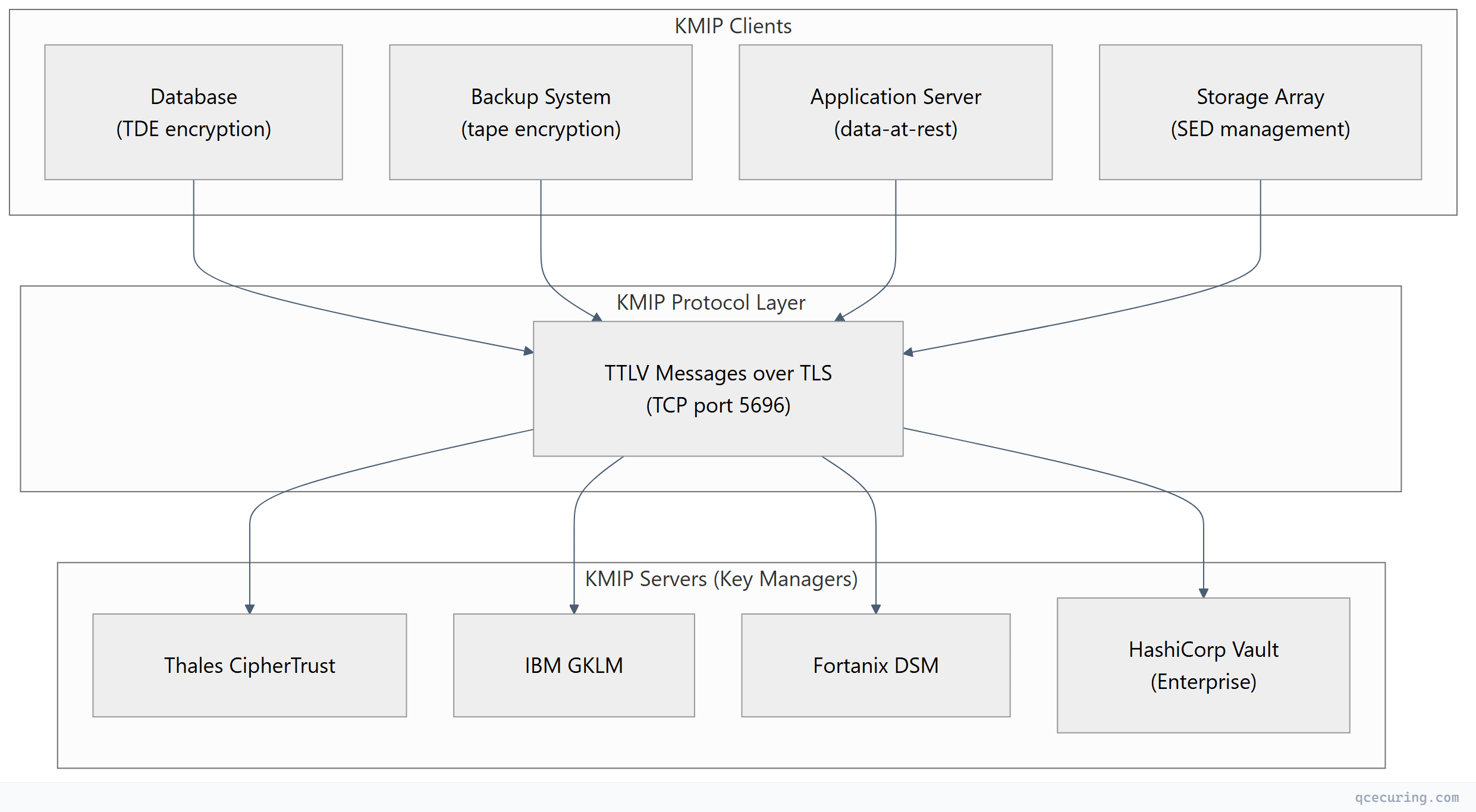
The key insight: any KMIP-compliant client can talk to any KMIP-compliant server. Your Oracle database can retrieve keys from Thales CipherTrust today and Fortanix DSM tomorrow — without changing application code.
KMIP Protocol Architecture
The Client-Server Model
KMIP uses a straightforward request-response model over TLS-encrypted TCP connections (default port 5696):
| Component | Role | Examples |
|---|---|---|
| KMIP Client | Requests cryptographic operations | Databases, backup software, storage arrays, applications |
| KMIP Server | Manages key lifecycle, enforces policy | HSMs, KMS platforms, key vaults |
| Managed Objects | The cryptographic material being managed | Symmetric keys, asymmetric key pairs, certificates, secrets |
Transport and Encoding
KMIP messages use TTLV encoding (Tag-Type-Length-Value) — a binary format designed for efficiency and unambiguous parsing:
| Field | Size | Purpose |
|---|---|---|
| Tag | 3 bytes | Identifies the attribute (e.g., 0x420001 = “Activation Date”) |
| Type | 1 byte | Data type (Integer, Text String, Byte String, DateTime, etc.) |
| Length | 4 bytes | Payload length in bytes |
| Value | Variable | The actual data, padded to 8-byte boundaries |
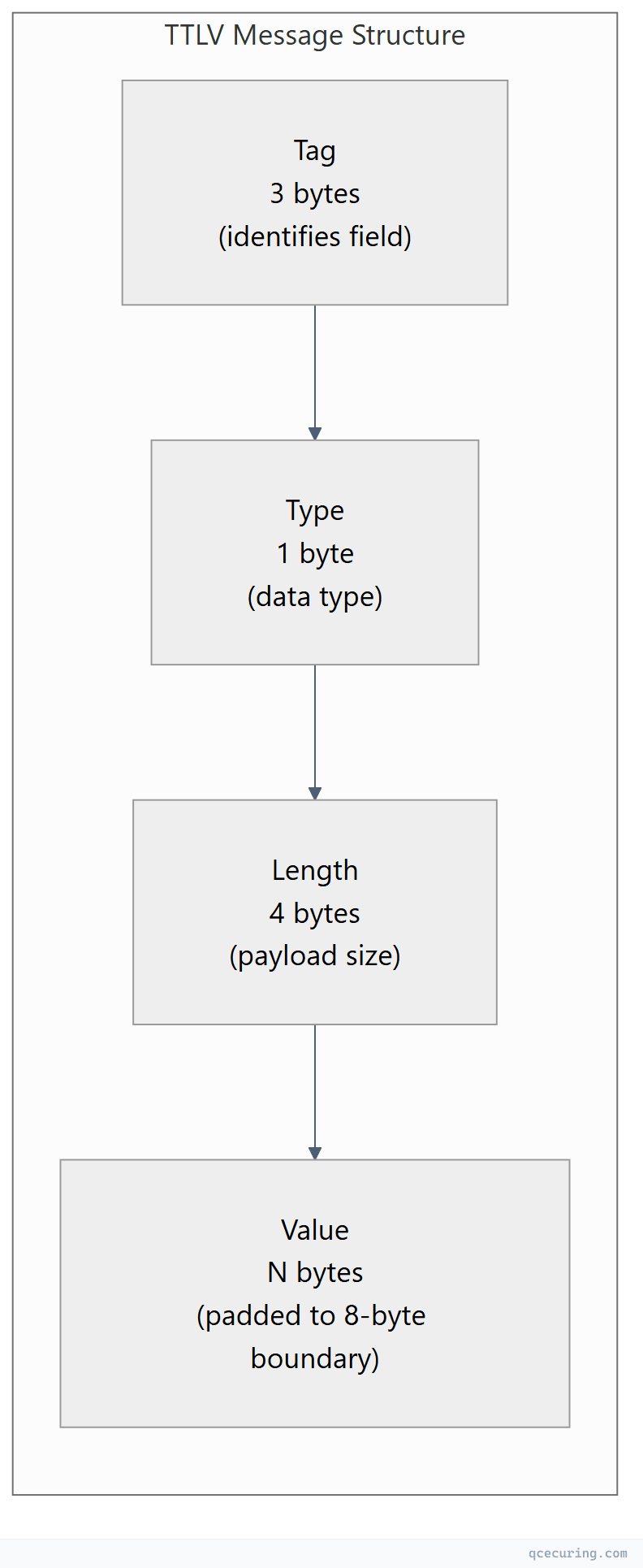
Why not JSON or XML? TTLV is deterministic — there’s no ambiguity in parsing, no whitespace issues, no encoding variations. For cryptographic protocols where a single bit flip matters, this predictability is essential. That said, KMIP 2.0+ also supports JSON and XML encoding for environments where binary isn’t practical.
Authentication and Security
KMIP mandates mutual TLS (mTLS) for all connections:
- Server authentication: Client verifies the KMS server’s certificate
- Client authentication: Server verifies the client’s certificate to authorize operations
- Channel encryption: All key material travels over TLS 1.2 or 1.3
Additional authentication layers (username/password, tokens) can be carried inside KMIP messages for defense-in-depth.
KMIP Operations Reference
KMIP defines a comprehensive set of operations for the full key lifecycle:
Core Lifecycle Operations
| Operation | Purpose | Example Use Case |
|---|---|---|
| Create | Generate a new cryptographic object | Create AES-256 key for database TDE |
| Register | Import an existing key into the KMS | Bring your own key (BYOK) to cloud |
| Get | Retrieve a managed object | Application fetches encryption key at startup |
| Locate | Search for objects by attributes | Find all keys expiring in 30 days |
| Destroy | Cryptographically erase a key | End-of-life key destruction per policy |
| Activate | Move key to Active state | Enable a pre-staged key for use |
| Revoke | Revoke a key (compromise, superseded) | Respond to suspected key compromise |
Cryptographic Operations
| Operation | Purpose | Example Use Case |
|---|---|---|
| Encrypt | Encrypt data using a managed key | Server-side encryption without key exposure |
| Decrypt | Decrypt data using a managed key | Decrypt backup tapes on restore |
| Sign | Create digital signature | Code signing with HSM-protected key |
| MAC | Generate message authentication code | Verify data integrity |
| Re-Key | Generate new key linked to old one | Automated key rotation |
| Derive Key | Derive new key from existing material | Key hierarchy derivation |
Administrative Operations
| Operation | Purpose | Example Use Case |
|---|---|---|
| Check | Verify object exists and is accessible | Health check before critical operation |
| Get Attributes | Read object metadata | Check key state, expiry, usage count |
| Add Attribute | Attach metadata to an object | Tag keys by application or environment |
| Set Attribute | Modify object metadata | Update contact info for key owner |
| Query | Discover server capabilities | Client auto-configuration |
Key Lifecycle States in KMIP
KMIP defines a strict state machine for cryptographic objects. Keys don’t just exist — they transition through states that control what operations are permitted:
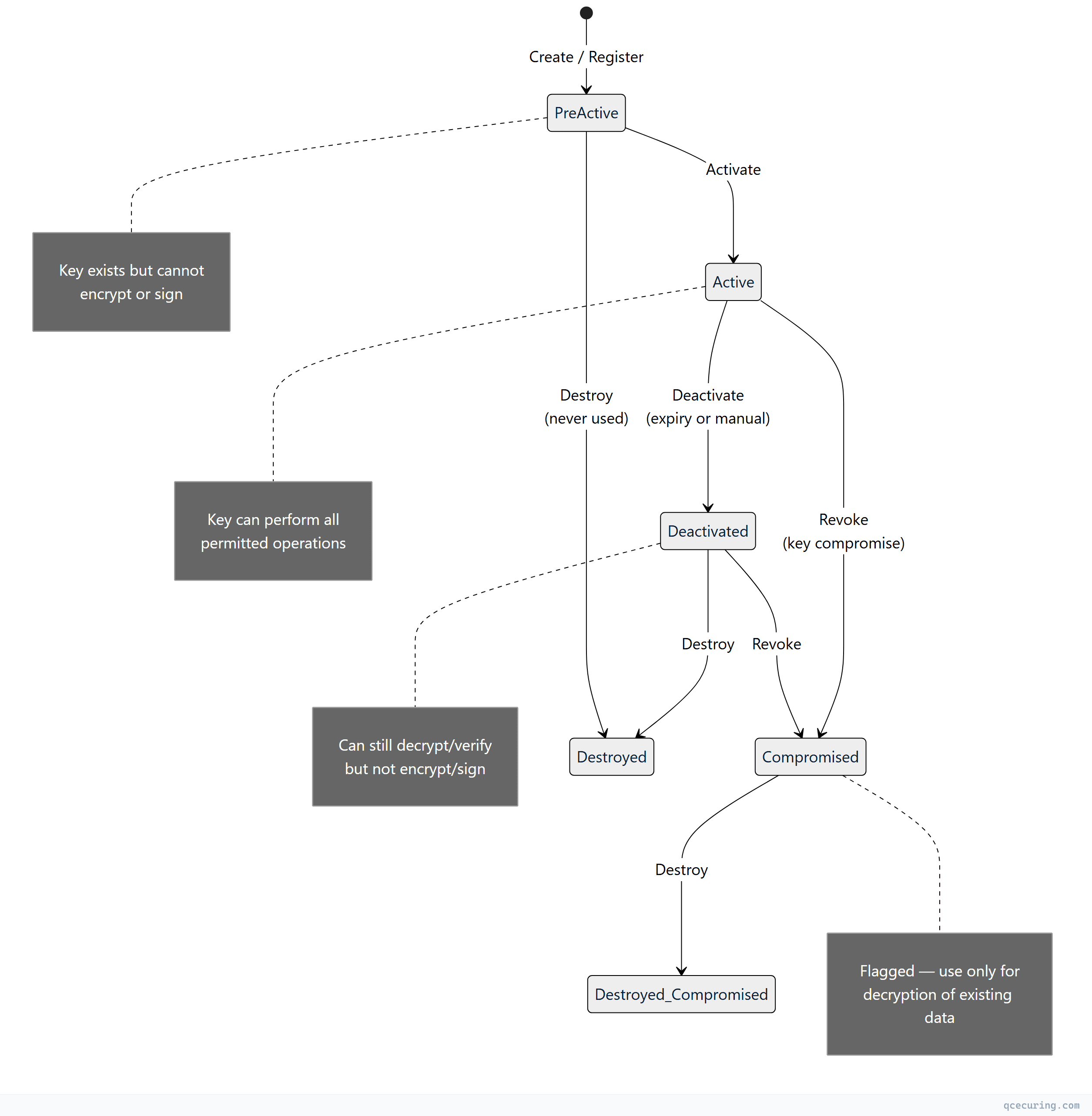
Why this matters operationally:
- Pre-Active: You can pre-stage keys for future use (e.g., generate next quarter’s encryption key now)
- Active → Deactivated: A deactivated key can still decrypt existing data but cannot encrypt new data — critical for key rotation without data loss
- Compromised: The key is flagged but not destroyed — you still need it to decrypt data encrypted before the compromise was detected
KMIP Message Example
Here’s what a Create operation looks like conceptually (shown in structured format rather than raw TTLV binary):
Request: Create an AES-256 Symmetric Key
<!-- KMIP Create Request (XML representation for readability) -->
<RequestMessage>
  <RequestHeader>
    <ProtocolVersion>
      <ProtocolVersionMajor>2</ProtocolVersionMajor>
      <ProtocolVersionMinor>1</ProtocolVersionMinor>
    </ProtocolVersion>
    <BatchCount>1</BatchCount>
  </RequestHeader>
  <BatchItem>
    <Operation>Create</Operation>
    <RequestPayload>
      <ObjectType>SymmetricKey</ObjectType>
      <Attributes>
        <CryptographicAlgorithm>AES</CryptographicAlgorithm>
        <CryptographicLength>256</CryptographicLength>
        <CryptographicUsageMask>Encrypt Decrypt</CryptographicUsageMask>
        <Name>
          <NameValue>prod-database-tde-key-2026</NameValue>
          <NameType>UninterpretedTextString</NameType>
        </Name>
        <ActivationDate>2026-06-01T00:00:00Z</ActivationDate>
      </Attributes>
    </RequestPayload>
  </BatchItem>
</RequestMessage>
Response: Key Created Successfully
<ResponseMessage>
  <ResponseHeader>
    <ProtocolVersion>
      <ProtocolVersionMajor>2</ProtocolVersionMajor>
      <ProtocolVersionMinor>1</ProtocolVersionMinor>
    </ProtocolVersion>
    <BatchCount>1</BatchCount>
  </ResponseHeader>
  <BatchItem>
    <Operation>Create</Operation>
    <ResultStatus>Success</ResultStatus>
    <ResponsePayload>
      <ObjectType>SymmetricKey</ObjectType>
      <UniqueIdentifier>a1b2c3d4-e5f6-7890-abcd-ef1234567890</UniqueIdentifier>
    </ResponsePayload>
  </BatchItem>
</ResponseMessage>
The server returns a Unique Identifier — this is how you reference the key in all future operations (Get, Activate, Rotate, Destroy). The actual key material never appears in the Create response; you retrieve it separately with a Get operation when needed.
KMIP Versions and Evolution
| Version | Year | Key Additions |
|---|---|---|
| 1.0 | 2010 | Core operations, symmetric/asymmetric keys, certificates |
| 1.1 | 2013 | Key wrapping, MAC operations, profiles |
| 1.2 | 2014 | Re-key, discover versions, streaming |
| 1.3 | 2015 | Client-side key register, log operations |
| 1.4 | 2017 | Sensitive attributes, key agreement |
| 2.0 | 2019 | Major restructure: JSON/XML encoding, simplified attributes, defaults |
| 2.1 | 2020 | Quantum-safe extensions, certificate renewal operations |
| 3.0 | 2024 | Post-quantum algorithm support, enhanced audit, multi-tenancy |
KMIP 2.0 was a breaking change. It simplified the attribute model (no more “Template” objects), added JSON/XML encoding options alongside TTLV, and restructured how profiles work. If you’re implementing KMIP today, target 2.1 minimum.
Real-World KMIP Deployment Patterns
Pattern 1: Database Transparent Data Encryption (TDE)
The most common KMIP use case. The database retrieves its master encryption key from a KMIP server at startup:
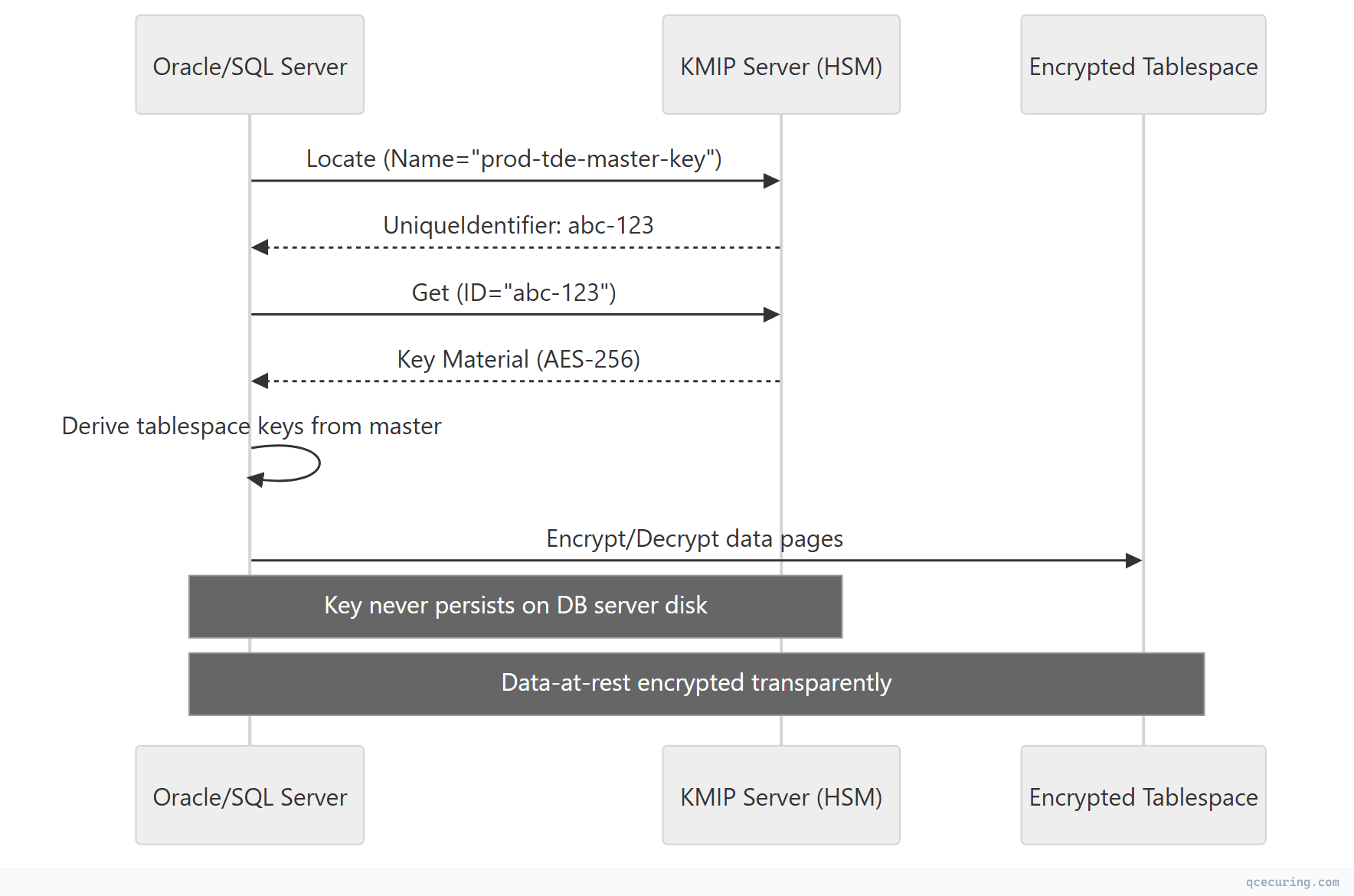
Supported databases: Oracle TDE, Microsoft SQL Server EKM, PostgreSQL (via plugins), MongoDB Enterprise, SAP HANA.
Pattern 2: Tape/Backup Encryption
Storage systems use KMIP to manage encryption keys for backup tapes and disk arrays:
- IBM Spectrum Protect → KMIP to IBM GKLM or Thales
- Veeam Backup → KMIP to any compliant KMS
- NetApp Storage Encryption → KMIP to external key manager
- Dell PowerProtect → KMIP for self-encrypting drive (SED) keys
Pattern 3: Multi-Cloud Key Management
Organizations using multiple cloud providers centralize key management through KMIP:
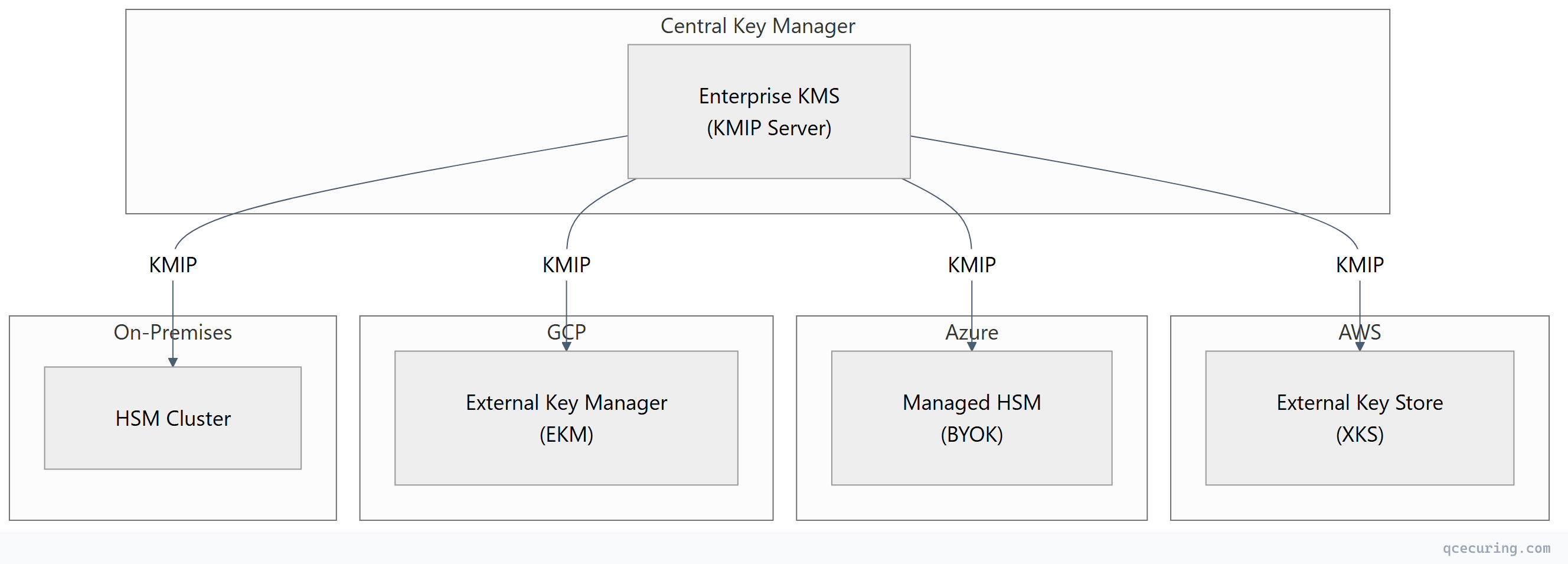
This pattern gives you a single audit trail, consistent key rotation policies, and the ability to revoke keys across all environments from one console.
KMIP Profiles and Compliance
KMIP profiles define minimum conformance levels for interoperability. Without profiles, “KMIP-compliant” could mean a server implements only the Query operation.
Key Profiles
| Profile | Required Operations | Target Use Case |
|---|---|---|
| Baseline Server | Create, Get, Destroy, Locate, Query | Minimum viable KMS |
| Symmetric Key Lifecycle | + Activate, Revoke, Re-Key, Get Attributes | Full key rotation |
| Asymmetric Key Lifecycle | + Create Key Pair, Sign, Verify | PKI and signing |
| Storage Array | Baseline + specific attributes for SEDs | Self-encrypting drives |
| Tape Library | Baseline + key wrapping for tape keys | Backup encryption |
| FIPS Profile | All operations + FIPS-approved algorithms only | Government/regulated |
Compliance Mapping
| Regulation | KMIP Relevance |
|---|---|
| PCI DSS 4.0 (Req 3.5-3.7) | Key management procedures — KMIP provides the interoperable mechanism |
| NIST SP 800-57 | Key lifecycle states map directly to KMIP states |
| FIPS 140-3 | KMIP server backed by FIPS-validated HSM satisfies key protection requirements |
| GDPR Art. 32 | Encryption of personal data — KMIP manages the keys |
| SOX Section 404 | Auditable key management controls — KMIP provides the audit trail |
| HIPAA | Encryption key management for PHI — KMIP centralizes control |
KMIP vs Proprietary Key Management APIs
| Aspect | KMIP | AWS KMS API | Azure Key Vault API | HashiCorp Vault API |
|---|---|---|---|---|
| Standard | OASIS open standard | Proprietary | Proprietary | Proprietary |
| Vendor lock-in | None (by design) | AWS only | Azure only | Vault only |
| Transport | TTLV/TLS (port 5696) | HTTPS REST | HTTPS REST | HTTPS REST |
| Key lifecycle states | Full state machine | Limited | Limited | Custom |
| Multi-vendor | Any compliant server | No | No | No |
| HSM integration | Native | CloudHSM backend | Managed HSM backend | PKCS#11 seal |
| Maturity | 14+ years | 10 years | 8 years | 8 years |
| Ecosystem | 100+ certified products | AWS services | Azure services | HashiCorp ecosystem |
When to use KMIP:
- Multi-vendor environments (multiple HSMs, multiple clouds)
- Compliance requirements mandating vendor-neutral key management
- Long-term data retention where you can’t depend on one vendor existing in 20 years
- Storage/backup systems that only speak KMIP
When proprietary APIs are fine:
- Single-cloud environments
- Application-level encryption within one ecosystem
- Short-lived keys with no long-term retention requirements
Implementing KMIP: Client Libraries and Tools
PyKMIP (Python)
from kmip.pie import client
from kmip import enums

# Connect to KMIP server with mTLS
with client.ProxyKmipClient(
    hostname='kmip-server.internal',
    port=5696,
    cert='/path/to/client.crt',
    key='/path/to/client.key',
    ca='/path/to/ca-chain.crt'
) as kmip_client:

    # Create an AES-256 symmetric key
    key_id = kmip_client.create(
        algorithm=enums.CryptographicAlgorithm.AES,
        length=256,
        name='prod-app-encryption-key',
        usage_mask=[
            enums.CryptographicUsageMask.ENCRYPT,
            enums.CryptographicUsageMask.DECRYPT
        ]
    )
    print(f"Created key: {key_id}")

    # Activate the key
    kmip_client.activate(key_id)

    # Retrieve the key
    key = kmip_client.get(key_id)
    print(f"Key algorithm: {key.cryptographic_algorithm}")
    print(f"Key length: {key.cryptographic_length}")

    # Locate keys by name
    results = kmip_client.locate(
        attributes={'Name': 'prod-app-encryption-key'}
    )
    print(f"Found {len(results)} matching keys")
Java (Bouncy Castle KMIP)
import org.bouncycastle.kmip.wire.*;
import org.bouncycastle.kmip.wire.enumeration.*;

// Create KMIP client with mTLS
KMIPClient client = new KMIPClient.Builder()
    .host("kmip-server.internal")
    .port(5696)
    .keyStore("/path/to/client-keystore.p12", "password")
    .trustStore("/path/to/truststore.p12", "password")
    .build();

// Create symmetric key
CreateRequest request = new CreateRequest.Builder()
    .objectType(ObjectType.SYMMETRIC_KEY)
    .attribute(CryptographicAlgorithm.AES)
    .attribute(new CryptographicLength(256))
    .attribute(new Name("prod-database-key"))
    .attribute(new CryptographicUsageMask(
        UsageMask.ENCRYPT | UsageMask.DECRYPT))
    .build();

CreateResponse response = client.create(request);
String keyId = response.getUniqueIdentifier();
Testing with OpenKMIP Server
For development and testing, you can run a local KMIP server:
# Install PyKMIP
pip install pykmip

# Start a test KMIP server
python -m kmip.services.server \
  --hostname=localhost \
  --port=5696 \
  --certificate=/path/to/server.crt \
  --key=/path/to/server.key \
  --ca=/path/to/ca.crt

# Test with the PyKMIP client
python -c "
from kmip.pie import client
from kmip import enums
c = client.ProxyKmipClient(hostname='localhost', port=5696,
    cert='client.crt', key='client.key', ca='ca.crt')
c.open()
uid = c.create(enums.CryptographicAlgorithm.AES, 256, name='test-key')
print(f'Created: {uid}')
c.close()
"
KMIP Deployment Considerations
High Availability
Key management is a Tier-0 dependency. If the KMIP server is down, nothing can encrypt or decrypt:
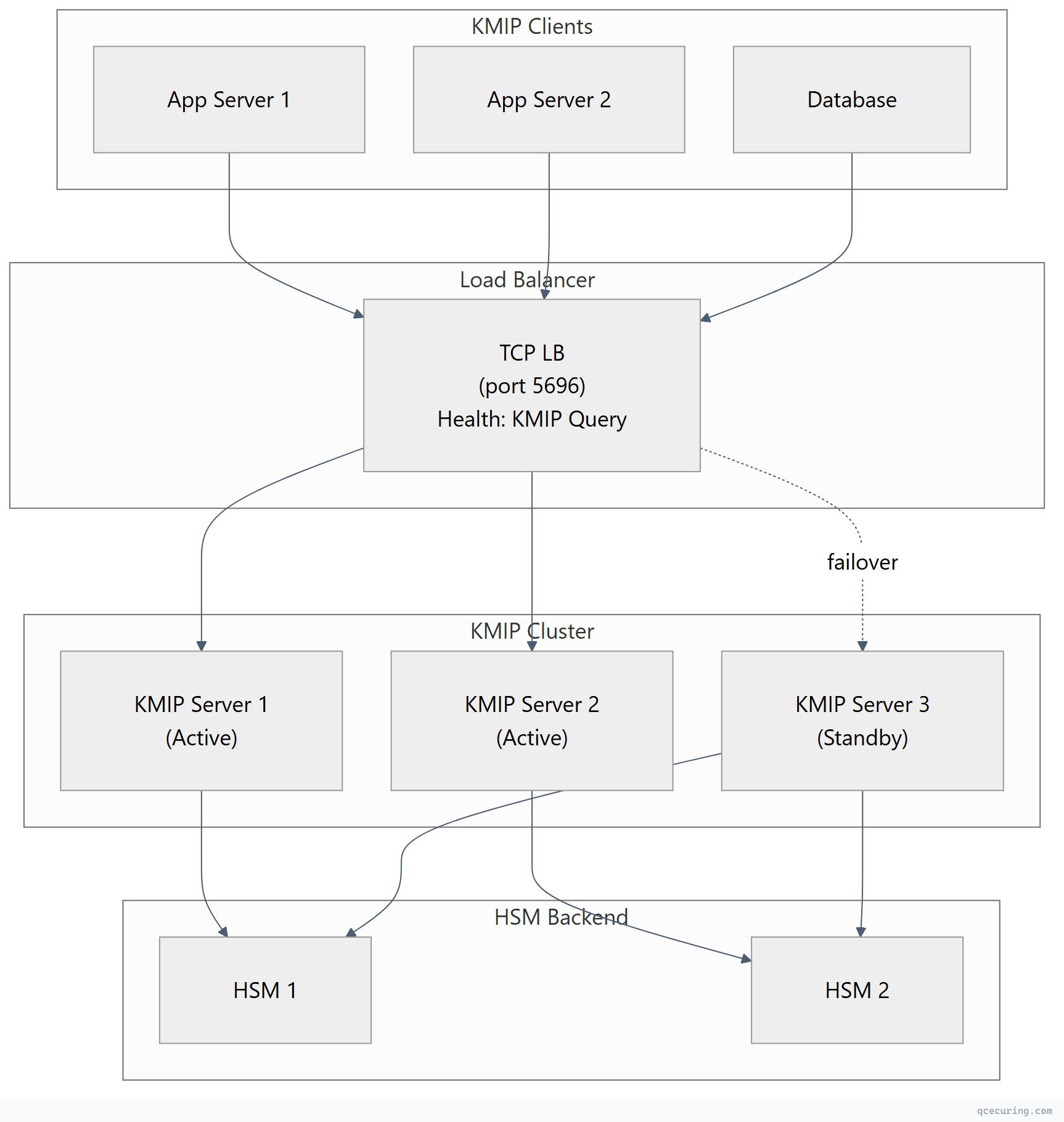
Design rules:
- Minimum 2 active KMIP servers behind a load balancer
- HSM backend must also be clustered (no single HSM)
- Clients should cache key material locally (encrypted) to survive brief KMS outages
- Monitor KMIP server health with Query operations every 30 seconds
Network Security
- KMIP traffic (port 5696) should never traverse the public internet
- Use dedicated network segments or VPN tunnels between sites
- Firewall rules: allow only known KMIP client IPs to reach port 5696
- mTLS certificates for KMIP should be short-lived (90 days) and auto-rotated
Performance
| Operation | Typical Latency | Notes |
|---|---|---|
| Create | 5-50ms | HSM key generation is the bottleneck |
| Get | 1-5ms | Cached in KMS memory after first access |
| Locate | 10-100ms | Depends on number of managed objects |
| Encrypt/Decrypt | 2-10ms | Server-side crypto adds network round-trip |
| Destroy | 5-20ms | Includes audit log write |
Performance tip: For high-throughput encryption, retrieve the key once with Get and perform encryption client-side. Don’t call Encrypt for every record — the network round-trip kills throughput.
Common KMIP Implementation Pitfalls
1. Assuming All “KMIP-Compliant” Products Are Interoperable
KMIP compliance is self-declared by many vendors. True interoperability requires matching profiles and protocol versions. Always test with the specific KMIP client-server combination before production deployment.
2. Not Planning for Key Recovery
If your KMIP server’s HSM fails and you have no key backup, all encrypted data is permanently lost. Implement:
- HSM key backup/cloning to a secondary HSM
- Key escrow for critical master keys
- Documented recovery procedures tested quarterly
3. Ignoring Key State Transitions
Applications that don’t check key state before use will fail when keys are deactivated or revoked. Your code should handle:
Pre-Active→ key not yet usable (wait or activate)Deactivated→ can decrypt but not encrypt (trigger rotation)Compromised→ alert security team, decrypt existing data onlyDestroyed→ key is gone, data is unrecoverable
4. Single-Threaded KMIP Connections
KMIP supports batch operations (multiple requests in one message). If you’re making sequential Create/Get calls in a loop, batch them:
# Bad: sequential calls (N round-trips)
for name in key_names:
    kmip_client.create(enums.CryptographicAlgorithm.AES, 256, name=name)

# Better: batch operations where supported by your client library
# Or use connection pooling for parallel requests
5. Not Rotating KMIP Client Certificates
The mTLS certificates used for KMIP authentication are themselves cryptographic material that expires. If your KMIP client cert expires, your application loses access to all keys. Automate rotation of KMIP client certificates with the same rigor as the keys they protect.
KMIP and Post-Quantum Cryptography
KMIP 3.0 (2024) added explicit support for post-quantum algorithms:
- ML-KEM (formerly CRYSTALS-Kyber) for key encapsulation
- ML-DSA (formerly CRYSTALS-Dilithium) for digital signatures
- SLH-DSA (formerly SPHINCS+) for stateless hash-based signatures
This means KMIP servers can now manage post-quantum keys with proper algorithm identifiers, key lengths, and usage masks. For organizations planning crypto-agility migration, KMIP provides the interoperability layer to manage both classical and post-quantum keys through the same interface.
FAQ
Q: Is KMIP the same as PKCS#11?
No. PKCS#11 (Cryptoki) is a local API for applications to talk to cryptographic tokens (HSMs, smart cards) on the same machine. KMIP is a network protocol for remote key management. They’re complementary: a KMIP server often uses PKCS#11 internally to communicate with its HSM backend, while clients use KMIP over the network to reach that server.
Q: Does KMIP support key wrapping (BYOK)?
Yes. The Register operation allows you to import externally-generated keys into a KMIP server. Combined with key wrapping (encrypting the key material with a wrapping key), this enables Bring Your Own Key workflows for cloud services that support KMIP-based external key stores.
Q: What port does KMIP use?
TCP port 5696 (IANA-assigned). All communication is TLS-encrypted with mutual authentication. Some implementations support alternative ports, but 5696 is the standard.
Q: Can I use KMIP with AWS/Azure/GCP?
Indirectly. Cloud providers don’t expose native KMIP endpoints, but they support external key stores:
- AWS: External Key Store (XKS) connects to your KMIP-backed KMS
- Azure: Managed HSM supports BYOK from KMIP-managed keys
- GCP: External Key Manager (EKM) integrates with KMIP-compliant key managers
Several vendors (Thales, Fortanix, Entrust) provide KMIP servers that bridge to cloud KMS services.
Q: How does KMIP handle key rotation?
KMIP provides the Re-Key operation, which generates a new key linked to the original. The old key transitions to Deactivated (can still decrypt) while the new key becomes Active (used for new encryption). Applications using Locate by name automatically get the latest active key.
Q: Is KMIP required for compliance?
No regulation mandates KMIP specifically. However, standards like NIST SP 800-57 require documented key management procedures, and PCI DSS 4.0 requires separation of key management from data systems. KMIP provides the technical mechanism to satisfy these requirements in a vendor-neutral, auditable way.
Related Reading: