
Your PKI was designed in 2012. A two-tier AD CS hierarchy, manual certificate requests via the web enrollment portal, 1-year validity periods, and a spreadsheet tracking who owns what. It worked when you had 200 certificates and a single data center.
Now you have 5,000 certificates across three clouds, Kubernetes clusters, a remote workforce, IoT devices, and certificate lifetimes shrinking to 47 days. The old PKI isn’t broken — it’s architecturally incapable of handling what’s coming. Modernization isn’t a nice-to-have; it’s a prerequisite for operational survival.
Signs Your PKI Needs Modernization
| Symptom | Root Cause | Modernization Fix |
|---|---|---|
| Certificate outages every quarter | No automated renewal | ACME/automation layer |
| ”Who owns this cert?” takes hours | No certificate inventory | Discovery + CLM platform |
| Can’t issue certs for Kubernetes | AD CS doesn’t speak ACME | Modern CA (Vault, step-ca) |
| Cloud workloads use self-signed certs | No CA accessible from cloud | Cloud-native CA or hybrid |
| 47-day certs are impossible to manage | Manual renewal processes | Full lifecycle automation |
| Audit prep takes weeks | No centralized reporting | CLM with compliance reports |
| Can’t rotate algorithms (PQC readiness) | Hardcoded crypto choices | Crypto-agile architecture |
| Single CA = single point of failure | No CA redundancy | Multi-CA strategy |
The PKI Maturity Model
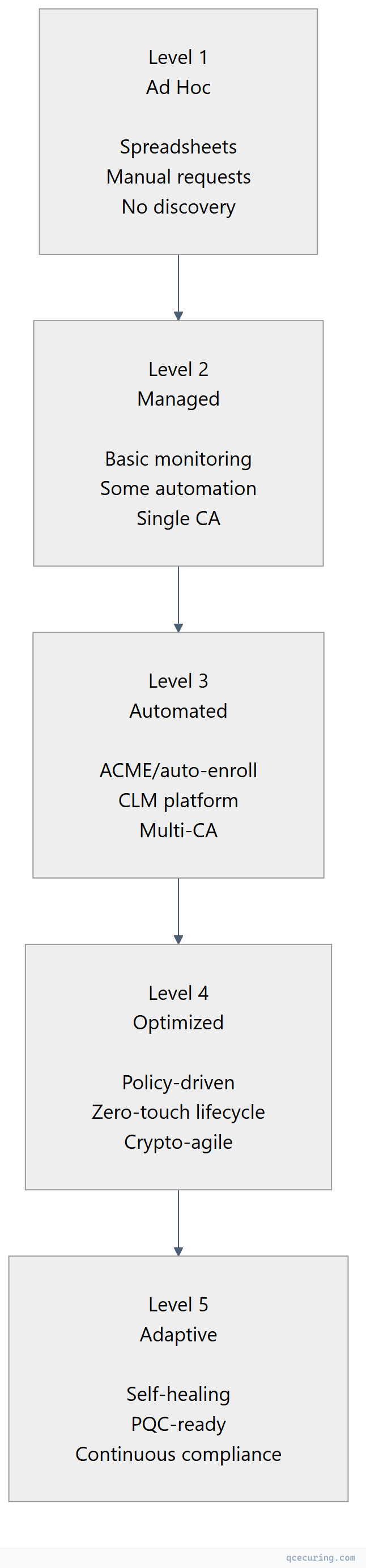
Most enterprises are at Level 1-2. The goal is Level 3-4 within 12-18 months.
| Level | Certificate Outages/Year | Manual Effort | Audit Readiness |
|---|---|---|---|
| 1 (Ad Hoc) | 5-10+ | 80%+ manual | Weeks of preparation |
| 2 (Managed) | 2-5 | 50% manual | Days of preparation |
| 3 (Automated) | 0-1 | 10% manual | Hours (reports on demand) |
| 4 (Optimized) | 0 | < 5% manual | Always ready |
| 5 (Adaptive) | 0 | Near-zero | Continuous |
Modernization Architecture
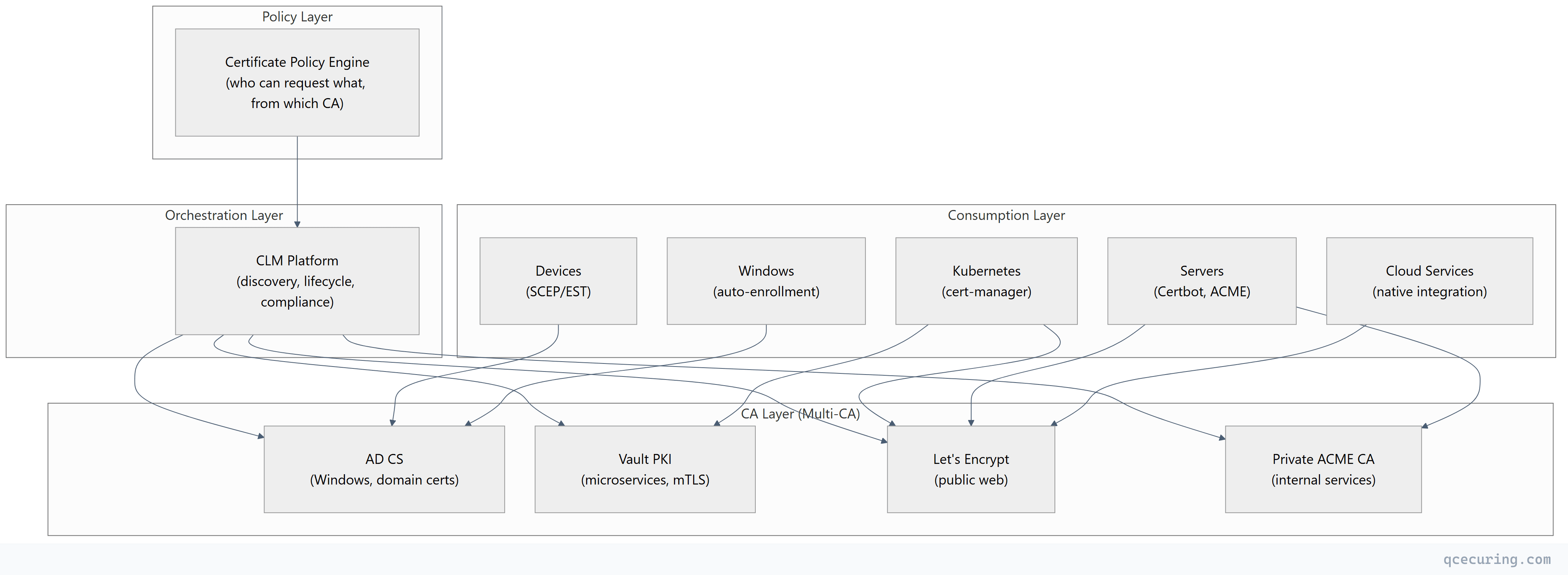
Target State
Key Principles
- No single CA dependency — workloads use the best CA for their context
- Protocol-based issuance — ACME, SCEP, EST (not manual web portals)
- Short-lived certificates — 90 days or less for automated workloads
- Centralized visibility — one platform sees all certificates regardless of CA
- Policy-driven — certificate standards enforced automatically, not by humans
- Crypto-agile — algorithms can be swapped without infrastructure changes
Phased Migration Playbook
Phase 1: Visibility (Months 1-2)
Goal: Know what you have before changing anything.
| Action | Tool | Output |
|---|---|---|
| Network certificate discovery | CLM platform or open-source scanner | Complete certificate inventory |
| Cloud certificate discovery | AWS/Azure/GCP API integration | Cloud-managed cert inventory |
| Kubernetes certificate discovery | cert-manager CRD scan | K8s certificate inventory |
| AD CS audit | certutil -view + template analysis | CA configuration baseline |
| Risk assessment | Prioritize by expiry, key strength, compliance | Migration priority list |
Phase 2: Quick Wins (Months 2-4)
Goal: Automate the easiest certificates first.
| Target | Action | Impact |
|---|---|---|
| Public web servers | Deploy Certbot/ACME | Eliminate manual renewal for public certs |
| Kubernetes workloads | Deploy cert-manager | Automated TLS for all K8s services |
| Expiring certificates | Renew everything < 30 days | Prevent imminent outages |
| Weak certificates | Replace RSA-1024, SHA-1 | Eliminate compliance violations |
Phase 3: Infrastructure (Months 4-8)
Goal: Build the modern CA infrastructure.
| Action | Details |
|---|---|
| Deploy internal ACME CA | Smallstep step-ca or Vault PKI for internal services |
| Configure CLM platform | Connect to all CAs, enable automated lifecycle |
| Implement policy engine | Define allowed algorithms, key sizes, validity periods |
| Set up monitoring | Expiry alerts, compliance dashboards, SIEM integration |
| Migrate Linux servers | From manual cert management to ACME auto-renewal |
Phase 4: Advanced Automation (Months 8-12)
Goal: Zero-touch certificate lifecycle.
| Action | Details |
|---|---|
| Deployment automation | Auto-deploy renewed certs to load balancers, CDNs |
| mTLS automation | Vault PKI for service-to-service certificates |
| Device certificate automation | SCEP/EST for IoT and network devices |
| Self-service portal | Developers request certs via API/portal (policy-enforced) |
| Compliance automation | Continuous compliance monitoring, auto-generated reports |
Phase 5: Future-Proofing (Months 12-18)
Goal: Crypto-agility and post-quantum readiness.
| Action | Details |
|---|---|
| Cryptographic inventory (CBOM) | Map all algorithms in use across infrastructure |
| Hybrid PQC testing | Enable ML-KEM hybrid key exchange on test endpoints |
| Algorithm agility | Ensure all systems can swap algorithms via config change |
| 47-day certificate readiness | Verify all automation handles 8x annual renewals |
| Disaster recovery | Test CA failover, key recovery, certificate re-issuance |
What to Keep on AD CS
Not everything should migrate away from AD CS. Keep it for:
| Use Case | Why AD CS Is Still Best |
|---|---|
| Domain controller certificates | Deeply integrated with AD authentication |
| Windows auto-enrollment | GPO-based, zero-touch for domain machines |
| Smart card / Windows Hello | Requires AD CS certificate templates |
| 802.1X (wired/wireless) | NPS/RADIUS integration with AD CS |
| NDES for legacy devices | Devices that only speak SCEP |
Migrate away from AD CS for:
- Linux/cloud server certificates → ACME
- Kubernetes workloads → cert-manager + Vault/step-ca
- Public-facing websites → Let’s Encrypt
- Microservice mTLS → Vault PKI (short-lived)
- CI/CD pipeline certificates → ACME or Vault
Common Modernization Mistakes
1. Rip-and-Replace Instead of Gradual Migration
Trying to replace AD CS overnight breaks auto-enrollment for thousands of Windows machines. Modernization is additive — add new CAs for new workloads, keep AD CS for what it does well, migrate gradually.
2. Ignoring Certificate Ownership
Deploying automation without knowing who owns each certificate means nobody gets notified when things go wrong. Establish ownership before automating.
3. Automating Without Policy
Automation without policy means anyone can request any certificate. Define allowed algorithms, key sizes, validity periods, and approval workflows before enabling self-service.
4. Forgetting Network Devices
Routers, firewalls, and load balancers often have the oldest, most neglected certificates. They typically don’t support ACME. Plan for SCEP/EST or manual renewal with calendar reminders.
5. No Rollback Plan
If the new CA or automation breaks, you need to be able to revert. Keep the old CA running in parallel until the new system is proven. Never decommission the old CA until all its certificates have expired or been replaced.
Measuring Success
| Metric | Before Modernization | After (Target) |
|---|---|---|
| Certificate outages per year | 3-10 | 0 |
| Mean time to issue a certificate | 2-5 days (manual) | < 5 minutes (automated) |
| Certificates with unknown owner | 30-50% | < 5% |
| Certificates using weak crypto | 10-20% | 0% |
| Audit preparation time | 2-4 weeks | < 1 day |
| Manual certificate operations | 80%+ | < 10% |
| Time to rotate all certificates (emergency) | Days to weeks | Hours |
FAQ
Q: How long does PKI modernization take?
For a mid-size enterprise (2,000-5,000 certificates): 12-18 months for full modernization. Phase 1 (visibility) delivers value in 4-6 weeks. Phase 2 (quick wins) reduces outage risk within 2-3 months. The full journey to Level 4 maturity takes 12-18 months with dedicated effort.
Q: What’s the budget for PKI modernization?
Typical ranges: $100K-$300K for mid-size (CLM platform + engineering time), $300K-$1M for large enterprise (platform + multiple CA deployments + integration). The ROI typically exceeds cost within the first year through prevented outages and reduced manual effort.
Q: Can we modernize without replacing AD CS?
Yes — and you should. Modernization means adding capabilities (ACME, cloud-native CAs, automation), not removing AD CS. AD CS continues serving Windows workloads while new CAs handle cloud and container workloads. A CLM platform provides unified visibility across all CAs.
Q: How do we handle the transition period where both old and new systems run?
Run both in parallel. New workloads use the modern CA. Existing workloads migrate gradually as certificates come up for renewal. The CLM platform tracks certificates from both systems. Set a target date (e.g., 18 months) after which no new certificates should be issued from the legacy system for migrated workload types.
Q: What team structure supports modern PKI?
A dedicated PKI/crypto team (2-4 people for mid-size, 5-10 for large enterprise) that owns: CA infrastructure, CLM platform, certificate policy, and automation. They serve as an internal service team — application teams consume certificates via self-service, the PKI team maintains the infrastructure.
Q: How does modernization prepare for post-quantum?
Modern PKI architecture enables crypto-agility — the ability to swap algorithms without infrastructure changes. When PQC algorithms are ready for production, you change a configuration (algorithm in certificate profiles, key exchange in TLS config) rather than rebuilding your entire PKI. Legacy AD CS with hardcoded RSA-2048 templates can’t adapt without significant rework.
Related Reading: