
Every service you expose from Kubernetes needs TLS. Whether you’re running Nginx Ingress Controller, Traefik, or the newer Gateway API, the pattern is the same: terminate TLS at the ingress layer, serve a valid certificate, and automate renewal so you never think about it again.
This guide covers the practical configuration for each ingress controller, cert-manager integration for automatic certificate issuance, mTLS at the edge, wildcard certificates, and the troubleshooting steps for when things go wrong.
TLS Termination Architecture
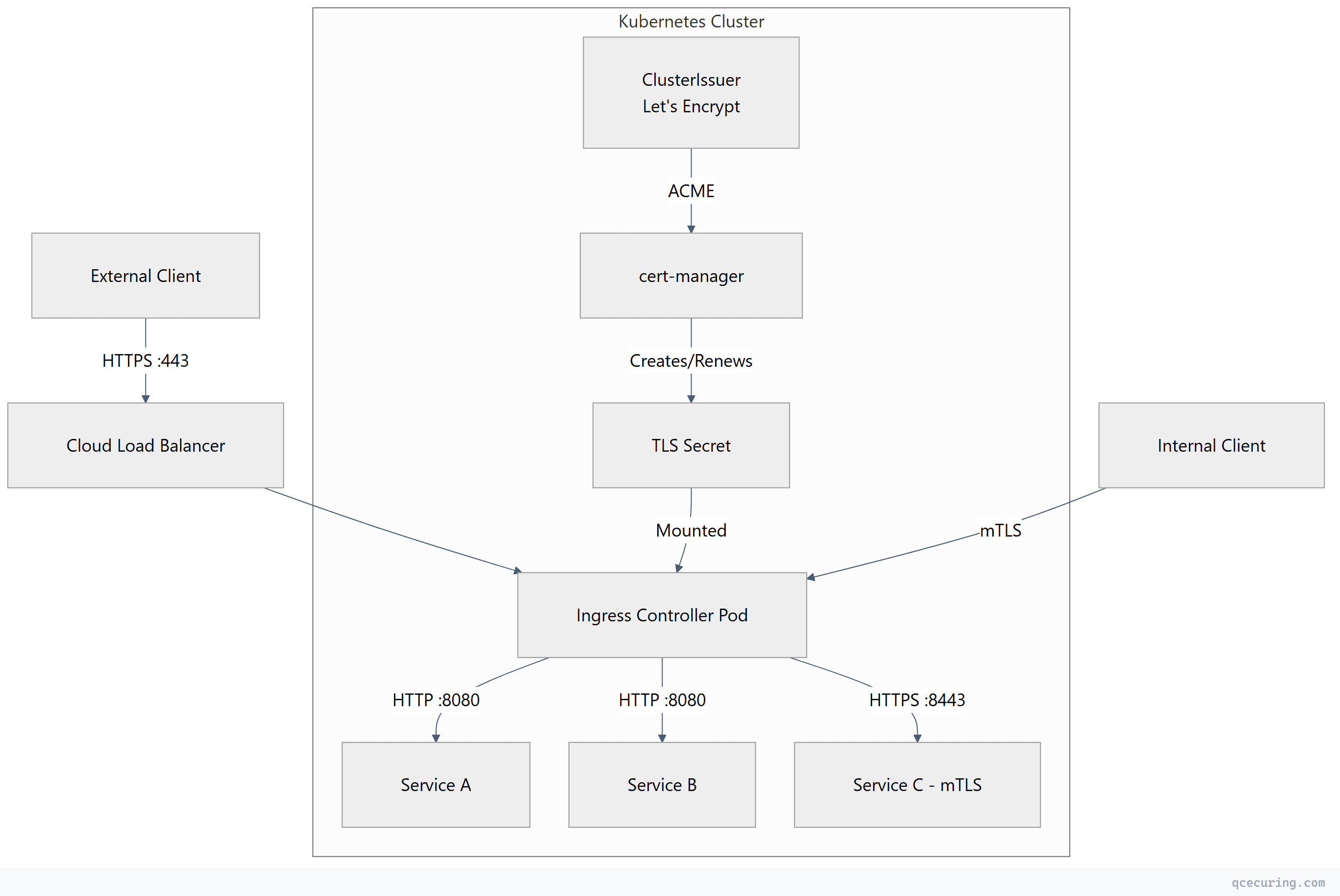
TLS termination options:
| Mode | Description | Use Case |
|---|---|---|
| Edge termination | TLS terminates at ingress, plain HTTP to pods | Most common, simplest |
| Passthrough | Ingress passes encrypted traffic directly to pods | Pod handles its own TLS |
| Re-encrypt | TLS at ingress, new TLS connection to pod | High-security environments |
TLS Secrets in Kubernetes
All ingress controllers consume TLS certificates from Kubernetes Secrets of type kubernetes.io/tls:
apiVersion: v1
kind: Secret
metadata:
  name: app-tls-secret
  namespace: production
type: kubernetes.io/tls
data:
  tls.crt: <base64-encoded-certificate-chain>
  tls.key: <base64-encoded-private-key>
Create a TLS secret from PEM files:
# From existing certificate files
kubectl create secret tls app-tls-secret \
  --cert=fullchain.pem \
  --key=privkey.pem \
  -n production

# Verify the secret
kubectl get secret app-tls-secret -n production -o jsonpath='{.data.tls\.crt}' | \
  base64 -d | openssl x509 -noout -subject -dates -issuer
Verify certificate chain in a secret:
# Extract and validate the full chain
kubectl get secret app-tls-secret -n production -o jsonpath='{.data.tls\.crt}' | \
  base64 -d | openssl verify -CAfile /etc/ssl/certs/ca-certificates.crt

# Check SANs match your ingress hostname
kubectl get secret app-tls-secret -n production -o jsonpath='{.data.tls\.crt}' | \
  base64 -d | openssl x509 -noout -ext subjectAltName
Nginx Ingress Controller TLS Configuration
Basic TLS Termination
apiVersion: networking.k8s.io/v1
kind: Ingress
metadata:
  name: app-ingress
  namespace: production
  annotations:
    nginx.ingress.kubernetes.io/ssl-redirect: "true"
    nginx.ingress.kubernetes.io/force-ssl-redirect: "true"
spec:
  ingressClassName: nginx
  tls:
    - hosts:
        - app.company.com
        - api.company.com
      secretName: app-tls-secret
  rules:
    - host: app.company.com
      http:
        paths:
          - path: /
            pathType: Prefix
            backend:
              service:
                name: frontend-svc
                port:
                  number: 80
    - host: api.company.com
      http:
        paths:
          - path: /
            pathType: Prefix
            backend:
              service:
                name: api-svc
                port:
                  number: 8080
TLS Hardening Annotations
metadata:
  annotations:
    # Force TLS 1.2+ only
    nginx.ingress.kubernetes.io/ssl-protocols: "TLSv1.2 TLSv1.3"

    # Strong cipher suites
    nginx.ingress.kubernetes.io/ssl-ciphers: "ECDHE-ECDSA-AES128-GCM-SHA256:ECDHE-RSA-AES128-GCM-SHA256:ECDHE-ECDSA-AES256-GCM-SHA384:ECDHE-RSA-AES256-GCM-SHA384"

    # HSTS header
    nginx.ingress.kubernetes.io/hsts: "true"
    nginx.ingress.kubernetes.io/hsts-max-age: "31536000"
    nginx.ingress.kubernetes.io/hsts-include-subdomains: "true"

    # OCSP stapling
    nginx.ingress.kubernetes.io/enable-ocsp: "true"
Nginx Ingress with cert-manager Auto-Issuance
apiVersion: networking.k8s.io/v1
kind: Ingress
metadata:
  name: app-ingress
  namespace: production
  annotations:
    cert-manager.io/cluster-issuer: "letsencrypt-prod"
    nginx.ingress.kubernetes.io/ssl-redirect: "true"
spec:
  ingressClassName: nginx
  tls:
    - hosts:
        - app.company.com
      secretName: app-tls-auto  # cert-manager creates this automatically
  rules:
    - host: app.company.com
      http:
        paths:
          - path: /
            pathType: Prefix
            backend:
              service:
                name: frontend-svc
                port:
                  number: 80
The cert-manager.io/cluster-issuer annotation tells cert-manager to automatically create a Certificate resource, solve the ACME challenge, and populate the TLS secret.
Default TLS Certificate (Catch-All)
# Set a default certificate for requests that don't match any Ingress host
kubectl create secret tls default-tls-secret \
  --cert=default-fullchain.pem \
  --key=default-privkey.pem \
  -n ingress-nginx

# Configure via Helm values or controller args
# --default-ssl-certificate=ingress-nginx/default-tls-secret
# Helm values for nginx-ingress
controller:
extraArgs:
default-ssl-certificate: "ingress-nginx/default-tls-secret"Traefik IngressRoute TLS Configuration
Traefik uses its own CRD (IngressRoute) for advanced TLS configuration.
Basic TLS with Traefik IngressRoute
apiVersion: traefik.io/v1alpha1
kind: IngressRoute
metadata:
  name: app-ingress
  namespace: production
spec:
  entryPoints:
    - websecure
  routes:
    - match: Host(`app.company.com`)
      kind: Rule
      services:
        - name: frontend-svc
          port: 80
    - match: Host(`api.company.com`) && PathPrefix(`/v1`)
      kind: Rule
      services:
        - name: api-svc
          port: 8080
  tls:
    secretName: app-tls-secret
Traefik TLS Options (Protocol/Cipher Control)
apiVersion: traefik.io/v1alpha1
kind: TLSOption
metadata:
  name: hardened
  namespace: production
spec:
  minVersion: VersionTLS12
  maxVersion: VersionTLS13
  cipherSuites:
    - TLS_ECDHE_ECDSA_WITH_AES_128_GCM_SHA256
    - TLS_ECDHE_RSA_WITH_AES_128_GCM_SHA256
    - TLS_ECDHE_ECDSA_WITH_AES_256_GCM_SHA384
    - TLS_ECDHE_RSA_WITH_AES_256_GCM_SHA384
  curvePreferences:
    - X25519
    - CurveP256
  sniStrict: true
---
apiVersion: traefik.io/v1alpha1
kind: IngressRoute
metadata:
  name: app-ingress
  namespace: production
spec:
  entryPoints:
    - websecure
  routes:
    - match: Host(`app.company.com`)
      kind: Rule
      services:
        - name: frontend-svc
          port: 80
  tls:
    secretName: app-tls-secret
    options:
      name: hardened
      namespace: production
Traefik with cert-manager
apiVersion: cert-manager.io/v1
kind: Certificate
metadata:
  name: app-cert
  namespace: production
spec:
  secretName: app-tls-auto
  issuerRef:
    name: letsencrypt-prod
    kind: ClusterIssuer
  dnsNames:
    - app.company.com
    - api.company.com
  duration: 2160h    # 90 days
  renewBefore: 720h  # 30 days before expiry
---
apiVersion: traefik.io/v1alpha1
kind: IngressRoute
metadata:
  name: app-ingress
  namespace: production
spec:
  entryPoints:
    - websecure
  routes:
    - match: Host(`app.company.com`)
      kind: Rule
      services:
        - name: frontend-svc
          port: 80
  tls:
    secretName: app-tls-auto
Traefik TLS Passthrough
apiVersion: traefik.io/v1alpha1
kind: IngressRouteTCP
metadata:
  name: passthrough-route
  namespace: production
spec:
  entryPoints:
    - websecure
  routes:
    - match: HostSNI(`secure-app.company.com`)
      services:
        - name: secure-app-svc
          port: 8443
  tls:
    passthrough: true
Gateway API TLS Configuration
Gateway API is the successor to the Ingress resource, providing more expressive routing and better separation of concerns between cluster operators and application developers.
Gateway with TLS
apiVersion: gateway.networking.k8s.io/v1
kind: Gateway
metadata:
  name: production-gateway
  namespace: gateway-system
  annotations:
    cert-manager.io/cluster-issuer: "letsencrypt-prod"
spec:
  gatewayClassName: nginx  # or istio, traefik, envoy
  listeners:
    - name: https
      protocol: HTTPS
      port: 443
      hostname: "*.company.com"
      tls:
        mode: Terminate
        certificateRefs:
          - name: wildcard-tls-secret
            namespace: gateway-system
      allowedRoutes:
        namespaces:
          from: Selector
          selector:
            matchLabels:
              gateway-access: "true"
    - name: http
      protocol: HTTP
      port: 80
      hostname: "*.company.com"
      allowedRoutes:
        namespaces:
          from: Same
HTTPRoute Attached to Gateway
apiVersion: gateway.networking.k8s.io/v1
kind: HTTPRoute
metadata:
  name: app-route
  namespace: production
spec:
  parentRefs:
    - name: production-gateway
      namespace: gateway-system
  hostnames:
    - "app.company.com"
  rules:
    - matches:
        - path:
            type: PathPrefix
            value: /api
      backendRefs:
        - name: api-svc
          port: 8080
    - matches:
        - path:
            type: PathPrefix
            value: /
      backendRefs:
        - name: frontend-svc
          port: 80
Gateway API with cert-manager (Automatic)
cert-manager 1.14+ supports Gateway API natively:
apiVersion: gateway.networking.k8s.io/v1
kind: Gateway
metadata:
  name: auto-tls-gateway
  namespace: gateway-system
  annotations:
    cert-manager.io/cluster-issuer: "letsencrypt-prod"
spec:
  gatewayClassName: nginx
  listeners:
    - name: https-app
      protocol: HTTPS
      port: 443
      hostname: "app.company.com"
      tls:
        mode: Terminate
        certificateRefs:
          - name: app-tls-gateway  # cert-manager creates this
cert-manager watches Gateway resources with the annotation and automatically creates Certificate resources for each listener hostname.
mTLS at Ingress
For services requiring client certificate authentication:
Nginx Ingress mTLS
apiVersion: networking.k8s.io/v1
kind: Ingress
metadata:
  name: mtls-ingress
  namespace: production
  annotations:
    nginx.ingress.kubernetes.io/auth-tls-verify-client: "on"
    nginx.ingress.kubernetes.io/auth-tls-secret: "production/client-ca-secret"
    nginx.ingress.kubernetes.io/auth-tls-verify-depth: "2"
    nginx.ingress.kubernetes.io/auth-tls-pass-certificate-to-upstream: "true"
spec:
  ingressClassName: nginx
  tls:
    - hosts:
        - secure-api.company.com
      secretName: secure-api-tls
  rules:
    - host: secure-api.company.com
      http:
        paths:
          - path: /
            pathType: Prefix
            backend:
              service:
                name: secure-api-svc
                port:
                  number: 8080
Create the client CA secret:
# The secret contains the CA certificate(s) that signed client certificates
kubectl create secret generic client-ca-secret \
  --from-file=ca.crt=client-ca-chain.pem \
  -n production
Traefik mTLS
apiVersion: traefik.io/v1alpha1
kind: TLSOption
metadata:
  name: mtls-strict
  namespace: production
spec:
  minVersion: VersionTLS12
  clientAuth:
    secretNames:
      - client-ca-secret
    clientAuthType: RequireAndVerifyClientCert
---
apiVersion: traefik.io/v1alpha1
kind: IngressRoute
metadata:
  name: mtls-route
  namespace: production
spec:
  entryPoints:
    - websecure
  routes:
    - match: Host(`secure-api.company.com`)
      kind: Rule
      services:
        - name: secure-api-svc
          port: 8080
  tls:
    secretName: secure-api-tls
    options:
      name: mtls-strict
      namespace: production
Wildcard Certificates
Wildcard certificates (*.company.com) reduce the number of certificates to manage but require DNS-01 challenges (HTTP-01 can’t validate wildcards).
cert-manager Wildcard with DNS-01
apiVersion: cert-manager.io/v1
kind: ClusterIssuer
metadata:
  name: letsencrypt-prod-dns
spec:
  acme:
    server: https://acme-v02.api.letsencrypt.org/directory
    email: pki-team@company.com
    privateKeySecretRef:
      name: letsencrypt-prod-dns-key
    solvers:
      - dns01:
          route53:
            region: us-east-1
            hostedZoneID: Z1234567890
            accessKeyIDSecretRef:
              name: route53-credentials
              key: access-key-id
            secretAccessKeySecretRef:
              name: route53-credentials
              key: secret-access-key
---
apiVersion: cert-manager.io/v1
kind: Certificate
metadata:
  name: wildcard-cert
  namespace: gateway-system
spec:
  secretName: wildcard-tls-secret
  issuerRef:
    name: letsencrypt-prod-dns
    kind: ClusterIssuer
  dnsNames:
    - "*.company.com"
    - "company.com"
  duration: 2160h
  renewBefore: 720h
Share Wildcard Secret Across Namespaces
# Option 1: Use kubernetes-reflector to sync secrets
apiVersion: v1
kind: Secret
metadata:
  name: wildcard-tls-secret
  namespace: gateway-system
  annotations:
    reflector.v1.k8s.emberstack.com/reflection-allowed: "true"
    reflector.v1.k8s.emberstack.com/reflection-allowed-namespaces: "production,staging"
    reflector.v1.k8s.emberstack.com/reflection-auto-enabled: "true"
type: kubernetes.io/tls
# Option 2: cert-manager Certificate per namespace (cleaner RBAC)
apiVersion: cert-manager.io/v1
kind: Certificate
metadata:
name: wildcard-cert
namespace: production # Each namespace gets its own copy
spec:
secretName: wildcard-tls-secret
issuerRef:
name: letsencrypt-prod-dns
kind: ClusterIssuer
dnsNames:
- "*.company.com"Troubleshooting TLS Ingress Issues
Certificate Not Applied to Ingress
# 1. Check if the secret exists and has data
kubectl get secret app-tls-secret -n production -o yaml | grep "tls.crt"

# 2. Check if cert-manager Certificate is Ready
kubectl get certificate -n production
kubectl describe certificate app-cert -n production

# 3. Check cert-manager events
kubectl get events -n production --field-selector reason=Issuing

# 4. Check ingress controller logs
kubectl logs -n ingress-nginx -l app.kubernetes.io/name=ingress-nginx --tail=50 | grep -i "ssl\|tls\|cert"

# 5. Verify the ingress references the correct secret
kubectl get ingress app-ingress -n production -o jsonpath='{.spec.tls[*].secretName}'
Wrong Certificate Served
# Check what certificate the ingress is actually serving
openssl s_client -connect app.company.com:443 -servername app.company.com < /dev/null 2>/dev/null | \
  openssl x509 -noout -subject -issuer -dates -ext subjectAltName

# Common causes:
# 1. SNI mismatch - hostname in request doesn't match any tls[].hosts
# 2. Default certificate being served - check default-ssl-certificate setting
# 3. Secret in wrong namespace
# 4. Ingress controller cache - restart controller pods

# Force ingress controller to reload
kubectl rollout restart deployment -n ingress-nginx ingress-nginx-controller
Mixed HTTP/HTTPS (Redirect Loop)
# Symptom: ERR_TOO_MANY_REDIRECTS

# Cause 1: Load balancer terminates TLS, ingress also redirects to HTTPS
# Fix: Tell ingress the original protocol via headers
metadata:
  annotations:
    nginx.ingress.kubernetes.io/use-forwarded-headers: "true"
    nginx.ingress.kubernetes.io/forwarded-for-header: "X-Forwarded-For"

# Cause 2: Backend app redirects to HTTPS but ingress already handles TLS
# Fix: Configure backend to trust X-Forwarded-Proto header

# Cause 3: HSTS cached in browser from previous config
# Fix: Clear browser HSTS cache or wait for max-age to expire
cert-manager Certificate Stuck in “Not Ready”
# Full diagnostic chain
kubectl get certificate,certificaterequest,order,challenge -n production

# Check the Order status
kubectl describe order -n production $(kubectl get order -n production -o name | head -1)

# Check Challenge status (for ACME)
kubectl describe challenge -n production $(kubectl get challenge -n production -o name | head -1)

# Common fixes:
# DNS-01: Verify DNS credentials, check propagation
dig _acme-challenge.app.company.com TXT

# HTTP-01: Verify ingress controller can serve /.well-known/acme-challenge/
curl -v http://app.company.com/.well-known/acme-challenge/test
Best Practices Summary
| Practice | Why |
|---|---|
| Always use cert-manager for automation | Manual secret management doesn’t scale |
Set renewBefore to 1/3 of certificate lifetime | Gives time for retry if renewal fails |
| Use DNS-01 for wildcards, HTTP-01 for specific hosts | HTTP-01 is simpler but can’t do wildcards |
| Enable HSTS after confirming TLS works | HSTS is hard to undo — test first |
| Monitor certificate expiry with alerts | Catch renewal failures before they cause outages |
| Use separate secrets per ingress | Avoid blast radius from a single secret issue |
Test TLS configuration with ssllabs.com or testssl.sh | Catch weak ciphers and misconfigurations |
FAQ
Q: Should I terminate TLS at the load balancer or the ingress controller? A: Terminate at the ingress controller in most cases. This gives you full control over TLS configuration, cipher suites, and client certificate validation. Cloud load balancers in TCP/passthrough mode forward encrypted traffic to the ingress controller. If you terminate at the load balancer, you lose visibility into client certificates and can’t enforce per-route TLS policies.
Q: Can I use different certificates for different paths on the same host? A: No. TLS negotiation happens before HTTP routing (the path is encrypted until TLS completes). One hostname = one certificate. If you need different certificates, use different hostnames (subdomains).
Q: How do I handle certificate renewal without downtime? A: cert-manager handles this automatically. It creates the new certificate in a temporary secret, validates it, then updates the target secret atomically. Nginx Ingress Controller watches for secret changes and reloads without dropping connections (using shared memory for the new cert).
Q: What’s the difference between tls.secretName in Ingress vs. Gateway API certificateRefs?
A: Functionally the same — both reference a Kubernetes TLS secret. Gateway API’s certificateRefs supports cross-namespace references (with ReferenceGrant), which Ingress doesn’t. Gateway API also allows multiple certificates per listener for different hostnames.
Q: Should I use one wildcard certificate or individual certificates per service? A: Individual certificates are more secure (compromise of one doesn’t affect others) and work with HTTP-01 challenges. Wildcards are operationally simpler when you have many subdomains and reduce rate limit pressure on Let’s Encrypt. For production, use wildcards for internal services and individual certificates for public-facing services.
Q: How do I rotate the ingress controller’s default certificate?
A: Update the secret referenced by --default-ssl-certificate. The controller watches the secret and reloads automatically. With cert-manager, point a Certificate resource at the default secret name and it renews automatically.
Related Reading: