
AD CS has been the default enterprise PKI for two decades. It works — until you need certificates for Kubernetes pods, cloud workloads, IoT devices, or anything outside the Windows domain. The 47-day certificate lifetime mandate makes manual AD CS enrollment workflows operationally impossible at scale.
This playbook gives you a phase-by-phase migration path that doesn’t require a forklift replacement. You’ll run AD CS and modern PKI in parallel, migrate workloads incrementally, and keep a rollback path open at every stage.
Why Migrate Now
Three forces are converging:
- 47-day certificate lifetimes — Manual enrollment through AD CS web portals or autoenrollment GPOs can’t handle 8x more renewals per year
- Cloud and container workloads — AD CS has no native integration with Kubernetes, AWS, GCP, or Azure PaaS services
- Post-quantum readiness — AD CS templates are hardcoded to RSA/ECC; migrating algorithms requires modern CA infrastructure
The goal isn’t to eliminate AD CS entirely. Domain controllers, NPS/RADIUS, and Windows device certificates may stay on AD CS indefinitely. The goal is to move everything else to infrastructure that supports automation natively.
Migration Architecture Overview
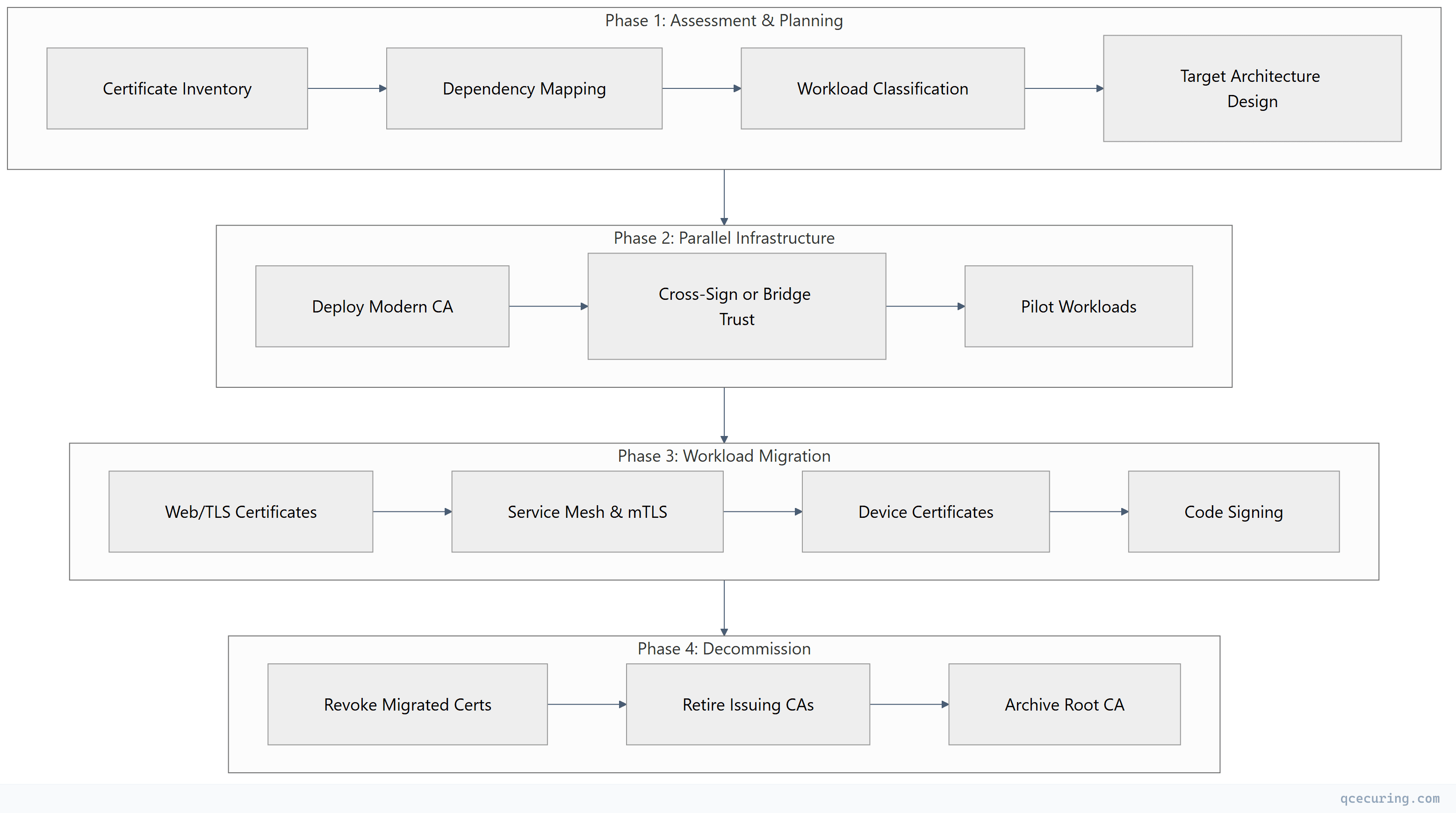
Phase 1: Assessment (Weeks 1-4)
Certificate Inventory
Before migrating anything, you need a complete picture of what AD CS is issuing today.
Automated discovery using certutil:
# Export all issued certificates from AD CS
certutil -view -restrict "Disposition=20" -out "RequestID,CommonName,NotAfter,CertificateTemplate,RequesterName" > issued_certs.csv

# Count certificates by template
certutil -view -restrict "Disposition=20" -out "CertificateTemplate" |
  Sort-Object | Group-Object | Sort-Object Count -Descending
Query AD CS database for template usage:
# Get certificate counts per template
$templates = certutil -catemplates
foreach ($t in $templates) {
    $count = (certutil -view -restrict "CertificateTemplate=$($t.Split(':')[0]),Disposition=20" -out RequestID).Count
    Write-Output "$($t.Split(':')[0]): $count active certificates"
}
Network-based discovery for certificates AD CS doesn’t know about:
# Scan network for TLS certificates (nmap)
nmap -p 443,8443,636,993,995 --script ssl-cert 10.0.0.0/16 -oX tls_scan.xml

# Parse results for issuer information
xmlstarlet sel -t -m "//script[@id='ssl-cert']" \
  -v "../@addr" -o "," -v "table/table[@key='issuer']/elem[@key='commonName']" -n tls_scan.xml
Workload Classification
Categorize every certificate into one of four migration buckets:
| Bucket | Examples | Migration Target | Priority |
|---|---|---|---|
| Migrate First | Web servers, load balancers, API gateways | ACME (Let’s Encrypt, step-ca) | High |
| Migrate Second | Service mesh, microservices mTLS, CI/CD | Vault PKI / cert-manager | High |
| Migrate Later | User S/MIME, smart card logon | Evaluate per use case | Medium |
| Keep on AD CS | Domain controllers, NPS, SCCM | Stay on AD CS | N/A |
Dependency Mapping
For each certificate template, document:
- What systems consume the certificate
- How the certificate is requested (autoenrollment, manual, NDES, CEP/CES)
- What trusts the issuing CA (trust store locations)
- Renewal frequency and current automation level
Phase 2: Parallel Infrastructure (Weeks 5-10)
Deploy the Modern CA Stack
The target architecture depends on your environment:
| Environment | Recommended Stack | Why |
|---|---|---|
| Kubernetes-heavy | cert-manager + step-ca or Vault PKI | Native K8s integration |
| Multi-cloud | HashiCorp Vault PKI | Cloud-agnostic, API-driven |
| Primarily Linux/web | step-ca with ACME | Lightweight, ACME-native |
| Regulated/air-gapped | EJBCA or Vault (self-hosted) | Full control, HSM support |
Example: Deploy Vault PKI as an intermediate CA:
# Enable PKI secrets engine
vault secrets enable -path=pki_int pki

# Set max TTL
vault secrets tune -max-lease-ttl=43800h pki_int

# Generate intermediate CSR
vault write -format=json pki_int/intermediate/generate/internal \
  common_name="Enterprise Intermediate CA v2" \
  issuer_name="enterprise-int-v2" \
  key_type="ec" \
  key_bits=384 | jq -r '.data.csr' > vault_int.csr
Sign the intermediate with your existing AD CS root (or a new offline root):
# Submit CSR to AD CS root CA for signing
certreq -submit -attrib "CertificateTemplate:SubCA" vault_int.csr vault_int.cer

# Or use certutil for offline root
certutil -sign vault_int.csr vault_int.cer
Establish Trust
The critical step: both old and new certificates must be trusted by all relying parties during migration.
Option A: Cross-sign the new intermediate under the existing AD CS root
- Simplest approach — all existing trust stores already trust the root
- New certificates chain to the same root CA
- No trust store changes needed on clients
Option B: New root with bridge trust
- Deploy new root CA certificate to all trust stores via GPO/MDM
- More work upfront, cleaner long-term separation
# Distribute new root via GPO (if using Option B)
# Copy root cert to SYSVOL
Copy-Item "new_root_ca.cer" "\\domain.local\SYSVOL\domain.local\Policies\Certificates\"

# Or push via Intune for hybrid-joined devices
# Upload to Intune > Devices > Configuration profiles > Trusted certificate
Pilot Migration
Select 5-10 non-critical workloads for the pilot:
- Internal development web servers
- CI/CD pipeline certificates
- Non-production API endpoints
- Internal tool TLS (Grafana, Jenkins, GitLab)
# cert-manager Certificate resource for pilot workload
apiVersion: cert-manager.io/v1
kind: Certificate
metadata:
  name: grafana-tls
  namespace: monitoring
spec:
  secretName: grafana-tls-secret
  duration: 720h      # 30 days
  renewBefore: 168h   # Renew 7 days before expiry
  issuerRef:
    name: vault-issuer
    kind: ClusterIssuer
  dnsNames:
    - grafana.internal.company.com
    - monitoring.internal.company.com
Phase 3: Workload-by-Workload Migration (Weeks 11-30)
Migration Wave 1: Web/TLS Certificates (Weeks 11-16)
These are the highest-volume, lowest-risk certificates to migrate.
From AD CS Web Server template → ACME automation:
# Install step-ca ACME server (if not using public CA)
step ca init --deployment-type=standalone \
  --name="Enterprise ACME CA" \
  --provisioner="acme" \
  --address=":443"

# Configure Certbot to use internal ACME
certbot certonly --server https://acme.internal.company.com/acme/directory \
  --standalone -d webserver.company.com \
  --preferred-challenges http-01
For Nginx/Apache servers, automate with deploy hooks:
# /etc/letsencrypt/renewal-hooks/deploy/reload-nginx.sh
#!/bin/bash
systemctl reload nginx
logger "Certificate renewed and Nginx reloaded for $RENEWED_DOMAINS"
Migration Wave 2: Service Mesh & mTLS (Weeks 14-22)
# Istio integration with cert-manager
apiVersion: cert-manager.io/v1
kind: Certificate
metadata:
  name: istio-ca
  namespace: istio-system
spec:
  isCA: true
  duration: 8760h
  secretName: istio-ca-secret
  issuerRef:
    name: vault-cluster-issuer
    kind: ClusterIssuer
  commonName: istio-ca.company.com
Migration Wave 3: Device Certificates (Weeks 20-28)
Device certificates (802.1X, VPN) are the hardest to migrate because they touch end-user devices.
Strategy: Dual-stack during transition
- Keep AD CS autoenrollment active for existing devices
- New device enrollments go through modern CA (SCEP via step-ca or Intune Cloud PKI)
- As devices refresh, they naturally move to the new CA
Migration Wave 4: Specialized Use Cases (Weeks 24-30)
- Code signing — Move to dedicated signing service (SignServer, Azure Trusted Signing)
- S/MIME — Evaluate if still needed; if yes, consider hosted S/MIME CA
- Smart card logon — Typically stays on AD CS (deep Windows integration)
What Stays on AD CS
Not everything should migrate. These workloads have deep AD CS dependencies:
| Workload | Why It Stays | Effort to Migrate |
|---|---|---|
| Domain Controller certs | Kerberos PKINIT requires AD-integrated CA | Extreme |
| NPS/RADIUS (802.1X server) | Supplicant trust chain expectations | High |
| SCCM/MECM client auth | Built-in AD CS integration | High |
| Smart card logon | Windows Hello hybrid cert trust | High |
| LDAPS on DCs | Auto-enrolled, auto-renewed | Low value to migrate |
Rule of thumb: If the certificate consumer is exclusively Windows and exclusively domain-joined, AD CS is still the right answer.
Timeline and Resource Planning

Resource Requirements
| Role | Phase 1 | Phase 2 | Phase 3 | Phase 4 |
|---|---|---|---|---|
| PKI Engineer | 100% | 100% | 50% | 25% |
| Platform/DevOps | 25% | 75% | 75% | 25% |
| Security Architect | 50% | 25% | 10% | 10% |
| App Teams (per wave) | 10% | 0% | 25% | 0% |
Risk Register and Rollback Plan
Top Risks
| Risk | Likelihood | Impact | Mitigation |
|---|---|---|---|
| Trust chain break during migration | Medium | Critical | Cross-sign under existing root; test trust on all platforms before cutover |
| Application hardcoded to AD CS enrollment | Medium | High | Discovery phase identifies these; migrate last or wrap with ACME proxy |
| CRL/OCSP unavailability for new CA | Low | Critical | Deploy redundant responders; monitor with synthetic checks |
| Team unfamiliar with Vault/cert-manager | High | Medium | Training in Phase 1; pilot builds confidence |
| Compliance audit during migration | Medium | Medium | Document parallel operation; both CAs meet same policy |
Rollback Procedures
Per-workload rollback (any wave):
# 1. Re-issue certificate from AD CS template
certreq -submit -attrib "CertificateTemplate:WebServer" request.csr

# 2. Deploy AD CS certificate back to the workload
# 3. Update DNS/load balancer if needed
# 4. Verify with openssl
openssl s_client -connect server:443 -servername server.company.com < /dev/null 2>/dev/null | \
  openssl x509 -noout -issuer -dates
Full rollback (abort migration):
- Stop issuing from modern CA
- Re-enable AD CS templates that were disabled
- Re-enroll workloads via autoenrollment or manual request
- Remove modern CA trust from stores (if Option B was used)
- Document lessons learned
The key principle: never disable AD CS issuance for a workload until the modern CA has been serving that workload successfully for at least two full renewal cycles.
Measuring Migration Success
Track these metrics weekly during migration:
| Metric | Target | How to Measure |
|---|---|---|
| Certificates on modern CA | Increasing weekly | Vault/cert-manager metrics |
| Certificates on AD CS | Decreasing weekly | certutil -view counts |
| Certificate-related incidents | Zero | Incident tracking |
| Mean time to issue | < 30 seconds | CA audit logs |
| Renewal success rate | > 99.5% | Monitoring alerts |
| Workloads fully migrated | Per wave targets | Migration tracker |
Common Pitfalls
1. Migrating too fast without trust validation Test certificate trust on every platform (Windows, macOS, Linux, mobile, Java trust stores) before migrating production workloads.
2. Forgetting about intermediate CA expiry If you cross-sign under the existing root, the intermediate still has its own validity period. Set calendar reminders for intermediate renewal.
3. Not accounting for offline/disconnected devices Laptops that connect once a month can’t use short-lived certificates with ACME. These need longer validity or on-connect renewal triggers.
4. Ignoring CRL/OCSP for the new CA Modern CAs need revocation infrastructure too. Deploy OCSP responders and configure stapling from day one.
5. Treating it as a one-time project PKI migration is an ongoing capability. Build the team and processes to continuously onboard new workloads to the modern CA.
FAQ
Q: Can I migrate without any downtime? A: Yes, if you use the parallel operation approach. Both CAs issue valid certificates simultaneously. Workloads switch one at a time, and each switch is a certificate replacement — not a CA cutover. The only risk window is the few seconds during certificate reload on the workload itself.
Q: How long should I run both CAs in parallel? A: Minimum 6 months after the last workload migrates. This ensures you’ve seen at least two renewal cycles on the modern CA and gives time to catch edge cases. Some organizations keep AD CS running indefinitely for domain controller certificates.
Q: What if my AD CS root CA expires during migration? A: Renew it before starting migration. A root CA renewal is disruptive on its own — don’t combine it with a migration project. If the root expires within 18 months, renew first, then migrate.
Q: Do I need to re-key all certificates during migration? A: Not necessarily. If you cross-sign the new intermediate under the existing root, the trust chain changes but the end-entity key can remain the same. However, migration is a good opportunity to rotate to stronger keys (RSA 2048 → ECDSA P-256).
Q: How do I handle certificates with 3-5 year validity that were recently issued? A: Let them expire naturally. Don’t revoke working certificates just to migrate them. Add them to your tracking system and migrate at next renewal. Exception: if you’re decommissioning the issuing CA, you must re-issue before decommission.
Q: What’s the minimum team size for this migration? A: One dedicated PKI engineer plus part-time support from platform/DevOps. For enterprises with 5,000+ certificates, plan for two PKI engineers and a dedicated project manager. The bottleneck is usually application team coordination, not technical work.
Related Reading: