
DigiCert Software Trust Manager is being deprecated on May 1, 2026. If you’re using it today, you have a forced migration ahead — either to DigiCert’s replacement (“DigiCert Binary Signing”) or to a platform that doesn’t tie your signing infrastructure to a single CA.
This comparison breaks down what DigiCert Software Trust Manager offered, what its replacement looks like, and how QCecuring Code Signing takes a fundamentally different approach to enterprise code signing.
The Deprecation Reality
DigiCert announced that Software Trust Manager reaches end-of-life on May 1, 2026. The replacement product is DigiCert Binary Signing — a rebuilt signing service within the DigiCert ONE platform. If you’re currently on Software Trust Manager, you need to migrate regardless. The question is: migrate to DigiCert’s new product, or migrate to something CA-agnostic?
Timeline:
- Now: Software Trust Manager still functional but no new features
- May 1, 2026: Official deprecation — no new enrollments
- Late 2026: Expected end of support (exact date TBD)
- DigiCert Binary Signing: Available now as the replacement
This forced migration is the right time to evaluate whether CA-bundled signing still makes sense for your organization.
Architecture Comparison
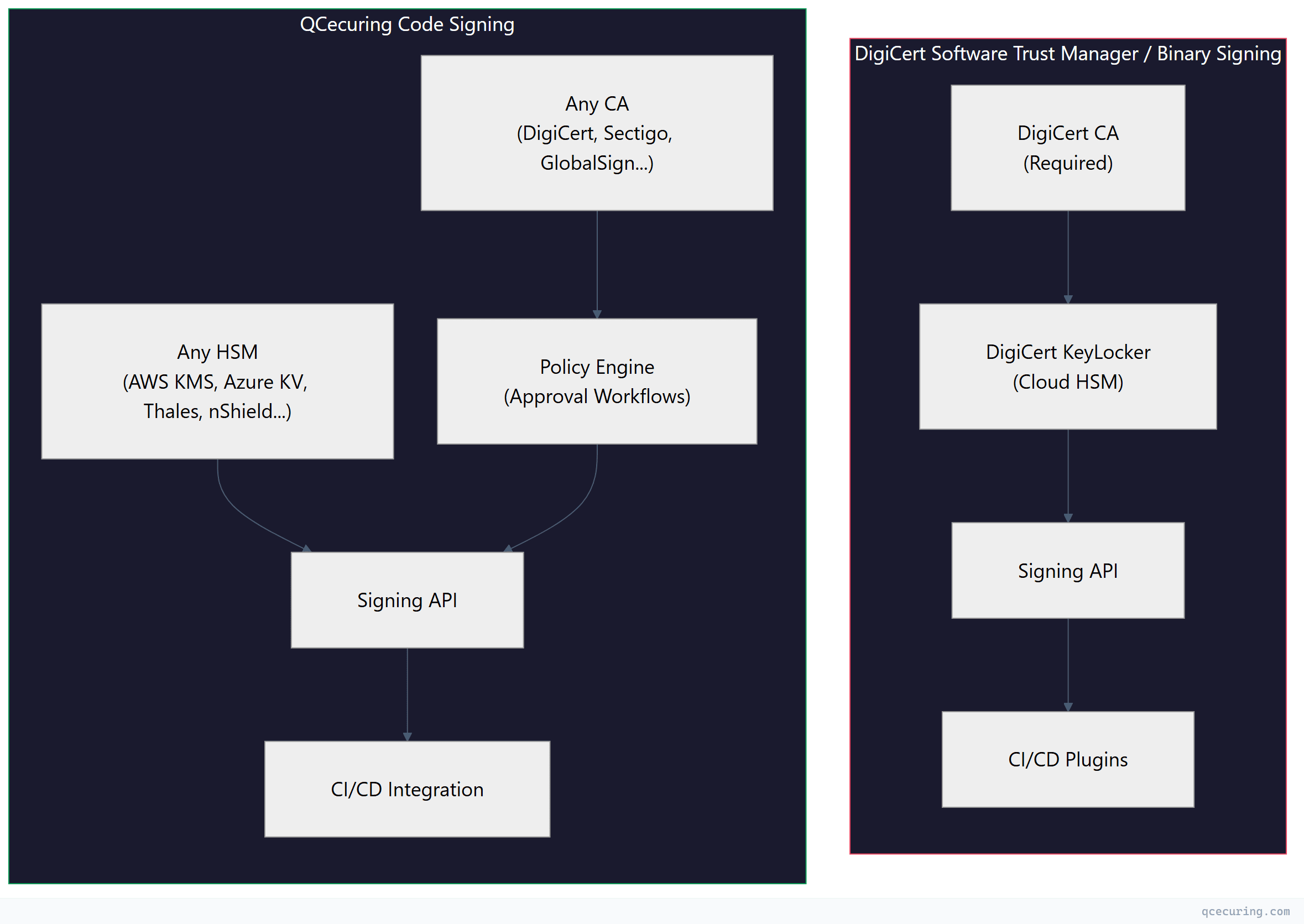
The architectural difference is fundamental. DigiCert’s model is vertically integrated: they issue the certificate, they store the key, they perform the signing. QCecuring’s model is horizontally integrated: bring your own CA, bring your own HSM, and QCecuring provides the policy layer and orchestration.
DigiCert Software Trust Manager: What It Was
Software Trust Manager was DigiCert’s enterprise code signing platform within DigiCert ONE. It provided:
Key Features
KeyLocker (Cloud HSM) DigiCert’s cloud-hosted HSM service for storing code signing private keys. Priced at approximately €85.50/year for a single key slot. Keys never leave DigiCert’s infrastructure — signing operations happen server-side.
# DigiCert KeyLocker signing via smctl
smctl sign --keypair-alias my-key \
  --input ./build/app.exe \
  --signature-algorithm SHA256
OpenSSL and Notation Plugins Software Trust Manager provided plugins for OpenSSL (PKCS#11 provider) and Notation (for container image signing):
# OpenSSL plugin for DigiCert KeyLocker
openssl dgst -sha256 -sign \
  "pkcs11:token=DigiCert;object=my-key" \
  -out signature.bin payload.bin

# Notation plugin for container signing
notation sign --plugin digicert-stm \
  --id my-key-id \
  registry.example.com/app:v1.0
CI/CD Integration GitHub Actions, Azure DevOps, and Jenkins plugins that wrapped the signing API:
# GitHub Actions example (DigiCert STM)
- name: Sign Windows Binary
  uses: digicert/stm-sign-action@v1
  with:
    keypair-alias: production-signing-key
    input-file: ./dist/installer.exe
    certificate-fingerprint: ${{ secrets.DC_CERT_FP }}
Limitations That Led to Deprecation
- CA lock-in: Only DigiCert-issued certificates worked with KeyLocker
- Limited HSM options: Cloud HSM only — no BYOK for on-premises HSMs
- Monolithic architecture: Tightly coupled to DigiCert ONE’s older service mesh
- No policy engine: Signing was binary — you either had access or you didn’t
- Pricing opacity: Per-operation costs on top of certificate and KeyLocker fees
DigiCert Binary Signing: The Replacement
DigiCert Binary Signing is the successor product. Early documentation suggests:
- Rebuilt on modern microservices architecture
- Continued KeyLocker integration (cloud HSM)
- Expanded signing format support (Authenticode, macOS, APK, NuGet)
- Better API design with OpenAPI 3.0 specs
- Still requires DigiCert-issued certificates for full functionality
The fundamental model hasn’t changed: it’s still a CA-bundled signing service. You sign with DigiCert certificates stored in DigiCert’s HSM using DigiCert’s API.
QCecuring Code Signing: The CA-Agnostic Approach
QCecuring takes the opposite architectural stance. The platform doesn’t issue certificates and doesn’t host HSMs. Instead, it provides:
Policy Engine
Define who can sign what, when, and under what conditions:
# QCecuring signing policy example
policy:
  name: "production-release-signing"
  conditions:
    - requester_role: ["release-engineer", "build-system"]
    - artifact_type: ["exe", "dll", "msi"]
    - branch: "main"
    - ci_pipeline_status: "passed"
  approvals:
    required: 2
    approvers: ["security-team"]
    timeout: "4h"
  signing:
    algorithm: "SHA-256"
    timestamp: true
    timestamp_server: "http://timestamp.digicert.com"
No equivalent exists in DigiCert Software Trust Manager or Binary Signing. DigiCert’s access control is “does this API key have permission to use this keypair?” — there’s no conditional logic, no approval workflows, no artifact-type restrictions.
HSM Agnosticism
QCecuring connects to whatever HSM infrastructure you already have:
| HSM/KMS | Connection Method | Key Types |
|---|---|---|
| AWS CloudHSM | PKCS#11 | RSA 2048/4096, ECDSA P-256/P-384 |
| AWS KMS | AWS SDK | RSA 2048/4096, ECDSA P-256/P-384 |
| Azure Key Vault | REST API | RSA 2048/4096, ECDSA P-256/P-384 |
| Google Cloud KMS | gRPC | RSA 2048/4096, ECDSA P-256/P-384 |
| Thales Luna | PKCS#11 | RSA, ECDSA, EdDSA |
| Entrust nShield | PKCS#11 | RSA, ECDSA |
| YubiHSM 2 | PKCS#11 | RSA 2048/4096, ECDSA P-256 |
DigiCert KeyLocker is a single cloud HSM option. If your security policy requires on-premises key storage or a specific HSM vendor, KeyLocker doesn’t work.
CA Agnosticism
Use code signing certificates from any CA:
- DigiCert EV code signing certificates
- Sectigo EV/OV code signing certificates
- GlobalSign code signing certificates
- Internal CA-issued certificates (for internal binaries)
- Any CA that issues code signing certificates
QCecuring manages the certificate lifecycle (renewal, revocation monitoring) regardless of issuer. DigiCert Software Trust Manager only managed DigiCert-issued certificates.
Feature Comparison
| Feature | DigiCert STM | DigiCert Binary Signing | QCecuring Code Signing |
|---|---|---|---|
| CA support | DigiCert only | DigiCert only | Any CA |
| HSM options | KeyLocker (cloud) | KeyLocker (cloud) | Any HSM/KMS |
| Policy engine | No | Limited | Yes (full) |
| Approval workflows | No | No | Yes |
| Windows Authenticode | Yes | Yes | Yes |
| macOS signing | Yes | Yes | Yes |
| Container signing | Notation plugin | Yes | Yes |
| Java JAR signing | Yes | Yes | Yes |
| NuGet signing | Yes | Yes | Yes |
| CI/CD plugins | GitHub, Azure DevOps, Jenkins | GitHub, Azure DevOps, Jenkins, GitLab | GitHub, Azure DevOps, Jenkins, GitLab, CircleCI |
| Timestamp servers | DigiCert TSA | DigiCert TSA | Any RFC 3161 TSA |
| Audit logging | Basic | Improved | Full (SIEM integration) |
| Certificate lifecycle | DigiCert certs only | DigiCert certs only | All signing certs |
| SBOM integration | No | Planned | Yes |
| Pricing model | Per-cert + per-op + KeyLocker | Per-cert + per-op + KeyLocker | Platform license |
Pricing Comparison
DigiCert Software Trust Manager / Binary Signing
DigiCert’s pricing has multiple components:
| Component | Cost |
|---|---|
| EV Code Signing Certificate (1 year) | ~€500-600/year |
| KeyLocker (cloud HSM key slot) | €85.50/year |
| Signing operations | Volume-based (opaque pricing) |
| Additional key slots | €85.50/year each |
| Premium support | Additional fee |
For a team signing 10 artifacts per day across 3 pipelines, expect €2,000-5,000/year all-in depending on certificate count and operation volume.
QCecuring Code Signing
QCecuring uses platform licensing:
| Component | Model |
|---|---|
| Platform license | Annual subscription |
| Signing operations | Unlimited (no per-op fees) |
| HSM connections | Unlimited |
| CA integrations | Unlimited |
| Users/pipelines | Tier-based |
No per-operation fees means predictable costs regardless of signing volume. If you’re signing thousands of artifacts daily in CI/CD, the per-operation model of DigiCert becomes expensive fast.
CI/CD Integration Comparison
DigiCert Approach
# GitHub Actions with DigiCert Binary Signing
name: Sign Release
on:
  push:
    tags: ['v*']

jobs:
  sign:
    runs-on: windows-latest
    steps:
      - uses: actions/checkout@v4
      - name: Setup DigiCert Signing
        uses: digicert/binary-signing-setup@v1
        with:
          api-key: ${{ secrets.DIGICERT_API_KEY }}
          certificate-id: ${{ secrets.DIGICERT_CERT_ID }}

      - name: Sign Binary
        run: |
          smctl sign --keypair-alias prod-key \
            --input ./dist/app.exe
QCecuring Approach
# GitHub Actions with QCecuring Code Signing
name: Sign Release
on:
  push:
    tags: ['v*']

jobs:
  sign:
    runs-on: ubuntu-latest
    steps:
      - uses: actions/checkout@v4
      - name: Request Signing
        uses: qcecuring/sign-action@v2
        with:
          api-token: ${{ secrets.QCECURING_TOKEN }}
          policy: "production-release"
          artifacts: |
            ./dist/app.exe
            ./dist/app.dll
            ./dist/installer.msi
          metadata:
            version: ${{ github.ref_name }}
            commit: ${{ github.sha }}
            pipeline: ${{ github.run_id }}
The key difference: QCecuring’s action references a policy rather than a specific key or certificate. The policy determines which key, which certificate, and whether approval is needed — all configured centrally rather than hardcoded in pipeline YAML.
Migration Path from Software Trust Manager
If you’re currently on DigiCert Software Trust Manager and evaluating options:
Option A: Migrate to DigiCert Binary Signing
Pros:
- Minimal disruption (same vendor, similar API)
- KeyLocker keys may transfer automatically
- Existing DigiCert certificates continue working
Cons:
- Still CA-locked to DigiCert
- Still cloud HSM only (KeyLocker)
- Still no real policy engine
- Pricing model unchanged
Option B: Migrate to QCecuring
Pros:
- CA-agnostic (keep DigiCert certs OR switch CAs)
- HSM flexibility (use existing infrastructure)
- Policy engine and approval workflows
- Unified management with CLM (if using QCecuring CLM)
- Predictable pricing
Cons:
- Migration effort (new API, new workflows)
- Need to provision your own HSM/KMS
- Different operational model (managed platform vs. CA service)
Migration Steps (to QCecuring)
- Inventory: Export all signing certificates and key metadata from STM
- HSM setup: Provision keys in your chosen HSM/KMS (or import if supported)
- Certificate enrollment: Enroll existing certificates (from any CA) into QCecuring
- Policy definition: Define signing policies matching your current access patterns
- CI/CD update: Replace DigiCert plugins with QCecuring signing actions
- Parallel run: Run both systems for 2-4 weeks to validate
- Cutover: Disable DigiCert STM access
When to Choose Each
Choose DigiCert Binary Signing If:
- You’re already all-in on DigiCert ONE ecosystem
- You only use DigiCert-issued certificates
- You don’t need complex approval workflows
- You want the simplest migration from STM
- Your signing volume is low (per-operation pricing is manageable)
- You don’t have existing HSM infrastructure
Choose QCecuring Code Signing If:
- You use certificates from multiple CAs
- You have existing HSM/KMS infrastructure (AWS KMS, Azure KV, Thales, etc.)
- You need policy-based signing governance
- You need approval workflows for production signing
- You have high signing volume (unlimited operations)
- You want unified management of signing + TLS certificates (CLM integration)
- You’re concerned about CA vendor lock-in
FAQ
Is DigiCert Software Trust Manager actually being deprecated?
Yes. DigiCert has announced that Software Trust Manager reaches end-of-life on May 1, 2026. The replacement is DigiCert Binary Signing, a rebuilt product within DigiCert ONE. Existing STM customers need to migrate.
Can I use my existing DigiCert certificates with QCecuring?
Yes. QCecuring is CA-agnostic — it manages certificates from any issuer. You can keep your DigiCert EV code signing certificates and manage them through QCecuring’s policy engine. You just need to provision the private keys in an HSM/KMS that QCecuring can connect to.
What happens to my KeyLocker keys when STM is deprecated?
DigiCert has indicated that KeyLocker keys will transfer to Binary Signing. If you’re migrating away from DigiCert entirely, you’ll need to generate new keys in your own HSM and get new certificates issued against those keys.
Does QCecuring support EV code signing?
Yes. QCecuring supports EV code signing certificates from any CA. The EV requirement (hardware-protected private key) is satisfied by connecting to a FIPS 140-2 Level 2+ HSM — whether that’s AWS CloudHSM, Azure Dedicated HSM, Thales Luna, or any other compliant device.
How does pricing compare for high-volume signing?
DigiCert charges per signing operation on top of certificate and KeyLocker fees. At high volumes (thousands of signatures per day in CI/CD), this adds up quickly. QCecuring’s platform license includes unlimited signing operations, making costs predictable regardless of volume.
Can QCecuring replace both STM and CertCentral?
QCecuring Code Signing replaces the signing management functionality of STM. QCecuring CLM (Certificate Lifecycle Management) can replace CertCentral’s certificate management features. However, you’ll still need a CA (DigiCert, Sectigo, or others) to actually issue the certificates — QCecuring manages them, it doesn’t issue them.
Related Reading
- Code Signing & Supply Chain Security Guide — comprehensive overview of code signing security practices
- Sigstore Cosign Keyless Signing with GitHub Actions — keyless alternative for container images
- Best Code Signing Platforms 2026 — full market comparison
- What is Code Signing — fundamentals of code signing
- Code Signing in CI/CD Pipelines — integration patterns and best practices