
Running your own CA infrastructure means managing HSMs, patching Windows servers, maintaining CRL distribution points, and keeping an offline root CA in a safe. Cloud-based PKI eliminates most of that operational burden — the cloud provider manages the CA infrastructure, HSM key protection, and availability while you focus on certificate policy and consumption.
But cloud PKI isn’t a simple lift-and-shift. Each provider has different capabilities, pricing models, and limitations. And for most enterprises, the answer isn’t “move everything to cloud PKI” — it’s a hybrid architecture where cloud CAs handle cloud-native workloads while on-premises CAs continue serving legacy systems.
Cloud PKI Provider Comparison
| Feature | AWS Private CA | Google CAS | Azure (AD CS + Managed HSM) |
|---|---|---|---|
| CA type | Managed private CA | Managed private CA | Self-managed (AD CS on Azure VMs) |
| HSM protection | FIPS 140-2 Level 3 (built-in) | FIPS 140-2 Level 3 (built-in) | Azure Managed HSM (separate) |
| Hierarchy support | Root + subordinate | Root + subordinate (up to 3 tiers) | Full (same as on-prem AD CS) |
| ACME support | Via AWS Private CA Connector | Native (since 2024) | Via NDES or third-party |
| Kubernetes integration | cert-manager + PCA issuer | cert-manager + CAS issuer | cert-manager + Vault |
| Certificate templates | API-defined profiles | Certificate templates (like AD CS) | AD CS templates |
| Short-lived certs | Yes (minutes to years) | Yes (hours to years) | Yes (template-defined) |
| CRL/OCSP | Managed CRL (S3) + OCSP | Managed CRL + OCSP | Self-managed |
| Audit logging | CloudTrail | Cloud Audit Logs | Azure Monitor |
| Cross-account/project | RAM sharing | Cross-project IAM | Azure AD RBAC |
| Pricing | $400/mo per CA + $0.75/cert | $20/mo per CA tier + $0.30/cert | VM + license costs |
| Max CAs | 200 per account | Unlimited | Unlimited |
AWS Private CA
Architecture
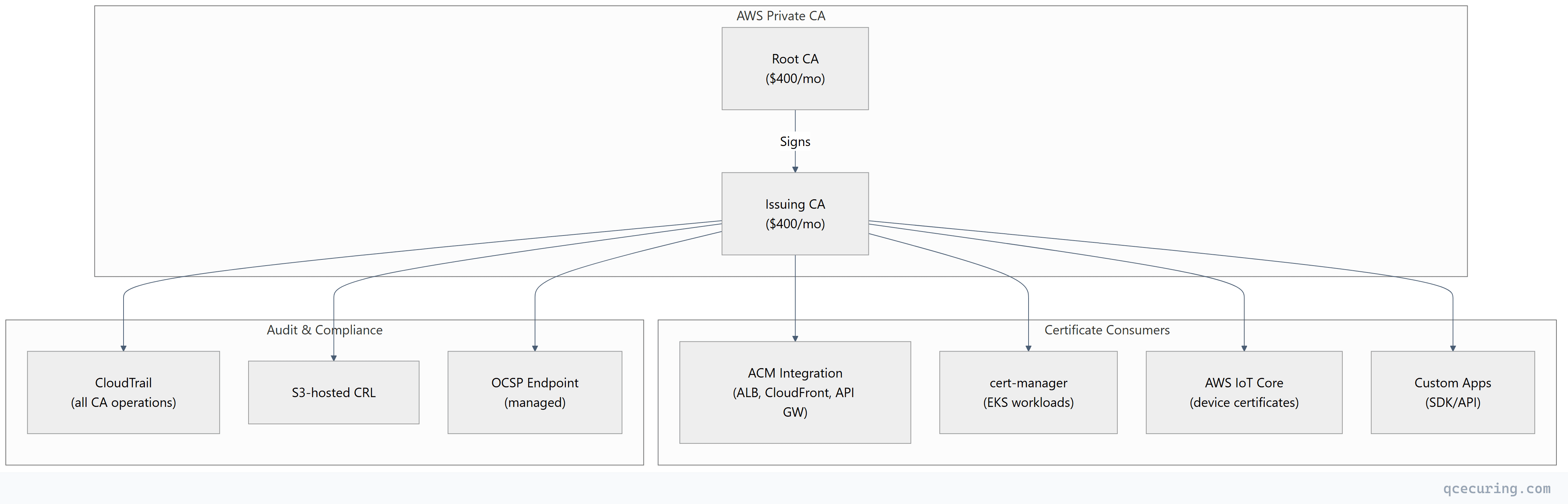
Setup
# Create a root CA
aws acm-pca create-certificate-authority \
  --certificate-authority-type ROOT \
  --certificate-authority-configuration '{
    "KeyAlgorithm": "RSA_4096",
    "SigningAlgorithm": "SHA256WITHRSA",
    "Subject": {
      "Country": "US",
      "Organization": "Acme Corp",
      "CommonName": "Acme Root CA"
    }
  }' \
  --tags Key=Environment,Value=Production

# Install the root CA certificate (self-signed)
ROOT_ARN="arn:aws:acm-pca:us-east-1:123456789:certificate-authority/abc-123"

CSR=$(aws acm-pca get-certificate-authority-csr --certificate-authority-arn $ROOT_ARN --output text)

CERT_ARN=$(aws acm-pca issue-certificate \
  --certificate-authority-arn $ROOT_ARN \
  --csr "$CSR" \
  --signing-algorithm SHA256WITHRSA \
  --template-arn arn:aws:acm-pca:::template/RootCACertificate/V1 \
  --validity Value=10,Type=YEARS \
  --query CertificateArn --output text)

aws acm-pca import-certificate-authority-certificate \
  --certificate-authority-arn $ROOT_ARN \
  --certificate fileb://<(aws acm-pca get-certificate --certificate-authority-arn $ROOT_ARN --certificate-arn $CERT_ARN --query Certificate --output text)
Cost Analysis
| Component | Monthly Cost | Annual Cost |
|---|---|---|
| Root CA (1) | $400 | $4,800 |
| Issuing CA (1) | $400 | $4,800 |
| 1,000 certificates/month | $750 | $9,000 |
| Total | $1,550 | $18,600 |
Compare to on-premises: 2 Windows Server licenses ($2K), HSM ($15-50K), admin time (0.5 FTE = $75K/yr). Cloud PKI is cheaper below ~5,000 certs/month; on-premises wins at high volume.
Google Certificate Authority Service (CAS)
Setup
# Create a CA pool
gcloud privateca pools create prod-pool \
  --location=us-central1 \
  --tier=enterprise

# Create a root CA in the pool
gcloud privateca roots create prod-root-ca \
  --pool=prod-pool \
  --location=us-central1 \
  --subject="CN=Acme Root CA, O=Acme Corp, C=US" \
  --key-algorithm=rsa-pkcs1-4096-sha256 \
  --max-chain-length=1

# Create a subordinate (issuing) CA
gcloud privateca subordinates create prod-issuing-ca \
  --pool=prod-pool \
  --location=us-central1 \
  --issuer-pool=prod-pool \
  --issuer-ca=prod-root-ca \
  --subject="CN=Acme Issuing CA, O=Acme Corp, C=US" \
  --key-algorithm=rsa-pkcs1-2048-sha256

# Issue a certificate
gcloud privateca certificates create server-cert \
  --pool=prod-pool \
  --location=us-central1 \
  --dns-san="api.acme.com" \
  --validity=P90D \
  --generate-key \
  --key-output-file=server.key \
  --cert-output-file=server.crt
GCP CAS + cert-manager
# cert-manager issuer for Google CAS
apiVersion: cert-manager.io/v1
kind: ClusterIssuer
metadata:
  name: google-cas
spec:
  googleCAS:
    project: my-project-id
    location: us-central1
    caPoolId: prod-pool
Cost Analysis (GCP)
| Tier | CA Cost | Certificate Cost | Best For |
|---|---|---|---|
| DevOps | $20/mo per CA | $0.10/cert | Dev/test, short-lived certs |
| Enterprise | $200/mo per CA | $0.30/cert | Production, compliance |
For 1,000 certs/month on Enterprise tier: $200 + $300 = $500/month — significantly cheaper than AWS PCA.
Hybrid Architecture (Cloud + On-Premises)
Most enterprises need both. The pattern:
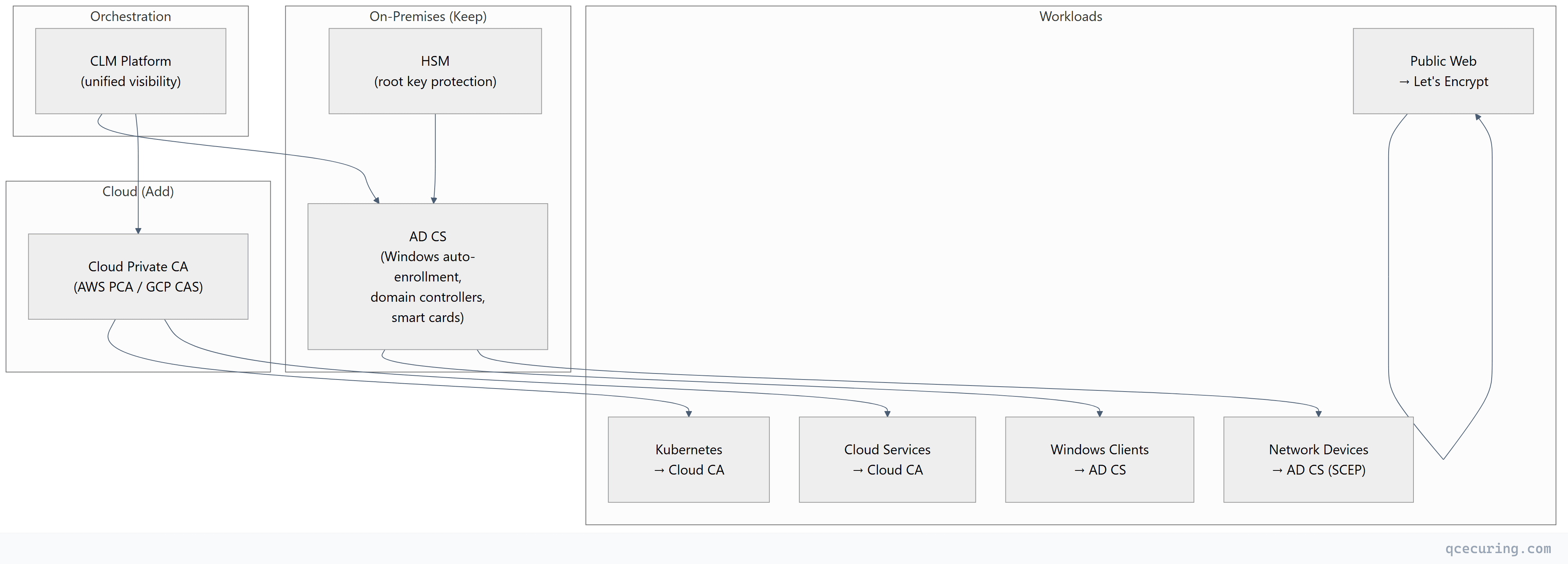
Decision Matrix: Which CA for Which Workload
| Workload | Recommended CA | Reason |
|---|---|---|
| Windows domain machines | AD CS | Auto-enrollment via GPO |
| Kubernetes pods (EKS/GKE/AKS) | Cloud Private CA | Native integration, short-lived |
| Public websites | Let’s Encrypt | Free, automated, trusted |
| Microservice mTLS | Cloud CA or Vault PKI | Short-lived, API-driven |
| IoT/network devices | AD CS (SCEP) or EST | Device protocol support |
| Serverless functions | Cloud CA (via SDK) | No persistent infrastructure |
| CI/CD signing | Cloud CA or Vault | Ephemeral, audited |
Migration from On-Premises to Cloud PKI
Step 1: Cross-Sign for Trust Continuity
Issue a subordinate CA certificate from your existing on-premises root to the new cloud CA. This means all existing clients trust certificates from the cloud CA without trust store changes.
# Generate CSR from cloud CA
# (AWS PCA or GCP CAS provides this)

# Sign with on-premises root CA
certreq -submit -config "ON-PREM-CA\Issuing CA" cloud-ca.csr cloud-ca.crt

# Import signed certificate into cloud CA
aws acm-pca import-certificate-authority-certificate \
  --certificate-authority-arn $CLOUD_CA_ARN \
  --certificate fileb://cloud-ca.crt \
  --certificate-chain fileb://on-prem-root.crt
Step 2: Parallel Operation
Run both CAs simultaneously. New cloud workloads use the cloud CA. Existing workloads continue with on-premises CA until their certificates renew.
Step 3: Gradual Migration
As certificates expire on the on-premises CA, renew them from the cloud CA instead. Track progress in your CLM platform.
Step 4: Decommission (Optional)
Once all workloads have migrated (except those that must stay on AD CS), reduce on-premises CA infrastructure. Keep the root CA offline for cross-signing if needed.
Limitations of Cloud PKI
| Limitation | Impact | Mitigation |
|---|---|---|
| Vendor lock-in | Can’t easily move CAs between clouds | Use CLM platform as abstraction layer |
| No SCEP support (AWS/GCP) | Can’t enroll legacy network devices | Keep AD CS for SCEP devices |
| Internet dependency | CA unavailable during cloud outage | Cache certificates, use short-lived with buffer |
| Cost at scale | Per-certificate pricing adds up | Evaluate break-even vs on-premises |
| Limited template flexibility | Less granular than AD CS templates | Use policy engine in CLM platform |
| Cross-cloud complexity | Multi-cloud = multiple CAs | Unified CLM for visibility |
FAQ
Q: Is cloud PKI cheaper than on-premises?
Depends on volume. Below ~3,000 certificates/month, cloud PKI is typically cheaper (no HSM hardware, no server maintenance, no dedicated admin). Above 5,000-10,000 certs/month, on-premises becomes more cost-effective per certificate. Most organizations use a hybrid — cloud for cloud workloads, on-premises for legacy.
Q: Can cloud PKI satisfy FIPS 140-2 requirements?
Yes. Both AWS Private CA and Google CAS use FIPS 140-2 Level 3 validated HSMs for key protection. The CA private keys never leave the HSM. This satisfies FedRAMP, HIPAA, and PCI DSS requirements for key protection.
Q: How do I trust cloud CA certificates on my on-premises systems?
Cross-sign the cloud CA from your existing on-premises root CA. Or distribute the cloud CA’s root certificate to your on-premises trust stores (GPO for Windows, update-ca-certificates for Linux, keytool -importcert for Java).
Q: Can I use AWS Private CA for non-AWS workloads?
Yes. AWS PCA issues standard X.509 certificates that work anywhere. You can use the API/SDK to request certificates for on-premises servers, other clouds, or any system. You’re paying for the CA service, not restricting where certificates are used.
Q: What happens to my certificates if I stop paying for the cloud CA?
Existing issued certificates remain valid until their expiry date — they don’t get revoked when you stop the CA. But you can’t issue new certificates or publish updated CRLs. Plan for this in your disaster recovery documentation.
Q: Should I put my root CA in the cloud?
For most enterprises — no. Keep the root CA offline (on-premises HSM or air-gapped server). Use the cloud CA as a subordinate/issuing CA signed by your on-premises root. This gives you portability — you can revoke the cloud CA and issue a new one from a different provider without changing your root of trust.
Related Reading: