

You’re seeing one of these:
Chrome:
NET::ERR_CERT_COMMON_NAME_INVALIDFirefox:
SSL_ERROR_BAD_CERT_DOMAINcurl / OpenSSL:
SSL: no alternative certificate subject name matches target host name 'api.example.com'Java:
javax.net.ssl.SSLPeerUnverifiedException: Hostname api.example.com not verifiedThe certificate is valid and trusted — but it doesn’t cover the domain you’re connecting to. The hostname you’re requesting isn’t listed in the certificate’s Subject Alternative Names (SANs).
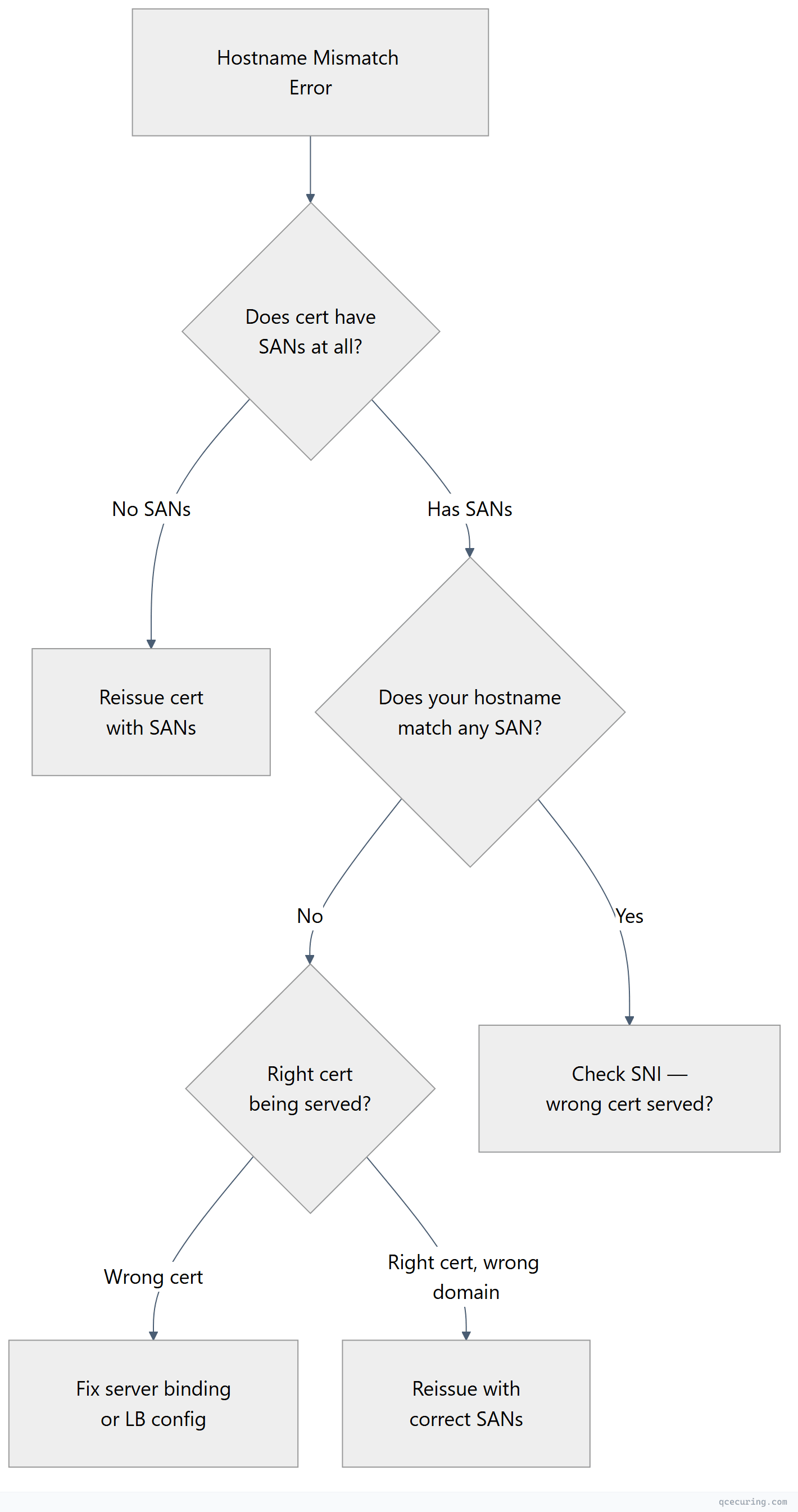
Diagnostic Flowchart
Fastest Fix: Check What SANs the Certificate Has
openssl s_client -connect yourdomain.com:443 -servername yourdomain.com 2>/dev/null | openssl x509 -noout -ext subjectAltNameOutput shows which domains the certificate covers:
X509v3 Subject Alternative Name:
    DNS:example.com, DNS:www.example.com
If your domain isn’t listed — that’s the problem. You need a certificate that includes it.
Common Causes and Fixes
Cause 1: www vs non-www Mismatch
Certificate covers www.example.com but you’re visiting example.com (or vice versa).
Fix:
# Reissue with both domains
sudo certbot certonly --nginx -d example.com -d www.example.com

# Or if using a commercial CA, include both in the CSR:
openssl req -new -key server.key -out server.csr \
  -subj "/CN=example.com" \
  -addext "subjectAltName=DNS:example.com,DNS:www.example.com"
Cause 2: Wildcard Doesn’t Cover Subdomain Depth
*.example.com covers app.example.com but NOT:
example.com(the apex domain itself)sub.app.example.com(two levels deep)
Fix: Include both the wildcard and the apex:
sudo certbot certonly --dns-cloudflare -d "*.example.com" -d "example.com"Cause 3: Connecting by IP but Certificate Only Has DNS SANs
# This fails if cert only has DNS:example.com
curl https://192.168.1.100/api

# Check if IP is in SANs
openssl s_client -connect 192.168.1.100:443 2>/dev/null | openssl x509 -noout -ext subjectAltName
# Needs: IP:192.168.1.100
Fix: Reissue the certificate with an IP SAN:
openssl req -new -key server.key -out server.csr \
  -subj "/CN=server.example.com" \
  -addext "subjectAltName=DNS:server.example.com,IP:192.168.1.100"
Cause 4: SNI Not Sent (Wrong Certificate Served)
If the server hosts multiple sites, it uses SNI to pick the right certificate. Without SNI, you get the default certificate.
# With SNI (correct cert)
openssl s_client -connect server.com:443 -servername app.example.com 2>/dev/null | openssl x509 -noout -subject

# Without SNI (default cert — may not match)
openssl s_client -connect server.com:443 2>/dev/null | openssl x509 -noout -subject
Fix: Ensure your client sends SNI. Most modern clients do automatically. For curl: curl --resolve app.example.com:443:IP https://app.example.com
Cause 5: Load Balancer Serving Wrong Certificate
Multiple certificates on a load balancer, and the wrong one is bound to your listener.
Fix: Check the LB configuration and ensure the correct certificate is bound to the listener/virtual server for that hostname.
# Verify what cert the LB is actually serving
openssl s_client -connect lb-ip:443 -servername yourdomain.com 2>/dev/null | openssl x509 -noout -subject -ext subjectAltName
Wildcard Certificate Rules
| Pattern | Matches | Does NOT Match |
|---|---|---|
*.example.com | app.example.com, api.example.com | example.com, sub.app.example.com |
*.api.example.com | v1.api.example.com | api.example.com, v1.v2.api.example.com |
Wildcards only cover ONE level of subdomain. You cannot have *.*example.com or *.com.
Generating a CSR with Correct SANs
# Method 1: OpenSSL with -addext (OpenSSL 1.1.1+)
openssl req -new -newkey rsa:2048 -nodes \
  -keyout server.key -out server.csr \
  -subj "/CN=example.com/O=My Company/C=US" \
  -addext "subjectAltName=DNS:example.com,DNS:www.example.com,DNS:api.example.com"

# Method 2: Using a config file (works with any OpenSSL version)
cat > san.cnf << EOF
[req]
distinguished_name = req_dn
req_extensions = v3_req

[req_dn]
CN = example.com

[v3_req]
subjectAltName = @alt_names

[alt_names]
DNS.1 = example.com
DNS.2 = www.example.com
DNS.3 = api.example.com
DNS.4 = *.example.com
IP.1 = 10.0.1.50
EOF

openssl req -new -newkey rsa:2048 -nodes \
  -keyout server.key -out server.csr \
  -config san.cnf -subj "/CN=example.com/O=My Company/C=US"

# Verify the CSR has SANs
openssl req -in server.csr -noout -text | grep -A 5 "Subject Alternative Name"
FAQ
Q: Why does Chrome show ERR_CERT_COMMON_NAME_INVALID even though the CN matches?
Since Chrome 58 (2017), Chrome ignores the CN field entirely and only checks SANs. Even if CN=example.com matches, the certificate MUST have a SAN extension with DNS:example.com. Certificates without SANs are rejected by all modern browsers.
Q: Can I add SANs to an existing certificate without reissuing?
No. SANs are baked into the certificate at issuance time and signed by the CA. To change SANs, you must generate a new CSR with the correct SANs and get a new certificate issued.
*Q: My wildcard cert covers .example.com but not example.com itself. Is that normal?
Yes. Wildcards don’t cover the apex domain. You need both *.example.com AND example.com in the SANs. Most CAs and Let’s Encrypt allow you to include both in one certificate.
Q: The certificate has the right SANs but I still get the error. What else?
Check: (1) Are you connecting to the right server? DNS might point elsewhere. (2) Is a CDN or proxy serving a different certificate? (3) Is there a cached old certificate? Clear browser SSL state. (4) Is the server using SNI correctly?
Q: How many SANs can a certificate have?
Let’s Encrypt allows up to 100 SANs per certificate. Commercial CAs vary — some allow 250+. There’s no hard limit in the X.509 standard, but very large SAN lists increase certificate size and can cause TLS handshake issues.
Related Reading: