
You’re seeing:
OpenSSL:
verify error:num=19:self-signed certificate in certificate chainNode.js:
Error: self-signed certificate in certificate chain
code: 'SELF_SIGNED_CERT_IN_CHAIN'
curl:
curl: (60) SSL certificate problem: self-signed certificate in certificate chainGit:
fatal: unable to access '...': SSL certificate problem: self-signed certificate in certificate chainnpm:
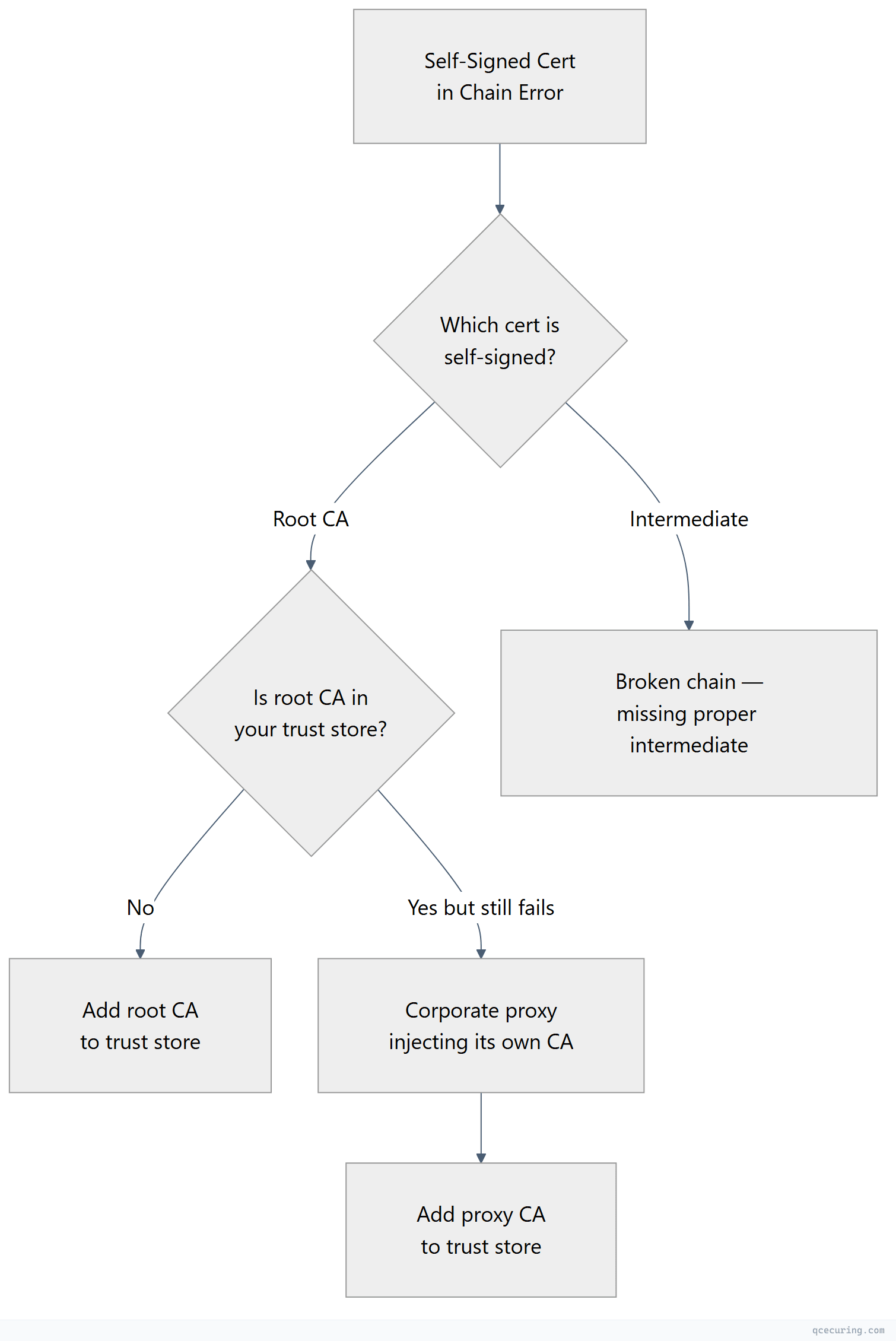
npm ERR! code SELF_SIGNED_CERT_IN_CHAINThis is different from “self-signed certificate” (error 18). Error 19 means a CA certificate in the chain is self-signed (which is normal for root CAs) but that root CA isn’t in your trust store.
Diagnostic Flowchart
Why This Happens
Every certificate chain ends at a self-signed root CA. That’s by design — the root signs itself. The error occurs when your client doesn’t have that root CA in its trust store.
Common scenarios:
- Internal/private CA — Your organization’s root CA isn’t in the system trust store
- Corporate proxy — TLS inspection proxy uses its own CA
- Server sends root CA in chain — Some clients reject chains that include the root (they expect to find it locally)
Fastest Fix: Identify the Untrusted Root
openssl s_client -connect server.com:443 -servername server.com -showcerts 2>/dev/null | grep -E "s:|i:|verify"Look at the last certificate in the chain — that’s the self-signed root. Check its issuer name. If it’s your company’s internal CA or a proxy CA, you need to add it to your trust store.
Fix by Tool
OpenSSL
# Specify the CA that signed the chain
openssl s_client -connect server.com:443 -servername server.com -CAfile /path/to/internal-root-ca.pem
curl
# Add the root CA
curl --cacert /path/to/internal-root-ca.pem https://server.com

# Or add to system trust store permanently
sudo cp internal-root-ca.pem /usr/local/share/ca-certificates/internal-ca.crt
sudo update-ca-certificates
Git
# Point Git to a bundle that includes the internal CA
git config --global http.sslCAInfo /path/to/ca-bundle-with-internal.pem

# Or add to system trust store (then Git uses it automatically)
sudo cp internal-root-ca.pem /usr/local/share/ca-certificates/internal-ca.crt
sudo update-ca-certificates
Node.js
# Environment variable
export NODE_EXTRA_CA_CERTS=/path/to/internal-root-ca.pem
node app.js
npm
# Point npm to a CA bundle that includes the internal root
npm config set cafile /path/to/ca-bundle-with-internal.pem
Python (pip/requests)
# Add to system trust store, then:
pip install pip-system-certs

# Or specify directly
export REQUESTS_CA_BUNDLE=/path/to/ca-bundle-with-internal.pem
Fix: Add Internal CA to System Trust Store
This is the permanent fix — add the root CA once and all tools trust it:
# Ubuntu/Debian
sudo cp internal-root-ca.pem /usr/local/share/ca-certificates/internal-ca.crt
sudo update-ca-certificates

# RHEL/CentOS/Fedora
sudo cp internal-root-ca.pem /etc/pki/ca-trust/source/anchors/
sudo update-ca-trust

# macOS
sudo security add-trusted-cert -d -r trustRoot -k /Library/Keychains/System.keychain internal-root-ca.pem

# Windows (PowerShell as Admin)
Import-Certificate -FilePath internal-root-ca.pem -CertStoreLocation Cert:\LocalMachine\Root
After this, curl, Git, OpenSSL, and most tools will trust the CA automatically. Node.js and Java have their own trust stores — see the tool-specific fixes above.
Fix: Server Sending Root CA in Chain (Remove It)
Some servers include the root CA in the certificate chain they send. While technically allowed, some strict clients reject this because they expect to find the root locally.
Diagnosis:
openssl s_client -connect server.com:443 -servername server.com -showcerts 2>/dev/null | grep "s:"
# If you see 3 certs: leaf, intermediate, AND root — the root shouldn't be there
Fix (server-side): Remove the root CA from your chain file. Only include leaf + intermediate(s):
# Wrong: leaf + intermediate + root
cat server.crt intermediate.crt root.crt > fullchain.pem

# Correct: leaf + intermediate only
cat server.crt intermediate.crt > fullchain.pem
Difference: Error 18 vs Error 19
| Error | OpenSSL Code | Meaning |
|---|---|---|
self signed certificate | verify error:num=18 | The LEAF certificate is self-signed (no CA at all) |
self signed certificate in certificate chain | verify error:num=19 | A CA in the chain is self-signed and not trusted |
Error 18 = the server itself has a self-signed cert (replace with a real cert). Error 19 = the chain’s root CA isn’t in your trust store (add the CA to your trust store).
FAQ
Q: Is it safe to add an internal CA to my trust store?
Yes, if you trust the organization that operates that CA. Adding a CA means you trust any certificate it issues. For your own company’s internal CA or a known corporate proxy CA, this is expected and safe. Never add unknown CAs from untrusted sources.
Q: Why does this error appear in Docker containers but not on my machine?
Your machine has the internal CA in its trust store (IT pushed it via GPO or you added it manually). Docker containers start with a minimal trust store that only includes public CAs. Add the internal CA to your Dockerfile: COPY internal-ca.crt /usr/local/share/ca-certificates/ && RUN update-ca-certificates
Q: The error appeared after a system update. What changed?
OS updates sometimes refresh the CA trust store, which can remove CAs that were manually added. Re-add your internal CA after the update. Better: use a configuration management tool (Ansible, Puppet) to ensure the CA is always present.
Q: Can I just use verify=False or --insecure?
Only for 30-second debugging. Never as a permanent fix. It disables all certificate validation, making you vulnerable to man-in-the-middle attacks.
Q: How do I get the internal root CA certificate?
Ask your IT/security team. Or extract it from your browser: visit any internal HTTPS site → click the padlock → view certificate → go to the root in the chain → export it as PEM/Base64.
Related Reading: