
You download a certificate from your CA and get a .cer file. Your web server wants a .pem. Your Java app needs a .jks. Your Windows admin sends you a .pfx. They’re all the same certificate — just packaged differently. Yet getting the format wrong means your server won’t start, your app throws cryptic errors, and you spend an hour on Stack Overflow.
This guide covers every certificate format you’ll encounter, how to identify what you have, and the exact commands to convert between any two formats.
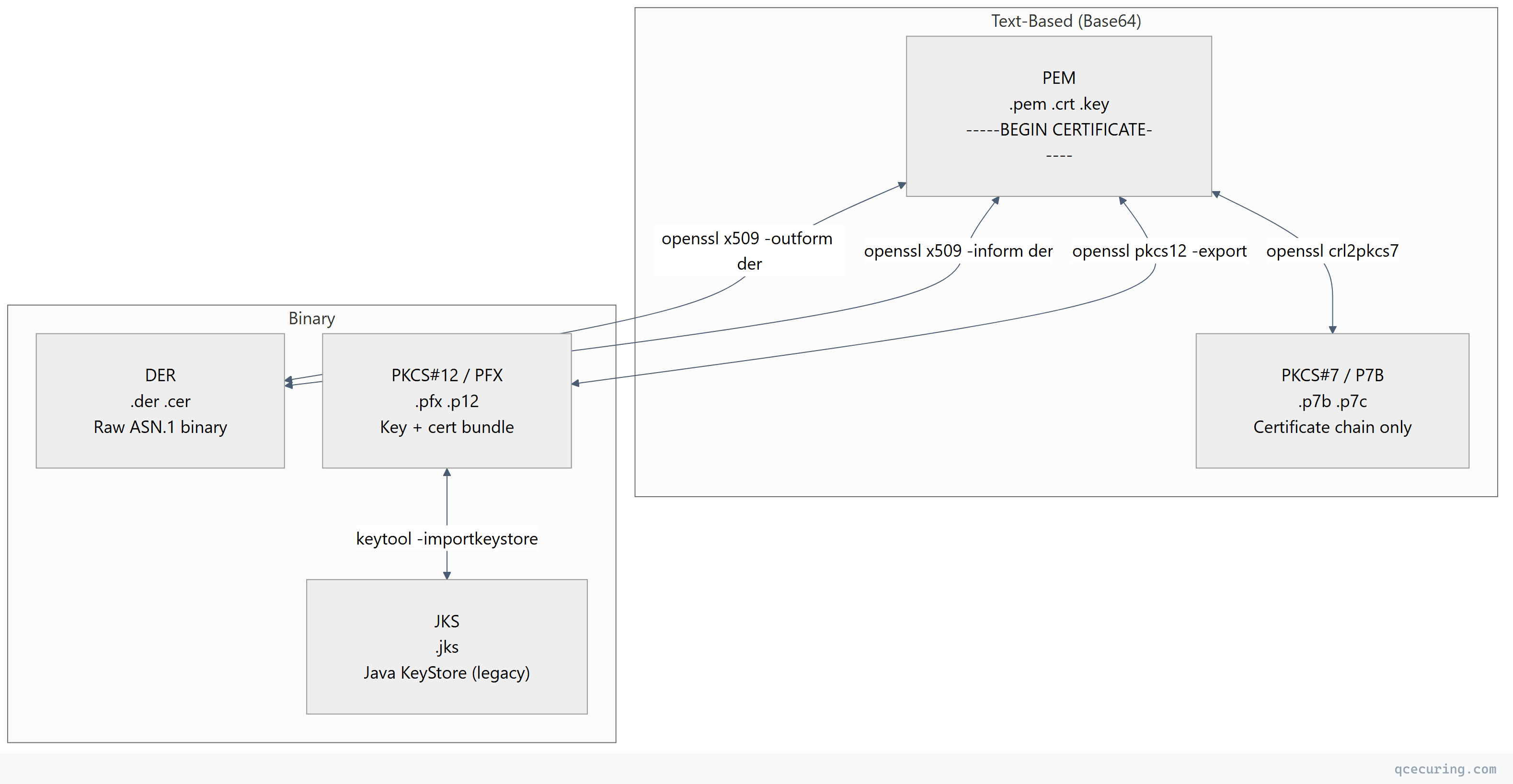
Format Quick Reference
| Format | Extension(s) | Encoding | Contains | Used By |
|---|---|---|---|---|
| PEM | .pem, .crt, .cer, .key | Base64 (ASCII) | Cert, key, chain (any combination) | Linux, Nginx, Apache, OpenSSL |
| DER | .der, .cer | Binary | Single cert or key | Windows, Java, embedded systems |
| PKCS#12 | .pfx, .p12 | Binary | Private key + cert + chain (bundled) | Windows, IIS, Java, macOS |
| PKCS#7 | .p7b, .p7c | Base64 or Binary | Certificates only (no private key) | Windows, Java, certificate chains |
| JKS | .jks | Binary (proprietary) | Keys + certs (Java-specific) | Java/Tomcat (legacy) |
PEM Format (Privacy Enhanced Mail)
The most common format on Linux/Unix systems. Human-readable Base64 encoding wrapped in header/footer markers.
Identification
-----BEGIN CERTIFICATE-----
MIIFjTCCA3WgAwIBAgIRANOxciY0IzLc9AUoUSrsnGowDQYJKoZIhvcNAQEL
BQAwTzELMAkGA1UEBhMCVVMxKTAnBgNVBAoTIEludGVybmV0IFNlY3VyaXR5
...
-----END CERTIFICATE-----
Header markers tell you what’s inside:
| Header | Contents |
|---|---|
-----BEGIN CERTIFICATE----- | X.509 certificate |
-----BEGIN PRIVATE KEY----- | PKCS#8 private key (unencrypted) |
-----BEGIN ENCRYPTED PRIVATE KEY----- | PKCS#8 private key (encrypted) |
-----BEGIN RSA PRIVATE KEY----- | RSA private key (legacy OpenSSL format) |
-----BEGIN EC PRIVATE KEY----- | EC private key (legacy OpenSSL format) |
-----BEGIN CERTIFICATE REQUEST----- | CSR (Certificate Signing Request) |
-----BEGIN X509 CRL----- | Certificate Revocation List |
Key Properties
- Encoding: Base64 (ASCII text)
- Multiple objects: A single
.pemfile can contain multiple certificates (chain) and/or a private key - Order matters: For certificate chains, leaf certificate first, then intermediates, then root
- File extensions:
.pem,.crt,.cer,.key(extension is just a hint — content determines format)
Reading PEM Files
# View certificate details
openssl x509 -in cert.pem -noout -text

# View private key details
openssl pkey -in key.pem -noout -text

# Count certificates in a chain file
grep -c "BEGIN CERTIFICATE" fullchain.pem

# Extract individual certs from a chain
csplit -f cert- -b '%02d.pem' fullchain.pem '/-----BEGIN CERTIFICATE-----/' '{*}'
DER Format (Distinguished Encoding Rules)
The raw binary encoding of the certificate’s ASN.1 structure. No Base64 wrapping, no headers — just bytes.
Identification
DER files are binary — you can’t read them in a text editor. They typically start with byte 0x30 (ASN.1 SEQUENCE tag).
# Quick check: is it DER or PEM?
file cert.cer
# DER: "cert.cer: data" (binary)
# PEM: "cert.cer: PEM certificate" or "ASCII text"

# Or check the first bytes
xxd cert.der | head -1
# 0000000: 3082 05a3 3082 038b ...  (starts with 30 = ASN.1 SEQUENCE)
Key Properties
- Encoding: Binary (ASN.1 DER)
- Single object: One certificate per file (no chaining)
- No private key: DER format for certificates doesn’t include keys
- Smaller: ~25% smaller than PEM equivalent (no Base64 overhead)
- Used by: Windows certificate store, Java (internally), embedded systems
Reading DER Files
# View DER certificate
openssl x509 -in cert.der -inform der -noout -text

# View DER private key
openssl pkey -in key.der -inform der -noout -text
PKCS#12 / PFX Format
A password-protected binary archive that bundles the private key, certificate, and certificate chain into a single file. The standard way to transport a complete identity.
Identification
Binary file, password-protected. Can’t be read without the password.
# Check if a file is PKCS#12
file bundle.pfx
# "bundle.pfx: data" (binary, no specific magic bytes)

# Try to read it (will prompt for password)
openssl pkcs12 -in bundle.pfx -info -nokeys -passin pass:test 2>&1 | head -5
Key Properties
- Encoding: Binary (DER-encoded PKCS#12 structure)
- Contains: Private key + certificate + chain (all in one file)
- Password-protected: Always encrypted (even if password is empty)
- Used by: Windows/IIS, macOS Keychain, Java (via keytool), email clients
- Extensions:
.pfx(Microsoft convention) and.p12(standard) are identical
Reading PKCS#12 Files
# List contents (certificates only)
openssl pkcs12 -in bundle.pfx -nokeys -passin pass:mypassword

# List contents (keys only)
openssl pkcs12 -in bundle.pfx -nocerts -passin pass:mypassword -nodes

# Full info
openssl pkcs12 -in bundle.pfx -info -passin pass:mypassword -nodes
PKCS#7 / P7B Format
A container for certificates and CRLs — but never private keys. Used primarily for distributing certificate chains.
Identification
-----BEGIN PKCS7-----
MIIHkAYJKoZIhvcNAQcCoIIHgTCCB30CAQExADALBgkqhkiG9w0BBwGgggdl
...
-----END PKCS7-----
Or in binary DER form (no headers).
Key Properties
- Encoding: Base64 (PEM-wrapped) or Binary (DER)
- Contains: Certificates and/or CRLs only — never private keys
- Used by: Windows certificate export, Java certificate chains, S/MIME
- Purpose: Distributing CA chains, intermediate certificates
Reading P7B Files
# View certificates in a P7B file
openssl pkcs7 -in chain.p7b -print_certs -noout

# Extract certificates from P7B to PEM
openssl pkcs7 -in chain.p7b -print_certs -out chain.pem
JKS Format (Java KeyStore)
A proprietary Java format for storing keys and certificates. Deprecated since JDK 9 in favor of PKCS#12, but still widely used in legacy Java applications.
Key Properties
- Encoding: Binary (proprietary Java format)
- Contains: Private keys + certificates (password-protected)
- Separate passwords: Store password and individual key passwords can differ
- Used by: Tomcat, Spring Boot, legacy Java applications
- Default password:
changeit(for the JVM’s cacerts trust store)
Reading JKS Files
# List entries
keytool -list -keystore store.jks -storepass changeit

# Verbose details
keytool -list -v -keystore store.jks -storepass changeit

# Export a certificate from JKS
keytool -exportcert -alias mykey -keystore store.jks -storepass changeit -rfc -file cert.pem
Complete Conversion Reference
PEM ↔ DER
# PEM to DER (certificate)
openssl x509 -in cert.pem -outform der -out cert.der

# DER to PEM (certificate)
openssl x509 -in cert.der -inform der -outform pem -out cert.pem

# PEM to DER (private key)
openssl pkey -in key.pem -outform der -out key.der

# DER to PEM (private key)
openssl pkey -in key.der -inform der -outform pem -out key.pem
PEM → PKCS#12 (PFX)
# Bundle key + cert + chain into PFX
openssl pkcs12 -export \
  -inkey server.key \
  -in server.crt \
  -certfile ca-chain.crt \
  -out bundle.pfx \
  -name "server" \
  -passout pass:MyPassword123

# Without chain (just key + cert)
openssl pkcs12 -export \
  -inkey server.key \
  -in server.crt \
  -out bundle.pfx \
  -passout pass:MyPassword123
PKCS#12 (PFX) → PEM
# Extract everything (key + certs) into one PEM file
openssl pkcs12 -in bundle.pfx -out everything.pem -nodes -passin pass:MyPassword123

# Extract private key only
openssl pkcs12 -in bundle.pfx -nocerts -out key.pem -nodes -passin pass:MyPassword123

# Extract certificates only (no key)
openssl pkcs12 -in bundle.pfx -nokeys -out certs.pem -passin pass:MyPassword123

# Extract client certificate only (no CA certs)
openssl pkcs12 -in bundle.pfx -nokeys -clcerts -out client.pem -passin pass:MyPassword123

# Extract CA certificates only
openssl pkcs12 -in bundle.pfx -nokeys -cacerts -out ca-chain.pem -passin pass:MyPassword123
PEM ↔ PKCS#7 (P7B)
# PEM certificates to P7B
openssl crl2pkcs7 -nocrl -certfile fullchain.pem -out chain.p7b

# P7B to PEM certificates
openssl pkcs7 -in chain.p7b -print_certs -out certs.pem

# DER-encoded P7B to PEM
openssl pkcs7 -in chain.p7b -inform der -print_certs -out certs.pem
PKCS#12 ↔ JKS
# PFX/P12 to JKS
keytool -importkeystore \
  -srckeystore bundle.pfx \
  -srcstoretype PKCS12 \
  -srcstorepass MyPassword123 \
  -destkeystore store.jks \
  -deststoretype JKS \
  -deststorepass changeit

# JKS to PFX/P12 (recommended migration)
keytool -importkeystore \
  -srckeystore store.jks \
  -srcstoretype JKS \
  -srcstorepass changeit \
  -destkeystore store.p12 \
  -deststoretype PKCS12 \
  -deststorepass NewPassword123
PEM → JKS (via PKCS#12 intermediary)
# Step 1: Create PKCS#12 from PEM
openssl pkcs12 -export \
  -inkey server.key \
  -in server.crt \
  -certfile ca-chain.crt \
  -out temp.p12 \
  -name "server" \
  -passout pass:temppass

# Step 2: Import PKCS#12 into JKS
keytool -importkeystore \
  -srckeystore temp.p12 \
  -srcstoretype PKCS12 \
  -srcstorepass temppass \
  -destkeystore server.jks \
  -deststoretype JKS \
  -deststorepass changeit

# Clean up
rm temp.p12
Conversion Quick Reference Table
| From → To | Command |
|---|---|
| PEM → DER | openssl x509 -in cert.pem -outform der -out cert.der |
| DER → PEM | openssl x509 -in cert.der -inform der -out cert.pem |
| PEM → PFX | openssl pkcs12 -export -inkey key.pem -in cert.pem -out bundle.pfx |
| PFX → PEM (all) | openssl pkcs12 -in bundle.pfx -out all.pem -nodes |
| PFX → PEM (key) | openssl pkcs12 -in bundle.pfx -nocerts -out key.pem -nodes |
| PFX → PEM (cert) | openssl pkcs12 -in bundle.pfx -nokeys -out cert.pem |
| PEM → P7B | openssl crl2pkcs7 -nocrl -certfile chain.pem -out chain.p7b |
| P7B → PEM | openssl pkcs7 -in chain.p7b -print_certs -out certs.pem |
| PFX → JKS | keytool -importkeystore -srckeystore a.pfx -srcstoretype PKCS12 -destkeystore a.jks |
| JKS → PFX | keytool -importkeystore -srckeystore a.jks -destkeystore a.p12 -deststoretype PKCS12 |
How to Identify an Unknown Certificate File
When someone hands you a certificate file and you don’t know the format:
# Step 1: Check if it's text (PEM) or binary (DER/PFX/JKS)
file mystery-cert.*

# Step 2: If text, look at the header
head -1 mystery-cert.crt
# "-----BEGIN CERTIFICATE-----" → PEM certificate
# "-----BEGIN PKCS7-----" → P7B
# "-----BEGIN PRIVATE KEY-----" → PEM private key

# Step 3: If binary, try each format
# Try as DER certificate
openssl x509 -in mystery.cer -inform der -noout -text 2>/dev/null && echo "It's DER"

# Try as PKCS#12
openssl pkcs12 -in mystery.pfx -info -passin pass: 2>/dev/null && echo "It's PKCS12"

# Try as JKS
keytool -list -keystore mystery.jks -storepass changeit 2>/dev/null && echo "It's JKS"

# Try as DER-encoded P7B
openssl pkcs7 -in mystery.p7b -inform der -print_certs 2>/dev/null && echo "It's P7B (DER)"
Platform-Specific Format Requirements
| Platform | Required Format | Notes |
|---|---|---|
| Nginx | PEM (separate key + cert files) | ssl_certificate = fullchain.pem, ssl_certificate_key = key.pem |
| Apache | PEM (separate files) | SSLCertificateFile, SSLCertificateKeyFile, SSLCertificateChainFile |
| IIS | PFX (with private key) | Import via MMC or PowerShell Import-PfxCertificate |
| Tomcat | JKS or PKCS#12 | PKCS#12 preferred since Tomcat 8.5+ |
| Spring Boot | PKCS#12 or JKS | Configure in application.yml |
| HAProxy | PEM (key + cert in one file) | Concatenate: cat cert.pem key.pem > haproxy.pem |
| AWS ALB/CloudFront | PEM (separate) | Upload cert, key, and chain separately |
| Azure App Service | PFX | Upload .pfx with password |
| GCP Load Balancer | PEM (separate) | Certificate and key as separate resources |
| macOS Keychain | PFX/P12 or DER | Double-click to import |
| Windows Cert Store | PFX (with key) or DER/CER (cert only) | Import via certmgr.msc |
| Docker/Kubernetes | PEM (as Secrets) | tls.crt and tls.key in a TLS Secret |
Common Mistakes
1. Wrong File Extension Doesn’t Mean Wrong Format
A .crt file could be PEM or DER. A .cer file could be PEM or DER. The extension is just a naming convention — always check the actual content.
2. Chain Order Matters in PEM
# WRONG order (root first)
cat root.crt intermediate.crt server.crt > wrong-chain.pem

# CORRECT order (leaf first)
cat server.crt intermediate.crt > correct-chain.pem
# (Root is usually NOT included — it's in the client's trust store)
3. Including the Root CA in the Chain
Don’t include the root CA in your server’s certificate chain. Clients already have it in their trust store. Including it wastes bandwidth and can cause issues with some TLS implementations.
4. Encrypted vs Unencrypted Private Keys
# Check if a key is encrypted
head -1 key.pem
# "-----BEGIN ENCRYPTED PRIVATE KEY-----" → encrypted (needs password)
# "-----BEGIN PRIVATE KEY-----" → unencrypted (ready to use)
# "-----BEGIN RSA PRIVATE KEY-----" + "Proc-Type: 4,ENCRYPTED" → legacy encrypted

# Decrypt a key (for server use)
openssl pkey -in encrypted.key -out decrypted.key
# (Will prompt for password)

# Most web servers need unencrypted keys (or you configure the passphrase)
5. PKCS#12 Compatibility Issues
OpenSSL 3.x creates PKCS#12 files with newer encryption (AES-256-CBC) that older systems can’t read. For maximum compatibility:
# Create PKCS#12 with legacy encryption (compatible with old Windows/Java)
openssl pkcs12 -export \
  -inkey server.key -in server.crt -certfile chain.crt \
  -out bundle.pfx \
  -legacy \
  -passout pass:MyPassword
FAQ
Q: What’s the difference between .crt, .cer, and .pem?
Nothing, technically. They can all contain the same PEM-encoded certificate. Convention: .pem is explicitly PEM format, .crt is common on Linux, .cer is common on Windows (and could be PEM or DER). Always check the file content rather than trusting the extension.
Q: Can a PEM file contain both the certificate and private key?
Yes. A single PEM file can contain multiple objects — certificate, private key, and intermediate certificates. HAProxy requires this (key + cert in one file). Most other servers prefer separate files for security (different file permissions on the key).
Q: Why does Windows use PFX while Linux uses PEM?
Historical reasons. Windows certificate store was designed around PKCS#12 (bundled key + cert with password protection). Linux/Unix tools (OpenSSL, Nginx, Apache) were designed around separate PEM files. Neither is technically superior — they’re just different packaging for the same cryptographic material.
Q: How do I convert a certificate for use in Kubernetes?
Kubernetes TLS Secrets expect PEM format with two keys: tls.crt (certificate + chain) and tls.key (private key):
kubectl create secret tls my-tls-secret \
  --cert=fullchain.pem \
  --key=server.key
Q: Is JKS still safe to use?
JKS uses a weak proprietary encryption scheme. Since JDK 9, PKCS#12 is the default and recommended format. Migrate existing JKS keystores to PKCS#12: keytool -importkeystore -srckeystore old.jks -destkeystore new.p12 -deststoretype PKCS12
Q: How do I verify that a private key matches a certificate?
Compare the modulus (RSA) or public key (EC):
# RSA
openssl x509 -noout -modulus -in cert.pem | openssl md5
openssl rsa -noout -modulus -in key.pem | openssl md5
# Both MD5 hashes must match

# ECDSA
openssl x509 -noout -pubkey -in cert.pem | openssl md5
openssl ec -in key.pem -pubout 2>/dev/null | openssl md5
Related Reading: