
Your OAuth2 authorization server signs JWTs with a private key. Relying parties verify those tokens using the public key published at your JWKS (JSON Web Key Set) endpoint. When you rotate that signing key — and you must rotate it — every service that validates your tokens needs to pick up the new key without rejecting valid tokens signed with the old one.
Get this wrong and you get a cascade of 401 errors across every microservice in your platform. This runbook covers zero-downtime JWKS rotation for the three major cloud KMS providers.
How JWKS Rotation Works
The core principle: overlap. The new key starts signing tokens while the old key remains in the JWKS for validation until all previously-issued tokens expire.
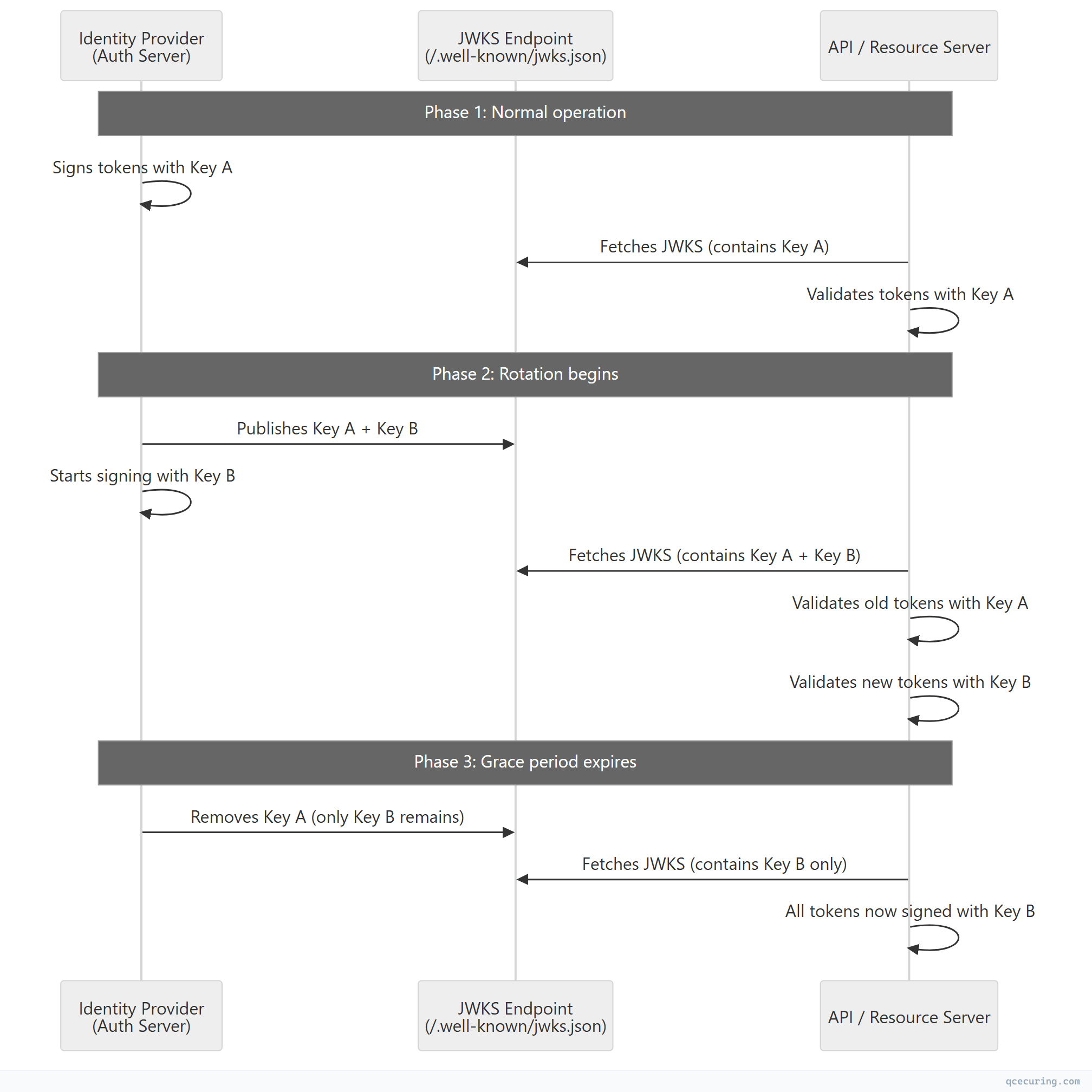
Critical timing:
| Phase | Duration | What Happens |
|---|---|---|
| Pre-rotation | — | Only old key in JWKS, signing with old key |
| Overlap start | T+0 | New key added to JWKS, still signing with old key |
| Signing switch | T+cache_ttl | Start signing with new key (after clients cache new JWKS) |
| Grace period | Token max lifetime | Both keys in JWKS for validation |
| Old key removal | T+cache_ttl+token_lifetime | Remove old key from JWKS |
The grace period must be at least: JWKS cache TTL + maximum token lifetime
If your tokens live 1 hour and clients cache JWKS for 24 hours, the old key must remain in the JWKS for at least 25 hours after you stop signing with it.
JWKS Endpoint Structure
A standard JWKS endpoint (/.well-known/jwks.json) returns:
{
  "keys": [
    {
      "kty": "RSA",
      "kid": "key-2026-05-rotation",
      "use": "sig",
      "alg": "RS256",
      "n": "0vx7agoebGcQSuuPiLJXZptN9nndrQmbXEps2aiAFbWhM...",
      "e": "AQAB"
    },
    {
      "kty": "RSA",
      "kid": "key-2026-02-previous",
      "use": "sig",
      "alg": "RS256",
      "n": "ofgWCuLjybRlzo0tZWJjNiuDfb4bGYWOFZEbLkNYNIYpB...",
      "e": "AQAB"
    }
  ]
}
Key fields:
| Field | Purpose | Example |
|---|---|---|
kty | Key type | RSA, EC, OKP |
kid | Key ID — matches the kid header in JWTs | key-2026-05-rotation |
use | Key usage | sig (signing) or enc (encryption) |
alg | Algorithm | RS256, ES256, EdDSA |
n, e | RSA public key components | Base64url-encoded |
x, y | EC public key coordinates | Base64url-encoded |
The kid is critical. JWTs include a kid in their header that tells the validator which key from the JWKS to use. Without proper kid matching, rotation breaks.
AWS KMS Rotation
Automatic Key Rotation (Symmetric Keys)
AWS KMS supports automatic annual rotation for symmetric CMKs:
# Enable automatic rotation (rotates every 365 days)
aws kms enable-key-rotation --key-id alias/jwt-signing-key

# Check rotation status
aws kms get-key-rotation-status --key-id alias/jwt-signing-key
Limitation: Automatic rotation only works for symmetric keys. For asymmetric keys (RSA/EC used in JWT signing), you must rotate manually.
Manual Asymmetric Key Rotation for JWKS
#!/bin/bash
# rotate-jwks-aws.sh — Zero-downtime JWKS rotation with AWS KMS

# Step 1: Create new signing key
NEW_KEY_ID=$(aws kms create-key \
  --key-usage SIGN_VERIFY \
  --key-spec RSA_2048 \
  --description "JWT signing key - $(date +%Y-%m)" \
  --query 'KeyMetadata.KeyId' --output text)

echo "Created new key: $NEW_KEY_ID"

# Step 2: Create alias for the new key (keep old alias active)
aws kms create-alias \
  --alias-name "alias/jwt-signing-key-$(date +%Y%m)" \
  --target-key-id "$NEW_KEY_ID"

# Step 3: Get the public key for JWKS
aws kms get-public-key \
  --key-id "$NEW_KEY_ID" \
  --output json > new-public-key.json

# Step 4: Convert to JWK format and add to JWKS endpoint
# (Use a library like python-jose or node-jose for conversion)
python3 convert-to-jwk.py new-public-key.json --kid "aws-$(date +%Y%m)"
Python: AWS KMS to JWKS Conversion
import boto3
import json
import base64
from cryptography.hazmat.primitives.serialization import load_der_public_key
from cryptography.hazmat.primitives.asymmetric.rsa import RSAPublicNumbers

kms = boto3.client('kms')

def get_jwk_from_kms(key_id: str, kid: str) -> dict:
    """Convert AWS KMS public key to JWK format."""
    response = kms.get_public_key(KeyId=key_id)
    public_key_der = response['PublicKey']

    # Parse the DER-encoded public key
    public_key = load_der_public_key(public_key_der)
    numbers = public_key.public_numbers()

    # Convert to JWK
    def int_to_base64url(n, length):
        data = n.to_bytes(length, byteorder='big')
        return base64.urlsafe_b64encode(data).rstrip(b'=').decode('ascii')

    key_size = public_key.key_size // 8

    return {
        "kty": "RSA",
        "kid": kid,
        "use": "sig",
        "alg": "RS256",
        "n": int_to_base64url(numbers.n, key_size),
        "e": int_to_base64url(numbers.e, 3)
    }

def rotate_jwks(new_key_id: str, old_key_id: str, jwks_bucket: str):
    """Add new key to JWKS while keeping old key for validation."""
    s3 = boto3.client('s3')

    # Get current JWKS
    try:
        current = json.loads(
            s3.get_object(Bucket=jwks_bucket, Key='.well-known/jwks.json')['Body'].read()
        )
    except s3.exceptions.NoSuchKey:
        current = {"keys": []}

    # Add new key
    new_jwk = get_jwk_from_kms(new_key_id, f"aws-{new_key_id[:8]}")
    current["keys"].insert(0, new_jwk)  # New key first

    # Upload updated JWKS
    s3.put_object(
        Bucket=jwks_bucket,
        Key='.well-known/jwks.json',
        Body=json.dumps(current, indent=2),
        ContentType='application/json',
        CacheControl='public, max-age=3600'  # 1 hour cache
    )
    print(f"JWKS updated with {len(current['keys'])} keys")

# Usage
rotate_jwks(
    new_key_id='arn:aws:kms:us-east-1:123456789:key/new-key-uuid',
    old_key_id='arn:aws:kms:us-east-1:123456789:key/old-key-uuid',
    jwks_bucket='auth-jwks-bucket'
)
GCP Cloud KMS Rotation
Automatic Rotation Schedule
GCP Cloud KMS supports automatic rotation with configurable periods:
# Create a key ring and key with automatic rotation
gcloud kms keys create jwt-signing-key \
  --keyring=auth-keyring \
  --location=global \
  --purpose=asymmetric-signing \
  --default-algorithm=rsa-sign-pkcs1-2048-sha256 \
  --rotation-period=90d \
  --next-rotation-time=$(date -u -d "+90 days" +%Y-%m-%dT%H:%M:%SZ)

# Check current key versions
gcloud kms keys versions list \
  --key=jwt-signing-key \
  --keyring=auth-keyring \
  --location=global
Manual Rotation with Version Management
#!/bin/bash
# rotate-jwks-gcp.sh

PROJECT="my-project"
LOCATION="global"
KEYRING="auth-keyring"
KEY="jwt-signing-key"

# Step 1: Create new key version (automatically becomes primary)
gcloud kms keys versions create \
  --key=$KEY \
  --keyring=$KEYRING \
  --location=$LOCATION

# Step 2: Get the new version number
NEW_VERSION=$(gcloud kms keys versions list \
  --key=$KEY --keyring=$KEYRING --location=$LOCATION \
  --filter="state=ENABLED" --sort-by="~createTime" \
  --limit=1 --format="value(name)" | grep -oP '\d+$')

echo "New primary version: $NEW_VERSION"

# Step 3: Get public key for JWKS
gcloud kms keys versions get-public-key $NEW_VERSION \
  --key=$KEY --keyring=$KEYRING --location=$LOCATION \
  --output-file=new-public-key.pem

# Step 4: After grace period, disable old version
OLD_VERSION=$((NEW_VERSION - 1))
# Wait for: JWKS_CACHE_TTL + MAX_TOKEN_LIFETIME
# Then:
gcloud kms keys versions disable $OLD_VERSION \
  --key=$KEY --keyring=$KEYRING --location=$LOCATION
GCP: Building the JWKS from Key Versions
from google.cloud import kms_v1
from cryptography.hazmat.primitives.serialization import load_pem_public_key
import json, base64

def build_jwks_from_gcp(project_id: str, location: str, keyring: str, key: str) -> dict:
    """Build JWKS from all enabled GCP KMS key versions."""
    client = kms_v1.KeyManagementServiceClient()
    key_name = f"projects/{project_id}/locations/{location}/keyRings/{keyring}/cryptoKeys/{key}"

    jwks = {"keys": []}

    # List all enabled versions
    versions = client.list_crypto_key_versions(
        request={"parent": key_name, "filter": "state=ENABLED"}
    )

    for version in versions:
        # Get public key
        pub_key_response = client.get_public_key(request={"name": version.name})
        pem_data = pub_key_response.pem.encode('utf-8')
        public_key = load_pem_public_key(pem_data)
        numbers = public_key.public_numbers()

        version_num = version.name.split('/')[-1]
        key_size = public_key.key_size // 8

        jwk = {
            "kty": "RSA",
            "kid": f"gcp-{key}-v{version_num}",
            "use": "sig",
            "alg": "RS256",
            "n": base64.urlsafe_b64encode(
                numbers.n.to_bytes(key_size, 'big')
            ).rstrip(b'=').decode(),
            "e": base64.urlsafe_b64encode(
                numbers.e.to_bytes(3, 'big')
            ).rstrip(b'=').decode()
        }
        jwks["keys"].append(jwk)

    return jwks
Azure Key Vault Rotation
Key Rotation Policy
Azure Key Vault supports rotation policies (GA since 2023):
# Create an RSA key for JWT signing
az keyvault key create \
  --vault-name auth-vault \
  --name jwt-signing-key \
  --kty RSA \
  --size 2048 \
  --ops sign verify

# Set rotation policy (rotate every 90 days, notify 30 days before)
az keyvault key rotation-policy update \
  --vault-name auth-vault \
  --name jwt-signing-key \
  --value '{
    "lifetimeActions": [
      {
        "trigger": {"timeBeforeExpiry": "P30D"},
        "action": {"type": "Notify"}
      },
      {
        "trigger": {"timeAfterCreate": "P90D"},
        "action": {"type": "Rotate"}
      }
    ],
    "attributes": {"expiryTime": "P180D"}
  }'
Manual Rotation with Version Tracking
#!/bin/bash
# rotate-jwks-azure.sh

VAULT="auth-vault"
KEY="jwt-signing-key"

# Step 1: Create new key version
az keyvault key create \
  --vault-name $VAULT \
  --name $KEY \
  --kty RSA \
  --size 2048 \
  --ops sign verify

# Step 2: Get all key versions
az keyvault key list-versions \
  --vault-name $VAULT \
  --name $KEY \
  --query "[?attributes.enabled].{kid:kid, created:attributes.created}" \
  --output table

# Step 3: Get public key for new version
NEW_VERSION=$(az keyvault key show \
  --vault-name $VAULT --name $KEY \
  --query "key.kid" --output tsv)

echo "New key version: $NEW_VERSION"
Azure: Event Grid for Automated Rotation
{
  "source": "Microsoft.KeyVault",
  "type": "Microsoft.KeyVault.KeyNearExpiry",
  "subject": "jwt-signing-key",
  "data": {
    "ObjectName": "jwt-signing-key",
    "ObjectType": "Key",
    "VaultName": "auth-vault",
    "Version": "abc123",
    "EXP": "2026-08-11T00:00:00Z"
  }
}
Wire this to an Azure Function that:
- Creates a new key version
- Updates the JWKS endpoint
- Notifies the team
- Schedules old version disablement after grace period
Zero-Downtime Rotation Checklist
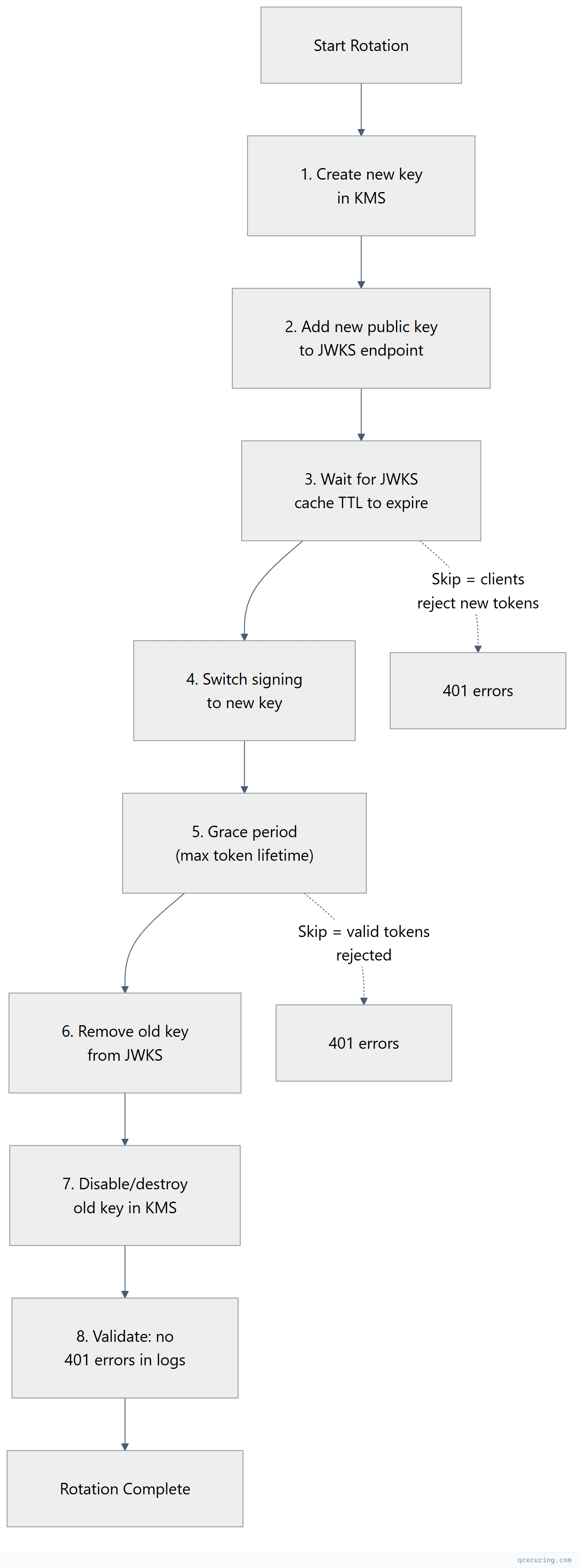
| Step | Action | Wait Time | Validation |
|---|---|---|---|
| 1 | Create new key in KMS | — | Key exists and is enabled |
| 2 | Add new key to JWKS | — | JWKS endpoint returns both keys |
| 3 | Wait for cache propagation | JWKS cache TTL (e.g., 24h) | Clients have fetched new JWKS |
| 4 | Switch signing to new key | — | New tokens have new kid header |
| 5 | Grace period | Max token lifetime (e.g., 1h) | Old tokens still validate |
| 6 | Remove old key from JWKS | — | JWKS only contains new key(s) |
| 7 | Disable old key in KMS | — | Old key can’t be used for signing |
| 8 | Monitor for errors | 24-48h | No 401/403 spikes in API logs |
Handling JWKS Caching
Relying parties cache JWKS responses. If your cache TTL is too long, clients won’t pick up new keys quickly. Too short, and you’re hammering the JWKS endpoint.
Recommended cache headers:
Cache-Control: public, max-age=3600, stale-while-revalidate=600Client-side best practices:
| Library | Cache Behavior | Force Refresh |
|---|---|---|
jose (Node.js) | Caches by default, refreshes on unknown kid | createRemoteJWKSet with cooldownDuration |
PyJWT + PyJWKClient | Caches with configurable TTL | get_signing_key_from_jwt(token) auto-refreshes |
java-jwt (Auth0) | JwkProvider with cache | GuavaCachedJwkProvider with TTL |
go-jose | Manual caching | Re-fetch on kid miss |
Smart client pattern: If token validation fails because the kid isn’t in the cached JWKS, fetch a fresh JWKS before rejecting the token. This handles rotation gracefully without aggressive polling.
# Python example: smart JWKS refresh on kid miss
from jwt import PyJWKClient

jwks_client = PyJWKClient(
    uri="https://auth.example.com/.well-known/jwks.json",
    cache_jwk_set=True,
    lifespan=3600  # Cache for 1 hour
)

def validate_token(token: str):
    try:
        signing_key = jwks_client.get_signing_key_from_jwt(token)
        # PyJWKClient automatically refreshes if kid not found in cache
        return jwt.decode(token, signing_key.key, algorithms=["RS256"])
    except jwt.exceptions.PyJWKClientError:
        # kid not found even after refresh — token is invalid
        raise InvalidTokenError("Signing key not found in JWKS")
Monitoring and Alerting
What to Monitor During Rotation
# Check for 401 spikes (indicates rotation issue)
# CloudWatch (AWS)
aws cloudwatch get-metric-statistics \
  --namespace "API/Auth" \
  --metric-name "401Responses" \
  --period 300 \
  --statistics Sum \
  --start-time $(date -u -d "-1 hour" +%Y-%m-%dT%H:%M:%S) \
  --end-time $(date -u +%Y-%m-%dT%H:%M:%S)
Validation Script (Post-Rotation)
#!/bin/bash
# validate-jwks-rotation.sh

JWKS_URL="https://auth.example.com/.well-known/jwks.json"
EXPECTED_KID="key-2026-05"

# Check JWKS is accessible
HTTP_CODE=$(curl -s -o /dev/null -w "%{http_code}" "$JWKS_URL")
if [ "$HTTP_CODE" != "200" ]; then
  echo "FAIL: JWKS endpoint returned $HTTP_CODE"
  exit 1
fi

# Check new key is present
JWKS=$(curl -s "$JWKS_URL")
if echo "$JWKS" | jq -e ".keys[] | select(.kid == \"$EXPECTED_KID\")" > /dev/null 2>&1; then
  echo "PASS: New key '$EXPECTED_KID' found in JWKS"
else
  echo "FAIL: New key '$EXPECTED_KID' not found in JWKS"
  exit 1
fi

# Count total keys (should be 2 during rotation, 1 after)
KEY_COUNT=$(echo "$JWKS" | jq '.keys | length')
echo "INFO: JWKS contains $KEY_COUNT key(s)"

# Validate a fresh token
TOKEN=$(curl -s -X POST "https://auth.example.com/oauth/token" \
  -d "grant_type=client_credentials&client_id=test&client_secret=test" | jq -r '.access_token')

TOKEN_KID=$(echo "$TOKEN" | cut -d. -f1 | base64 -d 2>/dev/null | jq -r '.kid')
echo "INFO: New tokens signed with kid='$TOKEN_KID'"

if [ "$TOKEN_KID" == "$EXPECTED_KID" ]; then
  echo "PASS: Signing switched to new key"
else
  echo "WARN: Still signing with old key (kid='$TOKEN_KID')"
fi
Common Pitfalls
1. Removing the Old Key Too Early
If you remove the old key from JWKS before all tokens signed with it expire, those tokens become unverifiable. Result: mass 401 errors.
Fix: Grace period = JWKS cache TTL + maximum token lifetime + buffer.
2. Not Including kid in JWT Headers
If your auth server doesn’t include a kid claim in the JWT header, clients can’t determine which key to use for validation. They’ll try all keys in the JWKS, which is fragile and slow.
Fix: Always include kid in JWT headers. Match it to the kid in your JWKS.
3. JWKS Endpoint Downtime During Rotation
If the JWKS endpoint is unreachable when clients try to refresh their cache, they’ll use stale keys — which might not include the new signing key.
Fix: Host JWKS on highly available infrastructure (CDN, S3 + CloudFront, Cloud Storage + LB). Never host it on the same server as your auth service.
4. Clock Skew Between Services
If the service that creates new keys and the service that publishes JWKS have different clocks, timing-based rotation logic can fail.
Fix: Use NTP everywhere. Base rotation timing on explicit steps (not wall-clock assumptions).
5. Forgetting to Rotate in All Environments
Rotating in production but not staging/dev means your CI/CD pipelines break when they validate tokens against stale JWKS.
Fix: Automate rotation identically across all environments, or use separate key sets per environment.
FAQ
Q: How often should I rotate JWKS signing keys?
NIST SP 800-57 recommends rotating asymmetric signing keys every 1-3 years for general use. For high-security environments, every 90 days. Many organizations rotate quarterly as a balance between security and operational overhead. The key factor is your token lifetime — shorter tokens reduce the blast radius of a compromised key.
Q: Can I use symmetric keys (HMAC) for JWKS?
JWKS is designed for asymmetric keys (RSA, EC) where you publish the public key. Symmetric keys (HS256) can’t be published — the same key signs and verifies. If you’re using HMAC-signed JWTs, you don’t use JWKS; you share the secret directly with validators. This doesn’t scale and is not recommended for multi-service architectures.
Q: What happens if my JWKS endpoint goes down?
Clients that have cached the JWKS continue validating tokens normally until their cache expires. After that, they can’t validate new tokens. This is why JWKS should be hosted on infrastructure with 99.99% uptime (CDN, object storage with CloudFront/Cloud CDN). Some libraries support stale-while-revalidate behavior.
Q: Should I use RSA or ECDSA for JWT signing?
ECDSA (ES256 with P-256) produces smaller signatures (64 bytes vs 256 bytes for RS256), resulting in smaller JWTs. Verification is also faster. The tradeoff: some older libraries have better RSA support. For new systems, use ES256. For compatibility with legacy consumers, use RS256.
Q: How do I handle rotation with multiple auth server instances?
All instances must sign with the same key and publish the same JWKS. Options:
- All instances read the signing key from a shared KMS (AWS KMS, Vault)
- Use a leader-election pattern where one instance rotates and others follow
- Use a shared configuration store (Consul, etcd) for the active key ID
Q: What’s the difference between key rotation and key revocation?
Rotation is planned — you gracefully transition to a new key. Revocation is emergency — a key is compromised and must be removed immediately (no grace period). For revocation, remove the key from JWKS immediately and accept that some valid tokens will be rejected. The security benefit outweighs the disruption.
Related Reading: