
You have 3,000 certificates across AWS, Azure, on-premises servers, Kubernetes clusters, and network devices. They’re issued by four different CAs. Some expire in 90 days, some in a year. Nobody has a complete inventory. The last outage cost $400K in lost revenue and took 6 hours to diagnose because nobody knew which certificate expired on which load balancer.
A PKI automation platform solves this by providing a single control plane for certificate discovery, lifecycle management, policy enforcement, and multi-CA orchestration. It’s the difference between managing certificates reactively (firefighting outages) and proactively (automated renewal before anyone notices).
What a PKI Automation Platform Does
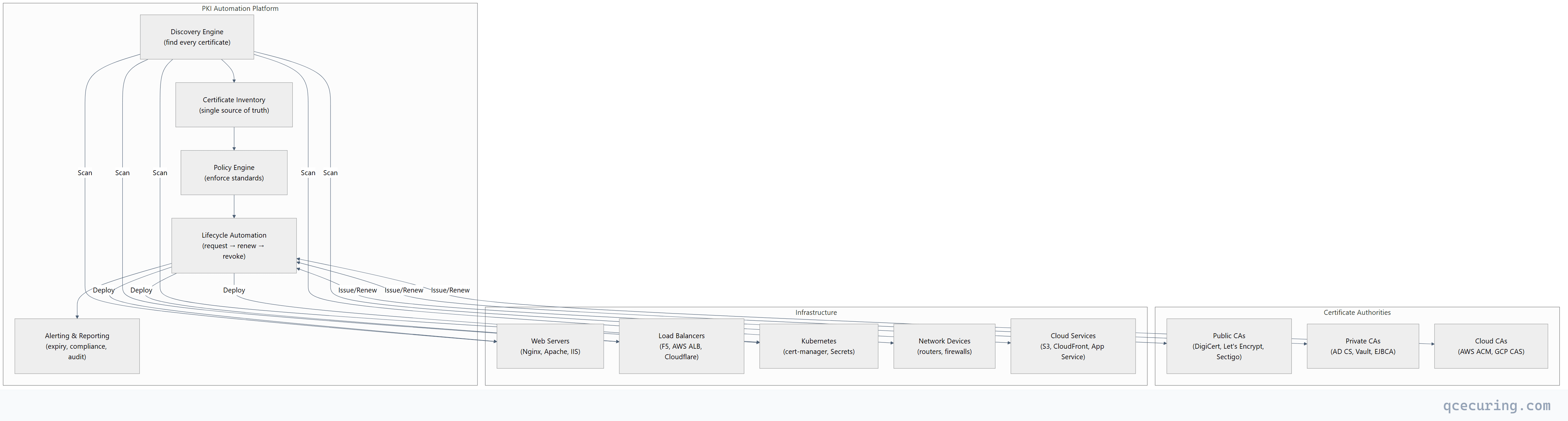
Core Capabilities
| Capability | What It Does | Without It |
|---|---|---|
| Discovery | Finds every certificate across all infrastructure | Spreadsheets, tribal knowledge, surprises |
| Inventory | Single dashboard with expiry, owner, CA, location | ”Who owns this cert?” takes hours to answer |
| Automated renewal | Renews certificates before expiry without human action | 3 AM pages, emergency certificate replacements |
| Multi-CA orchestration | Issues from the right CA based on policy | Manual CA selection, inconsistent practices |
| Policy enforcement | Blocks weak keys, wrong algorithms, unapproved CAs | Shadow certificates, non-compliant configurations |
| Deployment automation | Pushes renewed certs to servers/LBs/CDNs | Manual deployment, missed servers, partial outages |
| Compliance reporting | Generates audit-ready reports on demand | Weeks of manual evidence gathering |
| Alerting | Notifies owners at 90/60/30/7 days before expiry | Outages as the first notification |
Why Now: The 47-Day Certificate Forcing Function
The industry is moving to 47-day maximum TLS certificate lifetimes. This makes manual certificate management mathematically impossible:
| Certificate Lifetime | Renewals/Year (per cert) | 1,000 Certs | 10,000 Certs |
|---|---|---|---|
| 398 days (current max) | ~1 | 1,000 | 10,000 |
| 90 days (Let’s Encrypt) | ~4 | 4,000 | 40,000 |
| 47 days (proposed) | ~8 | 8,000 | 80,000 |
At 47-day lifetimes, an organization with 10,000 certificates needs to process 80,000 renewals per year — that’s 220 per day. No team can handle this manually. Automation isn’t optional; it’s survival.
Architecture Patterns
Pattern 1: Centralized (Single Platform)
One platform manages all certificates across all environments:
- Best for: Mid-size organizations, single-cloud, unified IT
- Advantage: Single pane of glass, consistent policy
- Risk: Single point of failure, vendor lock-in
Pattern 2: Federated (Platform + Local Agents)
Central platform for policy and visibility, local agents for execution:
- Best for: Large enterprises, multi-cloud, regulated industries
- Advantage: Central governance with local autonomy
- Risk: Agent deployment complexity, version management
Pattern 3: Hybrid (Platform + Native Tools)
Central platform for discovery and reporting, native tools for lifecycle:
- Best for: Organizations with existing investments (cert-manager, ACME, AD CS)
- Advantage: Leverages existing automation, adds visibility
- Risk: Integration complexity, potential gaps
Evaluation Criteria
Discovery
| Question | Why It Matters |
|---|---|
| Does it scan network ports (443, 8443, etc.)? | Finds certificates on any TLS endpoint |
| Does it integrate with cloud APIs (AWS, Azure, GCP)? | Finds certificates in managed services |
| Does it scan Kubernetes clusters? | Finds cert-manager certificates and TLS Secrets |
| Does it discover certificates in keystores (JKS, PKCS#12)? | Finds certificates inside Java applications |
| Does it scan certificate transparency logs? | Finds certificates you didn’t know were issued |
| How often does it scan? | Continuous vs daily vs weekly |
Automation
| Question | Why It Matters |
|---|---|
| Does it support ACME protocol? | Automated issuance from Let’s Encrypt and compatible CAs |
| Does it integrate with AD CS? | Automated enrollment for Windows environments |
| Does it support SCEP/EST? | Automated enrollment for network devices |
| Can it deploy to Nginx/Apache/IIS/F5? | End-to-end automation (not just issuance) |
| Does it handle Kubernetes cert-manager? | Cloud-native certificate lifecycle |
| Can it orchestrate across multiple CAs? | Policy-based CA selection |
Compliance & Reporting
| Question | Why It Matters |
|---|---|
| Does it track certificate ownership? | Accountability for renewals |
| Does it generate compliance reports (PCI, HIPAA, SOC 2)? | Audit readiness |
| Does it enforce key size and algorithm policies? | Prevent weak certificates |
| Does it maintain an audit trail of all operations? | Forensics and compliance |
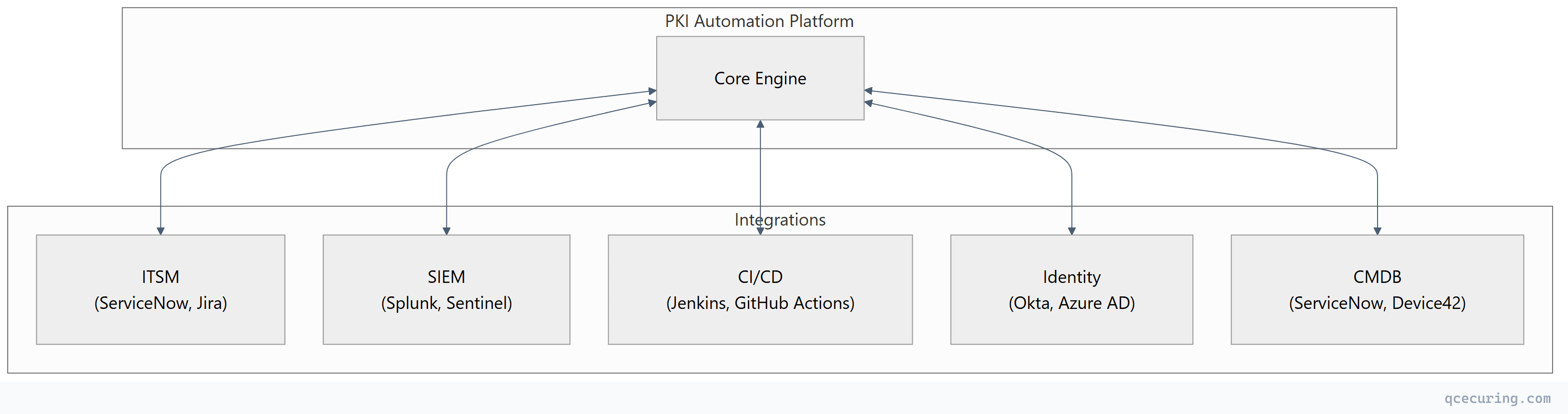
| Does it integrate with SIEM/SOAR? | Security operations visibility |
Build vs Buy Analysis
Building In-House
# The "we'll just script it" approach:
# - Certbot for public certs ✓
# - cert-manager for Kubernetes ✓
# - PowerShell for AD CS ✓
# - Custom scripts for discovery ✓
# - Spreadsheet for inventory ✓
# - PagerDuty for alerts ✓

# What you actually get:
# - 6 disconnected tools with no unified view
# - Scripts that break when someone changes a server
# - No compliance reporting
# - No policy enforcement
# - "Works on my machine" automation
# - The person who wrote the scripts leaves the company
True cost of building:
| Component | Build Cost | Maintain Cost (Annual) |
|---|---|---|
| Discovery engine | 3-6 months engineering | 20% of build cost |
| Multi-CA integration | 2-4 months per CA | API changes, version updates |
| Deployment automation | 2-3 months per platform | Ongoing platform changes |
| Dashboard/reporting | 2-3 months | Feature requests, bug fixes |
| Policy engine | 1-2 months | Policy updates |
| Total | 12-18 months, 2-3 engineers | 1-2 FTE ongoing |
Buying a Platform
| Factor | Buy | Build |
|---|---|---|
| Time to value | Weeks | 12-18 months |
| Ongoing maintenance | Vendor handles | Your team handles |
| Multi-CA support | Pre-built | Custom integration per CA |
| Compliance reports | Out of the box | Custom development |
| New platform support | Vendor roadmap | Your backlog |
| Cost (3 years) | $50K-$300K (depends on scale) | $500K-$1M+ (engineering time) |
Build when: You have unique requirements no vendor supports, or you’re a security vendor yourself.
Buy when: You need certificate management, not a software development project.
Deployment Considerations
On-Premises vs Cloud-Hosted
| Factor | On-Premises | Cloud-Hosted (SaaS) |
|---|---|---|
| Data residency | Full control | Check vendor’s data location |
| Network access | Direct access to internal networks | Requires agents or VPN for internal scanning |
| Maintenance | You patch and upgrade | Vendor handles |
| Scalability | Capacity planning required | Elastic |
| Compliance | Easier for air-gapped environments | Easier for cloud-native |
| Cost model | CapEx (hardware + license) | OpEx (subscription) |
Integration Points
ROI Calculation
Cost of Certificate Outages
| Metric | Industry Average |
|---|---|
| Mean time to detect certificate expiry | 4-8 hours |
| Mean time to resolve | 2-6 hours |
| Revenue impact per hour (e-commerce) | $50K-$500K |
| Compliance fine risk (HIPAA, PCI) | $10K-$1M+ |
| Brand/trust damage | Unquantifiable |
ROI Formula
Annual savings = (Outages prevented × avg outage cost)
               + (FTE hours saved × hourly rate)
               + (Compliance audit time saved × consultant rate)
               - Platform cost

Example (mid-size enterprise):
= (3 outages × $200K) + (2,000 hours × $75) + (200 hours × $300) - $150K
= $600K + $150K + $60K - $150K
= $660K net annual savings
FAQ
Q: Do I need a PKI automation platform if I only use Let’s Encrypt?
If all your certificates are from Let’s Encrypt and managed by Certbot/cert-manager, you have basic automation already. A platform adds value when you have: multiple CAs, certificates on devices that don’t support ACME, compliance reporting requirements, or need visibility across a large environment. If you have < 50 certificates all on ACME-capable servers, you probably don’t need a platform yet.
Q: How does a PKI automation platform differ from a CA?
A CA issues certificates. A PKI automation platform manages the lifecycle of certificates regardless of which CA issued them. It’s the orchestration layer that sits above CAs — discovering certificates from any source, automating renewal through any CA, and enforcing policy across all of them.
Q: Can a PKI automation platform replace AD CS?
Not directly — AD CS is a CA that issues certificates. A platform can orchestrate AD CS (request certificates from it, track what it issues, automate enrollment). Some platforms include their own CA functionality, which could replace AD CS for certain use cases. But for Windows auto-enrollment and domain controller certificates, AD CS remains necessary.
Q: What’s the minimum certificate count where a platform makes sense?
The tipping point is typically 200-500 certificates, or when you have certificates from multiple CAs, or when you’ve had your first certificate-related outage. Below 200 certificates with a single CA, scripting and spreadsheets may suffice. Above 500, the operational risk of manual management exceeds the platform cost.
Q: How long does implementation typically take?
- Discovery and inventory: 1-2 weeks
- Basic automation (ACME, AD CS): 2-4 weeks
- Full deployment automation: 4-8 weeks
- Policy enforcement and compliance: 2-4 weeks
- Total: 2-4 months for full deployment
Q: Does the platform need access to private keys?
For discovery and monitoring — no. The platform only needs to see the public certificate. For automated renewal and deployment — it depends on the architecture. Agent-based platforms generate keys locally (keys never leave the server). Centralized platforms may handle keys (ensure they use HSM-backed storage).
Related Reading: