
Keyfactor is the CLM platform that grew up inside the Microsoft PKI ecosystem. Originally founded as CSS (Certified Security Solutions) in 2001, it spent nearly two decades as the go-to tool for organizations drowning in AD CS complexity. Then it rebranded, raised $277 million from Insight Partners, acquired EJBCA (the most popular open-source CA), and positioned itself as a full-stack PKI company — CA, CLM, and signing in one vendor.
If your world is Windows-centric and you want one vendor for both your CA infrastructure and certificate management, Keyfactor is a compelling pitch. But that bundled approach comes with trade-offs — architectural complexity, pricing that reflects the full stack, and a platform whose heritage shows in its deployment model.
Company Backgrounds
Keyfactor
Keyfactor was founded in 2001 as CSS (Certified Security Solutions) in Cleveland, Ohio. For 18 years, it was primarily a Microsoft PKI consulting and tooling company — helping enterprises manage AD CS, fix broken certificate templates, and automate enrollment.
In 2019, CSS rebranded to Keyfactor and raised $77 million from Insight Partners. In 2021, they raised another $200 million at a $1.3 billion valuation. The same year, they acquired PrimeKey — the Swedish company behind EJBCA, the most widely deployed open-source certificate authority.
Key facts:
- 1,500+ enterprise customers
- Primarily large enterprise and government (US federal strong)
- Products: Command (CLM), EJBCA Enterprise (CA), SignServer (code signing)
- Architecture: Windows Server + SQL Server (Command), Java (EJBCA)
- Acquired PrimeKey/EJBCA in 2021
- Strong US federal/DoD presence (FedRAMP authorized)
- Headquarters: Cleveland, OH with offices in Stockholm (PrimeKey legacy)
The EJBCA acquisition changed Keyfactor’s positioning. Before 2021, they were a CLM vendor that worked with any CA. After acquiring EJBCA, they became a full-stack PKI vendor — and the sales motion shifted toward “buy our CA and our CLM together.” This is great if you want one vendor, but it means the platform is increasingly optimized for Keyfactor’s own CA rather than being truly CA-agnostic.
QCecuring
QCecuring is an enterprise cryptographic security company focused on making certificate and key management accessible beyond the Fortune 500. Built from the ground up with modern architecture, it covers the full cryptographic lifecycle — SSL/TLS certificates, SSH keys, code signing, HSM management, and cryptographic discovery (CBOM).
Key facts:
- Modern architecture: Spring Boot + MongoDB + Angular
- Single JAR deployment — runs on any OS
- Self-hosted, cloud, or hybrid deployment
- Products: SSL CLM, SSH KLM, Code Signing, PKI-aaS, HSM-aaS, CBOM
- Focus: Mid-market to enterprise, government, MSPs
- No external CA dependency — works with any CA
Architecture Comparison
This is where the platforms diverge most significantly:
| Component | QCecuring | Keyfactor Command |
|---|---|---|
| Backend | Spring Boot 3.5 (embedded server) | .NET on Windows Server + IIS |
| Database | MongoDB (flexible, scalable) | Microsoft SQL Server (licensed) |
| Frontend | Angular 17+ (modern SPA) | Web UI (ASP.NET) |
| Deployment | Single JAR, Docker, or K8s | Windows Server VMs (multiple components) |
| OS requirement | Any (Linux, Windows, macOS, Docker) | Windows Server (Command), Linux (EJBCA) |
| Agent model | Lightweight agent with mTLS | Orchestrators (per-platform agents) |
| Agent security | mTLS with auto-rotating certificates | API key / certificate authentication |
| HA model | Container orchestration (K8s native) | Windows clustering + SQL Always On |
| API | REST (OpenAPI documented) | REST + legacy SOAP |
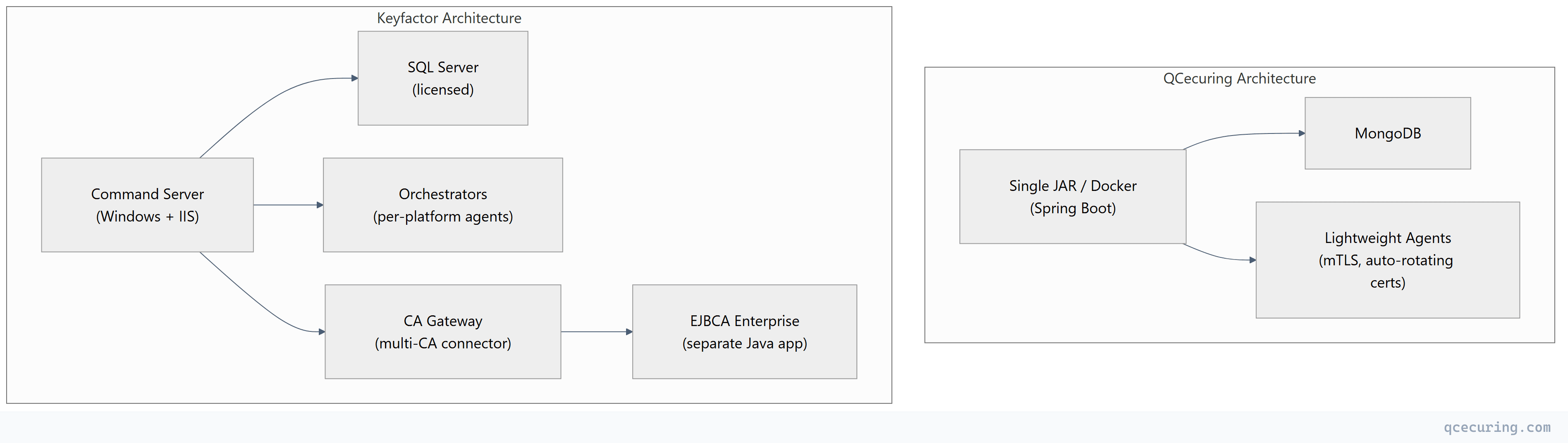
What this means in practice: Keyfactor Command requires a Windows Server environment with SQL Server — that’s infrastructure to maintain, patch, and license. If you also deploy EJBCA, that’s a separate Java application on Linux. And orchestrators are additional agents deployed per target platform. The total footprint is significantly larger than QCecuring’s single-process model.
Feature-by-Feature Comparison
Discovery
| Capability | QCecuring | Keyfactor Command |
|---|---|---|
| Network port scanning | Yes (7 discovery methods) | Yes |
| Cloud API (AWS, Azure, GCP) | Yes (native) | Yes |
| AD CS certificate store | Yes | Yes (deepest in market) |
| Kubernetes/cert-manager | Roadmap | Yes (via orchestrator) |
| Certificate Transparency logs | Yes | Yes |
| File system scanning | Yes | Yes (via orchestrator) |
| LDAP/Active Directory | Yes | Yes |
| Continuous scanning | Yes | Configurable |
| CBOM (cryptographic inventory) | Yes (core feature) | Limited (separate offering) |
Automation & Lifecycle
| Capability | QCecuring | Keyfactor Command |
|---|---|---|
| ACME protocol | Yes (full v2) | Yes |
| AD CS auto-enrollment management | Yes | Yes (market-leading depth) |
| SCEP/EST for devices | Yes | Yes |
| Zero-touch renewal | Yes | Yes |
| Deployment to web servers | Yes (Nginx, Apache, IIS) | Yes (via orchestrators) |
| Deployment to load balancers | Roadmap (F5, Citrix) | Yes (extensive — F5, Citrix, A10, Palo Alto) |
| Deployment to cloud services | Yes (AWS, Azure, GCP) | Yes |
| Approval workflows | Yes (multi-level) | Yes (enterprise workflow engine) |
| Self-service portal | Yes | Yes |
| REST API coverage | Full | Full (+ legacy SOAP) |
AD CS Integration Depth
This is Keyfactor’s strongest area — their 20-year heritage in Microsoft PKI:
| AD CS Capability | QCecuring | Keyfactor Command |
|---|---|---|
| Template management | Monitor | Full management (create, modify, publish) |
| CA health monitoring | Yes | Yes (deep — service status, queue, DB size) |
| Certificate enrollment | Via standard protocols | Direct AD CS API integration |
| GPO auto-enrollment visibility | Yes | Yes (with enrollment policy tracking) |
| Key archival management | Limited | Yes |
| CRL/AIA monitoring | Yes | Yes (with automated remediation) |
| CA migration tools | Limited | Yes (CA-to-CA migration wizard) |
| ESC vulnerability detection | Limited | Yes (AD CS security assessment) |
If AD CS is your primary CA and you need to manage templates, monitor CA health, and control enrollment policies from a single pane — Keyfactor has the deepest integration available. This is their heritage and it shows.
PKI & CA Capabilities
| Capability | QCecuring | Keyfactor |
|---|---|---|
| Built-in CA | No (CA-agnostic) | Yes (EJBCA Enterprise) |
| PKI-as-a-Service | No | Yes (Keyfactor-hosted EJBCA) |
| CA-agnostic orchestration | Yes (any CA) | Yes (but optimized for EJBCA) |
| Code signing | Separate product | SignServer (included in some bundles) |
| SSH certificate management | Separate product | Limited |
The bundling question: Keyfactor’s pitch is “buy Command + EJBCA + SignServer as a suite.” This is attractive if you need all three. But if you already have a CA (AD CS, Vault, Let’s Encrypt) and just need CLM, you’re paying for CA capabilities you won’t use.
Post-Quantum & Crypto Agility
| Capability | QCecuring | Keyfactor |
|---|---|---|
| CBOM (Cryptographic Bill of Materials) | Yes (core product) | Limited (partner integrations) |
| PQC algorithm inventory | Yes | Roadmap |
| Crypto-agility assessment | Yes (built-in) | Limited |
| Hybrid certificate support | Roadmap | Roadmap (EJBCA has PQC support) |
| Algorithm migration planning | Yes | Limited |
QCecuring treats CBOM and PQC readiness as first-class features. Keyfactor’s EJBCA has some PQC algorithm support at the CA level, but the CLM platform (Command) doesn’t yet provide comprehensive cryptographic inventory or migration planning.
Where QCecuring Wins
1. Deployment Simplicity
Keyfactor Command requires: Windows Server (multiple instances for HA), SQL Server (licensed, clustered for HA), IIS configuration, orchestrator deployment per target platform, and typically professional services for initial setup.
QCecuring requires: Download a JAR file. Run it. Done.
| QCecuring | Keyfactor | |
|---|---|---|
| Time to first value | Hours to days | 4-8 weeks |
| Infrastructure | Any machine with Java/Docker | Windows Server + SQL Server + IIS |
| Professional services | Not required | Typically required |
| Ongoing infrastructure | Single process | Multiple Windows VMs + SQL cluster |
2. Cost Structure
Keyfactor’s pricing reflects its full-stack positioning. You’re paying for the CLM platform, the CA capabilities (even if you don’t use EJBCA), the orchestrator framework, and the Windows/SQL infrastructure underneath.
| Cost Component | QCecuring | Keyfactor |
|---|---|---|
| Platform license | $$ | $$$-$$$$ |
| Infrastructure (servers, SQL) | Minimal | Significant (Windows + SQL licensing) |
| Professional services | Optional | Typically $50K-$100K |
| Orchestrator deployment | N/A (lightweight agents) | Per-platform effort |
| Year 1 total (mid-market) | Lower | Higher |
3. CBOM and PQC Readiness
QCecuring’s cryptographic inventory (CBOM) is a core platform feature — it discovers not just certificates but all cryptographic assets (algorithms, key sizes, protocols) and maps them to compliance requirements and PQC migration readiness.
Keyfactor doesn’t have an equivalent built-in capability. Their PQC story is primarily at the EJBCA level (CA can issue PQC certs) rather than at the CLM level (inventory and migration planning).
4. True CA-Agnosticism
QCecuring has no CA product to sell you. It works equally well with AD CS, Let’s Encrypt, DigiCert, Vault, or any other CA. There’s no incentive to push you toward a specific CA.
Keyfactor owns EJBCA. While Command works with other CAs, the sales motion and product roadmap increasingly favor the Keyfactor-EJBCA combination. If you’re not using EJBCA, you may not get the deepest integration.
5. Air-Gapped and Sovereign Deployment
QCecuring’s single-JAR architecture makes it trivial to deploy in air-gapped, classified, or data-sovereign environments. No internet connectivity required, no external dependencies, no Windows Update concerns.
Keyfactor’s Windows Server dependency makes air-gapped deployment more complex — Windows patching, SQL Server maintenance, and orchestrator updates all require planning in disconnected environments.
Where Keyfactor Wins
1. AD CS Depth
Nobody matches Keyfactor’s AD CS integration. If you have a complex Microsoft PKI with dozens of templates, multiple issuing CAs, auto-enrollment policies, and need to manage it all from one console — Keyfactor Command is purpose-built for this.
Specific capabilities QCecuring can’t match today:
- Template creation and modification from the CLM UI
- CA-to-CA migration wizards
- AD CS security assessment (ESC vulnerability detection)
- Enrollment policy management
- Key archival and recovery management
2. Built-In CA (EJBCA)
If you need a CA and a CLM, Keyfactor gives you both from one vendor. EJBCA Enterprise is a mature, FIPS-validated CA that supports ACME, SCEP, EST, CMP, and REST APIs. You don’t need to buy, deploy, and integrate a separate CA.
For organizations starting from scratch (no existing CA), this is genuinely valuable — one vendor, one support contract, one integration.
3. Load Balancer and Network Device Integration
Keyfactor’s orchestrator ecosystem covers more deployment targets than QCecuring today:
- F5 BIG-IP (deep integration)
- Citrix ADC / NetScaler
- A10 Networks
- Palo Alto firewalls
- Cisco devices
- Infoblox
If your infrastructure includes complex network appliances that need automated certificate deployment, Keyfactor’s orchestrator catalog is more mature.
4. FedRAMP Authorization
Keyfactor has FedRAMP authorization for their cloud offering. For US federal agencies and contractors, this is a hard requirement that eliminates vendors without it. QCecuring’s self-hosted model works in federal environments but doesn’t have the FedRAMP stamp for SaaS.
5. Market Maturity and References
Keyfactor has 1,500+ enterprise customers and 20+ years of deployment history. They have reference customers in every industry vertical. For procurement teams that need proven vendor track records and analyst recognition, Keyfactor’s market presence is an advantage.
Pricing Comparison
| QCecuring | Keyfactor | |
|---|---|---|
| Annual platform license | Contact for quote (competitive) | $80K-$400K+/year (depends on modules) |
| EJBCA included | No (bring your own CA) | Yes (in full bundle) |
| SQL Server license | Not needed (MongoDB) | Required ($15K-$50K+) |
| Windows Server licenses | Not needed | Required (multiple instances) |
| Professional services | Optional | $50K-$100K typical |
| Orchestrator deployment | Lightweight (included) | Per-platform effort |
| Year 1 TCO (2,000 certs) | $$ | $$$-$$$$ |
The EJBCA Factor
Keyfactor’s acquisition of EJBCA (PrimeKey) in 2021 fundamentally changed their market position. Before the acquisition, EJBCA Community Edition was the most popular open-source CA — used by organizations who didn’t want to pay for AD CS or commercial CAs.
Post-acquisition:
- EJBCA Community Edition still exists (LGPL) but receives fewer updates
- EJBCA Enterprise is the commercial version bundled with Keyfactor
- Organizations using EJBCA Community are natural upsell targets for Keyfactor
- The “open-source CA + commercial CLM” combination is now a single-vendor play
If you’re currently using EJBCA Community and considering a CLM platform: Keyfactor is the natural path (same CA, integrated management). But you’re also locking into their ecosystem. QCecuring works with EJBCA Community via standard protocols (ACME, REST API) without requiring the Enterprise version.
Who Should Choose What
Choose QCecuring if:
- You need CLM without Fortune 500 pricing
- You want deployment in days, not months
- You need self-hosted without Windows Server dependency
- You’re in government/defense needing air-gapped deployment
- CBOM and PQC readiness are priorities
- You already have a CA (AD CS, Vault, Let’s Encrypt) and just need lifecycle management
- You’re an MSP managing certificates for multiple clients
- You want a CA-agnostic platform with no vendor CA bias
- EU compliance (DORA, CRA) is a driver
Choose Keyfactor if:
- AD CS is your primary CA and you need deep template/health management
- You want one vendor for CA + CLM + code signing
- You need a hosted CA (PKI-as-a-Service with EJBCA)
- F5/Citrix/network device certificate automation is critical
- You need FedRAMP-authorized SaaS
- You’re already using EJBCA and want integrated management
- Budget is secondary to integration depth
- You need proven Fortune 500 references for procurement
FAQ
Q: Can QCecuring manage certificates issued by EJBCA?
Yes. QCecuring works with EJBCA (both Community and Enterprise) via standard protocols — ACME, REST API, and SCEP. You don’t need Keyfactor Command to manage EJBCA-issued certificates.
Q: Is Keyfactor’s AD CS integration worth the premium?
If AD CS is your primary CA with 20+ templates, multiple issuing CAs, and complex auto-enrollment policies — yes, Keyfactor’s depth here is unmatched. If you use AD CS as one CA among several and primarily need lifecycle management (discovery, expiry monitoring, renewal), QCecuring covers those needs at lower cost.
Q: What about Keyfactor’s Kubernetes support?
Keyfactor integrates with Kubernetes via orchestrators and through EJBCA’s cert-manager issuer plugin. It works, but it’s an integration rather than native architecture. QCecuring has Kubernetes on the roadmap. For Kubernetes-heavy environments today, consider using cert-manager directly with either platform providing the visibility layer.
Q: Does the EJBCA acquisition make Keyfactor less CA-agnostic?
In practice, yes. While Command still works with other CAs, the product roadmap, sales incentives, and deepest integrations favor the Keyfactor+EJBCA combination. If you’re using AD CS or another CA, you’ll get good support — but the tightest integration is with their own CA.
Q: Which handles 47-day certificates better?
Both support automated renewal at any frequency. The difference is deployment speed — if you need to get automation running quickly to handle 47-day certs, QCecuring’s hours-to-days deployment wins over Keyfactor’s weeks-to-months timeline.
Q: Can I migrate from Keyfactor to QCecuring (or vice versa)?
Yes in both directions. Certificate inventories can be exported/imported. Discovery engines work independently — deploy the new platform alongside the old one, verify it discovers everything, then decommission the old platform. The certificates themselves don’t change; only the management layer does.
Related Reading: