
Keyfactor SignServer is the enterprise-grade, self-hosted signing server that’s been around since 2003 (originally as part of EJBCA). It’s Java-based, runs on WildFly, and gives you complete control over your signing infrastructure — at the cost of managing that infrastructure yourself.
QCecuring Code Signing takes the opposite approach: a managed platform where you define policies and connect HSMs, but don’t operate signing servers. Both solve enterprise code signing, but the operational models are fundamentally different.
This comparison helps you decide: do you want to own and operate your signing infrastructure, or do you want signing-as-a-service with enterprise governance?
Company Backgrounds
Keyfactor (SignServer)
SignServer is developed by Keyfactor (formerly PrimeKey). The product has deep roots in the open-source PKI community — PrimeKey created both EJBCA (the most widely deployed open-source CA) and SignServer (the signing counterpart).
Key facts:
- Founded: 2003 (PrimeKey, Sweden); acquired by Keyfactor in 2021
- Model: Open-source Community Edition + commercial Enterprise Edition
- Architecture: Java 21, WildFly 38 application server
- Latest version: SignServer 7.5
- Deployment: On-premises (self-hosted)
- HSM support: PKCS#11 (Thales Luna, Entrust nShield, AWS CloudHSM, YubiHSM)
- PQ support: Post-quantum HSM integration via Entrust nShield 5c
- License: Community (LGPL) / Enterprise (commercial)
SignServer editions:
| Feature | Community (Free) | Enterprise (Commercial) |
|---|---|---|
| Authenticode signing | Yes | Yes |
| JarSigner | Yes | Yes |
| CMS signing | Yes | Yes |
| PDF signing | Yes | Yes |
| XML signing | Yes | Yes |
| Container signing | Limited | Yes |
| HA clustering | No | Yes |
| HSM key management | Basic | Advanced |
| Audit logging | Basic | Full |
| Support | Community forums | 24/7 commercial |
| PQ algorithms | No | Yes (nShield 5c) |
QCecuring
QCecuring is an enterprise cryptographic security company focused on certificate and signing lifecycle management. No CA business, no HSM hardware — pure management and policy layer.
Key facts:
- Architecture: Spring Boot + MongoDB + Angular, single JAR deployment
- Model: Managed platform (SaaS or self-hosted)
- HSM support: HSM-agnostic (connects to any PKCS#11 or cloud KMS)
- CA support: CA-agnostic (any certificate issuer)
- Focus: Policy engine, approval workflows, CLM integration
Architecture Comparison
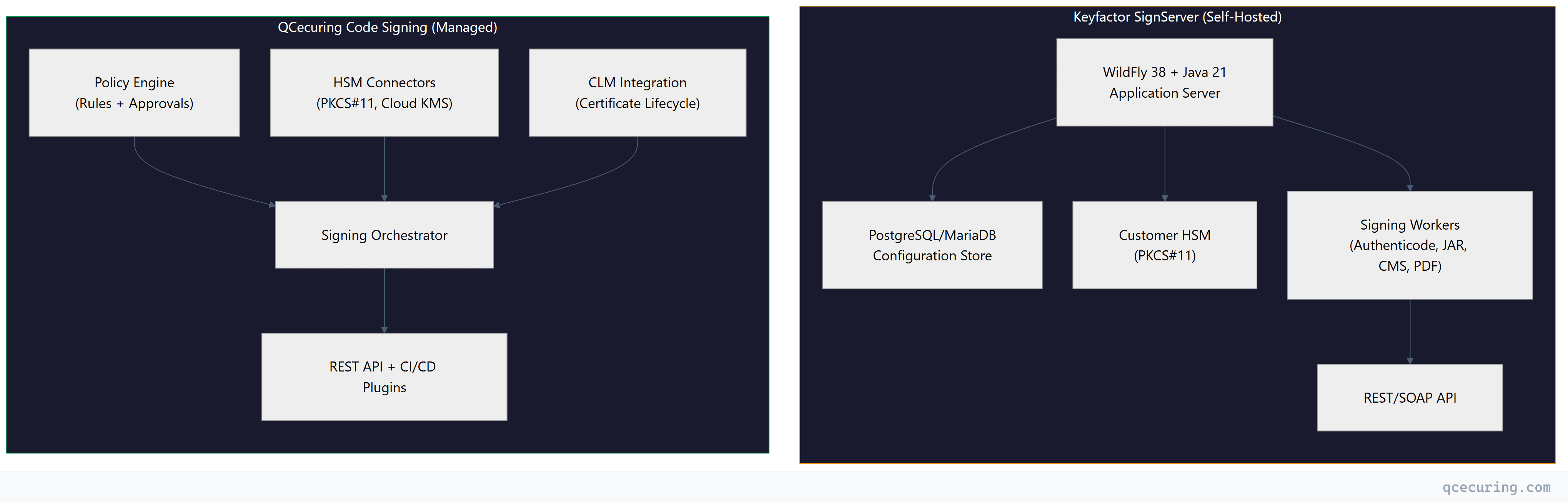
The fundamental difference: SignServer is infrastructure you deploy and operate. QCecuring is a service you configure and consume.
SignServer Deep Dive
Deployment Model
SignServer runs as a Java application on WildFly 38 (formerly JBoss). A production deployment looks like:
# SignServer system requirements
# - Java 21 (OpenJDK or Oracle)
# - WildFly 38
# - PostgreSQL 15+ or MariaDB 10.6+
# - HSM with PKCS#11 driver
# - 4+ CPU cores, 8GB+ RAM per node

# Typical deployment
wget https://signserver.org/download/signserver-ce-7.5.0.zip
unzip signserver-ce-7.5.0.zip
cd signserver-ce-7.5.0

# Configure datasource
cp conf/signserver_deploy.properties.sample conf/signserver_deploy.properties
# Edit: database.name=PostgreSQL
# Edit: datasource.jndi-name=java:/SignServerDS

# Deploy to WildFly
bin/ant deploy

# Configure HSM (example: SoftHSM for testing)
bin/signserver setproperty global WORKER1.CLASSPATH org.signserver.module.cmssigner.CMSSigner
bin/signserver setproperty global WORKER1.CRYPTOTOKEN_CLASSPATH org.signserver.server.cryptotokens.PKCS11CryptoToken
bin/signserver reload 1
This is real infrastructure work. You need:
- Java expertise (JVM tuning, garbage collection, memory management)
- Application server knowledge (WildFly configuration, JNDI, datasources)
- Database administration (backups, replication, performance)
- HSM operations (PKCS#11 driver installation, slot management)
- Network security (TLS termination, firewall rules, load balancing)
- High availability (clustering, session replication, failover)
Signing Workers
SignServer uses a “worker” model — each signing operation type is a configured worker:
# Authenticode signing worker
WORKER1.TYPE=PROCESSABLE
WORKER1.IMPLEMENTATION_CLASS=org.signserver.module.authenticode.AuthenticodeSigner
WORKER1.CRYPTOTOKEN=CryptoTokenP11
WORKER1.DEFAULTKEY=code-signing-key-1
WORKER1.DIGESTALGORITHM=SHA-256
WORKER1.TSA_URL=http://timestamp.digicert.com

# JAR signing worker
WORKER2.TYPE=PROCESSABLE
WORKER2.IMPLEMENTATION_CLASS=org.signserver.module.jarsigner.JArchiveSigner
WORKER2.CRYPTOTOKEN=CryptoTokenP11
WORKER2.DEFAULTKEY=jar-signing-key-1
WORKER2.DIGESTALGORITHM=SHA-256
WORKER2.SIGNATUREALGORITHM=SHA256withRSA
API Usage
# Sign a file via REST API
curl -X POST https://signserver.internal:8443/signserver/rest/v1/workers/AuthenticodeSigner/process \
  -H "Authorization: Bearer ${TOKEN}" \
  -F "file=@./build/app.exe" \
  -o ./build/app-signed.exe

# Sign via CLI
bin/signclient signdocument \
  -workername AuthenticodeSigner \
  -infile ./build/app.exe \
  -outfile ./build/app-signed.exe
Post-Quantum Support
SignServer Enterprise 7.5 supports post-quantum algorithms via Entrust nShield 5c HSM:
- ML-DSA (Dilithium) for signing
- Composite signatures (RSA + ML-DSA hybrid)
- PKCS#11 v3.0 interface for PQ key operations
This is a genuine differentiator — SignServer is one of the first signing platforms with production PQ support through hardware HSMs.
QCecuring Deep Dive
Deployment Model
QCecuring deploys as a single JAR or container — no application server, no complex infrastructure:
# QCecuring deployment (self-hosted option)
docker run -d \
  --name qcecuring-signing \
  -p 8443:8443 \
  -e MONGODB_URI=mongodb://db:27017/qcecuring \
  -e HSM_PKCS11_LIBRARY=/usr/lib/softhsm/libsofthsm2.so \
  -v /etc/qcecuring:/config \
  qcecuring/code-signing:latest
Or use the managed SaaS deployment where QCecuring handles all infrastructure.
Policy Engine
The core differentiator. QCecuring’s policy engine goes beyond “who can sign” to “under what conditions”:
# Policy: Production Windows releases
policy:
  name: "windows-production-release"
  description: "EV-signed Windows binaries for public distribution"

  conditions:
    requester:
      roles: ["release-engineer", "ci-service-account"]
      mfa_required: true
    artifact:
      types: ["exe", "dll", "msi", "msix"]
      max_size: "500MB"
      virus_scan: required
    source:
      branch: "release/*"
      pipeline_status: "all-checks-passed"
      commit_signed: true

  approvals:
    required: 1
    approvers_from: ["security-leads"]
    auto_approve_if:
      - requester_is: "ci-service-account"
      - artifact_hash_matches: "build-manifest.json"

  signing:
    key_alias: "ev-code-signing-2026"
    algorithm: "SHA-256"
    timestamp:
      url: "http://timestamp.digicert.com"
      algorithm: "SHA-256"
    counter_sign: true
SignServer has authorization modules, but nothing approaching this level of conditional logic and approval workflows.
CLM Integration
When you use QCecuring for both code signing and certificate lifecycle management, you get unified visibility:
- Signing certificate expiry alerts (before they expire in CI/CD)
- Automatic certificate renewal workflows
- Single dashboard for all cryptographic assets
- Compliance reporting across signing and TLS certificates
SignServer manages signing operations but doesn’t manage the certificates themselves — that’s a separate Keyfactor product (Command/EJBCA).
Feature Comparison
| Feature | SignServer Community | SignServer Enterprise | QCecuring Code Signing |
|---|---|---|---|
| Deployment | Self-hosted | Self-hosted | Managed or self-hosted |
| Infrastructure | You manage everything | You manage everything | Managed for you |
| Authenticode | Yes | Yes | Yes |
| JarSigner | Yes | Yes | Yes |
| CMS/PKCS#7 | Yes | Yes | Yes |
| PDF signing | Yes | Yes | Yes |
| XML/XAdES | Yes | Yes | Yes |
| Container signing | Limited | Yes | Yes |
| macOS signing | No | Limited | Yes |
| Policy engine | Basic auth | Authorization modules | Full conditional policies |
| Approval workflows | No | No | Yes |
| HA clustering | No | Yes | Built-in (managed) |
| PQ algorithms | No | Yes (nShield 5c) | Roadmap |
| CLM integration | No (separate product) | No (separate product) | Native |
| Open source | Yes (LGPL) | No | No |
| HSM support | PKCS#11 | PKCS#11 + cloud KMS | PKCS#11 + all cloud KMS |
| CI/CD plugins | REST API | REST API + plugins | REST API + native plugins |
| Audit trail | Basic | Full | Full (SIEM integration) |
| Pricing | Free | License + support | Platform subscription |
Operational Comparison
Day-to-Day Operations
SignServer requires:
- JVM monitoring and tuning (heap size, GC pauses)
- WildFly patching and upgrades
- Database maintenance (vacuuming, index optimization)
- HSM firmware updates and key ceremony procedures
- Certificate renewal for SignServer’s own TLS cert
- Log rotation and monitoring
- Capacity planning for signing throughput
- Security patching (Java CVEs, WildFly CVEs)
QCecuring requires:
- Policy updates when signing requirements change
- HSM/KMS connection monitoring
- Certificate enrollment for new signing certs
- User/role management
- Audit review
The operational burden difference is significant. SignServer is a production Java application that needs a team to run. QCecuring is a service you configure.
Scaling
SignServer scaling:
Single node → ~100 signatures/second (RSA 2048)
Clustered (Enterprise) → Linear scaling with nodes
Each node: WildFly + DB connection + HSM session
You scale by adding nodes, which means more infrastructure, more licenses, more operational complexity.
QCecuring scaling: Handled by the platform. Signing throughput scales with your HSM capacity, not with application server nodes.
Upgrade Path
SignServer upgrades:
# Typical SignServer upgrade (major version)
# 1. Read release notes for breaking changes
# 2. Test in staging environment
# 3. Backup database
# 4. Stop SignServer
# 5. Deploy new version to WildFly
# 6. Run database migration scripts
# 7. Verify worker configurations
# 8. Test signing operations
# 9. Promote to production

# This process takes 2-4 hours per environment
QCecuring upgrades: Managed by QCecuring (SaaS) or single container update (self-hosted). No WildFly upgrades, no database migrations, no Java version compatibility testing.
Pricing Comparison
SignServer Community (Free)
- No license cost
- No support (community forums only)
- No HA clustering
- No PQ support
- You pay for: infrastructure, HSM, staff time
Hidden costs: A production SignServer deployment typically requires 0.5-1 FTE for operations. At $150K/year fully loaded, that’s your real cost — not the software license.
SignServer Enterprise
- Commercial license (contact Keyfactor for pricing)
- Estimated: $50K-150K/year depending on scale
- Includes: HA clustering, commercial support, PQ features
- You still pay for: infrastructure, HSM, staff time
QCecuring Code Signing
- Platform subscription (annual)
- Includes: all features, unlimited signing operations, managed infrastructure (SaaS)
- You pay for: HSM/KMS costs (cloud KMS is typically $1-3/key/month)
- No infrastructure staff needed for the signing platform itself
Total Cost of Ownership (3-Year)
| Cost Component | SignServer Enterprise | QCecuring (Managed) |
|---|---|---|
| Software license | $150K-450K | Platform subscription |
| Infrastructure (servers) | $50K-100K | $0 (managed) |
| HSM costs | $30K-100K | $10K-30K (cloud KMS) |
| Operations staff (0.5 FTE) | $225K | $0 |
| Database hosting | $15K-30K | $0 (managed) |
| 3-year total | $470K-905K | Significantly lower |
The TCO gap widens with scale. Every additional SignServer node adds infrastructure and operational cost. QCecuring’s managed model absorbs that complexity.
When to Choose Each
Choose SignServer If:
- You need complete control over signing infrastructure (air-gapped environments)
- You have Java/WildFly expertise on staff
- You need post-quantum signing today (nShield 5c integration)
- You want open-source (Community Edition for non-critical use)
- Regulatory requirements mandate on-premises signing with no cloud components
- You need PDF/XML advanced signature formats (PAdES, XAdES)
- You already run EJBCA and want a unified Keyfactor stack
Choose QCecuring If:
- You want managed signing without infrastructure overhead
- You need policy-based governance (conditional signing, approval workflows)
- You want unified signing + certificate lifecycle management
- You use multiple CAs and need CA-agnostic management
- You prefer cloud KMS over on-premises HSMs
- You want predictable costs without per-operation fees
- Your team should focus on security policy, not Java server administration
FAQ
Is SignServer really free?
SignServer Community Edition is free (LGPL licensed). You can download it, deploy it, and sign artifacts without paying Keyfactor. However, you don’t get HA clustering, commercial support, PQ algorithms, or advanced features. For production enterprise use, most organizations need the Enterprise Edition, which requires a commercial license.
Can SignServer run in the cloud?
Yes, but it’s still self-managed. You can deploy SignServer on AWS EC2, Azure VMs, or GCP Compute Engine. You’re responsible for the Java runtime, WildFly, database, and HSM connectivity. It’s not a managed service — it’s a self-hosted application that happens to run on cloud infrastructure.
Does QCecuring support the same signing formats as SignServer?
QCecuring supports Authenticode, JAR, CMS/PKCS#7, container images, macOS, and NuGet signing. SignServer additionally supports PDF (PAdES), XML (XAdES), and some niche formats. If you need advanced document signing formats, SignServer has broader format coverage.
How does PQ readiness compare?
SignServer Enterprise has production PQ support today via Entrust nShield 5c HSMs (ML-DSA/Dilithium). QCecuring has PQ on its roadmap but doesn’t offer production PQ signing yet. If post-quantum code signing is a current requirement (not future), SignServer is ahead.
Can I migrate from SignServer to QCecuring?
Yes. The migration involves: (1) provisioning your signing keys in a QCecuring-compatible HSM/KMS, (2) enrolling your signing certificates in QCecuring, (3) defining policies that match your current SignServer worker configurations, and (4) updating CI/CD pipelines to use QCecuring’s API. Keys stored in PKCS#11 HSMs can often be accessed by both systems during a transition period.
What about Keyfactor Command + SignServer together?
Keyfactor sells Command (their CLM platform) and SignServer as complementary products. Together, they provide certificate management + signing — similar to what QCecuring offers in a single platform. The difference: Keyfactor’s approach is two separate products with integration, while QCecuring is a unified platform. Keyfactor’s combined solution also requires managing two separate infrastructure stacks.
Related Reading
- Code Signing & Supply Chain Security Guide — comprehensive code signing security practices
- Best Code Signing Platforms 2026 — full market comparison including SignServer
- QCecuring vs Keyfactor CLM Comparison — CLM-focused comparison with Keyfactor Command
- What is Code Signing — code signing fundamentals
- Code Signing in CI/CD Pipelines — integration patterns for automated signing