
Certificate templates are the policy engine of AD CS. They define what kind of certificate gets issued, who can request it, what key type and size to use, how long it’s valid, and what the certificate can be used for. A well-configured template set is the difference between a secure PKI and one that hands domain admin privileges to any authenticated user (that’s ESC1, and it’s more common than you’d think).
This guide covers template versions, configuration options, security hardening, and the specific misconfigurations that attackers exploit — with the exact steps to fix each one.
Template Versions
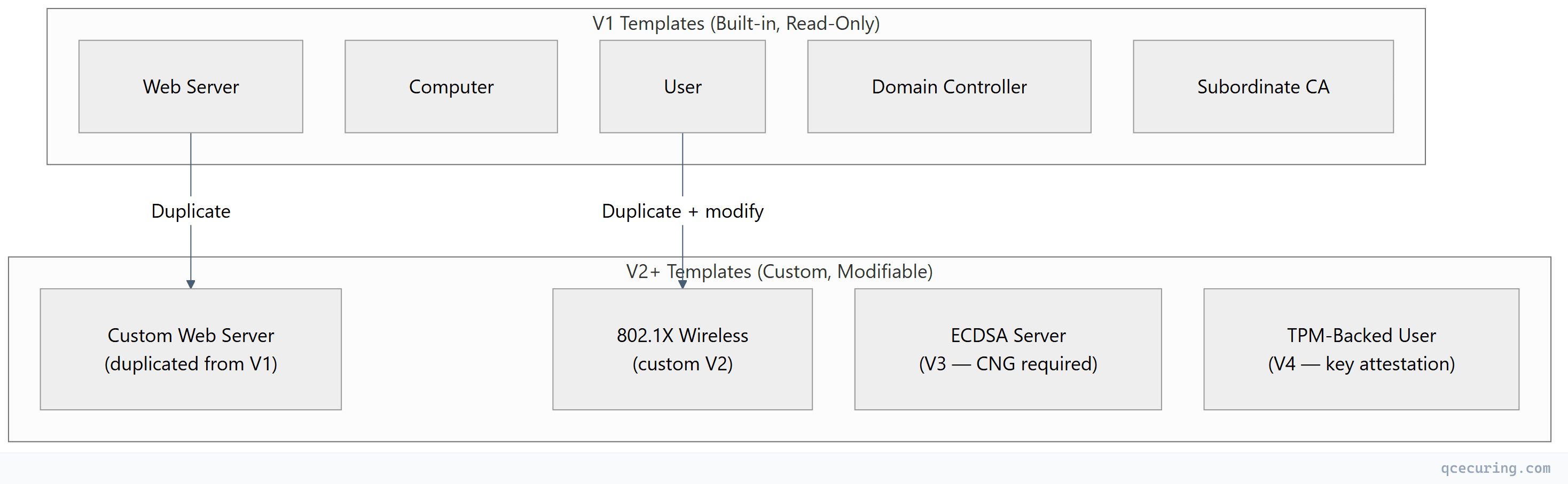
AD CS has evolved through four template versions, each adding capabilities:
| Version | Introduced | Minimum CA OS | Key Features |
|---|---|---|---|
| V1 | Windows 2000 | Windows 2000 | Basic templates, cannot be modified, no SANs, no auto-enrollment |
| V2 | Windows Server 2003 | Windows Server 2003 | Modifiable, auto-enrollment, SANs, key archival, supersede |
| V3 | Windows Server 2008 | Windows Server 2008 | CNG key providers, Suite B crypto (ECDSA), key attestation |
| V4 | Windows Server 2012 | Windows Server 2012 | Key attestation enforcement, renewal with same key, TPM-backed keys |
Critical rule: V1 templates cannot be modified — only duplicated. If you need to change a built-in template (User, Computer, Web Server), duplicate it as V2+ and modify the copy.
When to Use Each Version
| Use Case | Minimum Version | Why |
|---|---|---|
| Basic user/computer certificates | V2 | Auto-enrollment, modifiable |
| ECDSA certificates (P-256, P-384) | V3 | CNG provider required |
| TPM-backed keys (hardware attestation) | V4 | Key attestation enforcement |
| Smart card with PIN enforcement | V2 | CSP-based smart card providers |
| Windows Hello for Business | V3+ | CNG + key attestation |
| SCEP/NDES enrollment | V2 | ”Supply in request” subject name |
Template Configuration Deep Dive
General Tab
| Setting | Purpose | Recommendation |
|---|---|---|
| Template display name | Human-readable name | Use descriptive names: Corp-WebServer-2Year |
| Template name | Internal name (no spaces) | Matches display name without spaces |
| Validity period | How long issued certs are valid | 1 year for servers, 1-2 years for users |
| Renewal period | How early before expiry renewal is allowed | 6 weeks (gives time for auto-enrollment) |
| Publish in AD | Makes template visible to clients | Yes (required for auto-enrollment) |
Subject Name Tab
This is the most security-critical setting:
| Option | Behavior | Security Risk |
|---|---|---|
| Build from AD | Subject constructed from AD attributes (CN, email, UPN) | Safe — CA controls the subject |
| Supply in request | Requestor specifies the subject/SAN | DANGEROUS — enables ESC1 if combined with broad enrollment |
Rule: Only use “Supply in request” for templates where the requestor legitimately needs to specify the subject (web server templates where admins provide the FQDN). Never combine it with broad enrollment permissions (Authenticated Users, Domain Computers).
Key Usage and Extended Key Usage
# View a template's EKU settings
Get-ADObject -SearchBase "CN=Certificate Templates,CN=Public Key Services,CN=Services,CN=Configuration,DC=contoso,DC=com" `
  -Filter { Name -eq "WebServer" } `
  -Properties pKIExtendedKeyUsage | Select-Object -ExpandProperty pKIExtendedKeyUsage

# Common EKU OIDs:
# 1.3.6.1.5.5.7.3.1 = Server Authentication
# 1.3.6.1.5.5.7.3.2 = Client Authentication
# 1.3.6.1.5.5.7.3.3 = Code Signing
# 1.3.6.1.5.5.7.3.4 = Email Protection (S/MIME)
# 1.3.6.1.4.311.20.2.2 = Smart Card Logon
# 2.5.29.37.0 = Any Purpose (DANGEROUS)| EKU Configuration | Risk Level | Notes |
|---|---|---|
| Specific EKUs (Server Auth only) | Low | Certificate can only be used for intended purpose |
| Client Auth + Server Auth | Medium | Can be used for mTLS — verify enrollment is restricted |
| Any Purpose | HIGH | Certificate can be used for anything — avoid |
| No EKU specified | HIGH | Treated as “Any Purpose” by some applications |
Enrollment Permissions (Security Tab)
| Permission | Grants | Who Should Have It |
|---|---|---|
| Read | Can see the template exists | Authenticated Users (fine) |
| Enroll | Can request certificates from this template | Specific security groups only |
| Autoenroll | Certificates issued automatically via GPO | Specific security groups only |
| Write | Can modify the template | PKI Admins only (ESC4 if broader) |
| Full Control | Everything | Domain Admins / PKI Admins only |
Auto-Enrollment Configuration
Auto-enrollment is AD CS’s most powerful feature — certificates are issued and renewed without user or admin intervention.
Requirements for Auto-Enrollment
- Template has Autoenroll permission for the target group
- Template has Enroll permission for the same group
- Template is published on the issuing CA
- GPO enables auto-enrollment for the target OU
- Subject is built from AD (not “Supply in request”)
GPO Settings
Computer Configuration → Policies → Windows Settings → Security Settings →
  Public Key Policies → Certificate Services Client - Auto-Enrollment

Settings:
  Configuration Model: Enabled
  ☑ Renew expired certificates, update pending certificates, remove revoked certificates
  ☑ Update certificates that use certificate templates
Verifying Auto-Enrollment
# Force auto-enrollment
certutil -pulse

# Check what templates are available for auto-enrollment
certutil -CATemplates | findstr "Autoenroll"

# View enrolled certificates
certutil -store My

# Check auto-enrollment events
Get-WinEvent -LogName "Application" -FilterXPath "*[System[Provider[@Name='Microsoft-Windows-CertificateServicesClient-AutoEnrollment']]]" |
  Select-Object -First 10 TimeCreated, Id, Message
ESC Vulnerabilities: Template Misconfigurations Attackers Exploit
The “Certified Pre-Owned” research (Schroeder & Christensen, 2021) identified multiple AD CS escalation paths. Most involve template misconfigurations:
ESC1: Requestor Can Specify SAN + Low-Privilege Enrollment
The most dangerous misconfiguration. A template that allows:
- “Supply in request” for subject name (CT_FLAG_ENROLLEE_SUPPLIES_SUBJECT)
- Client Authentication or Any Purpose EKU
- Enroll permission for low-privilege users (Domain Users, Authenticated Users)
Attack: Any domain user requests a certificate with SAN=administrator@contoso.com, then uses it to authenticate as Domain Admin.
Detection:
# Find ESC1-vulnerable templates
Get-ADObject -SearchBase "CN=Certificate Templates,CN=Public Key Services,CN=Services,CN=Configuration,DC=contoso,DC=com" `
  -Filter * -Properties msPKI-Certificate-Name-Flag, pKIExtendedKeyUsage, nTSecurityDescriptor |
  Where-Object {
    # CT_FLAG_ENROLLEE_SUPPLIES_SUBJECT = 1
    ($_.'msPKI-Certificate-Name-Flag' -band 1) -and
    # Has Client Auth or Any Purpose EKU
    ($_.pKIExtendedKeyUsage -contains '1.3.6.1.5.5.7.3.2' -or
     $_.pKIExtendedKeyUsage -contains '2.5.29.37.0' -or
     $_.pKIExtendedKeyUsage.Count -eq 0)
  } | Select-Object Name
Fix: Remove “Supply in request” OR restrict enrollment to PKI admins only OR remove Client Authentication EKU.
ESC2: Any Purpose EKU or No EKU
Templates with “Any Purpose” EKU or no EKU at all can be used for any operation — including client authentication for privilege escalation.
Fix: Always specify explicit EKUs. Never leave EKU empty or set to “Any Purpose.”
ESC3: Certificate Request Agent
The “Certificate Request Agent” template allows a user to enroll on behalf of others. If low-privilege users can enroll in this template, they can request certificates as any user.
Fix: Restrict “Certificate Request Agent” enrollment to CA administrators only.
ESC4: Template ACL Allows Modification
If low-privilege users have Write or Full Control on a template, they can modify it to become ESC1-vulnerable.
Detection:
# Check who can modify templates
Get-ADObject -SearchBase "CN=Certificate Templates,CN=Public Key Services,CN=Services,CN=Configuration,DC=contoso,DC=com" `
  -Filter * -Properties nTSecurityDescriptor |
  ForEach-Object {
    $template = $_.Name
    $_.nTSecurityDescriptor.Access |
      Where-Object { $_.ActiveDirectoryRights -match "WriteProperty|WriteDacl|WriteOwner|GenericAll|GenericWrite" -and
                     $_.IdentityReference -notmatch "Domain Admins|Enterprise Admins|SYSTEM" } |
      ForEach-Object { [PSCustomObject]@{ Template=$template; Principal=$_.IdentityReference; Rights=$_.ActiveDirectoryRights } }
  }
Fix: Remove Write permissions from non-admin groups on all templates.
ESC6: EDITF_ATTRIBUTESUBJECTALTNAME2 Flag
If this flag is enabled on the CA, ANY template becomes ESC1-vulnerable — requestors can specify SANs regardless of template settings.
Detection and Fix:
# Check if the dangerous flag is set
certutil -getreg policy\EditFlags
# Look for: EDITF_ATTRIBUTESUBJECTALTNAME2

# Disable it
certutil -setreg policy\EditFlags -EDITF_ATTRIBUTESUBJECTALTNAME2
Restart-Service certsvc
ESC8: HTTP Enrollment Without HTTPS
Web Enrollment, CEP, or CES endpoints accessible over HTTP (not HTTPS) allow NTLM relay attacks to request certificates as the relayed user.
Fix: Enforce HTTPS on all enrollment endpoints. Disable HTTP bindings.
Template Security Audit Script
# ad-cs-template-audit.ps1 — Comprehensive template security check

$templateBase = "CN=Certificate Templates,CN=Public Key Services,CN=Services,CN=Configuration,$((Get-ADDomain).DistinguishedName)"

$templates = Get-ADObject -SearchBase $templateBase -Filter * -Properties *

foreach ($t in $templates) {
    $issues = @()

    # ESC1: Supply in request + Client Auth + broad enrollment
    if ($t.'msPKI-Certificate-Name-Flag' -band 1) {
        $enrollers = $t.nTSecurityDescriptor.Access |
          Where-Object { $_.ActiveDirectoryRights -match "ExtendedRight" -and $_.ObjectType -eq "0e10c968-78fb-11d2-90d4-00c04f79dc55" }
        if ($enrollers.IdentityReference -match "Authenticated Users|Domain Users|Domain Computers") {
            $issues += "ESC1: Supply-in-request + broad enrollment"
        }
    }

    # ESC2: Any Purpose or no EKU
    if ($t.pKIExtendedKeyUsage -contains '2.5.29.37.0' -or $t.pKIExtendedKeyUsage.Count -eq 0) {
        $issues += "ESC2: Any Purpose or empty EKU"
    }

    # ESC4: Writable by non-admins
    $writers = $t.nTSecurityDescriptor.Access |
      Where-Object { $_.ActiveDirectoryRights -match "WriteProperty|WriteDacl|GenericAll|GenericWrite" -and
                     $_.IdentityReference -notmatch "Domain Admins|Enterprise Admins|SYSTEM|Cert Publishers" }
    if ($writers) {
        $issues += "ESC4: Writable by $($writers.IdentityReference -join ', ')"
    }

    if ($issues.Count -gt 0) {
        Write-Warning "Template: $($t.Name)"
        $issues | ForEach-Object { Write-Warning "  - $_" }
    }
}

# ESC6: Check CA-level flag
$editFlags = certutil -getreg policy\EditFlags 2>$null
if ($editFlags -match "EDITF_ATTRIBUTESUBJECTALTNAME2") {
    Write-Warning "ESC6: EDITF_ATTRIBUTESUBJECTALTNAME2 is ENABLED on the CA!"
}
Recommended Template Set for Enterprise
| Template Name | Version | Subject | EKU | Auto-Enroll | Validity |
|---|---|---|---|---|---|
Corp-Workstation | V2 | Build from AD (DNS name) | Client Auth | Yes (Domain Computers) | 1 year |
Corp-User | V2 | Build from AD (UPN) | Client Auth + Smart Card Logon | Yes (Domain Users) | 1 year |
Corp-WebServer | V2 | Supply in request | Server Auth | No (manual, restricted) | 1 year |
Corp-DomainController | V2 | Build from AD | Client Auth + Server Auth + KDC Auth | Yes (Domain Controllers) | 1 year |
Corp-CodeSigning | V2 | Build from AD | Code Signing | No (approval required) | 1 year |
Corp-OCSP | V2 | Build from AD | OCSP Signing | Yes (OCSP servers) | 2 weeks |
Corp-WiFi-User | V2 | Build from AD (UPN) | Client Auth | Yes (WiFi Users group) | 1 year |
Corp-VPN | V2 | Build from AD | Client Auth + Server Auth | No (VPN admins) | 2 years |
FAQ
Q: Can I modify built-in V1 templates?
No. V1 templates (User, Computer, Web Server, etc.) are read-only. To customize them, duplicate the template (right-click → Duplicate Template), which creates a V2+ copy you can modify. Then unpublish the original V1 template and publish your custom version.
Q: What’s the difference between “Enroll” and “Autoenroll” permissions?
“Enroll” allows manual certificate requests (via MMC, certreq, or web enrollment). “Autoenroll” allows the certificate to be issued automatically via Group Policy without user action. A template needs BOTH permissions for auto-enrollment to work — Autoenroll alone isn’t sufficient.
Q: How do I know which template version I need?
If you need ECDSA keys (P-256/P-384) → V3 minimum. If you need TPM key attestation → V4. For everything else (RSA keys, standard enrollment) → V2 is sufficient. Don’t use V3/V4 unless you need their specific features — they require newer CNG-compatible clients.
Q: Why is “Supply in request” dangerous?
Because it lets the requestor specify any subject name or SAN in the certificate. If the template also allows Client Authentication and has broad enrollment permissions, any user can request a certificate impersonating any other user — including Domain Admins. This is the ESC1 attack.
Q: How do I check if my environment is vulnerable to ESC attacks?
Run Certipy (Python tool) or the PowerShell audit script above. Also check: certutil -getreg policy\EditFlags for ESC6, and review enrollment permissions on all templates for ESC1/ESC3/ESC4. Tools like BloodHound (with the PKI module) can also map AD CS attack paths.
Q: Should I disable all V1 templates?
Not necessarily — some V1 templates (like Domain Controller Authentication) are still used by default. But you should duplicate any V1 template you need, customize the V2+ copy with proper security settings, publish the copy, and unpublish the V1 original. This gives you control over permissions and settings.
Related Reading: