
You’re seeing:
java.security.cert.CertificateException: No subject alternative names presentOr:
javax.net.ssl.SSLHandshakeException: java.security.cert.CertificateException: No name matching api.example.com foundOr in Spring Boot / HttpClient:
javax.net.ssl.SSLPeerUnverifiedException: Certificate for <api.example.com> doesn't match any of the subject alternative names: []Since Java 8u181, Java strictly enforces SAN (Subject Alternative Name) matching. Certificates that only have a CN (Common Name) without SANs are rejected. The certificate must have a SAN extension listing the hostname.
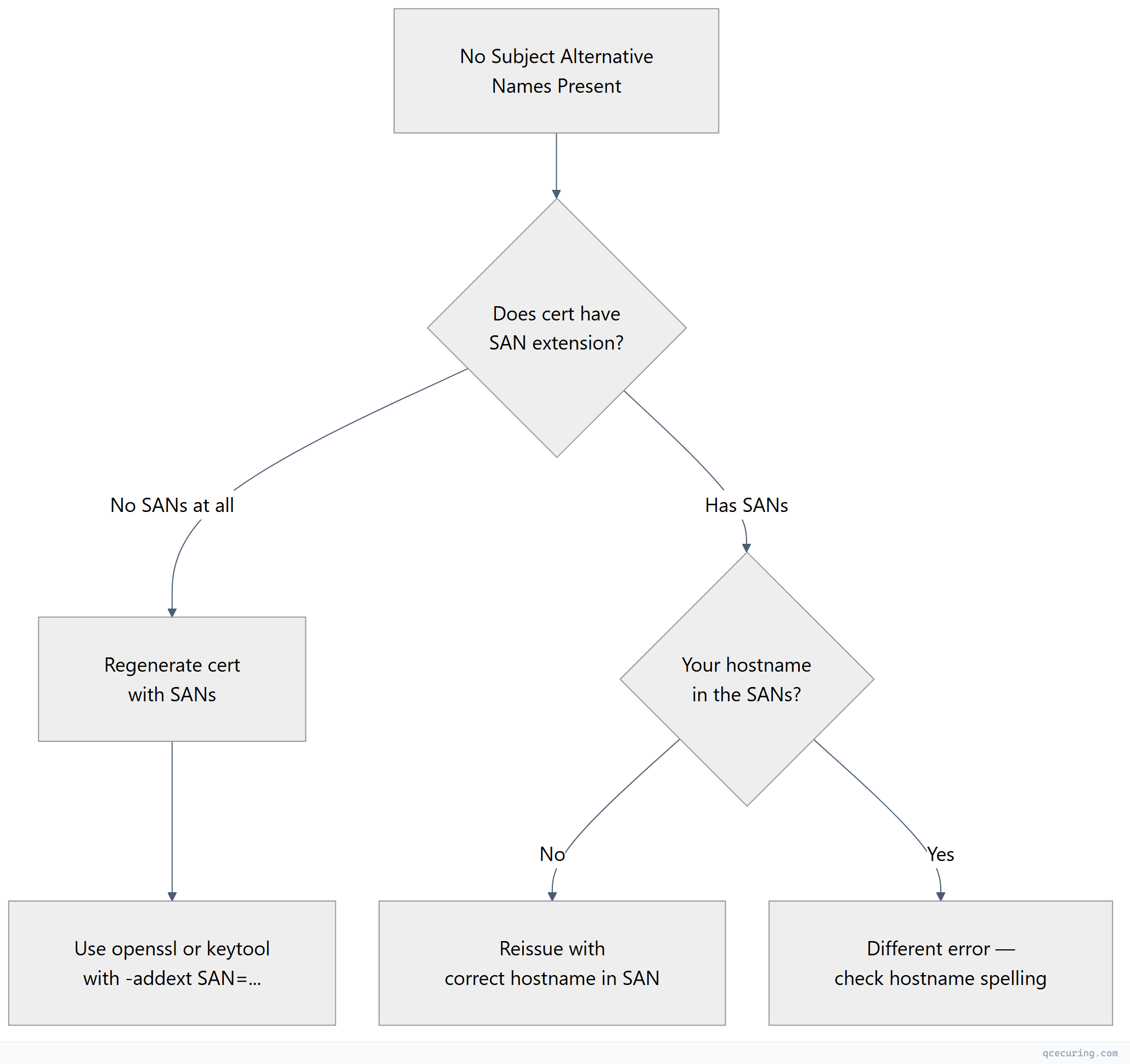
Diagnostic Flowchart
Fastest Fix: Check If the Certificate Has SANs
# Check the server's certificate for SANs
openssl s_client -connect api.example.com:443 -servername api.example.com 2>/dev/null | openssl x509 -noout -ext subjectAltName

# Or with keytool
keytool -printcert -sslserver api.example.com:443 | grep -A 2 "SubjectAlternativeName"
If the output is empty or says “No extensions” — the certificate has no SANs. That’s the problem.
If SANs are present but don’t include your hostname — see our hostname mismatch guide.
The Fix: Regenerate the Certificate with SANs
The only proper fix is to reissue the certificate with a SAN extension.
Self-Signed Certificate with SANs
# Generate a self-signed cert WITH SANs (for development)
openssl req -x509 -newkey rsa:2048 -nodes \
  -keyout server.key -out server.crt -days 365 \
  -subj "/CN=api.example.com" \
  -addext "subjectAltName=DNS:api.example.com,DNS:localhost,IP:127.0.0.1"

# Verify SANs are present
openssl x509 -in server.crt -noout -ext subjectAltName
CSR with SANs (for CA-signed certificates)
# Generate CSR with SANs
openssl req -new -newkey rsa:2048 -nodes \
  -keyout server.key -out server.csr \
  -subj "/CN=api.example.com/O=My Company/C=US" \
  -addext "subjectAltName=DNS:api.example.com,DNS:*.api.example.com,IP:10.0.1.50"

# Submit this CSR to your CA for signing
Using keytool (Java-native)
# Generate key pair with SANs directly in keytool
keytool -genkeypair -alias server \
  -keyalg RSA -keysize 2048 \
  -keystore server.p12 -storetype PKCS12 \
  -storepass changeit \
  -dname "CN=api.example.com, O=My Company, C=US" \
  -ext "SAN=dns:api.example.com,dns:localhost,ip:127.0.0.1" \
  -validity 365

# Generate CSR with SANs from keytool
keytool -certreq -alias server \
  -keystore server.p12 -storetype PKCS12 \
  -storepass changeit \
  -ext "SAN=dns:api.example.com,dns:localhost,ip:127.0.0.1" \
  -file server.csr

# Verify
keytool -list -v -keystore server.p12 -storepass changeit -alias server | grep -A 5 "SubjectAlternativeName"
Why This Started Failing
Java 8u181 (July 2018) introduced strict endpoint identification for HTTPS connections. Before this update, Java would fall back to checking the CN field if no SANs were present. After the update, SANs are mandatory — matching the behavior that browsers have enforced since 2017.
| Java Version | SAN Behavior |
|---|---|
| Java 8u180 and earlier | Falls back to CN if no SANs |
| Java 8u181+ | SANs required, CN ignored for HTTPS |
| Java 11+ | SANs required (no fallback) |
| Java 17+ | SANs required (no fallback) |
Common Scenarios
Connecting to a Legacy Internal Service
Old internal services often have certificates generated years ago without SANs.
Fix: Regenerate the certificate with SANs and redeploy to the service. This is the only correct fix.
Connecting by IP Address
If you connect by IP (https://10.0.1.50/api) but the certificate only has DNS:api.example.com, it won’t match.
Fix: Add an IP SAN:
openssl req -x509 -newkey rsa:2048 -nodes \
  -keyout server.key -out server.crt -days 365 \
  -subj "/CN=api.example.com" \
  -addext "subjectAltName=DNS:api.example.com,IP:10.0.1.50"
Development with localhost
# Generate a dev cert that works for localhost
openssl req -x509 -newkey rsa:2048 -nodes \
  -keyout dev.key -out dev.crt -days 365 \
  -subj "/CN=localhost" \
  -addext "subjectAltName=DNS:localhost,DNS:*.localhost,IP:127.0.0.1,IP:::1"
What NOT to Do
You’ll find code online that disables hostname verification:
// DO NOT USE IN PRODUCTION — disables all hostname checking
HttpsURLConnection.setDefaultHostnameVerifier((hostname, session) -> true);
Or:
// DO NOT USE — disables endpoint identification
System.setProperty("jdk.internal.httpclient.disableHostnameVerification", "true");
These disable security entirely. Any server can impersonate any hostname. Never deploy this.
Verify the Fix
After deploying the new certificate with SANs:
# Confirm SANs are present on the live server
openssl s_client -connect api.example.com:443 -servername api.example.com 2>/dev/null | openssl x509 -noout -ext subjectAltName

# Expected output:
# X509v3 Subject Alternative Name:
#     DNS:api.example.com, DNS:localhost, IP Address:10.0.1.50

# Test from Java
java -Djavax.net.ssl.debug=ssl:handshake -jar test-connection.jar https://api.example.com
FAQ
Q: My certificate has a CN that matches the hostname. Why isn’t that enough?
Since Java 8u181, Java follows RFC 6125 which states that if a SAN extension is absent, the CN MAY be checked — but if the SAN extension is present, ONLY SANs are checked. In practice, Java now requires SANs for all HTTPS connections regardless of CN. This matches browser behavior since 2017.
Q: Can I downgrade Java to avoid this?
Technically yes, but don’t. Running old Java versions exposes you to security vulnerabilities. The fix is to add SANs to your certificate — it takes 5 minutes and is the correct solution.
Q: Does this affect non-HTTPS connections (like LDAPS or IMAPS)?
Yes. Java’s endpoint identification applies to any TLS connection that uses SSLParameters.setEndpointIdentificationAlgorithm("HTTPS"). LDAPS, IMAPS, and other protocols that enable endpoint identification will also require SANs.
Q: I’m using a wildcard certificate. Do I still need SANs?
Yes. The wildcard must be in the SAN extension: DNS:*.example.com. A wildcard in the CN field alone is not sufficient for modern Java.
Q: How do I add SANs to a certificate issued by AD CS?
In the AD CS certificate template, go to the “Extensions” tab → “Subject Alternative Name” → configure it to include DNS names. Or use the -ext "SAN=..." flag when generating the CSR with keytool. See our AD CS templates guide for details.
Related Reading: